Turn Missing Pages into Revenue with an Effective 404 Error Page Strategy
Turn Missing Pages into Revenue with an Effective 404 Error Page Strategy
How do you fix a 404 error page without losing visitors?
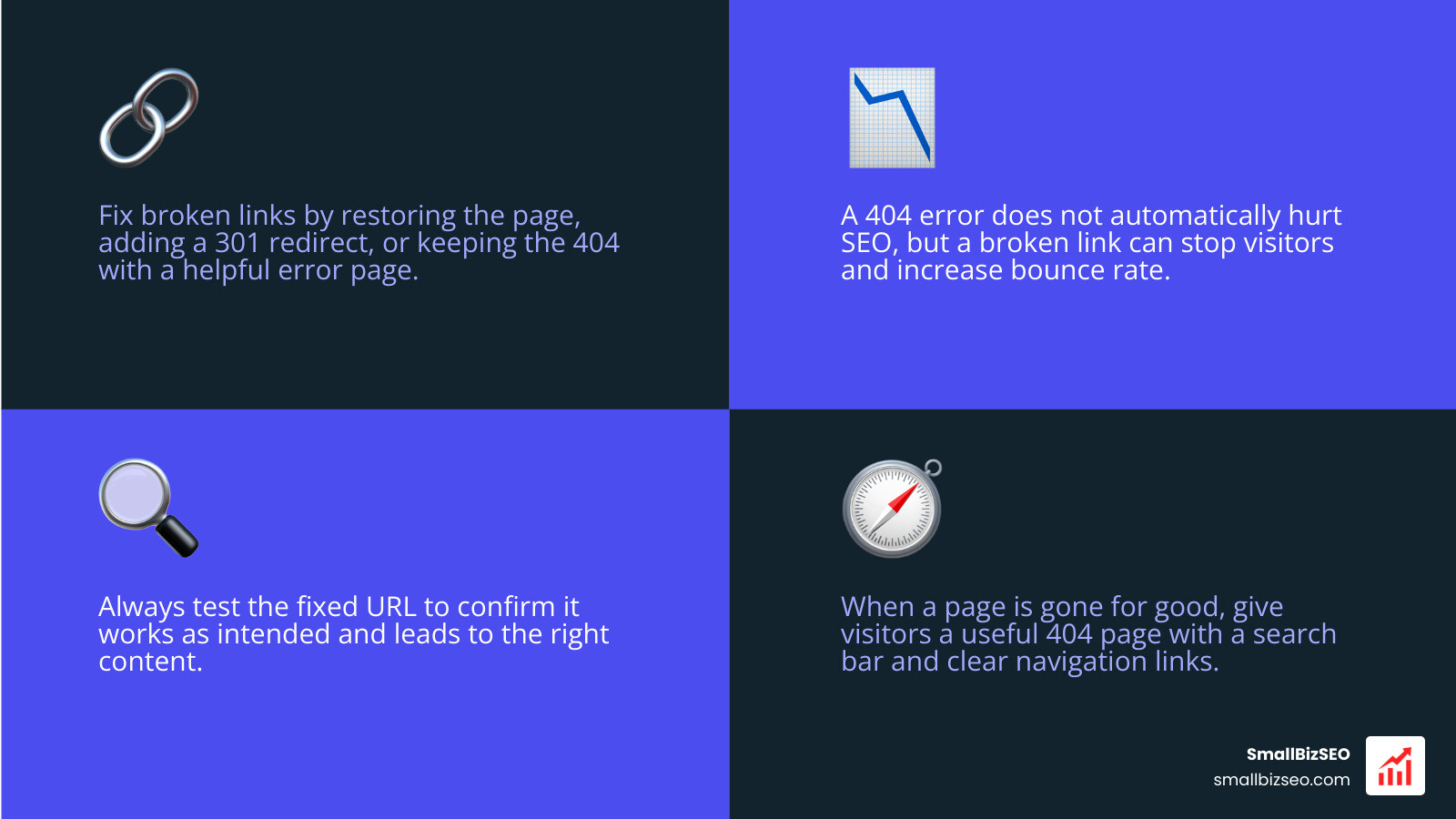
Start with the missing URL. Fix any links pointing to it. If the page moved, add a 301 redirect to the closest relevant page. If it was deleted by mistake, restore it. If it is gone and has no replacement, keep the 404 status and give visitors a useful error page with search and clear links. Then test the URL to confirm it works as intended.
A 404 means the server could not find the requested page. It does not automatically hurt SEO, but a broken link can stop a visitor from finding what they came for. The right fix depends on whether the page moved, should still exist, or is gone for good.
I'm Clayton Johnson, founder of SmallBizSEO. My work in SEO strategy, website structure, and content informs this practical approach to a 404 error page fix: repair the path where you can, and help visitors find their next step where you cannot.
404 error page fix terms simplified:
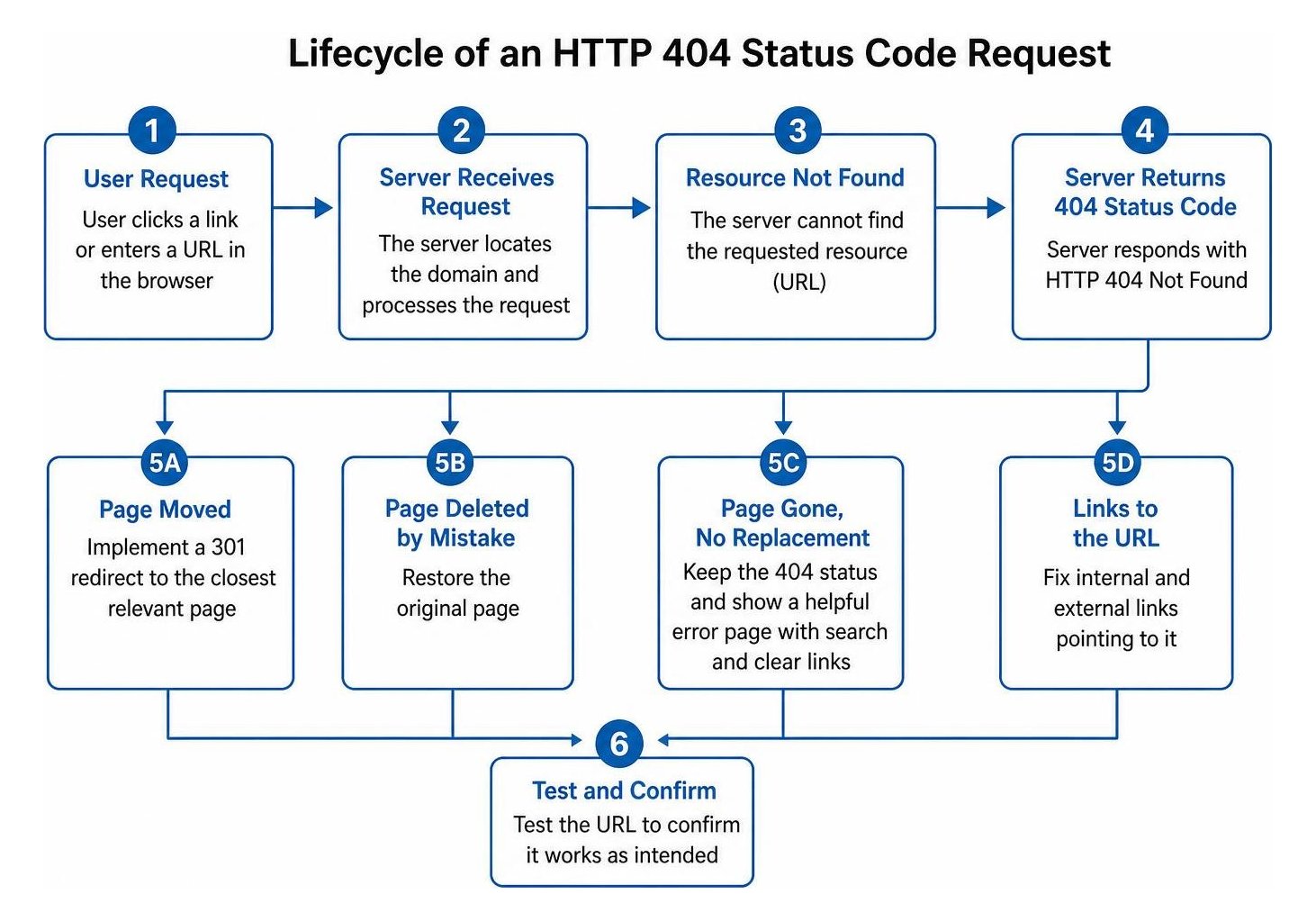
When a web server returns an HTTP 404 status code, it signals a client-side issue where the domain was reached successfully, but the specific resource could not be located. Link rot happens naturally across the internet. In fact, research shows that roughly half of the links cited in historical Supreme Court opinions no longer point to their original content. However, on commercial websites, unaddressed broken links come with a steep cost: approximately 70% of users abandon a website entirely after hitting a dead end. Beyond immediate customer frustration and lost revenue, persistent dead links waste search engine crawl budget.
Comprehensive 404 Error Page Fix: How to Identify and Resolve Broken URLs
To diagnose and resolve broken URLs, website owners must pinpoint whether the error stems from mistyped addresses, permalink modifications, deleted files, or server rewrite issues. For everyday visitors, simple browser-level troubleshooting like refreshing the tab, clearing cache and cookies, or opening the link in Incognito mode can determine if local data is causing the problem.
For website operators, resolving dead links requires auditing server logs and internal links to ensure proper status code delivery. In our work helping businesses through identifying critical SEO audit errors, we see that choosing the correct HTTP header is vital for preserving crawl equity and preventing confusing "soft 404" errors where a missing page accidentally returns a 200 OK status.
| Status Code / Approach | When to Use | Search Engine Action | Impact on Link Equity |
|---|---|---|---|
| 301 Permanent Redirect | Content moved permanently to a new, closely related URL | Passes equity to the new target URL and updates index | Retains almost all accumulated link equity |
| 410 Gone Header | Content permanently removed with no direct replacement | Removes URL from index faster than standard 404 | Ceases passing link equity cleanly |
| Custom 404 Not Found | URL does not exist and has no replacement | Drops URL from index after verification crawls | Discards equity but preserves user engagement |
How Do You Diagnose Broken Links and Implement a Technical 404 Error Page Fix?
To diagnose broken links, crawl your website using tools like Google Search Console, Screaming Frog, or Dead Link Checker to generate a complete inventory of 4xx responses.
Once you isolate broken URLs, implement technical fixes based on your server stack:
- Implement 301 Redirects: Map obsolete paths to live, relevant destinations to salvage link equity and preserve traffic.
- Configure Web Server Directives: On Apache environments, add an
ErrorDocument 404 /404.htmlrule inside your.htaccessfile, as outlined in standard server-side error configuration guides. - Set Proper PHP Response Codes: If you serve custom dynamic pages, follow proper PHP error response setup by declaring
http_response_code(404);prior to rendering HTML and terminating script execution.
Regularly auditing your infrastructure helps prevent crawl inefficiencies. You can read more about systematically auditing web page SEO or reference our advanced technical SEO guide for deeper architectural maintenance frameworks.
How to Apply a Platform-Specific 404 Error Page Fix on Shopify, Wix, and Single-Page Apps?
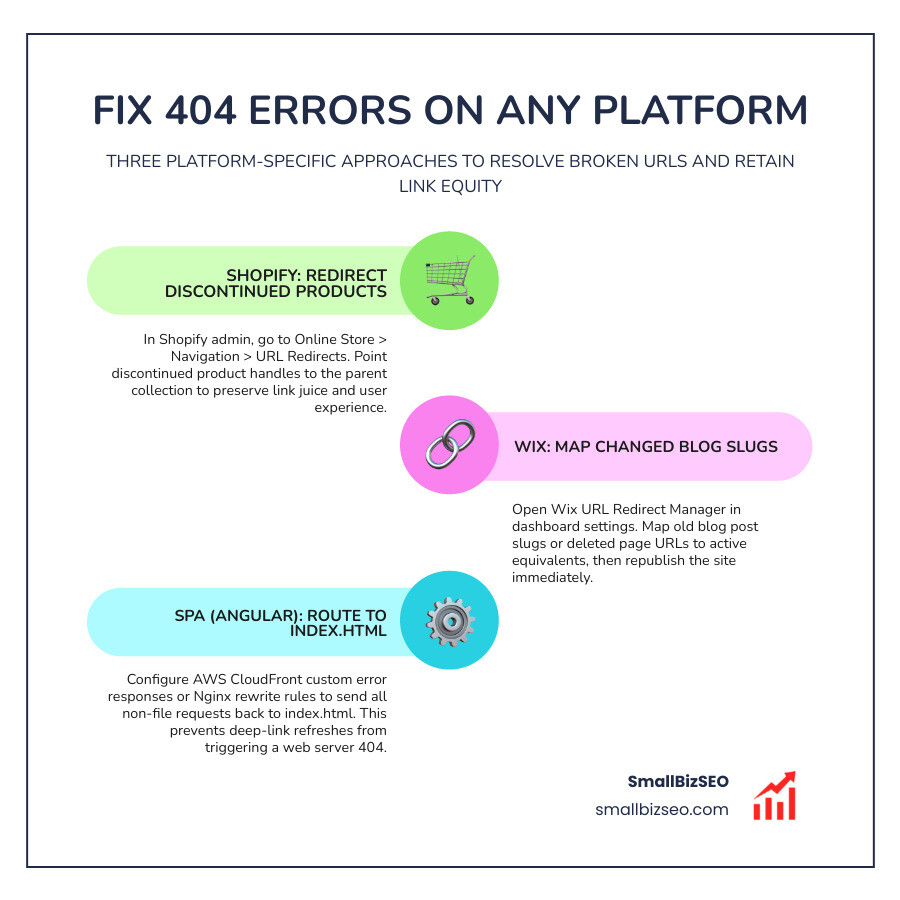
Platform-specific fixes require using built-in URL management tools or updating server routing:
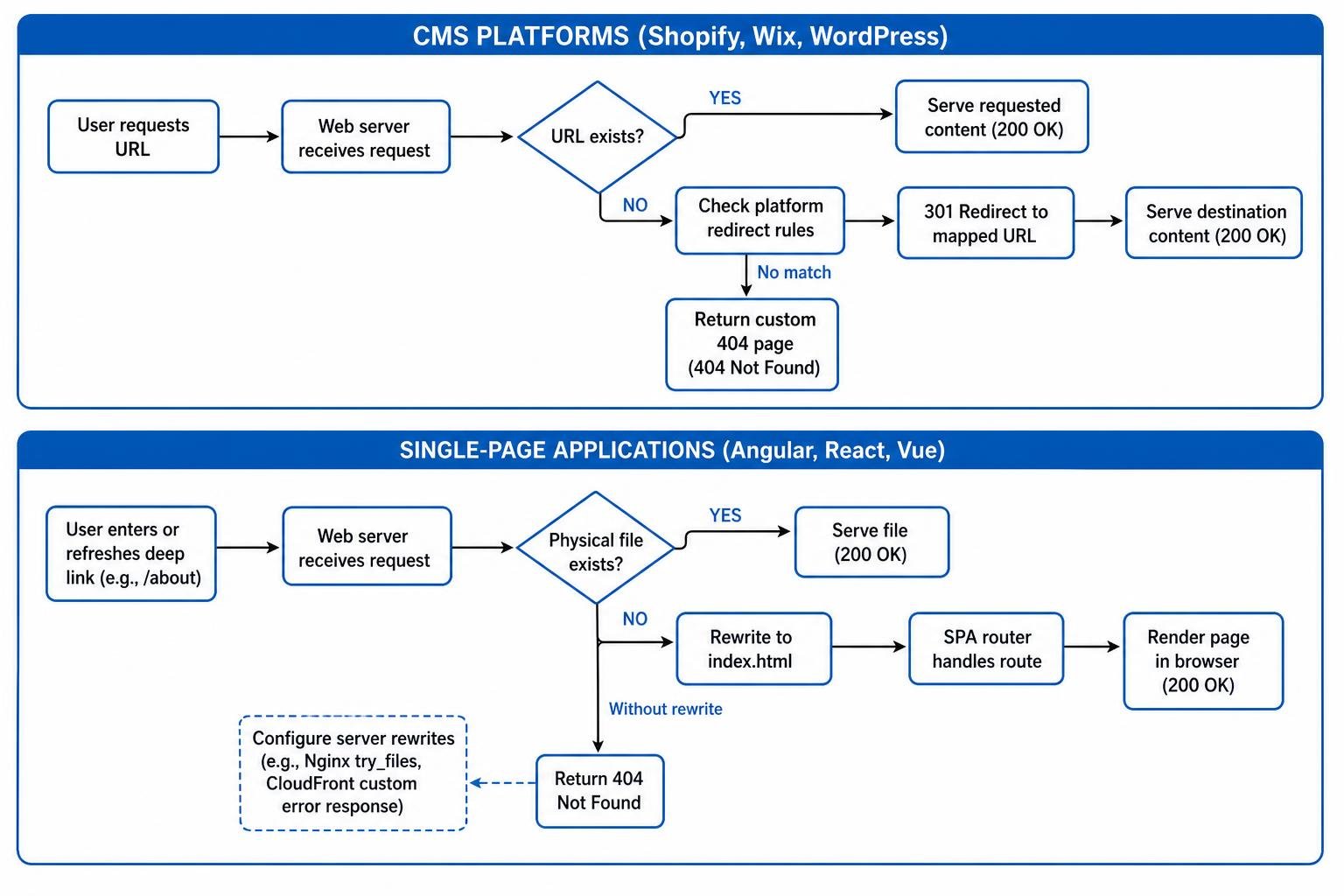
- Shopify: When products are discontinued, navigate to Online Store > Navigation > URL Redirects within your Shopify admin to point discontinued product handles directly to their parent collection.
- Wix: Open the Wix URL Redirect Manager in your dashboard settings to map changed blog post slugs or deleted pages to active URLs, ensuring the site is republished immediately.
- Single-Page Applications (Angular): In client-side routing frameworks like Angular, refreshing a deep link often triggers a web server 404 because the server searches for a physical file that does not exist. As highlighted in Angular SPA routing solutions, solve this by configuring AWS CloudFront custom error responses or Nginx rewrite rules to route all non-file requests back to
index.html.
Designing High-Converting Custom Error Pages and Long-Term Prevention

A well-crafted custom error page transforms a potential exit into an active navigation path. Instead of presenting a generic, unstyled browser warning, align the layout with your brand design, provide immediate search options, and suggest top-performing products or articles. E-commerce stores can even provide modest checkout discount codes on error pages to turn navigational slip-ups into revenue opportunities.
Through our SmallBizSEO Velocity framework, we emphasize proactive crawl efficiency and automated error detection so technical issues never degrade your search visibility. If your website is experiencing indexation issues or sudden traffic drops, schedule a comprehensive SEO visibility audit with our team to resolve hidden structural roadblocks.
What Are the Best Practices for Designing a Custom 404 Page That Retains Visitors?
To design an error page that retains visitors, focus on clarity, fast loading speeds, and helpful navigation aids:
- Display Clear, Friendly Messaging: Use human, conversational language that clearly explains the page is missing without relying on dry technical jargon.
- Embed Site Search: Provide an intuitive search bar right in the center of the page so users can immediately locate what they wanted.
- Provide Key Links: Include buttons pointing to your homepage, top category hubs, popular articles, and current service offerings.
- Offer Product Suggestions: E-commerce stores should showcase best-sellers or provide links to recent collections directly on the error template.
- Include System Status Links: For software platforms, link to an uptime or status page to answer questions about technical outages.
- Ensure True 404 Headers: Verify that your custom page template still returns a genuine 404 status code rather than a soft 404 response.
How Can Website Owners Prevent Broken Links and Protect Crawl Budget?
Website owners can prevent broken links by implementing routine link audits, establishing clean redirection workflows, and keeping XML sitemaps updated.
- Audit Links Monthly: Run regular automated crawls to uncover emerging dead links before search engines de-index them.
- Plan Redesigns Carefully: Map every historical URL to its new location before launching site overhauls by following website redesign best practices.
- Maintain Clean Sitemaps: Automatically regenerate your XML sitemaps and remove deleted URLs to keep search engine bots focused on active assets.
- Implement Regex Redirect Rules: Use pattern-matching redirect rules on your web server to capture changing URL folder structures en masse.
- Eliminate Orphan Pages: Ensure all live pages have internal links connecting them to the rest of your site architecture.
Turn Digital Dead Ends into Growth
Broken links do not have to result in lost revenue or dropped search rankings. By diagnosing missing URLs, setting up proper redirects, and designing branded error pages that guide visitors forward, you protect both search crawl performance and customer trust. Establish routine auditing habits today to keep your site running smoothly and ensure every visitor finds exactly what they need.