6 Inspiring Content Hub Navigation Models and Why Users Love Them

Which Content Hub Navigation Examples Fit Different Customer Needs?
Useful content hub navigation examples for different customer needs include a hub-and-spoke guide for exploring a topic, a topic gateway for beginners, a searchable database for finding a specific resource, a learning path for building skills, a resource library for comparing options, and an editorial hub for discovering stories. Choose the model that matches what visitors came to do.
Unlike a blog archive sorted by date, a content hub keeps related resources easy to find through clear topics and links. That helps visitors explore further and helps search engines see how your pages connect.
I’m Clayton Johnson, founder of SmallBizSEO. My work in SEO and content strategy shapes how I assess content hub navigation examples for different customer needs, with a focus on clear answers and qualified leads.
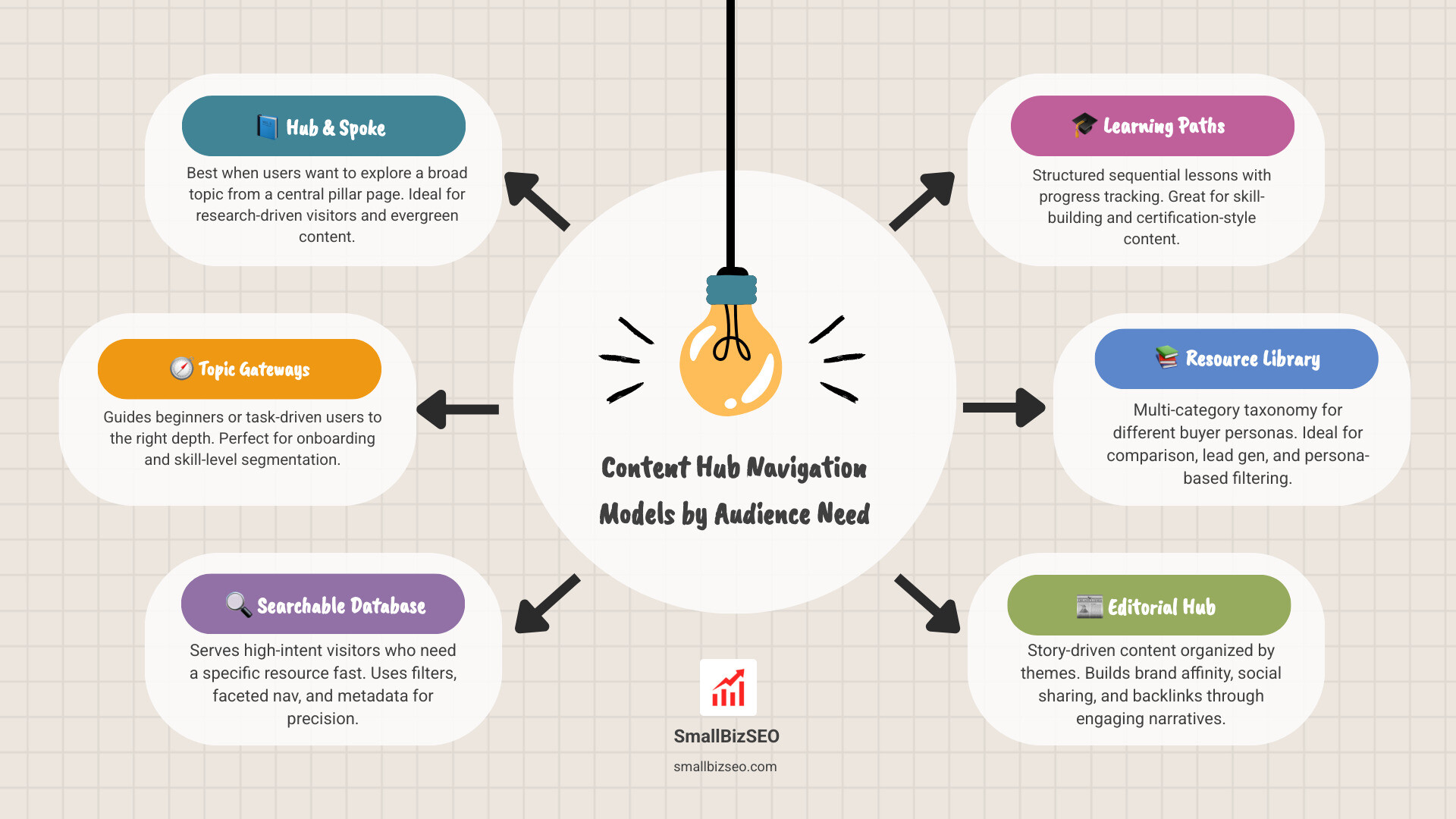
Which Content Hub Navigation Model Fits Different Customer Needs?
The best navigation model matches your audience's intent, the depth of their questions, and the total volume of your content library. When users land on a website, they want an effortless way to locate answers without wading through reverse-chronological blog archives.
A well-architected navigation framework reduces friction by mapping clear paths between introductory overviews and detailed technical articles. By categorizing assets into logical hierarchies, you help both visitors and search engines understand how your pages support one another.
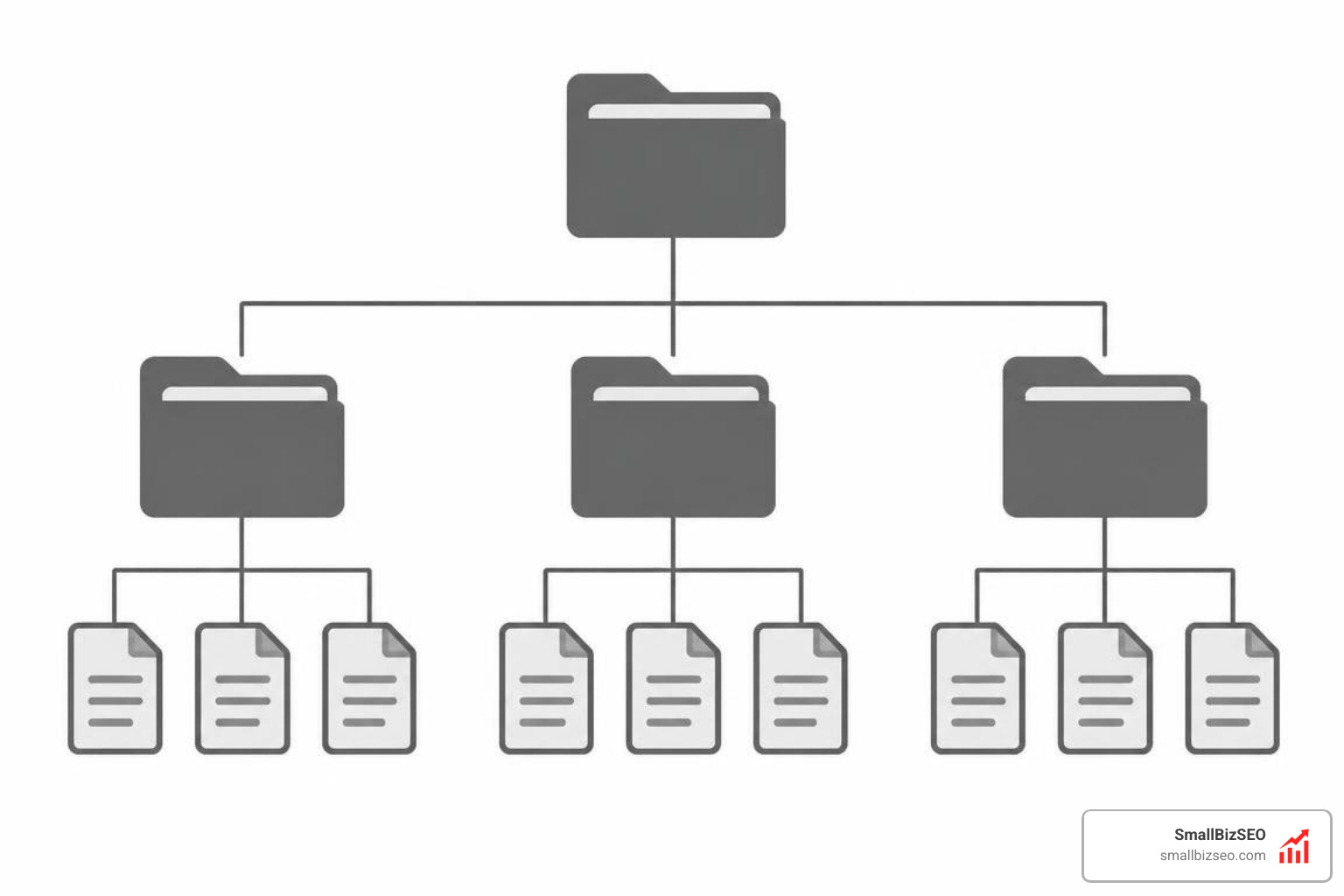
Selecting an appropriate model requires looking at what a visitor hopes to accomplish. Some need quick answers, while others need structured education or deep research tools.
| Navigation Model | Primary User Intent | Best Suited Audience | Structural Hierarchy |
|---|---|---|---|
| Hub and Spoke | Comprehensive topic research | Readers seeking depth on a single subject | Central pillar linking to detailed child pages |
| Topic Gateway | Task-based orientation | Beginners and multi-level practitioners | Overview portal routing to specialized tracks |
| Searchable Database | Specific asset retrieval | High-intent users looking for precise tools | Flat matrix powered by faceted filters |
| Learning Path | Sequential skill development | Students, onboarding users, practitioners | Linear, step-by-step module sequence |
| Resource Library | Evaluation and problem-solving | Diverse buyer personas and decision-makers | Multi-category grid with role and funnel filters |
| Editorial Hub | Inspiration and lifestyle reading | Brand advocates and casual community browsers | Curated digital magazine layout |
When planning these structures, conducting audience research is vital to understanding what users need before designing taxonomies, as outlined in guidelines on understanding your users from UKRI.
1. How Does a Classic Hub and Spoke Model Organize a Topic?
A classic hub and spoke model connects one comprehensive parent page to a group of detailed subpages. This approach uses a central Content Pillar to define a broad subject, while individual cluster pages answer specific sub-questions in depth.
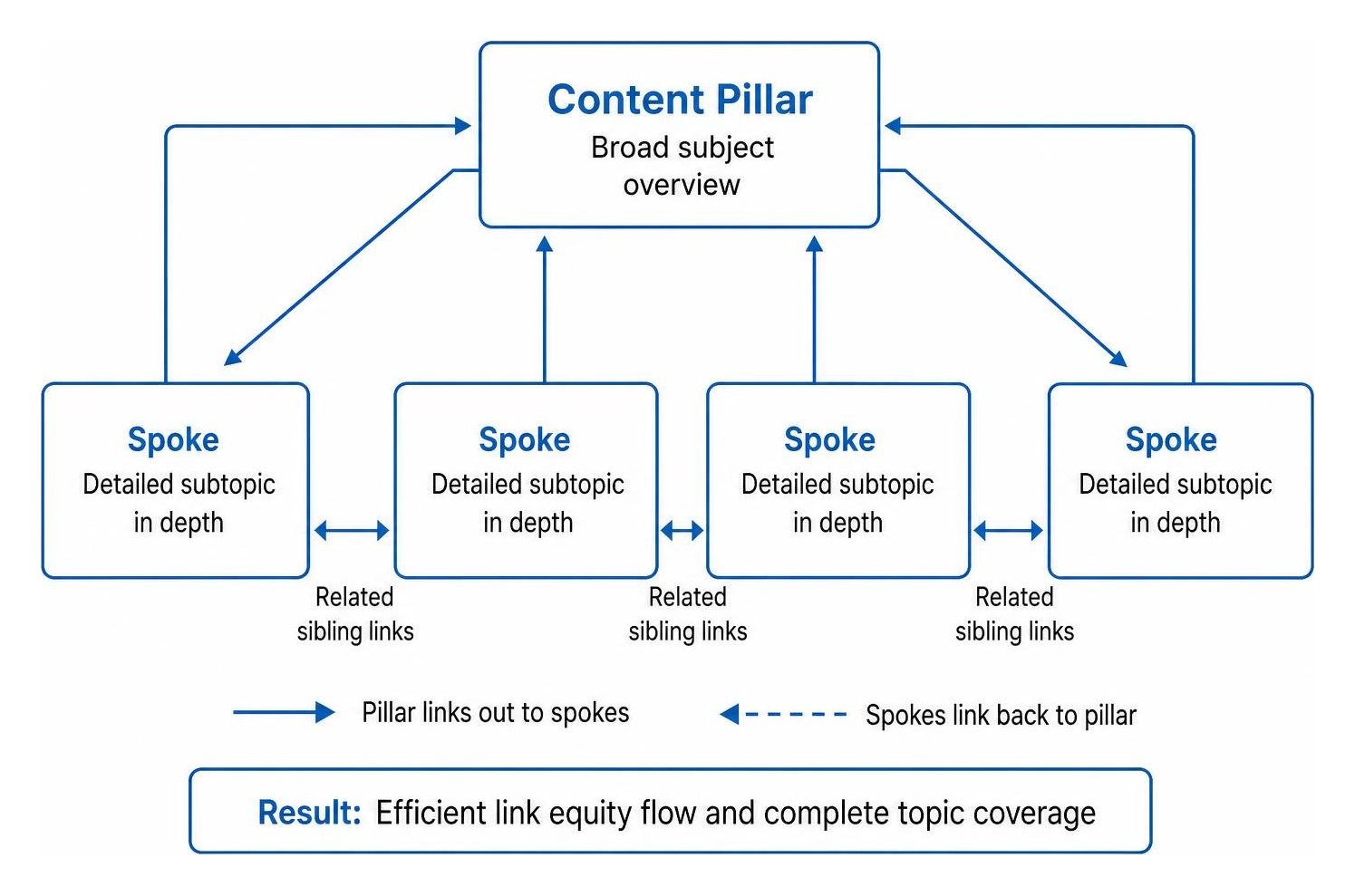
This structure relies on reciprocal internal linking. The main pillar introduces every subtopic and links out to the dedicated spokes, while each spoke links back to the pillar and to related sibling articles. This architecture passes link equity efficiently throughout the entire Topic Cluster, ensuring that no valuable asset remains orphaned.
A classic rule of thumb for this model is the three-click rule: a visitor should be able to reach any spoke within three clicks of entering the hub.
For instance, a home improvement brand might build a DIY patio hub where the parent page covers project planning, permits, and tools, linking directly to individual guides for pouring concrete, laying pavers, and installing drainage. Similarly, a medical resource might use a parent condition page to link out to distinct pages covering symptoms, diagnosis procedures, and treatment regimens.
2. How Can Topic Gateways Guide Readers to the Right Level of Detail?
Topic gateways guide users by organizing entry points around their current skill level, role, or immediate task rather than publishing dates. This format serves diverse audiences by providing clear paths for both beginners and experienced practitioners from a single entry page.
Instead of presenting an overwhelming directory, a topic gateway offers curated previews that state what the user will learn, any prerequisites, and the expected depth of the content. As explored in insights on designing content hubs that guide readers to relevant depth, effective entry points use reader-centered language rather than internal jargon.
Consider an SEO educational portal:
- Beginner Track: Covers fundamental concepts like keyword research, on-page optimization, and basic crawling.
- Intermediate Track: Focuses on site architecture, internal linking structures, and metadata setup.
- Advanced Track: Dives into log file analysis, programmatic page generation, and rendering budgets.
A nutrition platform uses the same approach by offering starting paths such as "Getting Started with Meal Prep," "Advanced Macronutrient Tracking," or "Plant-Based Transition Guides." Each path provides immediate clarity on where to begin.
3. When Do Searchable Databases Work Best for High-Intent Visitors?
Searchable databases work best when visitors know what specific resource they need and require fast, dynamic filtering to locate it. This model replaces rigid page trees with faceted navigation, allowing users to filter assets by format, industry, difficulty, or use case.
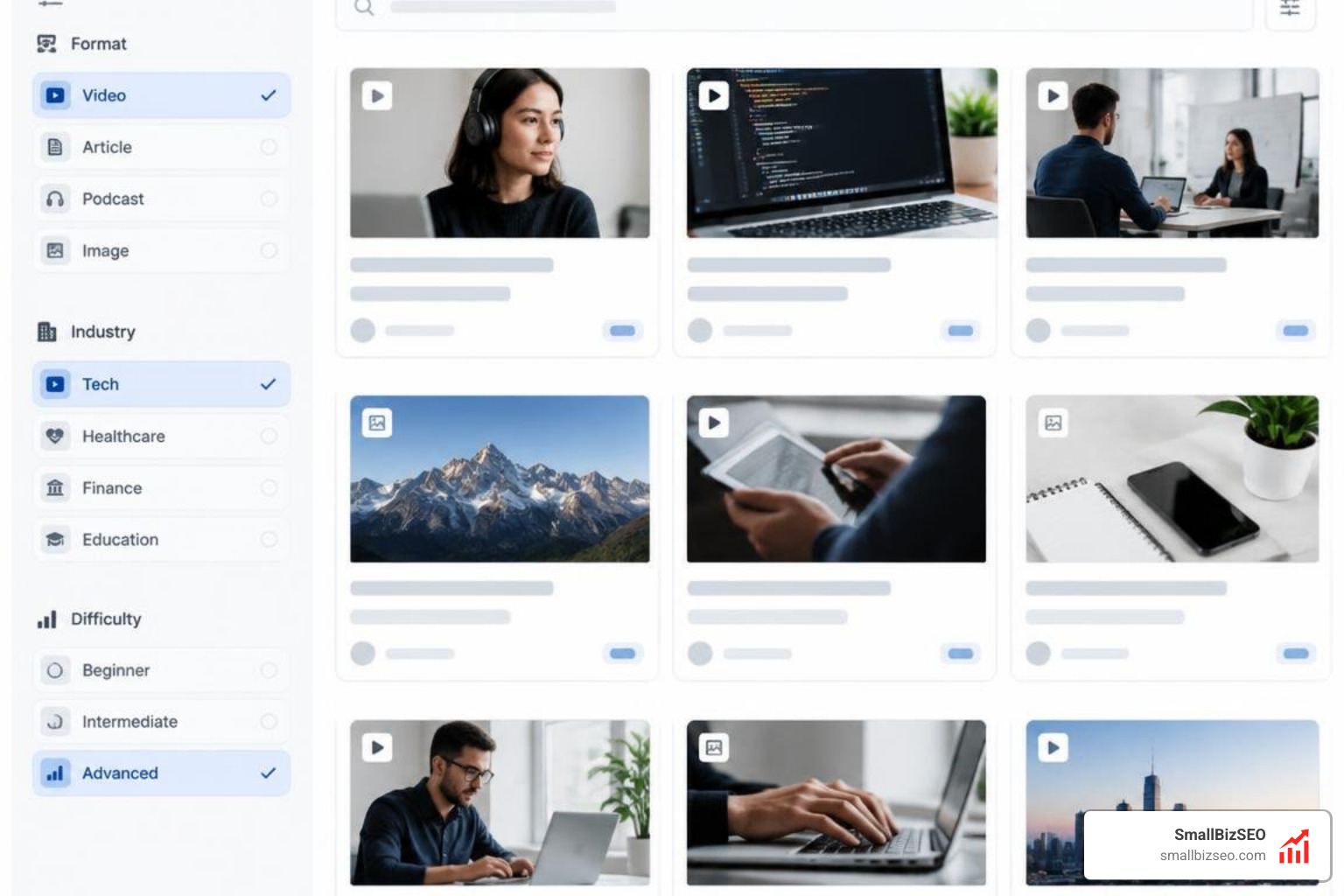
This structure is ideal for housing large volumes of modular assets. By tagging every piece of content with structured metadata, the hub allows high-intent visitors to pinpoint specific tools without manual browsing.
Searchable databases are especially effective at capturing non-commercial search queries that carry high aggregate volume. For example:
- Template Repositories: Project management platforms structure thousands of workflow templates filtered by department, team size, and tool integrations.
- Field Identification Directories: Wildlife organizations manage bird and plant databases searchable by region, plumage color, habitat, and season.
Faceted databases turn sprawling asset archives into actionable utilities that solve user problems immediately.
4. How Do Interactive Learning Paths Help People Build Skills?
Interactive learning paths guide visitors through an educational curriculum in a defined, step-by-step sequence. Unlike open-ended libraries, learning paths structure content sequentially to build foundational knowledge before introducing complex tasks.

This model organizes Search-Ready Long-Form Content into modular chapters. Each chapter features clear navigation showing progress, completed milestones, and recommended next steps.
Common use cases include:
- Software Onboarding: Guiding new administrators through account configuration, user permissions, and initial integration deployment.
- Technical Certifications: Taking developers through modular coding exercises, security compliance checklists, and final implementation exams.
- Customer Support Academies: Offering self-service troubleshooting tracks that walk users through resolving common configuration errors.
By providing clear sequencing and milestone tracking, learning paths keep users engaged and reduce support overhead.
5. How Can a Resource Library Serve Different Buyer Personas?
A resource library organizes large collections of marketing materials by clustering assets according to buyer persona, industry vertical, and funnel stage. Rather than dumping case studies, white papers, and webinars into an unorganized list, this model applies granular taxonomy to personalize the browsing experience.
Modern B2B websites rely on resource hubs to deliver relevant depth to multiple decision-makers at once. As highlighted in guides covering Content Hubs for B2B Marketing, tailoring content by role and buying stage removes friction and supports self-guided buyer journeys.
A typical enterprise software resource library might organize its navigation across three primary dimensions:
- By Role: Content filtered for IT Directors, Chief Financial Officers, or Operations Managers.
- By Industry: Dedicated collections for healthcare, financial services, and retail logistics.
- By Asset Type: Toolkits, ROI calculators, on-demand webinars, and implementation guides.
This multi-category taxonomy ensures that whether a prospect is researching initial solutions or evaluating final technical requirements, they find relevant material quickly.
6. How Do Editorial Hubs Build Interest in a Brand?
Editorial hubs function as digital publications that build brand affinity and community engagement through storytelling, thought leadership, and lifestyle journalism. Instead of focusing strictly on product features, editorial hubs center on the broader culture surrounding an industry.
These hubs attract top-of-funnel audiences and generate significant authority through backlinks and social sharing. Research indicates that comprehensive content hubs can generate four times the online shares and over three times the backlinks of isolated short-form posts.
Prominent applications include:
- Sports and Adventure Lifestyle Hubs: Brands create dedicated digital magazines covering extreme sports, athlete profiles, and event coverage to foster community engagement.
- Beauty and Personal Care Publications: Consumer brands run educational hubs that share styling tutorials, ingredient breakdowns, and trend reports without aggressive product pitches.
By providing consistent, high-value editorial content, these hubs establish long-term authority and organic visibility.
How to Build, Test, and Refine Your Hub Navigation
To build and maintain an effective hub, you must continually test whether visitors can locate the information they need with minimal friction. A well-designed hub evolves based on real user behavior and search performance data.

Follow these core practices to optimize your hub navigation:
- Conduct Task Retrieval Tests: Ask representative users to find specific answers within your hub to uncover points of confusion.
- Perform Card Sorting Exercises: Have target audience members organize your subtopics into logical categories to establish intuitive naming conventions.
- Implement Clear Breadcrumbs: Provide hierarchical breadcrumb navigation on every subpage so visitors always understand their location within the cluster.
- Maintain Mobile-First Usability: Ensure that filtering menus, dropdowns, and category selectors remain fast and easy to navigate on mobile screens.
- Track Search Console Performance: Monitor impressions and query rankings across your pillar and spoke pages to identify content gaps and refine internal link anchor text.
To map your topics directly to customer buying stages, download our Content Funnel Workbook to plan your architecture.
At SmallBizSEO, our data-driven Velocity framework uses automated reporting and structured technical implementation to help small businesses build authority fast. Explore our custom Content Hub strategies to turn scattered articles into high-performing organic assets.