How Render-Blocking Stylesheets Affect FCP and How to Fix Them

How Do Render-Blocking Stylesheets Affect FCP?
Render-blocking stylesheets delay First Contentful Paint (FCP) when the browser waits for CSS to download and process before showing the first text or image. To find a fix, check Lighthouse for blocking requests, then use Chrome DevTools to see when those files load. Keep styles needed for the first screen available right away. Remove unused rules or defer other styles only after testing the page for flashes of unstyled content.
A stylesheet with a media query that does not match the visitor’s screen does not block the initial render. The goal is not to defer all CSS; it is to deliver the right styles at the right time.
How Do Render-Blocking Stylesheets Affect FCP in Modern Browsers?
A stylesheet delays First Contentful Paint (FCP) by pausing the browser rendering pipeline until the CSS file is fully fetched, decompressed, and parsed into the CSS Object Model (CSSOM). While the HTML parser can stream and assemble the Document Object Model (DOM), the browser cannot calculate geometry or draw visible pixels until the DOM and CSSOM join into a complete render tree.
Understanding render-blocking CSS mechanisms clarifies why this delay occurs: browsers intentionally avoid displaying raw HTML to prevent jarring visual shifts. web.dev’s FCP guidance treats 1.8 seconds or less at the 75th percentile as a good target, not a requirement. FCP is not a Core Web Vital or a Google pass/fail ranking requirement, but it remains a useful signal for how quickly visitors first see page content. Because Largest Contentful Paint (LCP) measures the rendering of the primary content block, render-blocking CSS can delay both FCP and LCP. You can monitor how these paint delays show up across real visitor devices in Google's dataset using Core Web Vitals performance metrics.
What Happens to the Critical Rendering Path When CSS Blocks Rendering?
When a stylesheet blocks rendering, the layout engine suspends paint execution because it lacks the cascade rules required to calculate box dimensions, fonts, and positioning.
The browser processes web pages through a multi-stage sequence:
- DOM Construction: The browser reads incoming HTML tokens and builds the node hierarchy.
- Stylesheet Evaluation: Default external stylesheets link tags halt render-tree construction while the file downloads over the network.
- CSSOM Generation: The browser maps selectors and styles into memory.
- Render Tree Assembly: The engine matches DOM nodes with computed CSS rules.
- Layout & Paint: The browser determines physical coordinates and paints initial pixels to trigger FCP.
When stylesheets are linked globally without specific media conditions, the browser assumes every rule applies immediately. Applying targeted technical SEO audits helps prevent unnecessary stylesheets from stalling paint milestones on visitor viewports.
How Can You Find Render-Blocking Stylesheets in Chrome DevTools and Lighthouse?
You can use synthetic audits and waterfall profiling to identify render-blocking CSS candidates, then verify whether each one is on the critical path.
To diagnose your assets:
- Lighthouse / PageSpeed Insights: Review the Performance panel to locate render-blocking resources in Lighthouse. This audit highlights stylesheet links in the document head that may delay initial paint. Use PageSpeed Insights to spot candidates, then investigate them in context.
- Chrome DevTools Performance Panel: Record a page reload and inspect the request waterfall, initiators, and dependencies around the FCP marker. A stylesheet finishing near FCP is a candidate, not causal proof. Confirm its dependency on the render path, then compare controlled before-and-after tests.
- Chrome DevTools Coverage Panel: Open the Command Menu, select "Show Coverage," and record page load and relevant interactions. Coverage reports executed and unused code for that captured session; it is not an automated critical-CSS extraction tool. Test breakpoints, dialogs, menus, and other dynamic states before purging, and safelist selectors generated at runtime.
How Can You Fix Render-Blocking CSS Issues?
You can reduce avoidable rendering delays by prioritizing the styles required for the initial viewport and managing secondary stylesheets carefully. Incorporating regular asset audits into your standard site audit routine keeps codebases free of bloated legacy styling.
| Strategy | Implementation Complexity | Primary Benefit | Key Trade-Offs and Tests |
|---|---|---|---|
| Media Attribute Splitting | Low | Lets nonmatching styles wait without blocking the initial render | Confirm the media condition is accurate for each viewport. |
| Critical CSS Inlining | Moderate to High | Makes essential initial styles available during document parsing | Keep the inline set small and complete enough to avoid layout flashes. |
| Supported Noncritical CSS Loading | Moderate | Delivers secondary styles without relying on unsafe inline handlers | Verify the implementation under a strict CSP and on slow connections. |
| Unused CSS Purging | Moderate | Reduces stylesheet transfer size | Test templates, breakpoints, and interactive states, and safelist dynamic selectors. |
Following Google's recommendations for deferring non-critical CSS allows browsers to draw visible structural elements without waiting on full site bundles.
When Should You Use Critical CSS Instead of Deferred Loading?
Critical CSS extraction should be used when an external stylesheet is too large to download rapidly on constrained networks, delaying first paint. Critical CSS refers exclusively to the minimal rule subset needed to render content located above the fold.
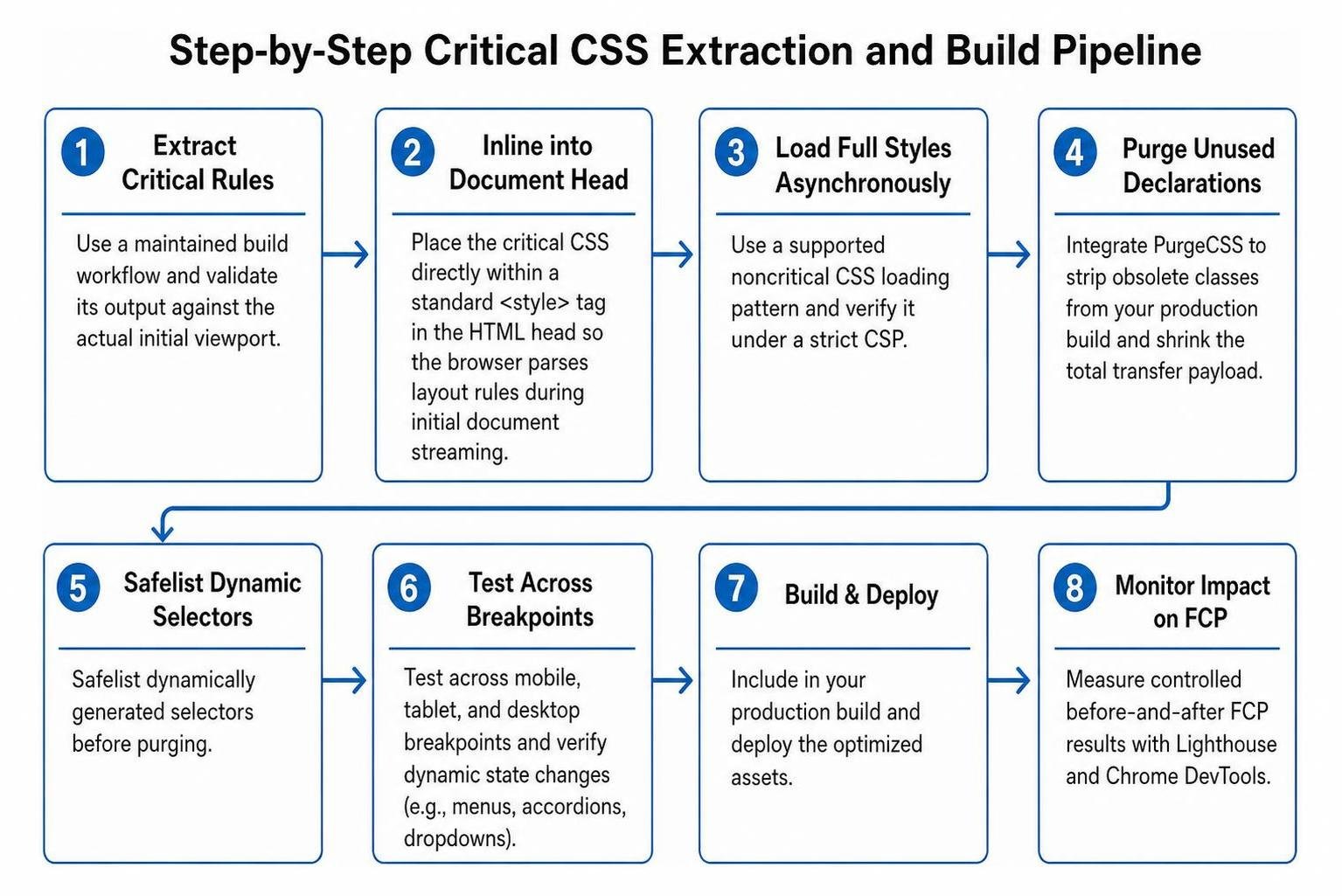
To manage this workflow effectively:
- Identify Essential Rules: Choose a maintained build tool or workflow that fits your stack, then validate the generated CSS against the actual initial viewport. Do not assume that selecting DOM-matched rules alone produces an accurate viewport-critical set.
- Inline into Document Head: Place only the verified essential styles in a standard style tag in the HTML head so the browser can parse layout rules during initial document streaming.
- Purge Unused Declarations Carefully: Before removing classes, test templates across mobile, tablet, and desktop breakpoints, plus dynamic states such as navigation toggles, accordions, and dropdowns. Safelist selectors generated at runtime.
- Adhere to Standards: Refer to established CSS performance optimization standards to balance smaller bundles with cache behavior and maintainability.
How Can You Load CSS Asynchronously Without Causing FOUC?
Asynchronous CSS loading allows secondary styles to download without blocking the initial paint, but improper configuration causes a Flash of Unstyled Content (FOUC) or unexpected layout shifts.
When implementing asynchronous delivery:
- Keep CSP Strict: Do not rely on unsafe inline handlers or loading shortcuts that conflict with a strict Content Security Policy. Use a supported build or plugin loading pattern for the site’s stack.
- Use Preload Precisely: Preload is a fetch hint. It does not apply a stylesheet by itself or automatically make CSS nonblocking, so do not preload every secondary stylesheet.
- Use Noscript for Its Actual Scope: A noscript fallback supports visitors with JavaScript disabled. It does not solve a JavaScript-enabled page where CSP blocks a handler.
- Prevent Layout Shifts: Ensure essential initial CSS accounts for hero images, headers, navigation containers, and fallback-font metrics. Deferred styles and font swaps can change layout geometry, so test visual stability.
- Maintain a Rollback Plan: Compare controlled before-and-after tests across representative connection speeds and templates. If a loading pattern creates visual flashes or shifting containers, roll it back and focus on safer pruning, media conditions, or bundle reductions.
How Should You Manage Third-Party Stylesheets and Web Fonts?
Third-party CSS assets, such as form styling, analytics-driven themes, and font stylesheets, introduce external network handshakes (DNS lookup, TLS negotiation) that stall rendering.
To optimize third-party resources:
- Avoid Unnecessary Serial Chains: In performance-critical CSS, avoid unnecessary
@importchains because a secondary stylesheet may not be discovered until the first file is parsed. - Evaluate Font Delivery: Self-host fonts only when licensing and performance make it beneficial.
font-display: swapcan improve text visibility but may contribute to layout shift, so test fallback-font metrics and real layouts. - Audit Plugin Declarations: Content management systems often enqueue redundant stylesheets on pages where they perform no function. Audit templates regularly so plugin styles load only where the feature is present.
Performance fixes work best alongside useful content, ongoing content refreshes and internal linking, and relevant earned outreach; they do not guarantee rankings. The FCP glossary explains the metric. For help prioritizing technical issues, explore technical SEO services or book a consultation.
Streamline Your Stylesheet Delivery for Faster Paints
Fixing render-blocking CSS is a matter of resource prioritization: deliver the styles needed for the initial viewport immediately, split files with appropriate media queries, and load secondary rules safely. By systematically auditing your assets in DevTools, removing unneeded selectors, and protecting against unstyled content flashes, you can improve the conditions for faster initial paints across representative devices and connections.