Is Your Robots Txt File Blocking Google? Here is How to Review It

Is Your Robots Txt File Blocking Google? Here is How to Review It
Is Your Robots.txt File Secretly Hiding Your Site From Google?
A robots txt review is the process of auditing your robots.txt file to make sure it is not accidentally blocking Google from crawling pages you want ranked. Here is what a basic review covers:
- Check the file exists - Visit
smallbizseo.com/robots.txtand confirm it returns a 200 status - Look for accidental site-wide blocks - A
Disallow: /rule underUser-agent: *blocks every crawler from your entire site - Check for blocked CSS and JavaScript - Blocking these files stops Google from rendering your pages properly
- Confirm important pages are crawlable - Test key URLs using Google Search Console's robots.txt report
- Verify the staging file did not go live - Staging environments often use
Disallow: /and can devastate traffic if deployed to production - Check your sitemap is referenced - A
Sitemap:line helps Google discover your pages faster
This matters more than most small business owners realize. One misplaced line can wipe out months of SEO work overnight. A developer at a mid-sized ecommerce company pushed what seemed like a routine update on a Thursday afternoon — within 24 hours, organic traffic had dropped 90%. The cause was a robots.txt file from their staging environment accidentally deployed to production.
Your robots.txt file is tiny — usually under 1 KB — but it is one of the most powerful files on your website.
I'm Clayton Johnson, and I specialize in using digital PR and technical SEO to help businesses improve their search visibility. I have reviewed hundreds of robots.txt files as part of broader SEO audits, and a robots txt review is almost always where I find the fastest wins. Let's walk through exactly how to audit yours.
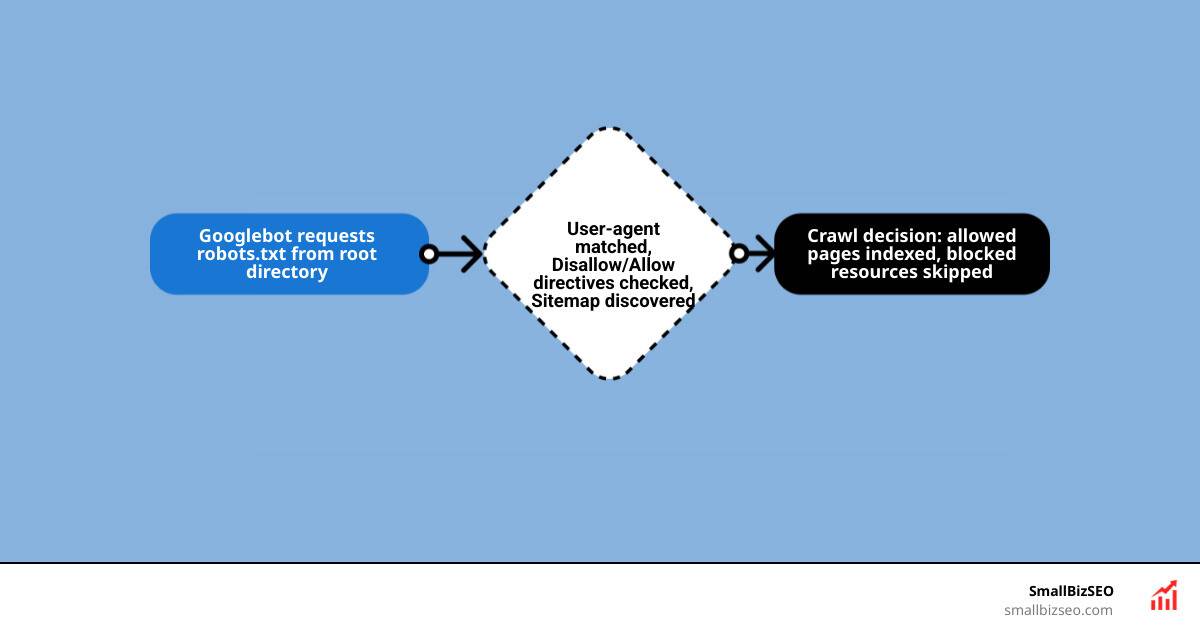
Robots txt review terms simplified:
Understanding Robots.txt and Its Impact on SEO
At its core, a robots.txt file acts as a gatekeeper for your website. It is the very first file a respectable search engine crawler requests when discovering your site. By using the Robots Exclusion Protocol, this simple file tells automated bots which paths on your server they are allowed to explore and which ones are strictly off-limits.
For small businesses, managing this access is critical for crawl budget management. Search engines do not have infinite time or resources to crawl every single page on the internet. They allocate a specific "crawl budget" to your site. If Googlebot spends its time crawling duplicate search filter pages, admin folders, or junk parameters, it might completely miss your high-value product pages or newly published blog posts. This directly harms your overall On-Page SEO strategy.
Furthermore, a poorly configured robots.txt file can cause excessive server load. If hundreds of bots crawl unoptimized, dynamically generated URLs simultaneously, your website could slow down or crash. Following the official Robots.txt Introduction and Guide | Google Search Central helps ensure your site remains lightweight, accessible, and easily readable for search engines.
What is Robots.txt and How Does It Work?
The robots.txt file is a plain-text file that must live in the root directory of your website. This means it should always be accessible at a URL like https://smallbizseo.com/robots.txt. If you place it in a subdirectory, such as https://smallbizseo.com/assets/robots.txt, search engine crawlers will completely ignore it.
When a bot visits your site, it reads this file from top to bottom. According to the standard outlined in robots.txt on Wikipedia, the file operates on voluntary compliance. Respectable search engines like Google and Bing strictly follow these rules, whereas malicious scrapers and email harvesters will ignore them entirely.
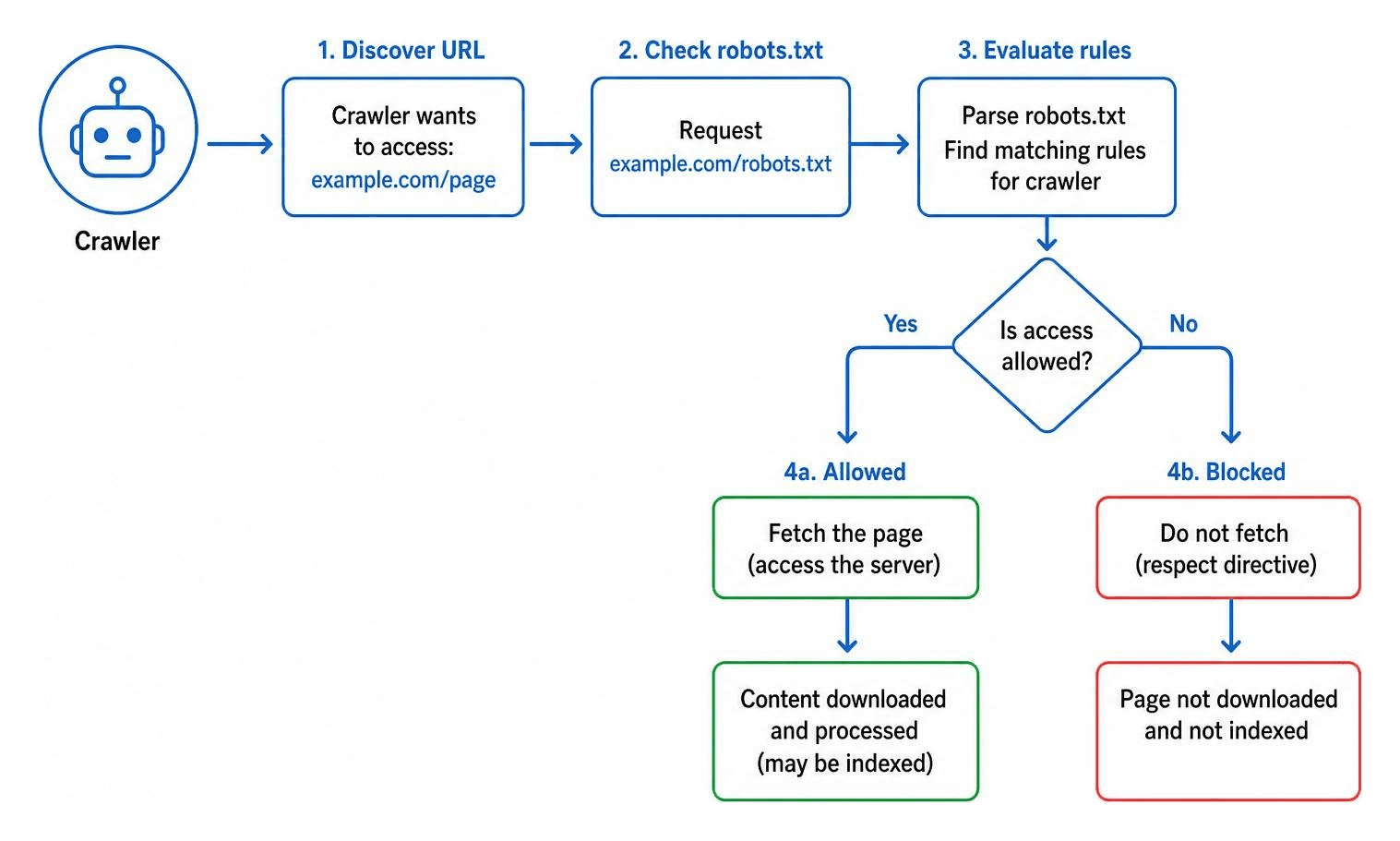
Key Directives: User-agent, Disallow, Allow, and Sitemap
To conduct an effective robots txt review, you must understand the basic vocabulary used in the file. Here are the core directives:
- User-agent: This line specifies which bot the subsequent rules apply to. For example, using
User-agent: Googlebottargets Google's main search crawler. UsingUser-agent: *acts as a wildcard, applying the rules to all search bots. - Disallow: This tells the specified bot what it cannot crawl. A simple slash, such as
Disallow: /, blocks access to the entire site. - Allow: This creates an exception to a Disallow rule. For instance, if you block access to a folder with
Disallow: /blog/, you can still let bots crawl a specific post by addingAllow: /blog/allowed-post. - Sitemap: This points crawlers directly to your XML sitemap. It should always use an absolute URL, such as
Sitemap: https://smallbizseo.com/sitemap.xml.
According to the Robots.txt Setup & Analysis Guide, modern parsers follow RFC 9309 rules. One critical rule is "longest-match-wins." If you have conflicting Allow and Disallow rules, the rule with the most specific, longest character path will take precedence.
The Ultimate Checklist for a Robots Txt Review
When we perform a robots txt review, we look for crawl waste and structural issues. Small errors can easily prevent your site from earning the traffic it deserves.

To keep your crawl budget clean, you should block duplicate content generators, such as faceted navigation or internal search result pages. For example, product filter pages on an ecommerce site can generate millions of unique URLs that waste crawl budget.
We also pay close attention to case sensitivity. Robots.txt paths are case-sensitive. If you disallow /Admin/ but your actual folder is /admin/, search engine crawlers will still access the lower-case folder, defeating the purpose of your block. If you need help structuring your overall search strategy, check out our tailored SEO Services to see how we clean up these complex technical issues.
Preparing for Your Robots Txt Review
Before making any changes to your file, you must understand your current crawl health. We recommend starting with a technical audit process:
- Review Google Search Console Crawl Stats: Look for sudden spikes in crawl activity or a high volume of crawled but unindexed pages.
- Conduct Log File Analysis: Analyze your server logs to see exactly which URLs Googlebot and Bingbot are requesting. This highlights crawl waste in real time.
- Verify Host and Protocol: robots.txt files are protocol-specific. If you run both HTTP and HTTPS, or multiple subdomains, each must have its own robots.txt file at the root.
If you are looking for a complete roadmap to audit your business's search presence, our comprehensive SEO Services Guide outlines how we integrate technical diagnostics with content growth.
Common Robots.txt Mistakes and Indexing Misconceptions
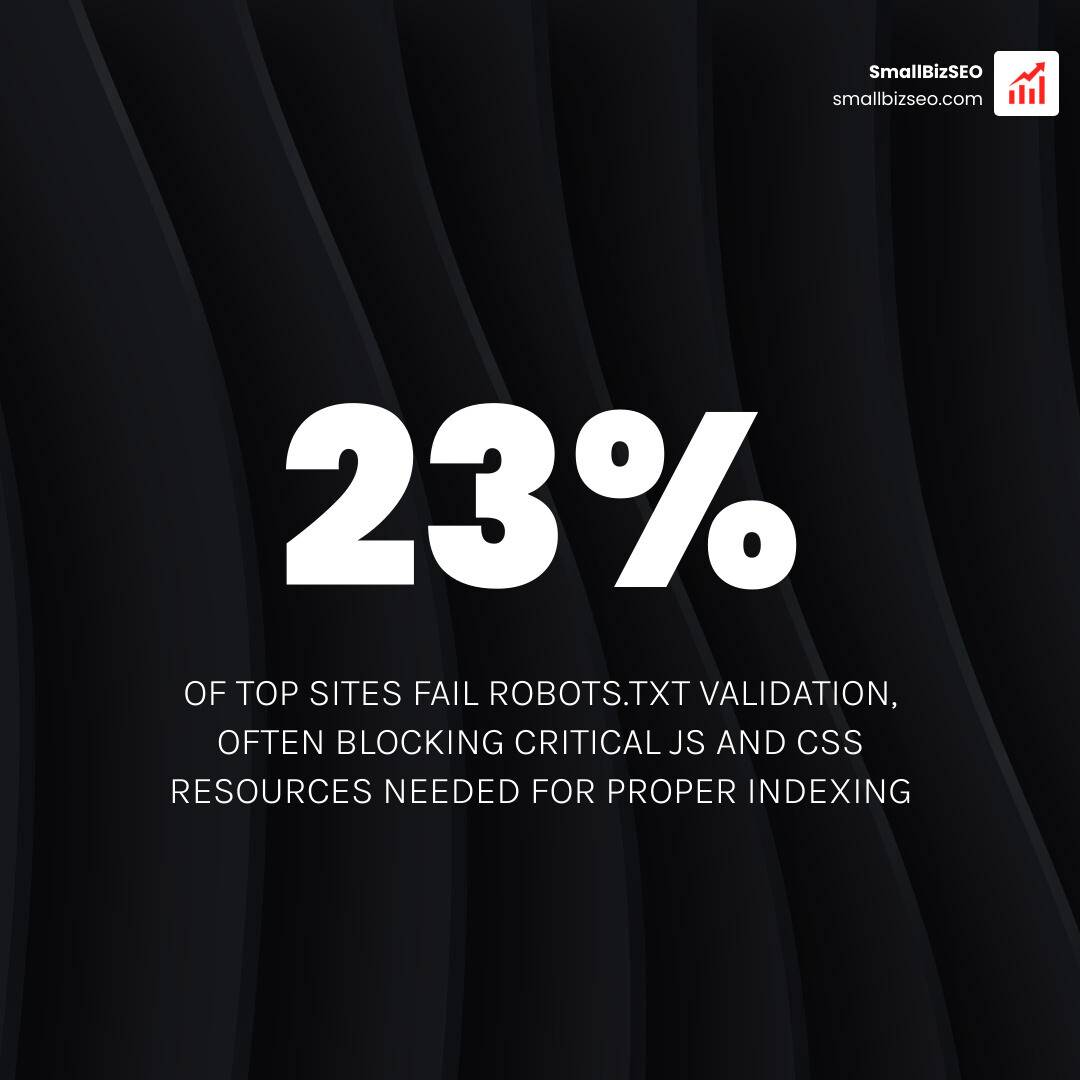
The most devastating mistake we see during a robots txt review is the accidental block of CSS and JavaScript files. Historically, SEOs blocked these resource folders to save crawl budget. However, Google now renders pages like a modern browser. If you block Googlebot from reading your CSS and JS, it cannot determine if your site is mobile-friendly or structured correctly, which can hurt your rankings.
Another common pitfall is the staging environment disaster. Developers frequently block staging sites with Disallow: /. If this file is pushed directly to your live production environment, your entire site can disappear from search indexes within a couple of weeks.
Many webmasters also confuse crawling with indexing. As discussed in Tell HN: Robots.txt pitfalls, robots.txt only stops search engines from crawling a page—it does not stop them from indexing it. If another website links to your blocked page, Google can still index the URL and display it in search results without a description. To completely keep a page out of search results, you must use a "noindex" meta tag or an HTTP response header instead.
Managing Large and International Sites
For enterprise and international sites, robots.txt management requires a highly strategic approach. If you target multiple countries using regional subdomains (e.g., uk.claytonjohnson.net vs. us.claytonjohnson.net), you must maintain a separate robots.txt file for each subdomain.
Some massive sites use dynamically generated robots.txt files. These files update automatically based on inventory levels or site changes, ensuring that out-of-stock products or expired event pages are quickly deprioritized for crawlers. If you are scaling content across multiple regions, our SEO Content Services can help you align your localized content with clean technical crawl paths.
How to Test, Validate, and Deploy Your File
Never upload a new robots.txt file without testing it first. A single syntax error can render the entire file invalid, causing search engines to ignore your rules.
| Tool Name | Best For | Key Advantage | Limitation |
|---|---|---|---|
| Google Robots.txt Tester | Googlebot validation | 100% accurate for Googlebot behavior | Only tests Googlebot; no bulk URL testing |
| TechnicalSEO.com Validator | Multi-engine testing | Validates rules for Google, Bing, and Yandex | Cannot connect directly to live Search Console data |
| Screaming Frog | Bulk URL testing | Checks thousands of URLs against robots.txt rules | Requires a paid license for larger crawls |
Using a reliable robots.txt Validator and Testing Tool allows you to test your directives in real time before deploying them live, ensuring you don't accidentally block essential pages.
Using Google Search Console for a Robots Txt Review
Google Search Console provides an official report to monitor how Google processes your robots.txt file. This report displays the fetch status of your file, showing when it was last crawled and highlighting any errors or warnings.
If you make critical changes to your file, you don't have to wait days for Google to discover them. You can use the "Request a recrawl" option in the Search Console report to notify Google immediately. For a deep dive into how to leverage these diagnostics, check out the Robots.txt Tester Review or read Google's official announcement on how they made Testing robots.txt files made easier.
CI/CD Pipeline Integration and Version Control
For modern websites, robots.txt should be managed like code. We highly recommend keeping your robots.txt file in a git repository. This allows you to track changes, see who modified a rule, and quickly execute a rollback strategy if a deployment goes wrong.
To prevent staging files from slipping into production, build environment-aware steps into your CI/CD pipeline. These automated checks ensure that the production build replaces any developer-focused Disallow: / directives with your fully optimized production rules.
Managing AI Crawlers and Emerging Standards
The rise of generative search engines and large language models (LLMs) has changed how we manage website access. A robots txt review is no longer just about traditional search engines; it is now a strategic decision about how your content is used to train AI.

Many publishers are actively deciding whether to allow AI bots to scrape their content. According to the Robots.txt for AI crawlers checklist, you must explicitly name these bots in your robots.txt file if you want to block or allow them, as they do not always inherit rules from the universal wildcard group.
Controlling AI Bots and Generative Search Engines
When managing AI crawlers, we categorize them into distinct groups:
- AI Training Bots: Bots like GPTBot (OpenAI) and ClaudeBot (Anthropic) crawl the web to train their language models. Blocking them protects your proprietary content but prevents your brand from being natively understood by the underlying model.
- AI Citation Bots: Bots like PerplexityBot crawl to provide real-time citations and clickable links to users. Allowing these bots can drive high-intent referral traffic to your site.
- Google-Extended: This token specifically controls whether your content is used to train Google's Gemini and Vertex AI models. Blocking Google-Extended does not affect your Google Search rankings or visibility in AI Overviews.
To help you make these strategic choices, you can use the Robots.txt Tester + AI-Crawler Decision Matrix to weigh the benefits of citation exposure against content licensing protection.
The Rise of llms.txt and Complementary Standards
As AI-driven search evolves, new standards are emerging alongside traditional files. The most notable is llms.txt, a markdown file proposed to serve as a curated, clean roadmap specifically for LLMs and developer tooling.
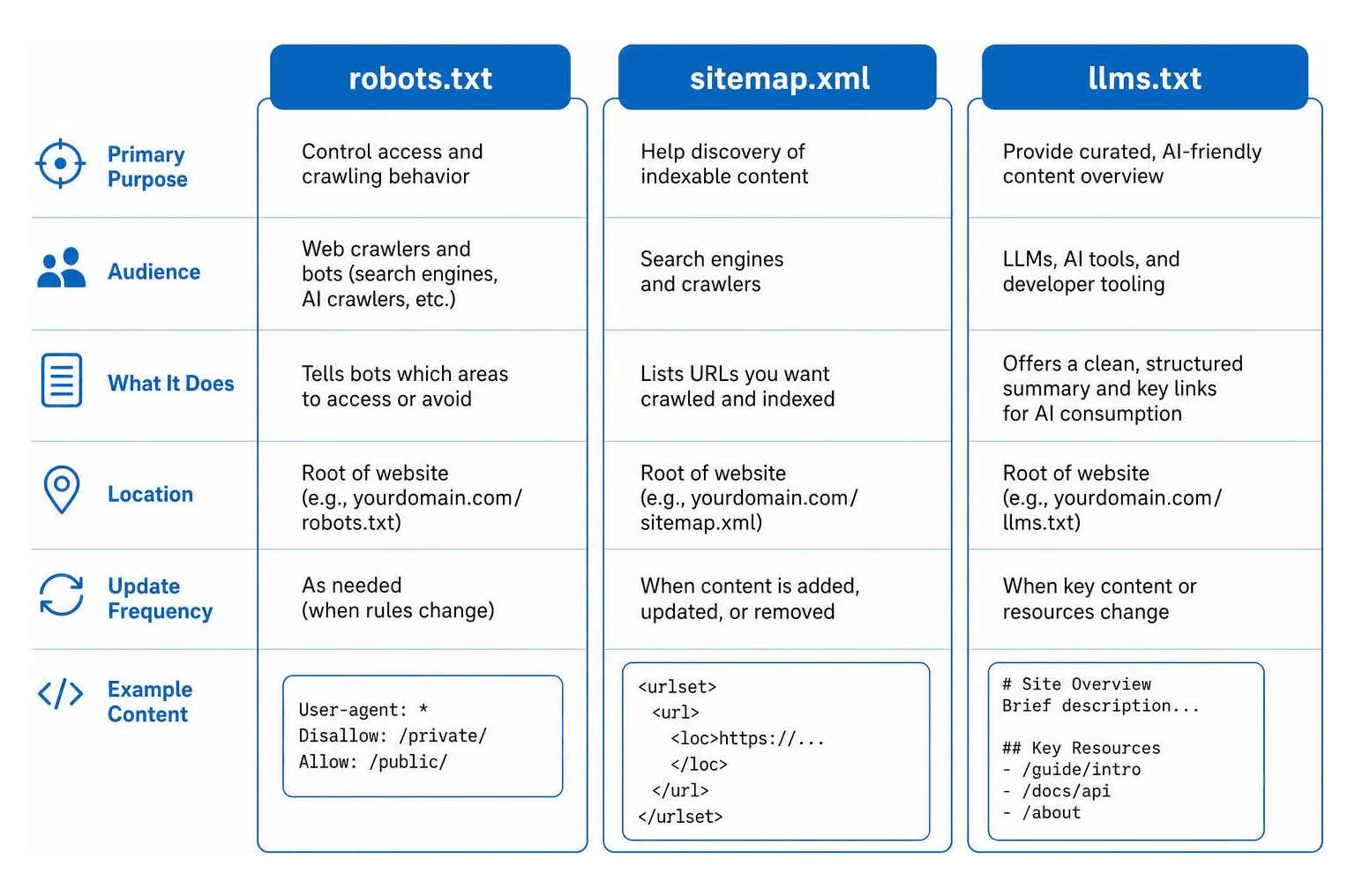
As explained in the detailed guide on llms.txt vs robots.txt vs sitemap.xml | Attrifast, these files perform entirely different, complementary jobs:
- robots.txt: Restricts access and acts as the gatekeeper.
- sitemap.xml: Lists your entire indexable inventory for discovery.
- llms.txt: Curates and summarizes your content specifically for AI reading.
Using all three files gives your business a modern, technical advantage, ensuring traditional search engines, AI models, and citation engines can all interact with your site perfectly.
Frequently Asked Questions About Robots.txt
Does robots.txt prevent pages from appearing in Google search results?
No. Robots.txt only controls crawling, not indexing. If Google finds links pointing to a disallowed page from other websites, it can still index the URL and display it in search results. To prevent a page from appearing in search results, leave it crawlable in robots.txt and apply a "noindex" meta tag or an X-Robots-Tag HTTP response header.
What happens if a website has no robots.txt file?
If your website has no robots.txt file, search engines will receive a 404 "Not Found" status code. They will assume you have no restrictions and will crawl your entire website. While this is not an immediate SEO disaster, it is highly unoptimized for crawl budget and server efficiency. If you run a local business and want to ensure your foundational search settings are correct, our Local SEO Guide offers a great starting point.
Can robots.txt block specific AI bots while allowing Googlebot?
Yes. You can achieve granular control by writing separate user-agent blocks. For example, you can allow Googlebot full access while explicitly disallowing GPTBot or ClaudeBot. Because user-agent rules do not inherit directives from the general wildcard block, ensure you list your specific blocks clearly.
Conclusion
Your robots.txt file may be small, but it holds immense power over your website's search visibility. A regular, strategic robots txt review ensures that your crawl budget is spent on high-converting pages, your resources are fully rendered, and your content is protected from unwanted AI scraping.
At SmallBizSEO, we help small businesses navigate these complex technical challenges. Our proprietary "Velocity" framework delivers rapid rankings and E-E-A-T-compliant growth through transparent, automated reporting. Let us handle the technical heavy lifting so you can focus on running your business.
Ready to see if your website is hiding from search engines? Get a comprehensive technical review with our SEO Visibility Audit today!