An Essential Guide to Fixing Shopify SEO Issues
An Essential Guide to Fixing Shopify SEO Issues
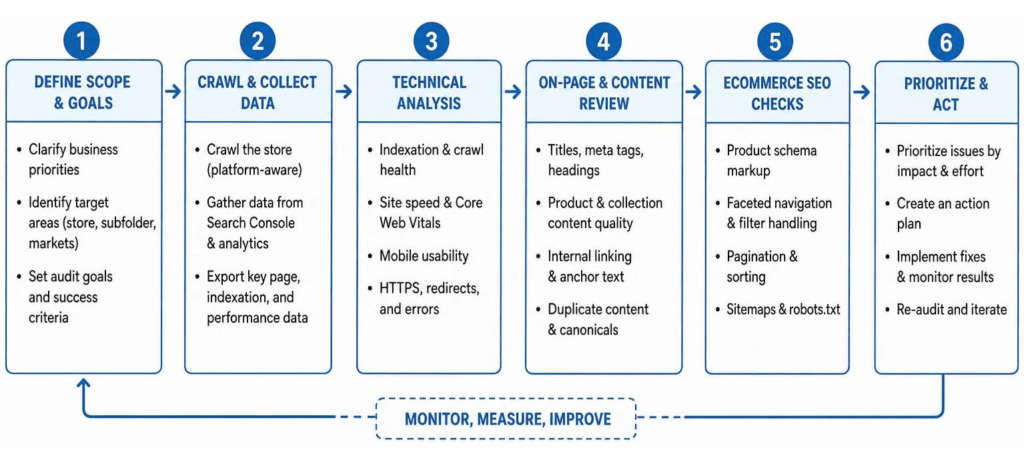
How to Perform a Strategic SEO Audit for Shopify
Running a strategic SEO audit for Shopify is not about chasing a perfect 100/100 score on a generic website scanner. Instead, it is about aligning your site's technical foundation with actual e-commerce strategy. Every technical bug, slow-loading page, or missing schema markup tag acts as a friction point that leaks potential revenue. When you identify and fix these bottlenecks, search engines can efficiently crawl your catalog and send ready-to-buy traffic to your store.
To run a meaningful audit, you need to look beyond surface-level metrics and evaluate how search engine crawlers interact with your specific site architecture. You can learn how to audit your web pages to ensure each individual landing page satisfies both search engine requirements and consumer intent. To gain broader e-commerce context, you can also read Shopify's guide on e-commerce audits to understand standard platform baselines.
Manual Audits vs Free Automated Scans
Free automated crawlers are great for a quick high-level check, but they often struggle with platform nuances. Automated scanners frequently flag standard platform behaviors as critical errors, creating "false positives" that waste time. For example, a basic tool might flag valid collection filters as duplicate content without recognizing that appropriate canonical tags are already working behind the scenes.
| Feature / Capability | Automated App Scans | Expert Manual Audits |
|---|---|---|
| Speed & Initial Setup | Instant (20 to 60 seconds) | Takes 15 to 30 hours over 1 to 2 weeks |
| Liquid Code Analysis | Surface-level client HTML only | Deep inspection of Liquid loops, tags, and dependencies |
| App Bloat Diagnosis | Detects script count only | Isolates main-thread blocking time per third-party app |
| Contextual Prioritization | Arbitrary alphabetical or pass/fail flags | Ranked strictly by estimated revenue and traffic impact |
| AI & Schema Validation | Basic syntax validation | Tests live AI prompts across ChatGPT, Perplexity, and Gemini |
Manual audits dig deep into your theme's Liquid code, analyzing raw JavaScript execution, database calls, and template structures. While an automated tool points out what looks wrong, a thorough manual code inspection tells you why it is happening and how to fix it without breaking your conversion flow.
Audit Frequency and Schedule
We recommend performing a comprehensive SEO audit for Shopify at least twice a year. However, certain triggers require an immediate technical health check:
- Theme Updates or Redesigns: Updating your store theme can accidentally wipe out custom JSON-LD schema or overwrite essential meta tags.
- Rapid Catalog Expansion: Adding hundreds of new products or variants can introduce indexation bloat and thin-content issues.
- Peak Holiday Preparation: Running an audit several months before major sales events ensures your server response times and Core Web Vitals are fully optimized for high traffic.
- Post-Migration Checks: If you recently migrated from another platform, auditing your 301 redirects prevents massive organic traffic drops.
Technical Infrastructure and Code Health Checklist
A store's technical infrastructure dictates how quickly search engines can discover and index your catalog. Over time, code debt accumulates from uninstalled apps, custom Liquid edits, and bloated image libraries. Cleaning up your technical infrastructure ensures search engine bots do not exhaust their crawl budget on duplicate or low-value pages.
Resolving Shopify-Specific URL and Canonical Issues
One of the most widespread platform-specific issues is how themes handle internal product links. By default, many themes link to products directly through collection paths:
/collections/frontpage/products/blue-widget
Although Shopify automatically inserts a canonical tag pointing back to the clean URL (/products/blue-widget), Google must still crawl both versions. This duplicates processing effort across large catalogs. Modifying your theme grid templates to link directly to clean /products/ URLs saves significant crawl budget.
Additionally, tag filtering (e.g., /collections/all/mens+shirts) can create thousands of indexable variations with identical meta titles and headings. You must ensure that filter parameters use standard self-referencing canonical tags or implement soft disallows to keep search indexes clean.
Core Web Vitals and App Bloat Reduction
Core Web Vitals measure real-world user experience across speed, responsiveness, and visual stability:
- Largest Contentful Paint (LCP): Target under 2.5 seconds. Unbounded Liquid loops on large collection templates often delay LCP by inflating Time to First Byte (TTFB).
- Interaction to Next Paint (INP): Target under 200 milliseconds. Excessive third-party app JavaScript blocks the main browser thread, causing input lag on button clicks.
- Cumulative Layout Shift (CLS): Target under 0.1. Unsized hero banners and late-loading app widgets (like review badges or popups) shift page layouts unexpectedly.
Every app installed on your store injects external scripts into your theme header. Even after an app is uninstalled, leftover script tags and Liquid snippets often remain. Auditing your app stack quarterly and removing inactive script dependencies is the single fastest way to improve performance. For a full step-by-step breakdown of managing site updates cleanly, review website redesign best practices.
Sitemap and Robots.txt Customization
Shopify automatically generates a structured XML sitemap located at /sitemap.xml on your root domain. Verify inside Google Search Console that your main sitemap index is submitted and free from errors.
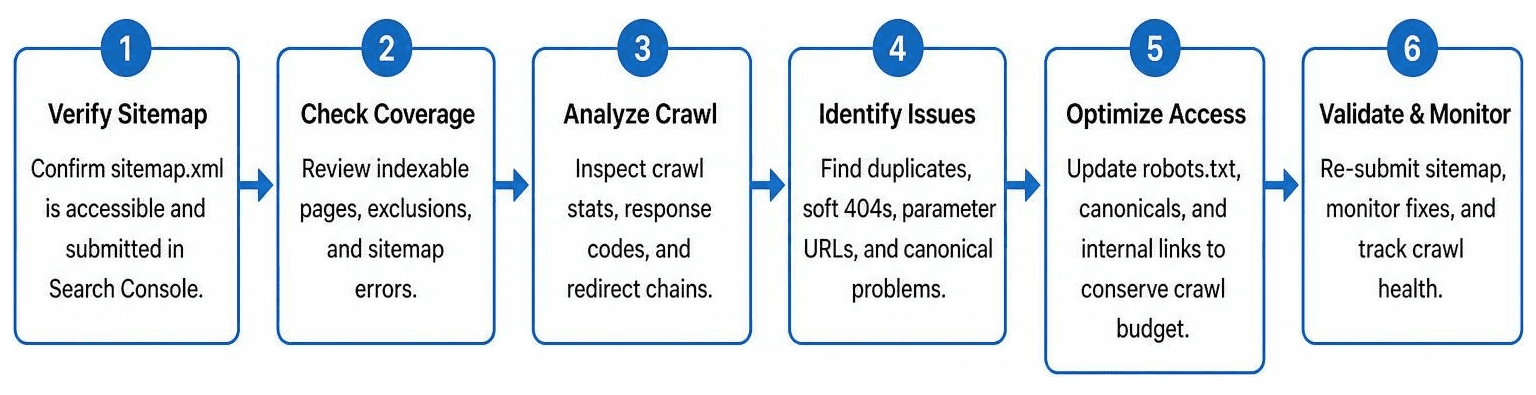
Using the robots.txt.liquid template file, you can customize crawling permissions directly within your store admin. Never remove default platform blocks for personal cart, checkout, or account pages. However, you can add explicit disallow directives for parameter-heavy search result pages or internal tagged filters that drain crawl budget.
On-Page Architecture, Schema, and AI Search Optimization
A clean technical base sets the stage for on-page optimization and structured data. Search engine algorithms rely on clear information architecture, descriptive metadata, and rich content to understand the intent behind your products.
Optimizing Metadata and Product Architecture
Every page on your store needs a clear content hierarchy. Your category taxonomy should follow a logical path: Homepage > Parent Collection > Sub-Collection > Product Page.
Keep your on-page elements clean and direct:
- H1 Tags: Ensure every product and collection page has exactly one distinct H1 tag. Never wrap logo images or header navigation elements in H1 tags.
- Title Tags and Meta Descriptions: Write unique metadata that includes target keywords and brand modifiers. Keep title tags under 60 characters to prevent truncation in search results.
- Image Alt Text: Write descriptive alt text that explains the product's visual features for screen readers and search engines, avoiding generic keyword lists.
To dive deeper into strategic content alignment across your product hierarchy, you can explore comprehensive on-page SEO strategies.
Leveraging AI Readiness and Structured Data
Generative AI search engines, ChatGPT, and Google AI Overviews rely on structured data (JSON-LD) to parse product catalogs. Missing or malformed schema markup makes your brand invisible to AI shopping recommendations.
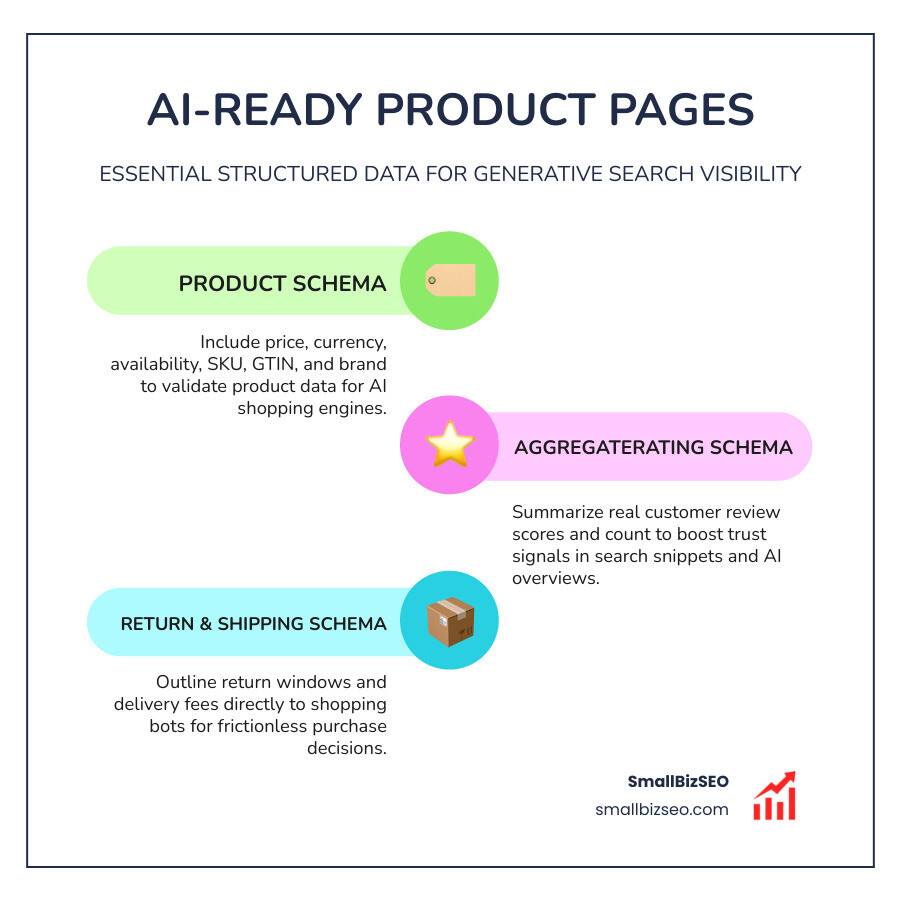
Ensure your store theme embeds complete schema types across all product pages:
- Product Schema: Validates price, currency, availability, SKU, GTIN/barcode, and brand name.
- AggregateRating Schema: Summarizes real customer review scores and review counts.
- ReturnPolicy & ShippingDetails Schema: Outlines return windows and delivery fees directly to shopping bots.
- BreadcrumbList Schema: Defines page hierarchy for search engine breadcrumbs.
Additionally, introducing an llms.txt file in your root directory provides AI assistants with a clean, Markdown-formatted overview of your brand and key products. To run a fast diagnostic on your storefront's overall health and structured data, you can test your store with Taylor Sicard's audit tool.
Prioritization Framework and Recommended Audit Tools
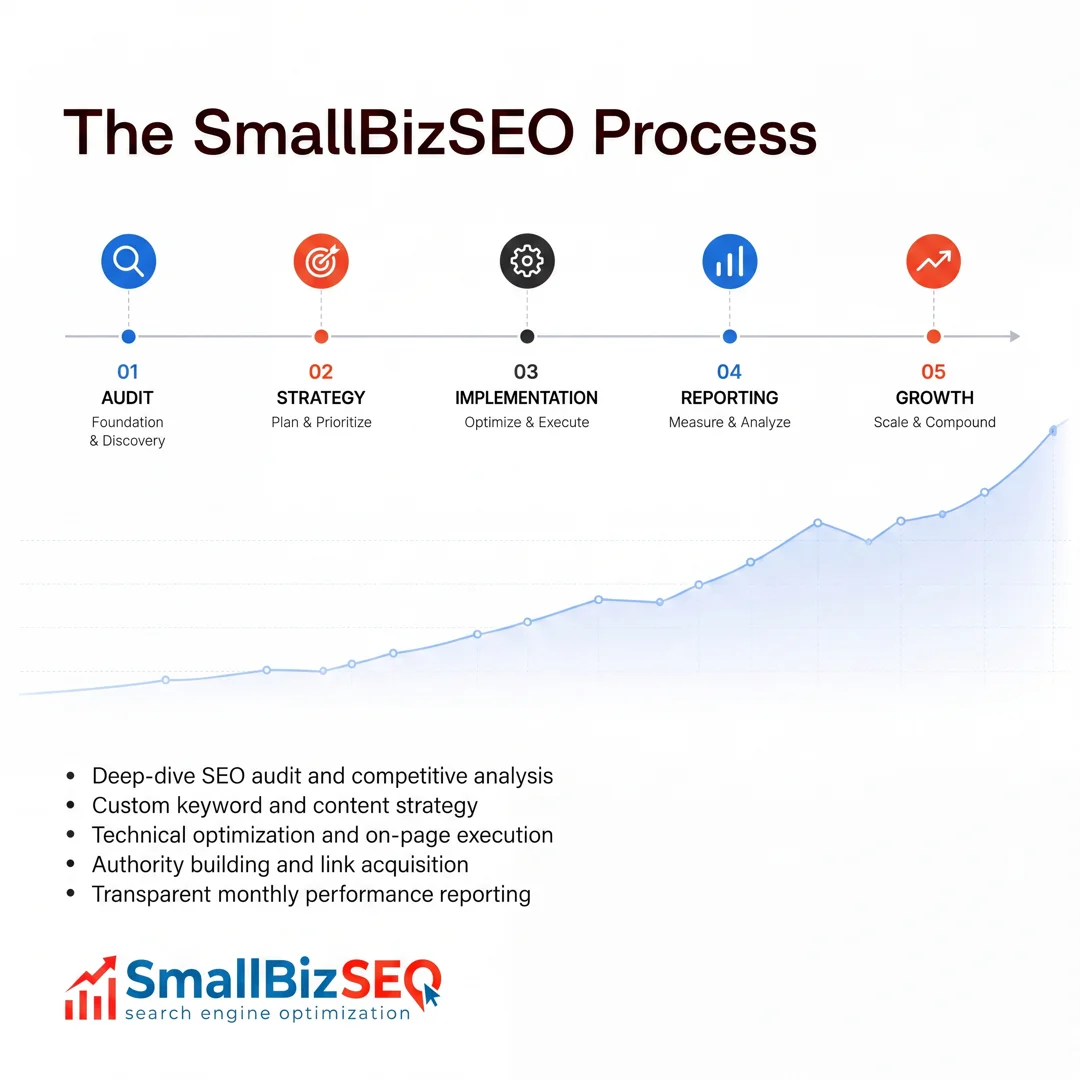
Running an audit generates dozens—sometimes hundreds—of data points. Attempting to fix every minor item at once leads to developer paralysis. Success comes from prioritizing fixes based on business leverage and implementation difficulty.
Core Tools Required for an SEO Audit for Shopify
To perform a thorough audit, combine these essential tools:
- Google Search Console: Identifies real-world indexation issues, query gaps, and canonical errors.
- Screaming Frog SEO Spider: Crawls up to 500 URLs for free (or unlimited with a paid license) to audit titles, canonical tags, status codes, and internal link depth.
- Google PageSpeed Insights & Chrome UX Report (CrUX): Measures LCP, INP, and CLS performance using actual user field data.
- Shopify CLI & Theme Inspector: Helps developers inspect theme code validity, profile Liquid render times, and flag deprecated tags.
Prioritizing Fixes After an SEO Audit for Shopify
Sort identified issues using a standard 2x2 matrix that balances business impact against developer effort:
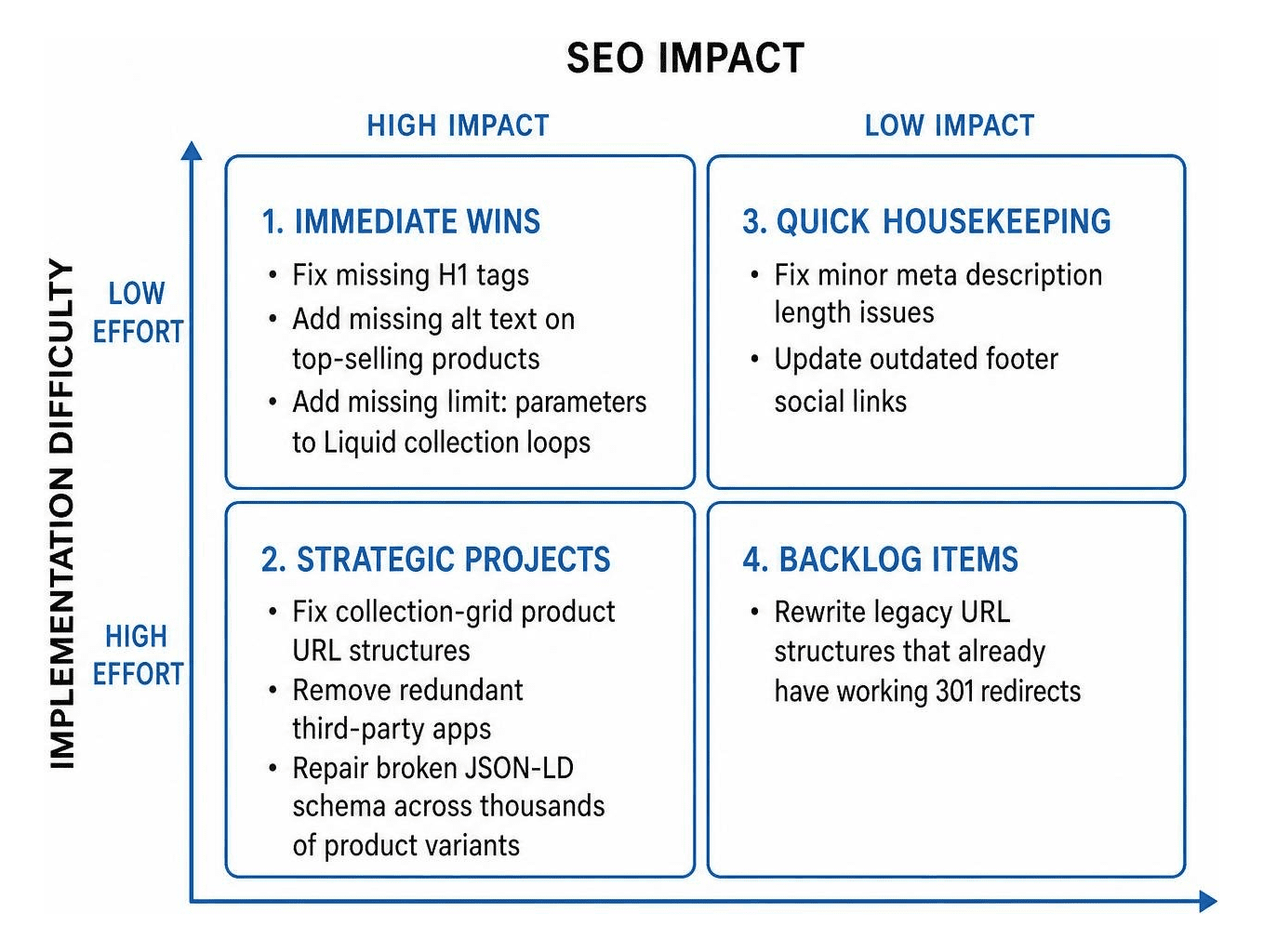
- High Impact / Low Effort (Immediate Wins): Fixing missing H1 tags, updating missing alt text on top-selling products, and adding missing
limit:parameters to Liquid collection loops. - High Impact / High Effort (Strategic Projects): Fixing collection-grid product URL structures, removing redundant third-party apps, and repairing broken JSON-LD schema across thousands of product variants.
- Low Impact / Low Effort (Quick Housekeeping): Fixing minor meta description length issues or updating outdated footer social links.
- Low Impact / High Effort (Backlog Items): Rewriting legacy URL structures that already have working 301 redirects.
When presenting your audit findings to a development team, clearly articulate why each issue matters in dollars and cents. To see how AI tools fit into this prioritization strategy, discover how to execute an AI SEO audit.
Frequently Asked Questions About Shopify Audits
What is the most common technical SEO issue found on Shopify stores?
The most common technical SEO issue is unbounded Liquid loops in theme code, combined with collection-appended product URLs. Unbounded loops iterate through every single item in a large collection, causing high server response times and slow page loads. Simultaneously, themes that link to products via collection paths force search engines to crawl multiple URLs for the exact same item, wasting valuable crawl budget.
How long does it take to perform a full technical audit on Shopify?
A quick automated scan finishes in under two minutes, but a comprehensive manual technical audit typically takes between 15 and 30 hours of execution spread across one to two weeks. This allows time to perform deep code analysis, review Search Console data, test real-world Core Web Vitals, evaluate app bloat, and produce an actionable, prioritized dev roadmap.
Can non-technical store owners perform a Shopify audit without a developer?
Non-technical store owners can easily handle initial diagnostics using free tools like Google Search Console, PageSpeed Insights, and automated crawlers. These tools uncover high-level issues like missing meta titles, broken links, slow images, or unindexed pages. However, implementing code-level fixes—such as adjusting Liquid logic, migrating JavaScript dependencies, or editing robots.txt.liquid—usually requires an experienced developer.
Mastering Your Shopify Store's Organic Growth
Running a strategic SEO audit for Shopify provides a clear roadmap to turn hidden technical bugs into real organic growth. By addressing platform-specific canonical quirks, eliminating app bloat, and implementing structured data for search engines and AI agents, you give your online store a distinct edge over competitors who rely solely on basic automated checks.
Fixing technical debt is not a one-time project; it is an ongoing process of refinement that protects your margins and helps scale your e-commerce revenue over time. When your store loads fast, features clean structured data, and makes it easy for search bots to index your products, high rankings follow naturally. If you want to expand your store's reach into location-based queries and local markets, accelerate your store rankings with our local SEO guide.