Chunk Loading Errors: A Practical Guide to Handling Missing JS Bundles

How to Handle Missing JavaScript Bundles on Client-Rendered Websites: Root Causes and Hosting Conflicts
To handle missing JavaScript bundles on client-rendered websites, retain older hashed build assets on your server or CDN for at least 48 hours after each deployment, configure edge routing so missing asset paths return a true 404 instead of the HTML shell, and add a safe client-side reload listener with a retry limit. These three steps prevent most chunk loading failures and stop stale browser tabs from crashing when they request a file that a new deployment has already removed.
In client-side rendering (CSR), dynamic imports download split code chunks on demand. When a new deployment overwrites or deletes old chunks, or when hosting rules misroute asset requests, the browser cannot run the required code.
When modern bundlers like Vite or Webpack split an application into separate files, they add a content hash to each filename (for example, app-feature.c8f3b2.js). This enables long-term browser caching. However, if a user keeps a browser tab open during a new deployment, that tab still holds the old HTML shell referencing old file hashes. As explored in technical breakdowns of React lazy load chunk errors, when the user clicks a link to a lazy-loaded route, the application requests the old hash. If your host deleted that file, the request fails.
Understanding these breakages is crucial because unhandled script failures can trigger severe SEO audit errors and break indexing pipelines when search bots encounter empty shells.
Why Do Deployment-Skew and Stale Lazy-Loaded Chunks Cause Runtime Failures?
Deployment-skew occurs when an active client session runs on an older build version than the assets currently hosted on the server. When the client navigates to a new route powered by dynamic imports (such as React.lazy() or Vue Router dynamic components), the browser makes a network request for the corresponding code chunk.
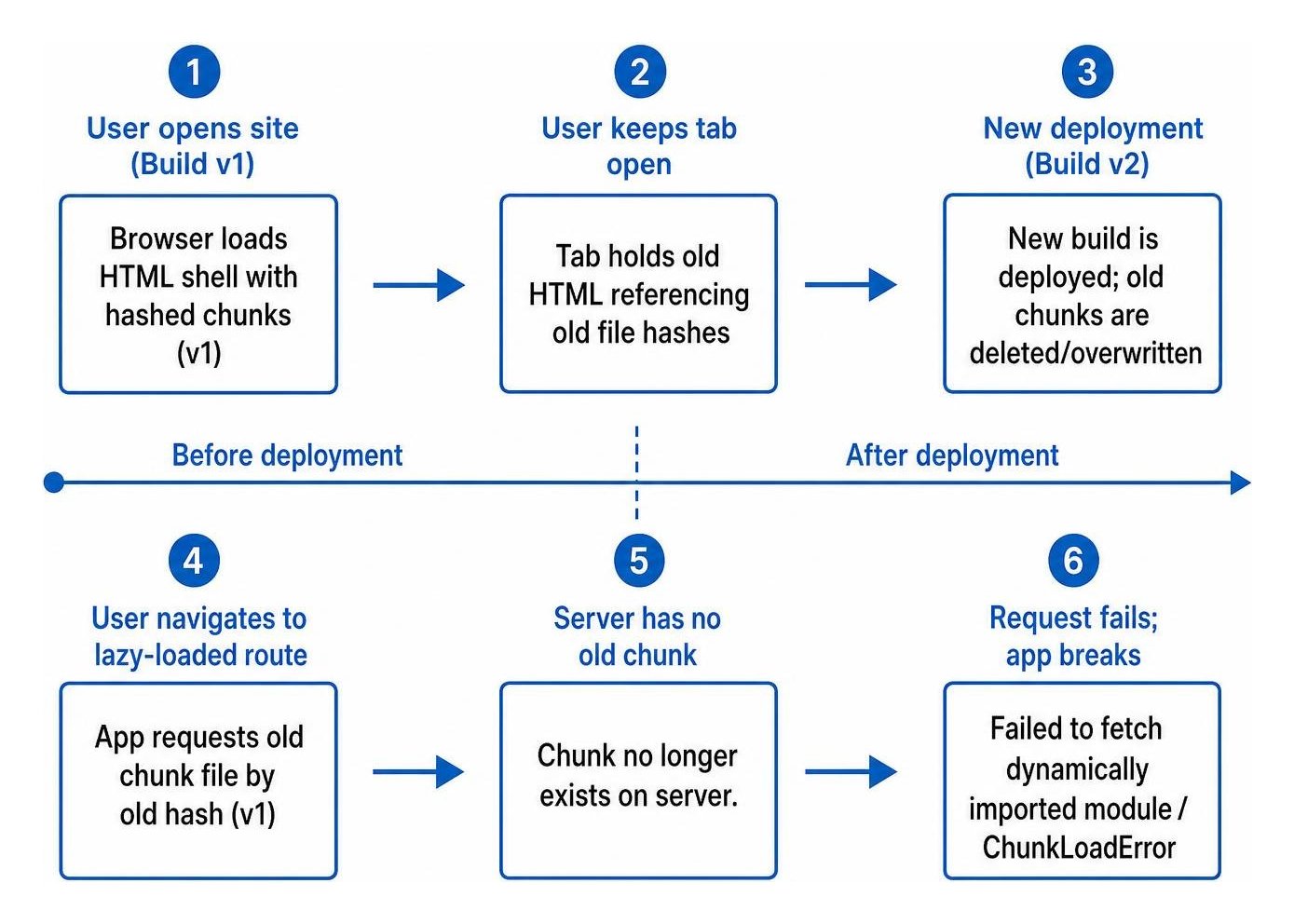
If the server only hosts the newest build, that requested chunk no longer exists. The network request fails, throwing errors such as Failed to fetch dynamically imported module or ChunkLoadError. Without a built-in recovery strategy, the application crashes, leaving the user with a broken interface or a perpetual loading spinner. Unresolved runtime bugs like this represent a major form of early-stage technical SEO debt that hurts organic conversions and user retention.
How Do Cloudflare Pages, Netlify, and Single-Page Routes Return 200 HTML Instead of 404s?
Hosting platforms designed for single-page applications use catch-all rewrite rules. These rules ensure that deep routes (like /dashboard/settings) serve the root index.html file so client-side routers can handle page rendering.
However, if these rewrite rules are applied globally across all paths without excluding asset directories, a request for a missing file (like /assets/settings-d84f1a.js) also returns index.html with an HTTP status of 200 OK and a Content-Type: text/html header.
When the browser expects JavaScript but receives an HTML document, it halts execution and logs:
SyntaxError: Unexpected token '<' or Failed to load module script: Expected a JavaScript module script but the server responded with a MIME type of "text/html".
To prevent this issue:
- Place a dedicated
404.htmlfile inside your assets directory (for example,public/assets/404.html) on platforms like Cloudflare Pages. This forces the edge network to return a true404 Not Foundresponse with aCache-Control: no-storeheader for missing scripts, rather than serving the HTML shell. - Configure static hosting headers to prevent caching failed asset lookups.
- Use hidden source maps (
sourcemap: 'hidden') in production builds. This prevents missing public.mapfiles from returning HTML and generating invalid source map JSON warnings in monitoring tools.
Following established client-side rendering patterns ensures that edge routing rules distinguish between frontend application routes and immutable static assets.
How Can You Detect Missing JavaScript Modules in Code?
You can detect chunk failures programmatically by monitoring global runtime errors, unhandled promise rejections, and framework error boundaries.
To catch missing chunks across different bundlers:
- Listen to unhandled promise rejections: Dynamic imports return promises. When an import fails, it triggers an unhandled rejection containing message strings like
Failed to fetch dynamically imported module(Vite) orLoading chunk failed(Webpack). - Implement React Error Boundaries: Wrap lazy-loaded component trees in error boundaries that parse caught error messages to distinguish network chunk failures from standard application logic bugs.
- Capture Vite preload events: Vite dispatches a specialized
vite:preloadErrorevent on the window object whenever a module preload fails.
Catching these errors allows you to take corrective action rather than leaving the visitor stuck. This pairs naturally with an effective 404 error page strategy that maintains a functional user journey even when an underlying resource fails.
How Can You Recover From Missing Chunks and Keep Old Assets Available?
The best recovery strategy combines two approaches: retaining previous build assets on the server and implementing a safe client-side reload fallback.

How Can You Use vite:preloadError and Safe Reload Guards Without Creating Infinite Loops?
When a dynamic import fails, the quickest client-side fix is to reload the browser window so it downloads the newest index.html shell. However, an unconstrained reload can cause an infinite loop if the file is truly missing due to a network outage or bad build.
To build a safe reload guard:
- Listen for the
vite:preloadErrorevent. - Read a retry tracking counter from
sessionStorage. - If the retry count is below your threshold (such as 2 or 3 retries), increment the counter and trigger a page reload (
window.location.reload()). - If the retry threshold is exceeded, stop reloading, reset the counter, and render a clean fallback UI with a manual "Refresh Application" button.
- Clear the retry counter once the application successfully mounts and runs without errors.
Using this pattern, as outlined in guides on reloading SPAs on missing chunk errors, ensures that users running stale tabs automatically receive the updated application without risking infinite refresh loops.
How Can You Version Assets and Smoke-Test 404 Status Codes in CI/CD?
The most permanent way to eliminate chunk loading errors is to stop deleting old assets immediately when deploying new code.
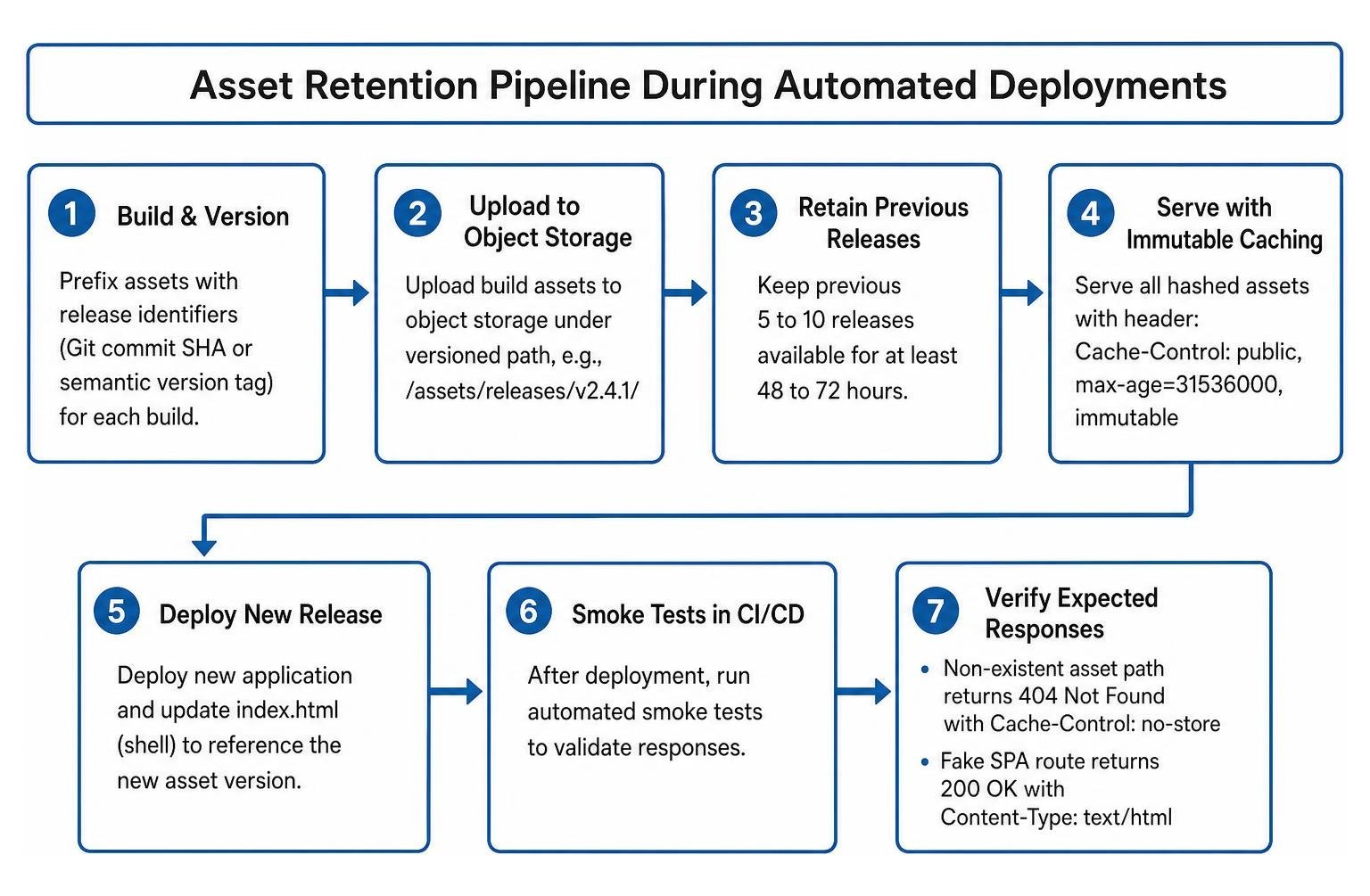
Implement versioned asset retention within your CI/CD pipeline:
- Prefix assets with release identifiers: Upload build assets to object storage (like Cloudflare R2, AWS S3, or Google Cloud Storage) under a path that includes the Git commit SHA or semantic version tag (for example,
/assets/releases/v2.4.1/). - Retain previous releases: Keep assets from the last 5 to 10 releases available for at least 48 to 72 hours. This gives open browser tabs enough time to complete their active sessions.
- Serve assets with immutable caching: Use the header
Cache-Control: public, max-age=31536000, immutablefor all hashed files. - Automate smoke tests in CI/CD: Run automated tests after deployment to confirm that a non-existent asset path returns a
404 Not FoundwithCache-Control: no-store, while a fake SPA route returns200 OKwithContent-Type: text/html.
Additionally, optimizing bundle configuration helps reduce the surface area for errors. In one case study, grouping related authenticated routes and preloading shared code reduced the production build from 167 individual JavaScript files down to 33, significantly lowering the risk of chunk request races during deployments.
How Do Client Reloads, Server-Side Asset Retention, and Service Worker Caching Compare?
Choosing the right approach depends on your hosting architecture, release frequency, and deployment infrastructure.
| Strategy | Recovery Speed | Implementation Complexity | Infrastructure Cost | SEO & Indexing Safety |
|---|---|---|---|---|
| Client-Side Reload Guard | Moderate (requires page refresh) | Low (pure frontend code) | Zero added cost | Moderate (requires bot execution) |
| Server-Side Asset Retention | Instant (no reload required) | Moderate (CI/CD pipeline updates) | Very Low (minimal storage fees) | High (assets remain accessible) |
| Service Worker Shell Caching | Instant (serves cached chunks) | High (cache management & invalidation) | Zero added cost | High (works offline and under poor network conditions) |
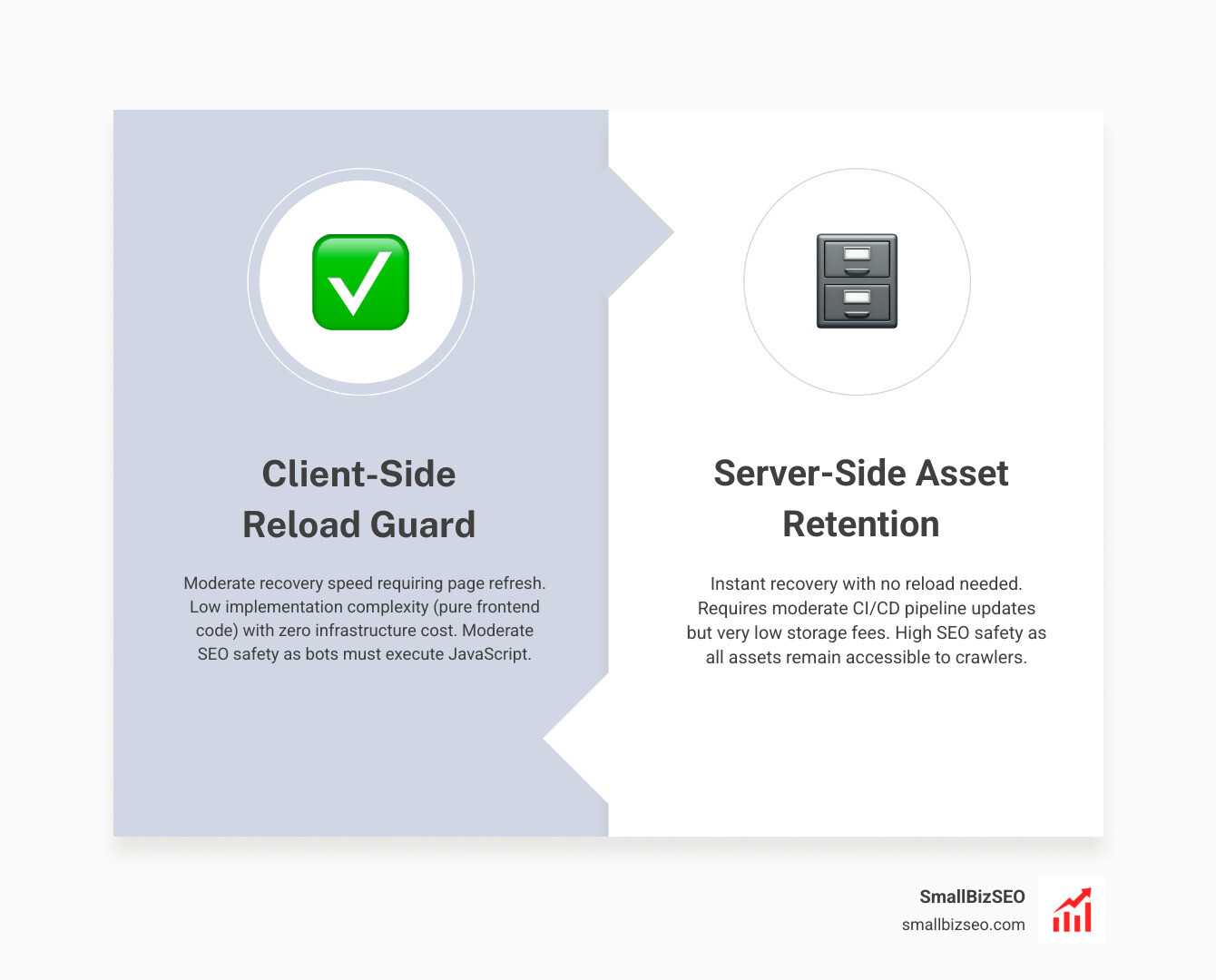
For most growing web applications, combining Server-Side Asset Retention with a Client-Side Reload Guard offers the best balance of reliability, simplicity, and performance.
Practical Steps to Protect Your Site from Broken Bundles
To prevent chunk loading errors on your client-rendered site, follow this checklist:
- Verify hosting response codes: Ensure that missing paths in your assets folder return a real
404 Not Foundrather than theindex.htmlshell. - Retain previous release chunks: Keep older hashed JavaScript files on your CDN or object storage for at least 48 hours post-deployment.
- Add a safe client-side recovery listener: Use
vite:preloadErroror global unhandled rejection handlers equipped with asessionStoragereload counter to stop infinite loops. - Group and optimize split bundles: Avoid over-splitting your code into hundreds of tiny chunks; keep your chunk graph manageable.
- Run automated deployment smoke tests: Validate that your asset 404 rules and SPA routing fallbacks work as expected on every release.
If you want to ensure your client-rendered application is fully accessible, performant, and resilient to indexing issues, check out our client-side rendering audit services. We help businesses eliminate technical friction and build robust foundations for long-term organic search growth.