A Practical Guide to Partitioning GA4 Export Tables for Maximum Savings

How Can You Keep GA4 BigQuery Export Costs Under Control?
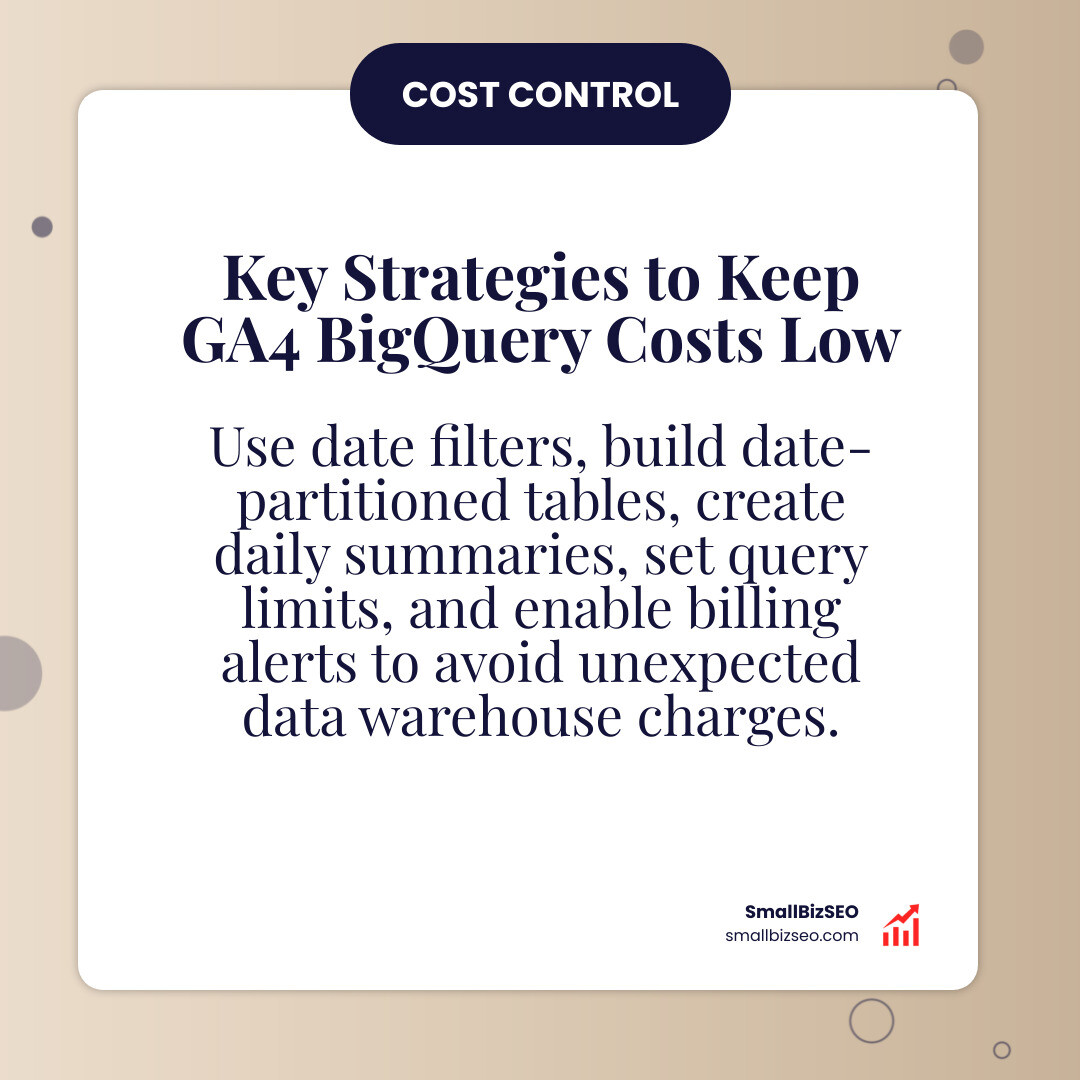
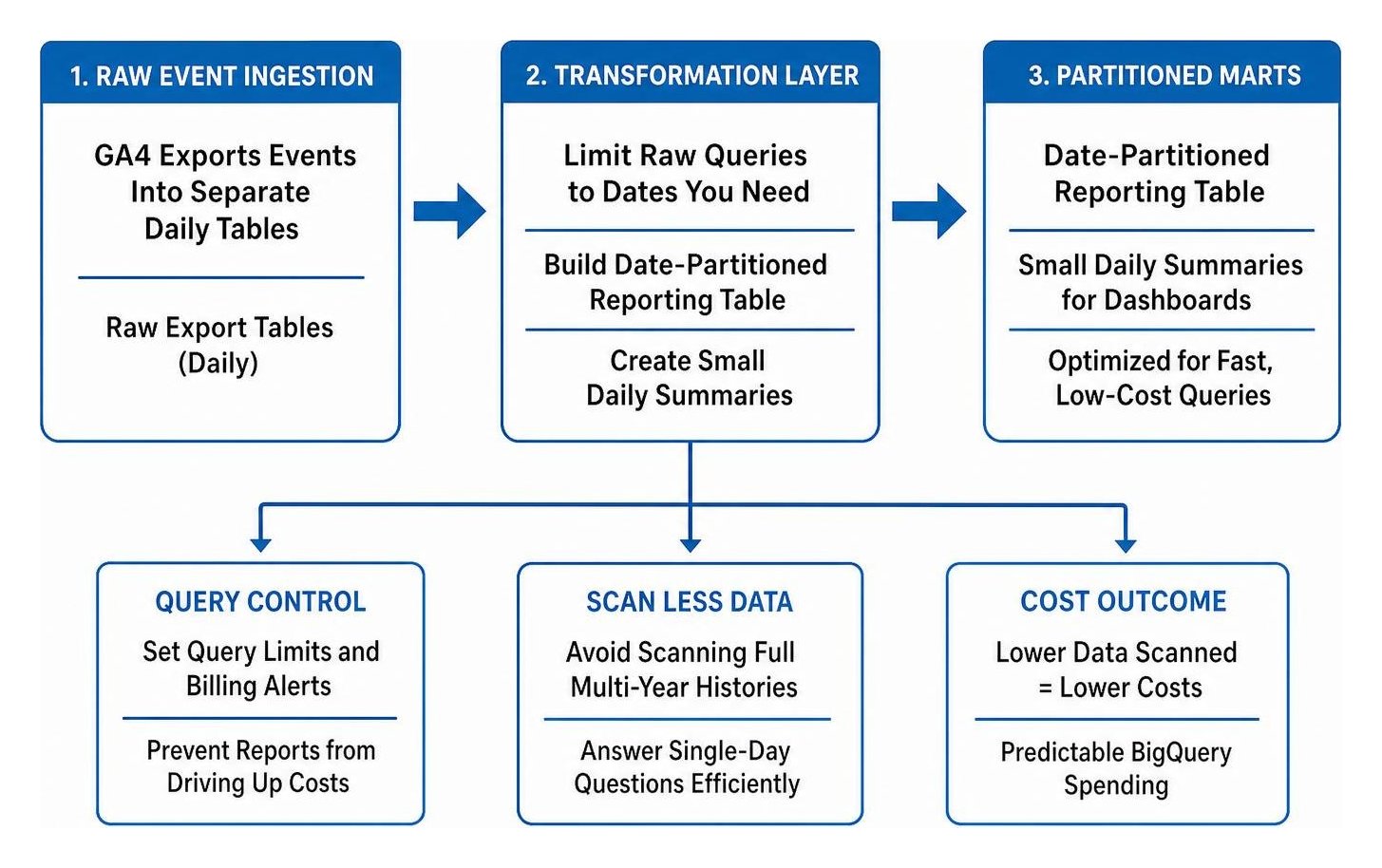
Start by scanning less data. GA4 exports events into separate daily tables. Limit each raw-data query to the dates you need, then build a date-partitioned reporting table and small daily summaries for dashboards. Set query limits and billing alerts so a report cannot quietly drive up costs.
BigQuery includes 1 TiB of on-demand query processing and 10 GiB of storage each month at no charge. Beyond the query allowance, on-demand processing starts at $6.25 per TiB scanned. Small sites may stay within the free tier, but repeated dashboard queries can turn even modest exports into a bill.
I’m Clayton Johnson, founder of SmallBizSEO. My background in SEO strategy and data-driven reporting informs this practical approach to ga4 bigquery export cost control.
Strategic Architecture for GA4 BigQuery Export Cost Control
To keep data warehouse spending predictable, you must decouple raw ingestion from daily analytical reporting. Direct queries against raw export tables are the leading reason marketing analytics budgets break down. Implementing a structured architecture ensures you never scan full multi-year event histories to answer single-day reporting questions.
BigQuery divides expenses into two primary categories: data storage and query processing compute.
- Active storage costs $0.02 per GiB each month.
- Long-term storage costs $0.01 per GiB each month, automatically applied when a table or partition remains unmodified for 90 consecutive days (a 50% automatic discount).
- On-demand compute is billed at $6.25 per TiB of data scanned during query execution.
For small businesses collecting roughly 50,000 events daily (generating around 36.37 MB per day), annual storage requirements remain below 14 GiB. Factoring in Google Cloud’s free monthly allowance of 10 GiB of storage, the baseline storage expense for an entire year sits at or near zero dollars. Even high-volume websites recording 1,000,000 events daily (assuming an average payload of 1,500 bytes per event) generate approximately 45 GB of uncompressed data per month, resulting in a predictable monthly storage cost of only about $6.06 in standard US multi-region configurations.
Storage is inexpensive. Runaway expenses are almost entirely driven by compute. If an unoptimized automated script or dashboard triggers 1,000 monthly queries that scan across a full year of enterprise-level event logs (processing nearly 50 TiB), your compute bill will jump to $249 per month for that dashboard alone. Performing regular data audits, such as the ultimate guide to google analytics audits, helps identify low-value events before they inflate warehouse compute. You can review the underlying base pricing directly on the official BigQuery pricing schedule.
How Do Storage and Compute Fees Drive GA4 BigQuery Export Cost Control?
Managing analytics budgets requires understanding how storage rates and on-demand compute interact as your tracking footprint grows over time.
| BigQuery Service Tier | Base Pricing Structure | Free Monthly Allowance | Effective Cost Impact |
|---|---|---|---|
| Active Storage | $0.02 per GiB / month | First 10 GiB free | Minimal expense for raw marketing events |
| Long-Term Storage (90+ Days) | $0.01 per GiB / month | Included in storage quota | Automatic 50% discount on historical archives |
| On-Demand Compute | $6.25 per TiB scanned | First 1 TiB free | Primary driver of high or unexpected bills |
| Streaming Ingestion | $0.05 per GiB (~600k events) | No free tier | Optional surcharge for real-time streaming |
When calculating expected usage, total data scanned depends on table schema and column access patterns. A standard GA4 event payload averages roughly 1,500 bytes across its nested fields. Without proper filtering, calculating core business metrics like your marketing cost per lead across hundreds of raw export tables scans every single column and row in your historical export.
Comprehensive resources like this GA4 BigQuery Export Tutorial illustrate how quickly unstructured analytics queries exhaust the free 1 TiB compute allowance. Establishing clear budget thresholds and estimating your monthly scan volume beforehand keeps your data pipeline completely cost-effective.
Why Does Sharding Fail and How Does Partitioning Enable GA4 BigQuery Export Cost Control?
By default, the native GA4 integration exports data as individual date-sharded tables named with their respective dates. Querying across multiple days requires using wildcard table matches. While applying date suffix filters restricts which tables BigQuery opens, wildcard querying still carries significant metadata overhead, causes planning friction in business intelligence tools, and increases the likelihood of accidental full-table scans.
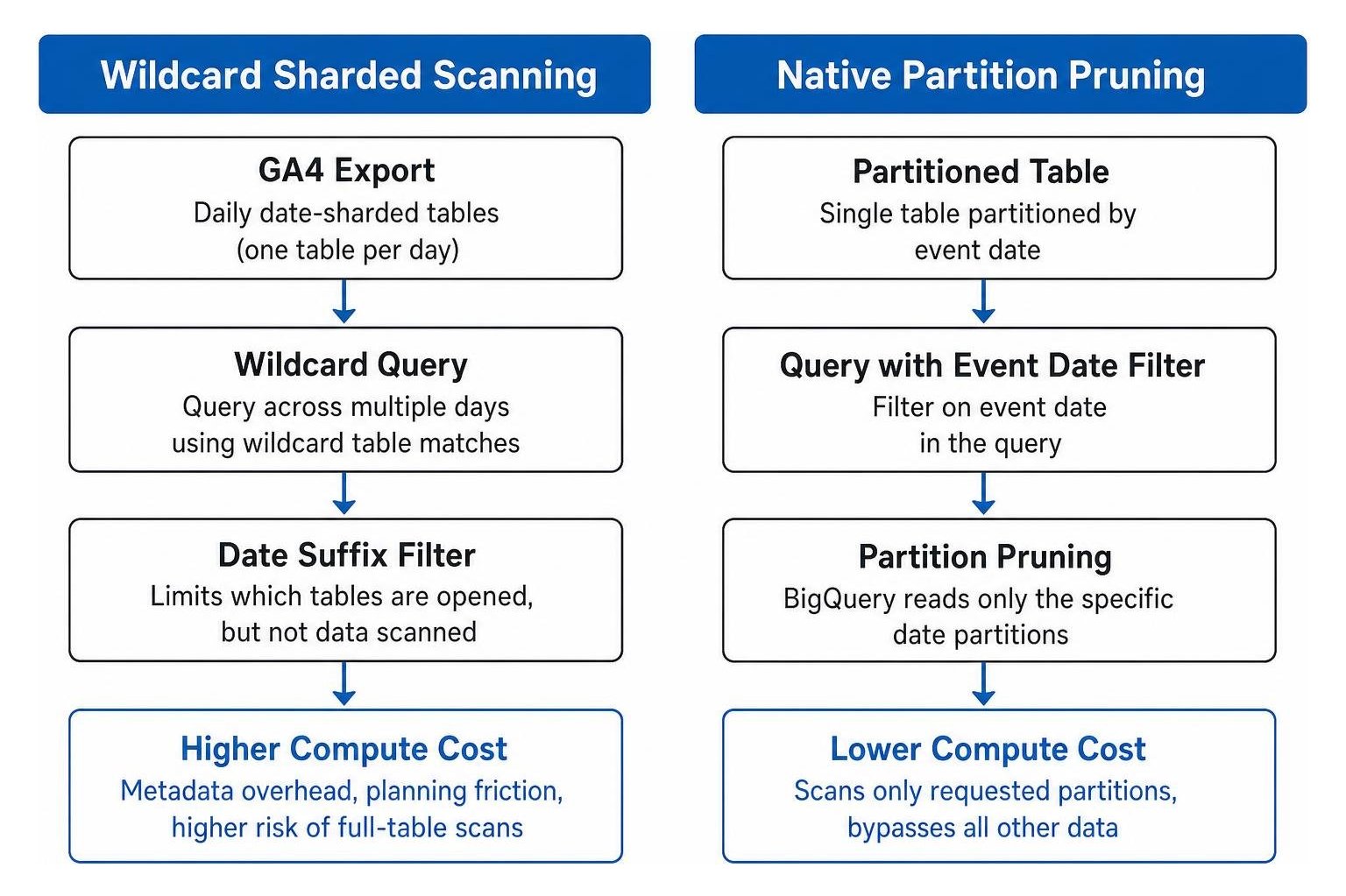
Migrating your raw daily export data into a single, natively partitioned and clustered table solves this issue permanently. A native partitioned table segments data into date partitions based on the event date. When you run a query with an event date filter, BigQuery executes partition pruning, reading only the specific storage blocks assigned to those days and bypassing all other data.
- Native Ingestion Partitioning: Segment tables directly by date so queries only scan the requested time window.
- Multi-Column Clustering: Cluster your partitioned table by high-cardinality search dimensions such as event name, traffic source medium, and user pseudo ID. Clustering colocates related records within each partition, allowing BigQuery to skip non-matching rows and cutting scanned bytes by 80% to 95%.
- Partition Expiration Policies: Configure automatic partition expiration lifecycles (such as 400 days) to delete stale, unused raw events while preserving aggregate summaries.
As demonstrated in technical research on BigQuery Partitioning for GA4 Data, native partitioning paired with clustering provides substantial savings. When running complex attribution workflows using an advanced attribution model, pruning allows data teams to evaluate complex multi-touch customer paths without scanning years of unrelated raw event records.
How Do Summary Tables and Incremental Loading Cut Query Compute by 90%?
Directly querying raw event tables for everyday reporting is wasteful. You can reduce query processing fees by 90% or more by creating curated data marts and updating them through scheduled incremental loading.
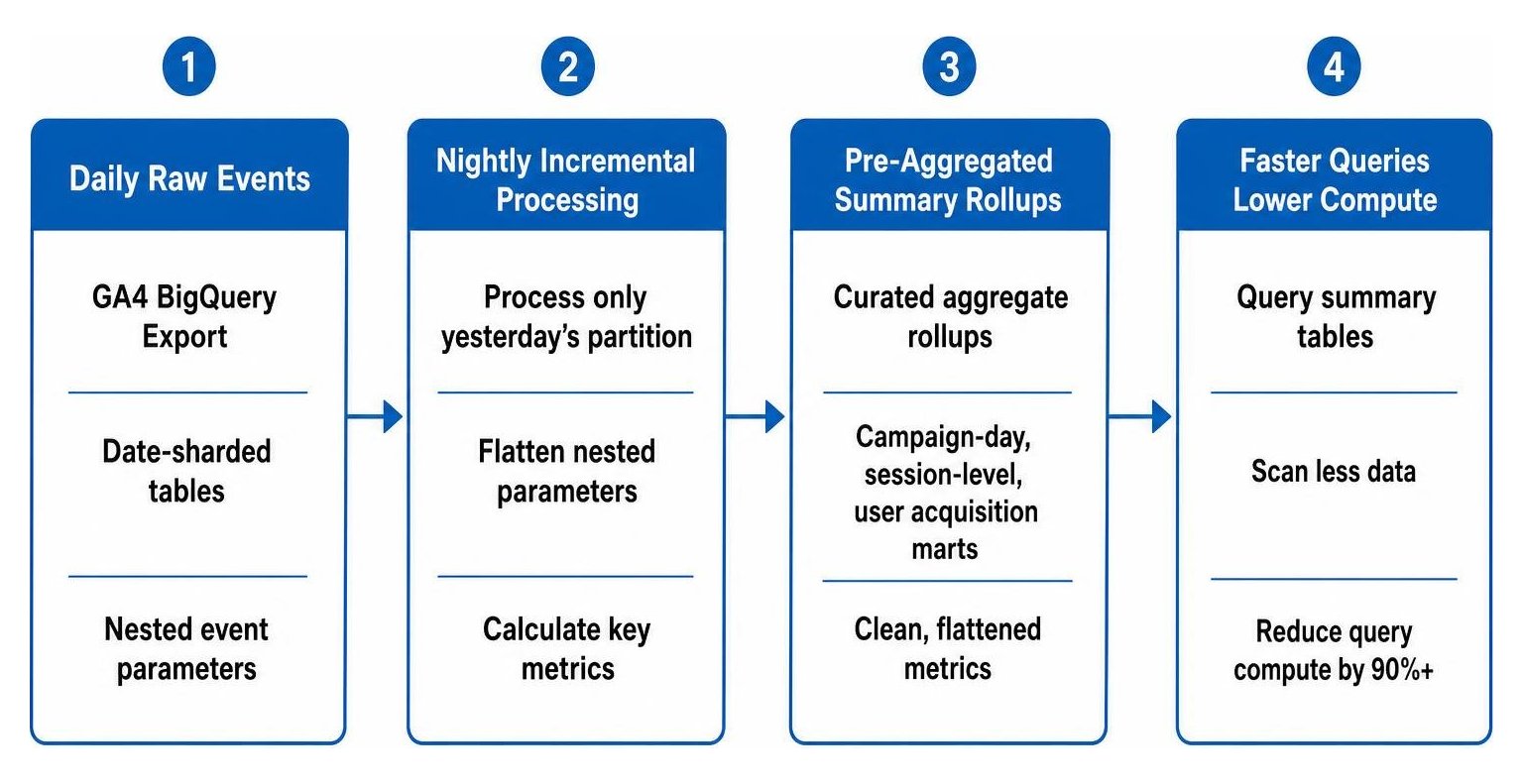
Instead of re-evaluating raw tables on every dashboard load, set up a nightly scheduled query that processes only yesterday's partition. This job flattens the nested event parameters, calculates key performance metrics, and appends the aggregated records into clean summary tables.
- Curated Data Marts: Build specialized aggregate rollups, such as campaign-day summaries, session-level metrics, and user acquisition marts.
- Single-Pass Parameter Unnesting: Extract nested event parameter values (such as session IDs and engagement times) once during the transformation stage rather than unpacking arrays inside every user query.
- Incremental Appends: Use automated query schedules with dynamic run date parameters to process only newly arrived daily batches.
Using transformed data marts allows marketing teams to scale your search visibility using actionable customer analytics without running expensive compute operations against raw log archives. Dashboards connect directly to pre-aggregated tables that scan mere megabytes instead of tens of gigabytes per view.
Practical Governance, BI Integration, and Pipeline Execution
Technical optimizations inside BigQuery must be paired with strict cloud governance and smart business intelligence connections. Without guardrails, a single misconfigured query or un-cached dashboard can consume your entire monthly processing quota in minutes.
High-volume merchants operating large digital footprints face strict reporting demands, as explored in deep-dive architectures like the GA4 BigQuery Export Ecommerce Production Pipeline. Establishing rigid governance rules protects your SEO investment by ensuring data warehouse costs remain stable as your traffic scales.
How Should You Configure Cloud Console Quotas, Access Controls, and BI Extracts?
Implementing guardrails within Google Cloud Platform ensures no individual user or automated reporting tool generates unexpected runaway costs.
- Set Maximum Bytes Billed Limits: Configure custom query settings in the Google Cloud Console to enforce a hard cap on bytes billed per query. Any query that exceeds this scan limit is blocked before execution begins.
- Restrict Access via IAM Least Privilege: Grant analysts and third-party tools access only to modeled summary datasets. Restrict direct read permissions on raw daily export datasets to administrative data transformation pipelines.
- Establish Daily Per-User Query Quotas: Define project-level and user-level daily compute limits within Cloud Quotas to prevent accidental infinite query loops or un-cached development testing.
- Configure Looker Studio Data Extracts: Avoid connecting reporting tools directly to live raw event tables. Use Looker Studio data extract connectors or native BigQuery BI Engine caching when building an automated SEO tracking dashboard that leadership loves.
- Implement Staged Cloud Billing Alerts: Set automated billing notifications in the GCP Billing Console at 50%, 80%, and 100% of your target monthly analytics budget to catch spending spikes immediately.
How Do Daily and Streaming Export Modes Impact Billing and Accuracy?
Choosing the right export mode in your GA4 property configuration affects both data freshness and your monthly cloud spend.
| Feature & Metric | GA4 Daily Batch Export | GA4 Streaming Real-Time Export |
|---|---|---|
| Ingestion Cost | Free within standard GA4 limits | $0.05 per GiB (~600k events) |
| Event Volume Caps | 1,000,000 events/day (Standard properties) | Unlimited volume capacity |
| Data Availability | Appears once daily within 24 hours | Arrives within seconds/minutes |
| Intraday Table Overlap | Replaces intraday staging tables | Retains intraday tables alongside daily records |
| Attribution Completeness | Full first-touch and session attribution | Lacks certain user acquisition dimensions |
Standard GA4 properties carry a daily batch export limit of 1 million events per day; exceeding this threshold consistently can pause daily data delivery until event filtering is applied. Streaming export avoids volume caps but introduces direct ingestion fees and creates intraday tables that require careful filtering to prevent duplicate counting.
When querying GA4 export tables, avoid common calculation errors:
- Sessionization Logic: Never count user sessions using session IDs alone, as different users can share identical session timestamps. Always generate a unique composite key by combining user pseudo IDs with session IDs.
- Parameter Data Types: Check parameter value formats carefully. Extract string parameters from their designated string column and numerical values from their respective integer or float columns to avoid silent null outputs.
- Intraday Deduplication: When streaming is active, ensure date filters explicitly match eight-digit date table suffixes to avoid scanning temporary intraday records twice.
Maximizing Value with Cost-Controlled BigQuery Analytics
Controlling BigQuery expenses for your GA4 exports comes down to three operational fundamentals: convert raw sharded exports into partitioned and clustered tables, build incremental daily rollups for dashboard reporting, and set strict query limits within Google Cloud Platform.
At SmallBizSEO, our data-driven Velocity framework uses streamlined, automated data pipelines to power technical SEO, conversion tracking, and high-impact executive reporting without unnecessary cloud overhead. By structuring your warehouse governance correctly from day one, your business can unlock the full power of unsampled marketing data while keeping operational costs completely under control. Discover how our specialized bigquery export services help you build an efficient, scalable analytics foundation.