AI Crawler Access Rules: Separating Model Training from Search Retrieval

Why Separate AI Training Crawlers from Search Retrieval Crawlers?
The practical approach to separating AI training crawlers from search retrieval crawlers in access policies is to make a documented decision for each operator and purpose. For example, OpenAI lets publishers manage GPTBot and OAI-SearchBot independently in robots.txt, while Google-Extended is a product-control token rather than a separate HTTP crawler. Review your existing robots.txt, CDN, and firewall rules together so an intended policy is not contradicted at another layer.
This distinction matters because automated requests can support model training, search indexing, or a user-directed fetch. Allowing or blocking one bot is not a guarantee of citations, traffic, legal permission, or protection from every form of access. It is a scoped technical preference that must be matched to the operator’s current documentation and your own content-access policy.
Why Separating AI Training Crawlers from Search Retrieval Crawlers in Access Policies Is Essential
Automated visitors are not a single category. A site may receive requests from training crawlers, search crawlers, product-control systems, and user-initiated fetchers, each with different documented behavior and controls.
A single blanket rule can be too coarse because it may apply to bots with different purposes. The safer approach is to decide which documented requests may access public content, which training preferences to express, and which private paths must require authentication. Do not assume that a robots.txt rule creates legal rights, prevents indexing by every system, or secures sensitive material.
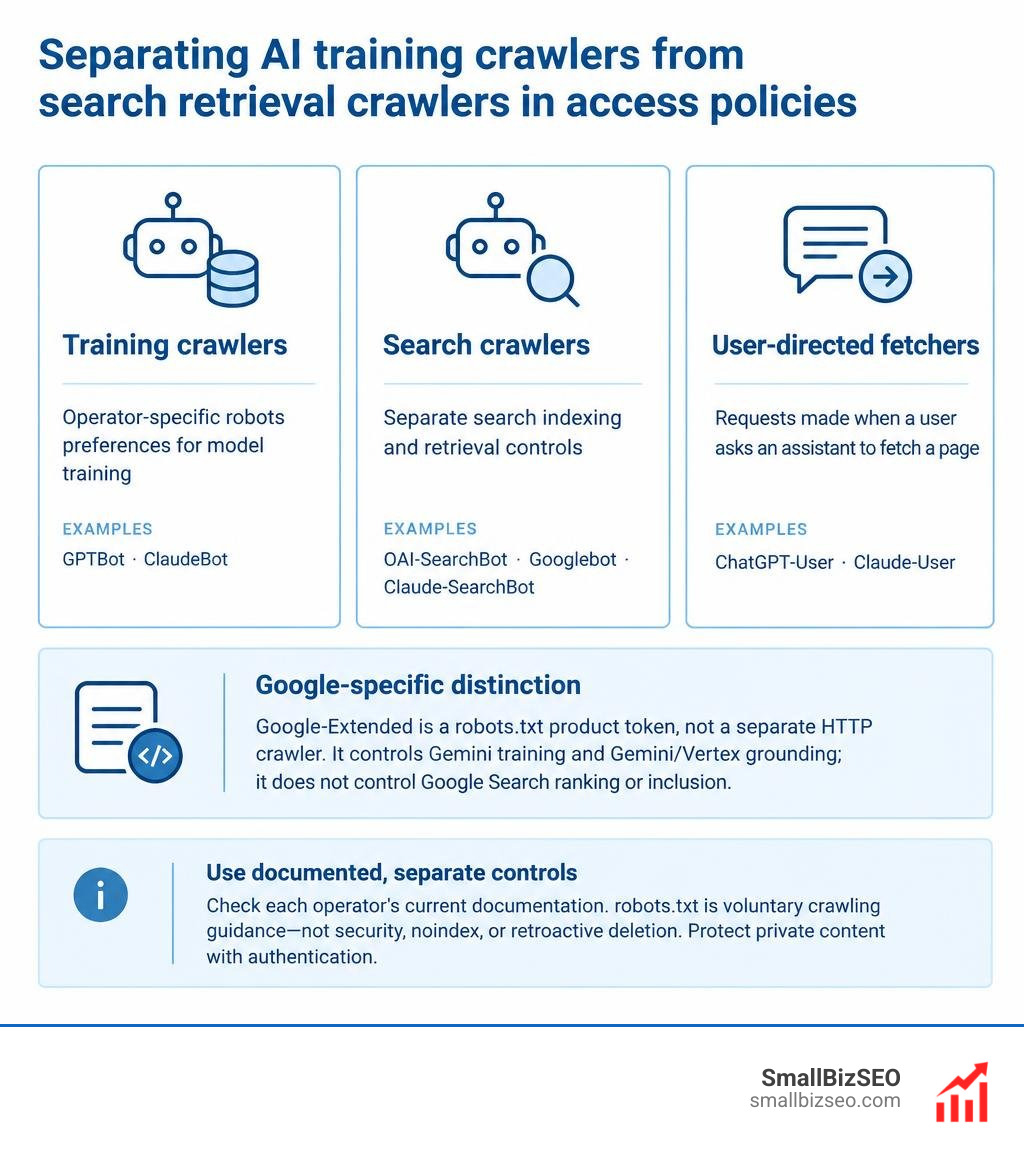
What Is the Difference Between Training Crawlers, Search Crawlers, and User-Directed Fetchers?
Training crawlers collect publicly available material that an operator may use to improve or train models, subject to that operator’s published controls. A robots.txt directive is a crawler preference signal, not a security control, a noindex command, or a mechanism for deleting material already obtained.
Search crawlers can index public pages for an operator’s search features, while user-directed fetchers visit a page because someone asked an assistant to retrieve it. These roles may be controlled separately, and neither role guarantees that a page will be cited, linked, ranked, or visited.
Use each operator’s primary documentation before changing access rules. Granular AI bot categorization controls can also help teams distinguish crawler purposes at the edge. The controls below are intentionally not treated as identical: some are HTTP crawlers, some are user-directed fetchers, and Google-Extended is a robots.txt product token rather than a network agent.
| Operator | Training or preference control | Search role | User-directed role | Important distinction |
|---|---|---|---|---|
| OpenAI | GPTBot may crawl content that could be used to train OpenAI foundation models. | OAI-SearchBot is used for ChatGPT search features and is managed independently. | ChatGPT-User may visit a page for a user action. | ChatGPT-User is not an automatic web crawler, may not follow robots.txt, and does not determine search eligibility. |
| Google-Extended is a robots.txt product token for Gemini training and specified grounding uses. | Googlebot controls Google Search crawling, including Search features. | Not applicable in this table. | Google-Extended has no separate HTTP user agent, does not control Google Search inclusion, and is not a Search ranking signal. | |
| Anthropic | ClaudeBot supports model-development collection. | Claude-SearchBot supports search-result quality. | Claude-User retrieves content for a user request. | Anthropic states that these bots honor robots.txt; each role can be managed separately. |
Which Access Decision Fits Each Type of Content?
| Content or goal | Safer policy direction | Verification before rollout |
|---|---|---|
| Public service pages and articles | Evaluate documented search crawlers separately from training controls. | Confirm the exact user agent or product token, then check staging logs and response status. |
| Private portals, paid research, and client data | Use authentication and authorization. Do not rely on bot names or robots.txt. | Confirm that unauthenticated requests cannot retrieve protected content. |
| High-cost public endpoints | Use product-specific rate limits or WAF controls without disabling broader security. | Monitor request patterns, status codes, and false-positive blocks. |
| Training preference | Add the operator’s documented training control only after preserving existing rules. | Keep a backup, test the effective rules, and document a rollback step. |
A policy change should begin with a clear business decision, not a promise of a particular visibility outcome. Define the content scope, identify each operator’s documented control, and record which requests must remain available. That process reduces the risk of accidentally blocking a legitimate crawler or exposing a path that should be protected.
Start with the user-agent glossary to distinguish a user-agent label from a verified request. For broader context, review this AI crawler governance guide before changing a production policy.
Step-by-Step Implementation: Configuring Technical Access Controls
A reliable bot policy separates preference signals from security controls. Robots.txt communicates crawl guidance to compliant automated clients. A WAF or CDN can enforce product-specific traffic rules. Authentication and authorization protect private content. These layers serve different purposes and should be tested together.
How Should Robots.txt Rules Be Added Safely?
Robots.txt provides voluntary crawl guidance for clients that choose to honor it. It is not access control, does not make a URL private, does not guarantee noindex behavior, and does not retroactively delete material an operator may already have obtained. Public accessibility also does not grant legal permission to reuse content.
Back up the current robots.txt file before editing it, then merge new groups with existing private-route and sitemap directives. Matching is based on the most-specific applicable user-agent group, not a top-to-bottom precedence rule. A specific group does not automatically inherit Disallow directives from a wildcard group.
If an OpenAI training preference fits your policy, review and preserve the existing rules before adding a GPTBot group. To express this preference, add a group whose User-agent value is GPTBot and whose Disallow value is a forward slash. This expresses a GPTBot preference only: it is not a security control, an allow-all template, or a replacement for the rest of your robots.txt file.
For Google, Google-Extended is a product token, not a separate HTTP crawler. Its documented scope covers future Gemini training and specified Gemini or Vertex grounding uses, while Googlebot remains the control for Google Search crawling. Anthropic documents separate robots.txt controls for ClaudeBot, Claude-SearchBot, and Claude-User. Review the operator’s current documentation instead of assuming one vendor’s model applies to another. For an edge-policy example, review Cloudflare’s search discoverability guidelines.
How Should WAF and CDN Rules Be Tested?
A WAF or CDN can enforce access policies, but the correct rule set depends on the product and its verified-bot features. Never disable an entire security system merely to permit a crawler. Instead, make the narrowest product-specific exception that your provider documents and retain protections for private paths, abuse controls, and rate limits.
Before a production change, apply the rule in a staging environment or a narrowly scoped path when available. Confirm that the intended request receives the expected HTTP status and response body, while protected paths remain protected. Review CDN, WAF, origin, and application logs together because a block can occur at any layer.
Use this safe staging, logging, and rollback AI access controls checklist:
- Record the current robots.txt, CDN, WAF, and origin rules and save a rollback copy.
- State the goal for each public path: search crawl, training preference, user-directed retrieval, rate limiting, or authenticated-only access.
- Apply the smallest documented change in staging or to a limited path first; preserve existing private-route protections and sitemap rules.
- Check request logs, HTTP status codes, and response bodies for the intended bot control and for normal visitor traffic.
- Verify the operator using its documented method before creating a WAF exception, then monitor for false positives and roll back if protected or public paths behave unexpectedly.
For platform-specific implementation, use your CDN or WAF provider’s current documentation and change controls, such as the Cloudflare AI Crawl Control documentation.
Testing, Governance, and Long-Term Policy Maintenance
Crawler policy is an ongoing governance task. Operators can change bot documentation, verification mechanisms, product scopes, and user-agent behavior, so review each documented control before a material policy change.
How Can You Verify a Crawler Before Trusting It?
Never trust a raw user-agent string by itself. It is easy to spoof, so a matching label is not proof that a request came from the operator it claims to represent.
Use the verification method documented by the relevant operator:
- For OpenAI, use the published IP-range endpoints listed in its crawler documentation for the specific bot you are evaluating.
- For Google, follow Google’s documented verification process, including reverse DNS and forward DNS confirmation where applicable, or its published crawler IP data.
- For Anthropic, follow the current source-IP and robots guidance in Anthropic’s documentation rather than assuming a static JSON range is available.
- Use
curlwith a spoofed user-agent only to test how your own rules respond. It does not authenticate the request as a real bot. - Audit logs for the expected status code and response body after every change, and keep a rollback record.
An llms.txt overview may help explain a site’s content structure to tools that choose to use it, but it is optional. It is not an access-control mechanism, an enforcement layer, or a standard training opt-out.
When Should Content Types Use Different Controls?
Different content types need different controls. Decide what is genuinely public, what needs a crawler preference, what needs traffic controls, and what must be inaccessible without authorization:
- Public marketing content: Assess documented search and training controls by operator, then monitor the effect without assuming a visibility outcome.
- Private research, premium material, and client data: Require authentication and authorization. Do not treat robots.txt or a bot-name block as protection.
- Dynamic applications and APIs: Keep normal security controls in place and use product-specific rate limiting or narrowly scoped WAF rules to manage abusive automation.
For ongoing policy refreshes, use the AI crawler glossary alongside the AI crawler governance guide. If broader implementation or content work is needed, technical SEO services and SEO content services can support the next step. Related internal linking guidance and earned outreach resources can help strengthen discovery without treating crawler access rules as a substitute for SEO. For a tailored review, book a strategy session.
Building a Resilient AI Discovery Strategy
Managing automated access requires a documented balance between public discovery, training preferences, performance protection, and private-data security. Separate each operator’s current controls by purpose, then use authentication for anything that must not be publicly retrievable.
Audit the current rules, preserve a rollback copy, stage the smallest change, and verify logs, HTTP status, and response bodies before production rollout. Recheck the relevant operator documentation whenever a policy is revised.