SEO for Computer Printer Businesses
SEO for Computer Printer Businesses
SEO for computer printers helps businesses that sell, lease, service, supply, or manage office printer fleets connect each buyer task to a useful page. The strongest pages make it easy to confirm the device brand and model, compare the available sales or lease path, check compatibility, understand service scope, and request the next appropriate step.
This topic is for business printer hardware and related services, not commercial printer SEO for print-shop marketing or copier repair SEO pages. Give each page one clear job, such as helping a buyer evaluate a device, confirm a consumable, understand a maintenance option, or prepare for a fleet assessment. That separation keeps the content useful for buyers and helps clarify page roles.
Build Pages Around Real Hardware and Service Decisions
A practical SEO program for computer printer businesses starts with pages that answer a specific buyer question. Keep product discovery, sales and lease information, supplies, repair, and managed print services distinct, then connect them with clear internal links so readers can move from research to the right next step.
When Does Local Visibility Support Printer Sales and Service?
Local visibility can support a business that meets customers in person or travels to provide service. A Google Business Profile should reflect the actual business model, with accurate categories, contact details, and service information. Online-only businesses should not create a profile simply to appear in local results.
Use the service pages to explain what the business actually handles, such as delivery, installation, maintenance, supplies, or managed print support. When a page discusses a specific printer or consumable, identify the brand and model, link to the relevant product or service page, and use current manufacturer documentation as the source for public specifications. For a printer-focused profile routine, see Local SEO: The Weekly Google Business Profile Routine Printers Ignore; for broader fundamentals, see local search optimization basics.
Technical SEO makes those pages easier to crawl and use. Keep the catalog navigable, provide stable internal links, and make key information readable on mobile devices. For a deeper implementation checklist, see Technical SEO guidance.
- Clear page purpose: Separate device pages, lease or sales information, supplies, repair, and fleet-service pages.
- Model-level detail: Use the exact device brand and model where it helps a buyer confirm relevance.
- Current public specifications: Attribute publicly available speeds, duty cycles, connectivity, and consumables to the current manufacturer documentation.
- Privacy-aware intake: Request only the network or device information needed to evaluate the stated service task, and explain why it is needed.
- Useful internal paths: Link related products and services so readers can continue their research without guessing where to go next.
Content services can turn common buyer questions into pages with clear evidence and next steps.
How Should Answer-Ready Content Support Computer Printer SEO?
Answer-ready content helps readers quickly assess whether a page fits their task. Use question-based headings, place a clear answer near the heading, and then provide the supporting details a buyer needs to verify fit. This improves clarity for people and systems that summarize web content, but it does not guarantee indexing, rankings, or citations.
Use concise answers and verifiable details rather than a fixed word count or a formula intended to trigger AI visibility.
- Start with the buyer task: State whether the page helps with choosing a device, comparing a sale or lease option, checking supplies, arranging service, or reviewing a fleet.
- Show verifiable evidence: Use current manufacturer specifications, product availability details, and a clear description of the business's own service scope.
- Explain the next step: Link to the relevant product, service, contact, or assessment page.
- Keep claims bounded: Do not imply guaranteed rankings, indexing, performance outcomes, or capabilities that the business has not verified.
For content planning and refresh work, see Content SEO. Review internal links regularly so product, service, and supporting pages remain connected as the catalog changes.
How Should Product and Canonical Guidance Work on Printer Websites?
Printer websites often publish closely related models, consumables, and configuration choices. Each page should make its own purpose clear so buyers and search engines can tell the difference between a distinct product, a service offering, and an equivalent duplicate URL.
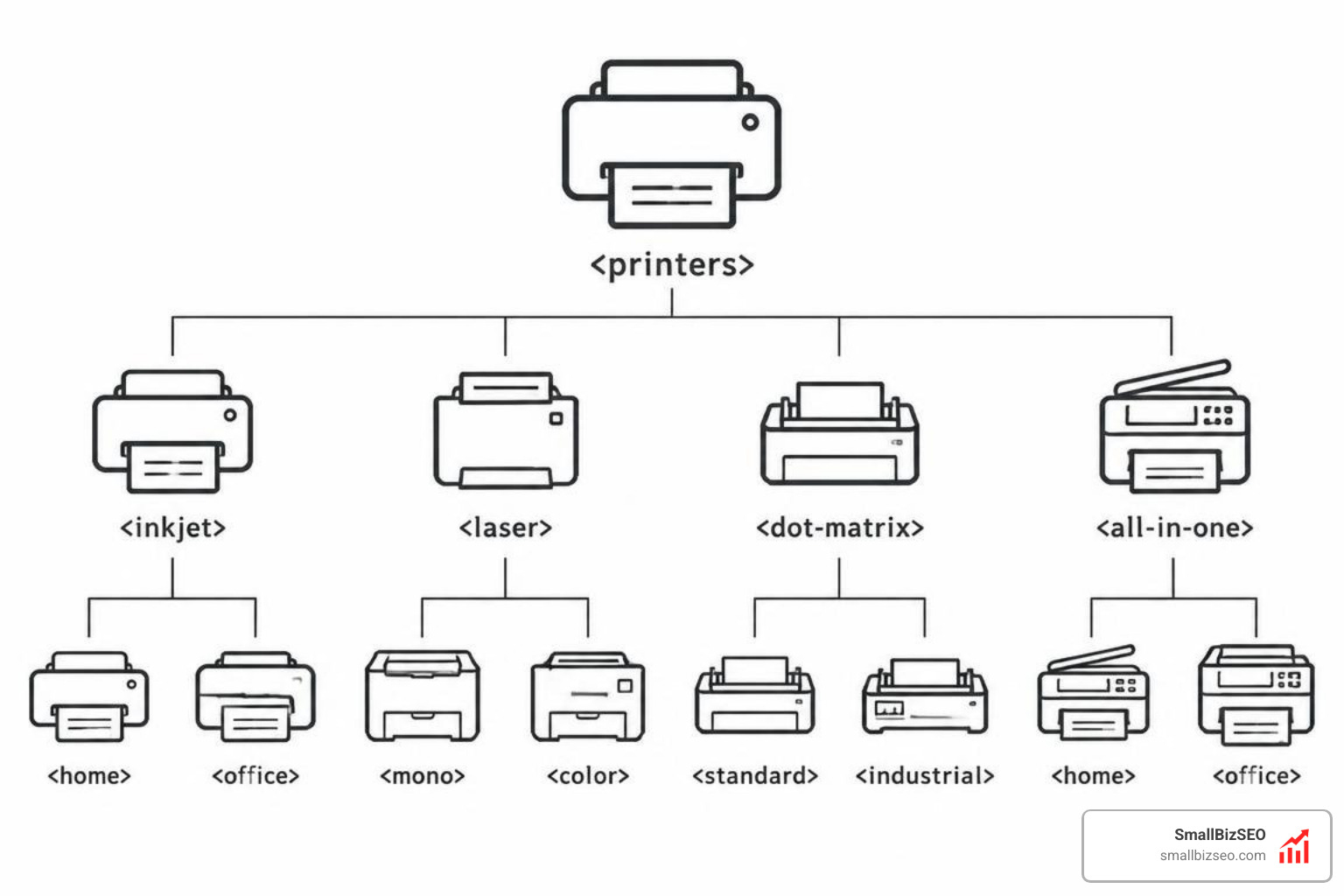
Illustrative catalog grouping only: categories can overlap, are not XML, schema, or code, and multifunction printers may use inkjet or laser technology.
Use product structured data on the actual product page, not on this SEO article. Google's Product structured data documentation distinguishes product pages that are editorial or informational from pages where customers can purchase a product. Match the markup to the page and the available product information.
- Product pages: Identify the device brand, model, and relevant public specifications using current manufacturer information.
- Compatibility guidance: Explain the specific device, consumable, driver, or environment the guidance applies to.
- Canonical URLs: Use a canonical when URLs are equivalent or substantially duplicate, not as a blanket rule for every model or variant.
- Distinct variants: Give meaningfully different models or configurations their own accurate content when they serve different buyer needs.
- Privacy: Avoid publishing or collecting unnecessary network details, device identifiers, or customer environment information.
For on-page structure and internal-link decisions, use the principles in On-Page SEO.
Which Authority Signals Fit a Computer Printer Business?
Authority grows when useful resources earn relevant references and when the site clearly documents the services it provides. Focus on content that helps a buyer compare device requirements, prepare a compatibility check, or understand a service process.
Useful outreach and link-earning assets may include:
- Compatibility and setup guides: Clear, model-specific explanations that cite current public manufacturer materials where appropriate.
- Service-scope explainers: Pages that distinguish on-site work from depot service and state what the business can verify.
- Fleet-assessment checklists: Practical questions a buyer can prepare before discussing a printer fleet.
- Relevant partner resources: Contextual mentions from technology, facilities, or business-operations publications when they genuinely support the reader.
Learn more about earning relevant references through SEO-friendly links and link-building services.
Use a Buyer-Task Evidence and Next-Step Framework
Replace broad ROI claims with pages that help a business buyer verify what matters before contacting a seller or service provider. The table below maps common tasks to evidence that can be checked and a useful next step.
What Should Each Printer SEO Page Help a Buyer Verify?
The goal is not to promise a ranking or commercial result. The goal is to reduce uncertainty with accurate, task-specific information and a clear path to the right product or service page.
| Buyer task | Verified evidence to show | Next step |
|---|---|---|
| Confirm a device brand and model | Current manufacturer specifications, exact model name, and the relevant use case | Visit the matching product page or request availability details |
| Compare sales and lease terms | The business's published options and the terms it can document | Review the relevant sales or lease page and ask focused questions |
| Check compatibility | The specific device, consumable, driver, or environment covered by the guidance | Use the compatibility page or request a documented compatibility review |
| Understand on-site or depot scope | A plain-language description of what each service option covers | Choose the appropriate service page before submitting a request |
| Prepare for a fleet assessment | The devices, volumes, workflows, and constraints the assessment asks the buyer to provide | Request a fleet assessment with the available information |
Keep these pages current as product details and service offerings change. SmallBizSEO can support the work with technical SEO, content services, ongoing content refreshes, internal-link improvements, and earned outreach. For service options, review SmallBizSEO Comprehensive SEO Packages. When the site needs a focused plan, book a consultation.
Turn Clear Printer Information Into Useful Next Steps
A strong computer printer SEO strategy gives each page a precise buyer job and supports it with information that can be checked. Keep product, sales or lease, supplies, service, and fleet-assessment paths distinct; cite current public manufacturer specifications where relevant; protect customer network and device information; and maintain internal links as the catalog evolves. This produces a more useful research path for hardware and service buyers without relying on unsupported performance claims.