Debugging 308 Permanent Redirects: How to Validate Form Payloads

How do you check that a 308 redirect keeps form submissions intact?
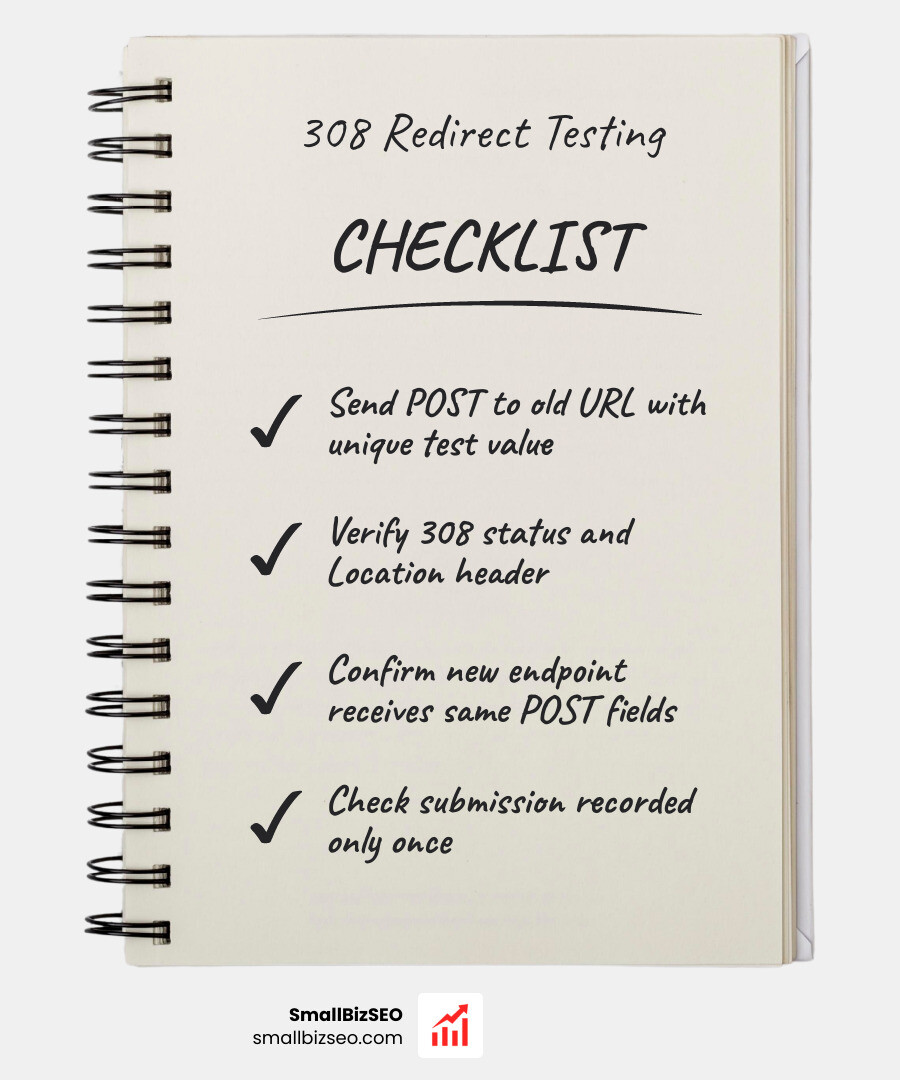
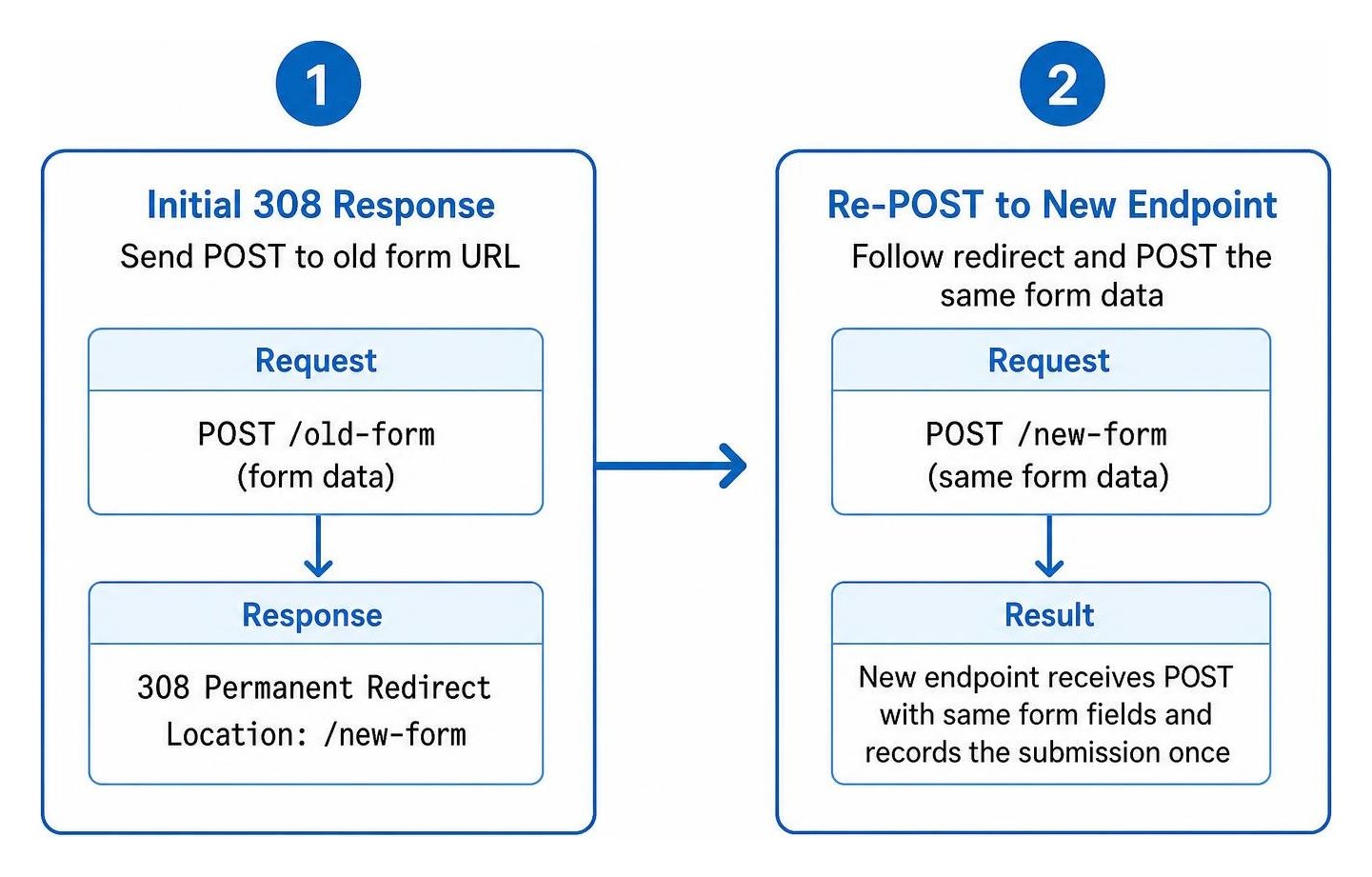
Here’s how to test form submissions after adding a 308 redirect: send a test POST to the old form URL with a unique value. Check that the response is 308 and has a Location header pointing to the new endpoint. Then follow the redirect and confirm the new endpoint receives a POST with the same form fields and records the submission once. You can inspect both requests with curl or your browser’s Network tab.
A 308 is for moving a form endpoint while keeping its POST data. If the form has already processed the submission and needs to send the visitor to a thank-you page, use a 303 instead. That turns the next request into a GET.
I’m Clayton Johnson, founder of SmallBizSEO. My work in technical SEO and website structure informs this guide on how to test form submissions after adding a 308 redirect.
Step-by-Step Guide: How to Test Form Submissions After Adding a 308 Redirect

When migrating form handlers or updating your site architecture, a misconfigured redirect can quietly drop incoming lead data. Testing ensures that the client transmits the original payload to the new location without altering the request method.
Why Does HTTP Method Preservation Matter for Form Submissions?
Understanding the difference between redirect status codes protects your forms from silent data loss. When a server responds with a standard 301 redirect or a temporary 302 redirect, standard web browsers historically rewrite the HTTP method from POST to GET.
When a POST request transforms into a GET request, the browser discards the payload body. Your application endpoint receives an empty query, frequently throwing a 405 Method Not Allowed error or creating empty database records.
According to the official RFC standard for 308 Permanent Redirect, user agents must not change the HTTP method used in the original request. If an endpoint receives a POST request with form data and returns a 308, the client resubmits the exact same POST request and body to the URI specified in the Location header.
| Status Code | Redirection Type | Preserves Original Method (POST stays POST)? | Retains Request Body? | Primary Use Case |
|---|---|---|---|---|
| 301 Moved Permanently | Permanent | No (Browsers change to GET) | No (Payload dropped) | Legacy static URL restructuring |
| 302 Found | Temporary | No (Historically rewritten to GET) | No (Payload dropped) | Temporary page relocations |
| 303 See Other | Temporary | No (Explicitly forces GET) | No (Intentionally dropped) | Post-submission thank-you redirection |
| 307 Temporary Redirect | Temporary | Yes (Guaranteed) | Yes (Payload preserved) | Temporary endpoint moves, HSTS internal redirects |
| 308 Permanent Redirect | Permanent | Yes (Guaranteed) | Yes (Payload preserved) | Permanent API and form endpoint migrations |
How to Test Form Submissions After Adding a 308 Redirect Using cURL and Postman
Command-line utilities and graphical API tools provide the fastest way to validate server headers and confirm payload forwarding during a site migration.
1. Checking the Initial 308 Response with cURL
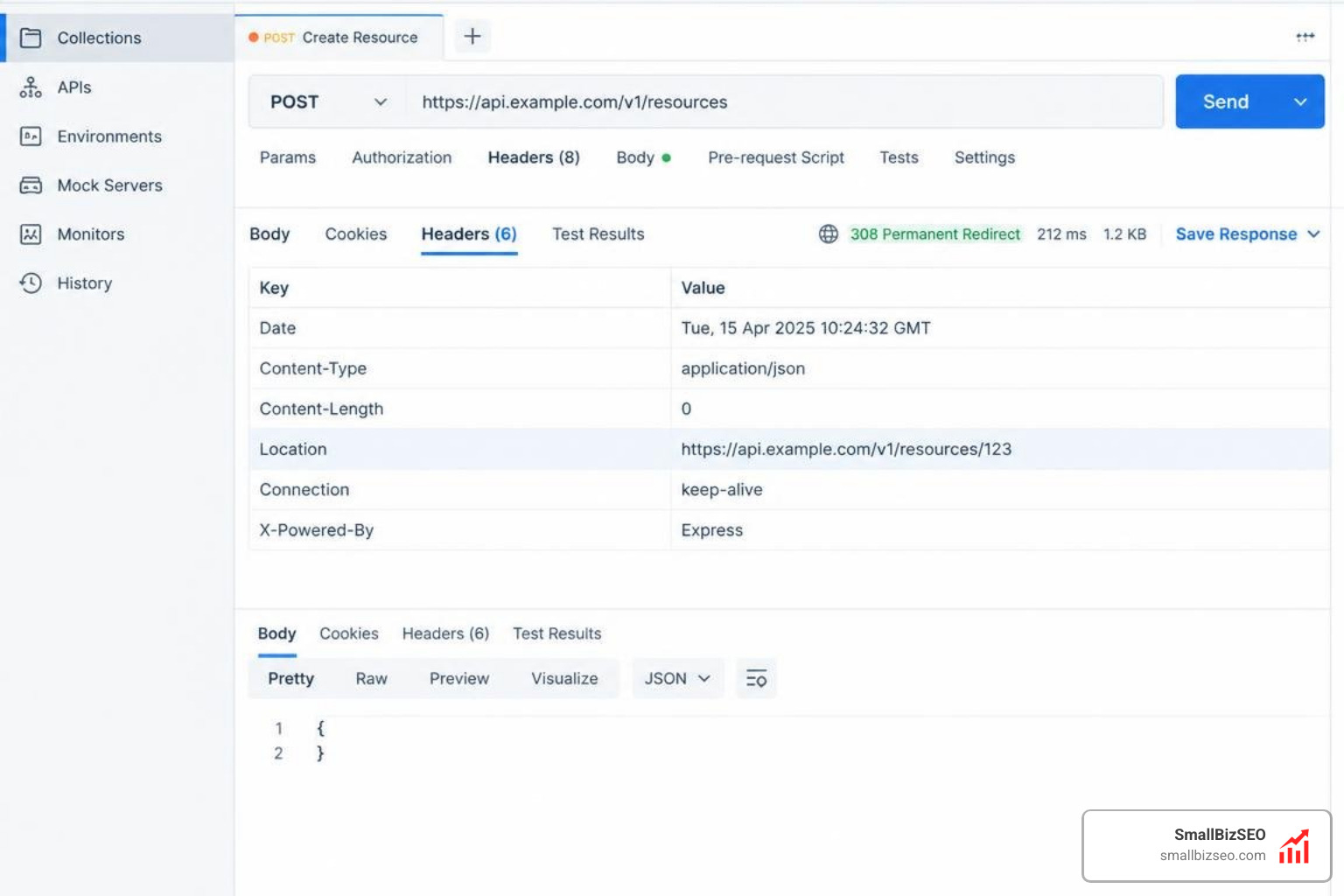
First, verify that your server is returning the correct 308 status code and a valid Location header rather than a standard 301:
- Execute an explicit POST request in your terminal:
curl -v -X POST -d "name=Test&email=test@example.com" https://example.com/old-form-endpoint - Verify the server returns an HTTP response line reading
HTTP/1.1 308 Permanent RedirectorHTTP/2 308. - Confirm that the
Locationheader points to the exact, fully qualified destination path.
2. Following the Redirect and Verifying Method Preservation
By default, command-line clients require specific parameters to follow 308 redirects while preserving the POST body. Following established API migration redirect best practices, verify the full submission sequence:
- Run cURL with location and POST-retention flags:
curl -L --post308 -X POST -d "name=Test&email=test@example.com" https://example.com/old-form-endpoint - Observe the two-step transaction: the initial 308 response followed immediately by an outgoing POST request containing your form payload to the new URL.
- Ensure the final response returns a 200 OK or your expected success status code.
3. Validating in Postman
If you prefer graphical testing:
- Create a new request in Postman, set the method to POST, and enter the old form endpoint URL.
- Add form fields under the Body tab (using
x-www-form-urlencodedorform-data). - In Postman Settings, confirm Automatically follow redirects is toggled ON.
- Click Send and open the Postman Console (bottom left).
- Inspect the network trace: verify the first call returned a 308, followed by a second call to the new URL that maintained the POST method and forwarded all form fields intact.
How to Test Form Submissions After Adding a 308 Redirect in Browser DevTools and Automated Suites
Real browsers and programmatic test pipelines should be evaluated to verify that client-side forms and API wrappers perform reliably.
Browser Developer Tools Verification
To verify real-world browser submissions without leaving your application:
- Open the page containing your form in Google Chrome, Firefox, or Edge.
- Press
F12or right-click and choose Inspect, then navigate to the Network tab. - Check the Preserve log checkbox at the top of the Network panel so redirect steps are not cleared upon navigation.
- Fill in the form fields and click submit.
- Filter the Network panel by
DocorFetch/XHR. - Inspect the first entry corresponding to the old form URL: verify the status shows
308 Permanent Redirectand check theLocationresponse header. - Inspect the second entry corresponding to the new destination URL: verify the request method remains
POST, thePayloadtab contains your submitted key-value pairs, and accurate conversion tracking tags register the lead.
Automated Integration Testing (Spring Boot MockMvc, Fetch, and Axios)
Modern HTTP clients like the browser fetch() API, axios, and Python requests follow 308 redirects automatically while retaining the POST method and body payload.
However, server-side test harnesses like Spring Boot's MockMvc do not emulate a browser environment and will not follow redirects automatically. When writing unit and integration tests:
- In Spring Boot MockMvc, submit your mock POST request and assert
status().is3xxRedirection(). - Extract the target URL using
result.getResponse().getRedirectedUrl(). - Execute the second request explicitly within your test runner using the captured URL and assert the final view, database insertion, and status 200 OK.
When Should You Use 308 vs 303 Redirects with the PRG Pattern?
A common mistake in form architecture is confusing endpoint migrations with post-processing page navigation.
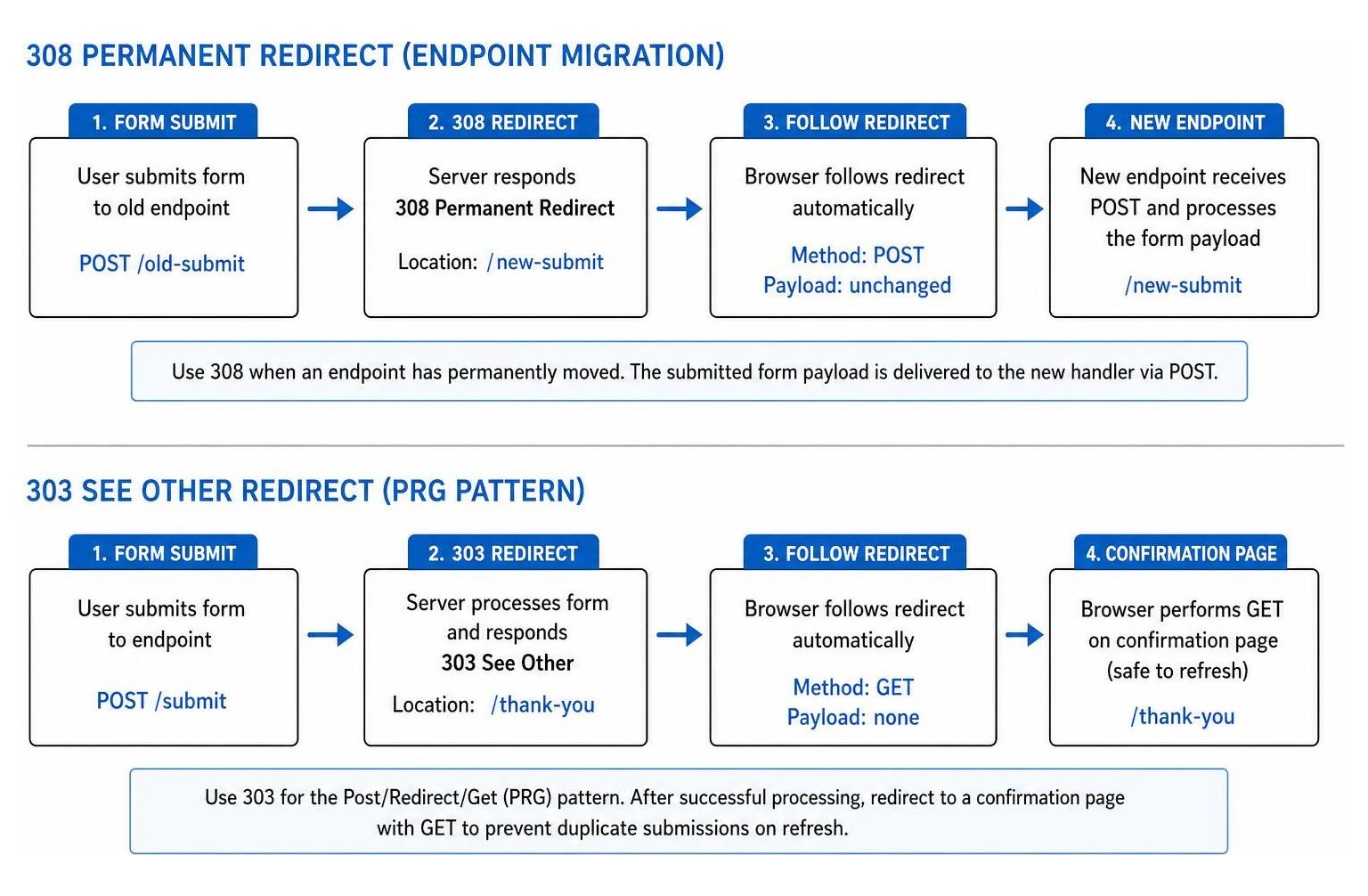
- Use a 308 Permanent Redirect when an endpoint has permanently moved (such as migrating
/submit-v1to/api/v2/submit). It instructs the browser to deliver the submitted form payload directly to the new handler via POST. - Use a 303 See Other Redirect for the standard Post/Redirect/Get (PRG) pattern. Once your server successfully receives and processes form data, it must return a 303 redirect pointing to a static confirmation page. This instructs the client to perform a GET request, preventing duplicate charges or repeated form submissions if the visitor refreshes their screen.
Troubleshooting Common Pitfalls and Ensuring SEO Performance

When performing technical SEO audits, verify that redirect rules do not introduce routing issues that waste crawl budget or disrupt conversion funnels.
How Do You Identify and Fix Redirect Chains, Loops, and Caching Bugs?
- Eliminate Lengthened Redirect Chains: Combining an HTTP-to-HTTPS redirect, trailing-slash adjustments, and endpoint rewrites into multiple steps can degrade user experience and cause older clients to drop POST data. Route directly from the old endpoint to the final canonical HTTPS destination in a single hop.
- Prevent Unwanted Redirect Loops: If your destination endpoint matches an overly broad server rewrite rule, the target page may redirect back to the old endpoint, creating an infinite loop. Always define specific, terminating rewrite conditions in your Nginx (
return 308 /new-path;) or Apache (RewriteRule ^old-path$ /new-path [R=308,L]) configurations. - Monitor HSTS 307 Interceptions: If your form action points to an insecure
http://address, modern browsers enforce an internal 307 redirect to upgrade tohttps://before sending packets over the network. Ensure all formactionattributes hardcode explicithttps://URLs to avoid intermediate client hops. - Configure Cross-Origin Resource Sharing (CORS): If your new form endpoint resides on an alternate subdomain or domain, ensure the server issues appropriate
Access-Control-Allow-OriginandAccess-Control-Allow-Methodsheaders to allow cross-origin POST redirects without browser blocking.
How Does Google Treat 308 Redirects for SEO and Canonicalization?
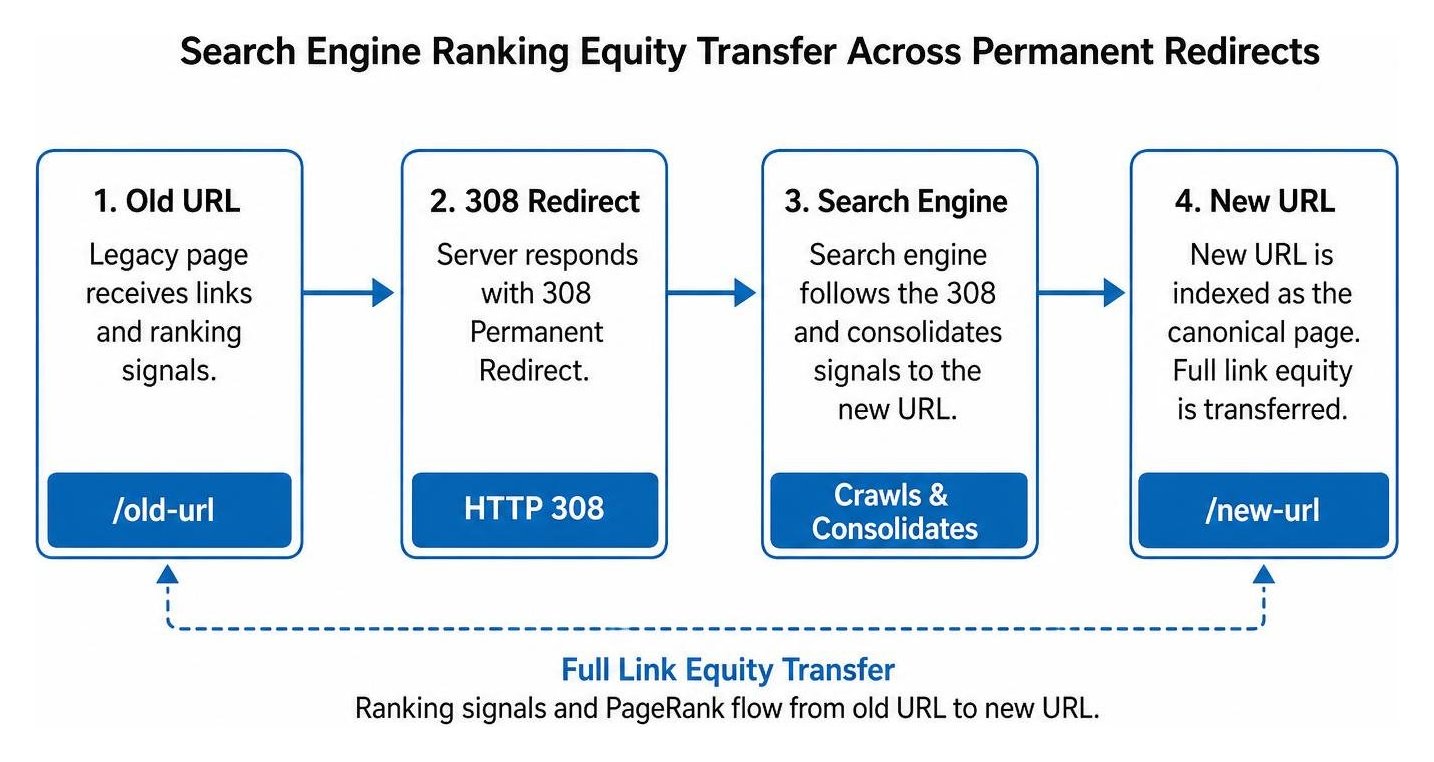
Search engines process 308 redirects cleanly. Googlebot treats an HTTP 308 response identically to a standard 301 redirect:
- Full Link Equity Transfer: Ranking signals and PageRank flow from the old URL to the new destination.
- Canonical URL Indexing: Google uses the 308 redirect as a clear canonicalization signal, indexing the new URL in search results and retiring the legacy path.
- Index Verification: You can verify that Googlebot successfully crawls and consolidates your redirected URLs by testing them inside Google's URL Inspection tool.
Ensure that deprecated form URLs are not redirected to generic homepages, which can trigger soft 404 warnings in search consoles. For comprehensive implementation frameworks, explore SmallBizSEO's 308 redirect resources to maintain full search equity across every site update.
Safeguarding Your Conversion Funnels and Data Architecture
Verifying form endpoints after implementing a 308 redirect guarantees that your lead pipelines, payment processors, and user registration flows continue operating without interruption. By testing your endpoints across cURL, Postman, browser developer consoles, and automated test runners, you ensure that every POST method and data payload arrives safely at its new destination.
Maintain a single-hop redirect path, implement clear 303 PRG patterns on thank-you routes, and regularly monitor server logs to ensure seamless user experiences and sustained search visibility across your entire web ecosystem.