From Archive to Architecture: A Tactical Guide to Building a Modern Content Hub

How Can You Turn a Resource Library Into a Content Hub?
Here’s how to organize an existing resource library into a content hub: inventory what you have, decide what still helps a defined audience complete a task, then curate useful pages into clear topic paths. Improve pages in place where possible, and change URLs only when the evidence supports it.
A resource library stores content. A content hub gives readers a guided way to explore a topic, understand why each resource matters, and choose a sensible next step.
Start by organizing the work already published. A useful hub can preserve strong URLs and improve discovery without requiring a wholesale rewrite or site move.
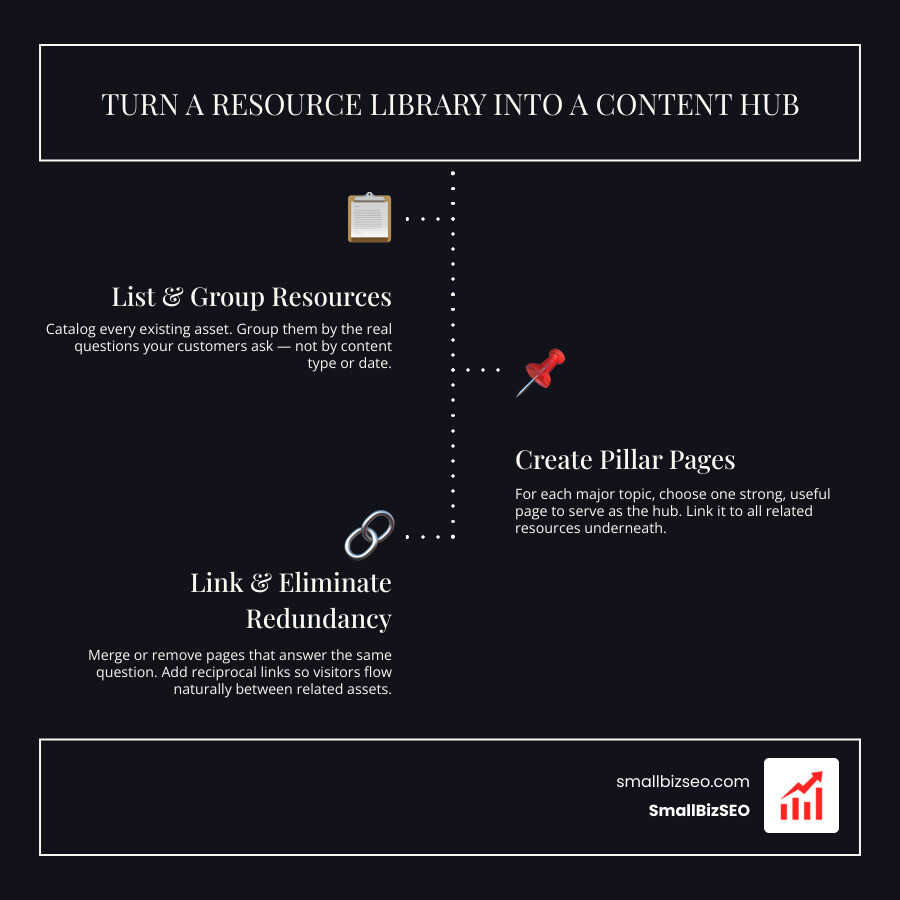
The goal is not to force every asset into a new structure. Use the inventory to identify useful pages, clarify their roles, and create a practical path from a broad topic to the resources that answer specific questions.
How Do You Organize an Existing Resource Library into a Content Hub?
To organize an existing resource library into a content hub, assign each page a clear audience task, confirm whether its information is accurate, and connect related resources with useful navigation. Start with what readers need, not a predetermined site map or a requirement to rewrite every page.
Which Content Hub Structure Fits Your Existing Library?
Choose a structure that matches how people use the library. A central overview page works well when one broad question leads to several related tasks. Category pages can help when visitors begin with a format or audience need. A searchable library can help with a large catalog, but it should complement clear editorial paths rather than replace them.
- Topic overview with related resources: Useful when readers need a starting point and clear next steps. It can become cluttered if the overview tries to summarize everything.
- Curated category pages: Useful when the library contains several formats or audience needs. Add short annotations so readers know what each link will help them do.
- Search and filters: Useful for large libraries. Keep important pages reachable through ordinary links as well, and make filters accessible on mobile and with a keyboard.
- Consistent page groupings: Useful when content naturally follows a repeatable pattern. Avoid forcing unrelated resources into the same structure just for uniformity.
Build topical paths with descriptive, crawlable links and concise annotations that explain the destination. Google recommends standard anchor links with meaningful link text so people and crawlers can understand the relationship between pages. See Google’s link best practices, this overview of topic clusters, and Adobe’s guide to content hub models for planning connected resources.
How Do You Audit Existing Resources Before Changing the Hub?
Audit the library before making structural changes. For each URL, record the intended audience and task, format, accuracy, content owner, overlap with other pages, existing links, performance evidence, and next action. This creates a decision record for keeping, updating, merging, retiring, or simply relinking a resource.
A structured content audit helps distinguish pages that remain useful from pages that need attention. Traffic is one signal, but it is not the sole decision-maker: consider accuracy, audience fit, conversions or qualified inquiries, links, and the page’s role in the broader topic.
- Keep: Preserve pages that are accurate, useful, and distinct, even when their value is not captured by one traffic metric.
- Update: Refresh pages when the core topic still serves readers but examples, guidance, ownership, or supporting links need work. Use content gap analysis to identify unanswered audience tasks and content decay analysis to flag pages that may need a closer review.
- Merge: Combine materially overlapping pages only when a stronger replacement is clear and relevant.
- Retire: Remove or archive pages when they no longer serve a meaningful audience task and no better recovery option fits.
How Should You Restructure Navigation, URLs, and Internal Links?
Restructure navigation only where it improves discovery. Keep useful URLs when possible, use clear page labels, and present related resources in a curated sequence. Filters can support exploration, but they should not be the only route to important content; test navigation on mobile and with keyboard controls.
Use descriptive internal links that tell readers what they will find next, rather than generic labels. Important paths should be available in ordinary, crawlable links, while contextual links can explain why a related guide, checklist, or service is relevant.
When a merge requires a URL change, point an old page to the closest relevant replacement with an appropriate permanent redirect, such as a 301 or 308. Do not send unrelated retired pages to the homepage as a blanket rule. Before and after any change, document the rollback path, check the redirect response and status, update internal links where needed, and validate the sitemap. Use structured data and canonical tags where they accurately describe the page, not as universal fixes for filtered views or indexing decisions. Google’s SEO Starter Guide is a useful reference for these site-maintenance fundamentals.
How Can You Improve Performance, Organize Topics, and Maintain Your Hub?
Maintain a content hub with clear ownership, accessible navigation, and a recurring review process. The objective is to keep resources accurate and useful as audience questions, services, and site content evolve.
How Do You Balance Search Optimization with User Experience and Discoverability?
Balance SEO and user experience by making each page easy to scan, easy to navigate, and genuinely useful for the question it addresses. Use logical headings, concise summaries, and labels that explain where a link leads. Check that navigation, filters, and interactive controls work on mobile devices and with a keyboard.
Readers should be able to find a direct answer and then choose a deeper resource when they need it. Use the hub to reduce confusion, not to make every visitor follow the same path.
- Match the audience task: Give each resource a clear job, such as explaining a concept, comparing options, or helping a prospect prepare for a service. Use search intent to keep that purpose clear.
- Make paths understandable: Use descriptive headings, link labels, and short annotations for related resources. Apply content readability principles so the page remains easy to scan.
- Keep navigation inclusive: Test key paths on a phone and with keyboard navigation, especially when using filters or dynamic menus.
- Review the technical basics: Confirm important links resolve, pages can be discovered, and changes do not create unnecessary duplication. Use on-page SEO optimization as a review aid rather than a fixed formula.
- Improve based on evidence: Use search, engagement, support, and qualified-outcome signals to prioritize the next update.
What Technology and Tools Do You Need to Manage a Content Hub?
A content hub can be managed with the tools your team can maintain reliably. A CMS, spreadsheet, project board, or asset system may each be appropriate depending on the size of the library, ownership model, and publishing workflow; no single architecture is required.
Choose tools that make it easier to find the current source of truth, assign ownership, and review resources before they become outdated. A content hub asset-management perspective can help teams compare workflow options, but no single toolset is required. Run a site audit when you need to investigate broken links, performance issues, or technical errors. SmallBizSEO can support a practical program with content planning, ongoing refresh work, internal linking, earned outreach, and technical SEO.
How Do You Maintain a Content Hub Over Time?
Maintain the hub with a named owner, a review date for each priority resource, a visible task status, and a definition of the qualified outcomes that matter to the business. Review whether readers can complete their task, whether the information remains accurate, and whether key internal paths still work before attributing any change to a single edit.
Use a regular review to prioritize the next action:
- Content accuracy and ownership: Confirm who is responsible for each priority page and whether its guidance still reflects the business.
- Task completion: Look for evidence that readers can reach the next relevant resource, inquiry, or conversion step.
- Internal-link health: Check important paths, anchor text, redirects, and sitemap coverage after structural changes. Use this framework for building a scalable content hub as a practical reference.
- Qualified outcomes: Track the business signals that matter for the resource, while avoiding claims that one content change caused every result.
Turn Your Resource Library Into a Useful Content Hub
A well-run content hub makes existing resources easier to evaluate, maintain, and use. Start with an inventory, preserve what is useful, improve the paths between related pages, and document why each change is being made. For support with content audits, ongoing refresh work, internal linking, technical SEO, and earned outreach, explore SmallBizSEO’s services or book a conversation.