Stop Losing Link Equity When Sunsetted Products Disappear

How to Choose a Redirect Destination for a Discontinued Product
Here’s how to choose a redirect destination for a discontinued product: send shoppers to a close replacement that meets the same need. If there isn’t one, use a relevant category only if it helps them find an alternative. Check the old page’s traffic and backlinks before you decide whether to redirect it, keep it as a useful archive, or return a 410 Gone response. Don’t send every retired product to your homepage.
I’m Clayton Johnson, founder of SmallBizSEO, where I help small businesses make technical SEO decisions that support search visibility. My approach to how to choose a redirect destination for a discontinued product starts with what visitors need and whether the old page still has value.
Inventory distortion costs retailers worldwide around $1.77 trillion, representing roughly 7.2% of all retail sales. In total, stockouts alone cost merchants close to $1 trillion annually. For an ecommerce store turning over $500,000 each year, losing just 4% of sales to poorly managed stockouts strips $20,000 directly off the bottom line. With cart abandonment hovering near 70% across online retail, sending potential customers to broken links or generic landing pages simply multiplies lost revenue.
When items reach the end of their lifecycle, deleting their URLs without a strategy triggers soft 404 errors, erodes earned rankings, and drains domain authority. Implementing a proper SEO for discontinued products framework allows you to protect your organic traffic and convert shoppers who land on retired URLs.
How Do You Choose a Redirect Destination for a Discontinued Product?
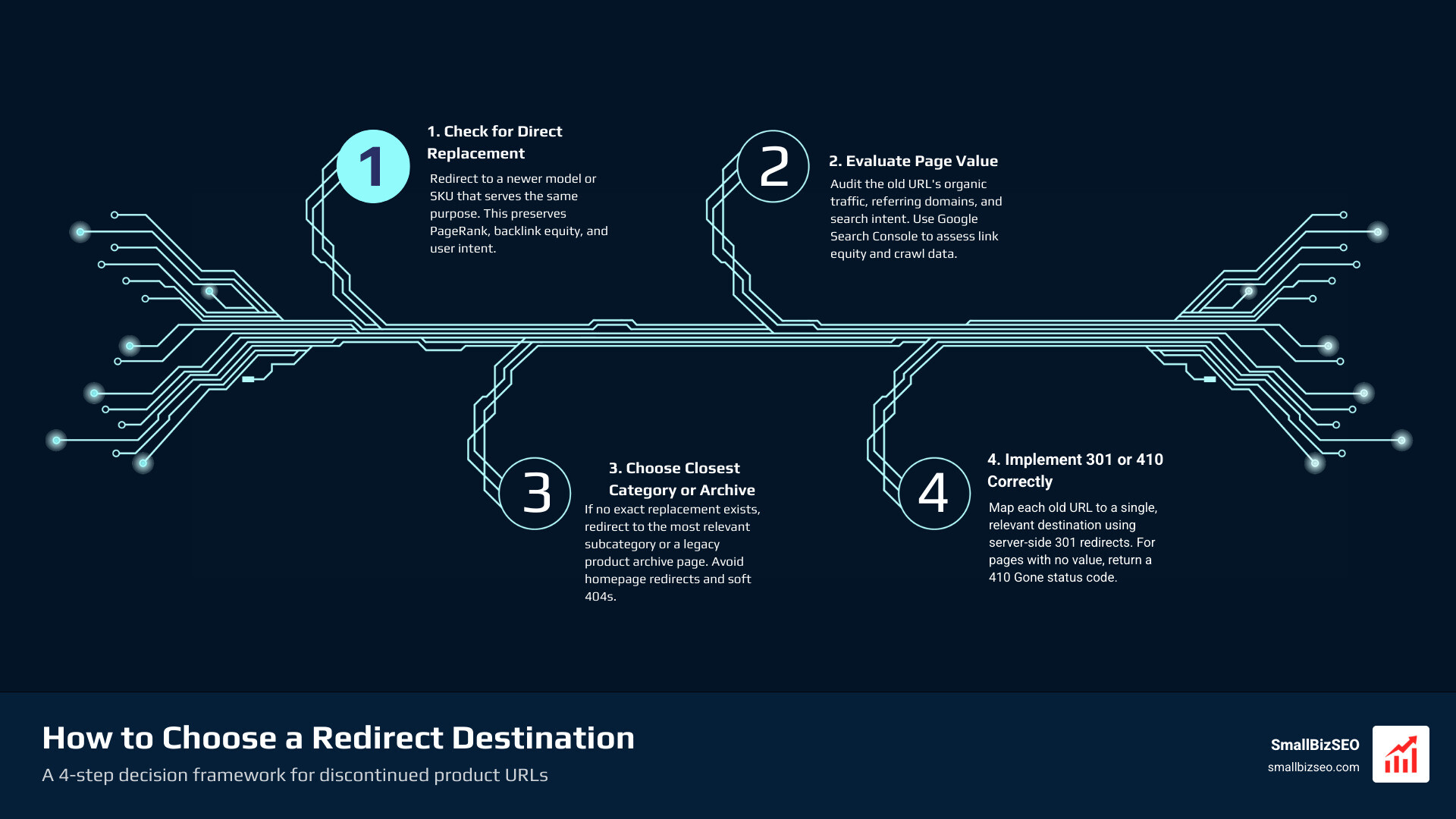
Check for a direct replacement first, then evaluate the retired page's historical organic traffic, backlink profile, and underlying search intent. Redirect the URL only to an active destination that satisfies the visitor's original purchasing or informational goal.
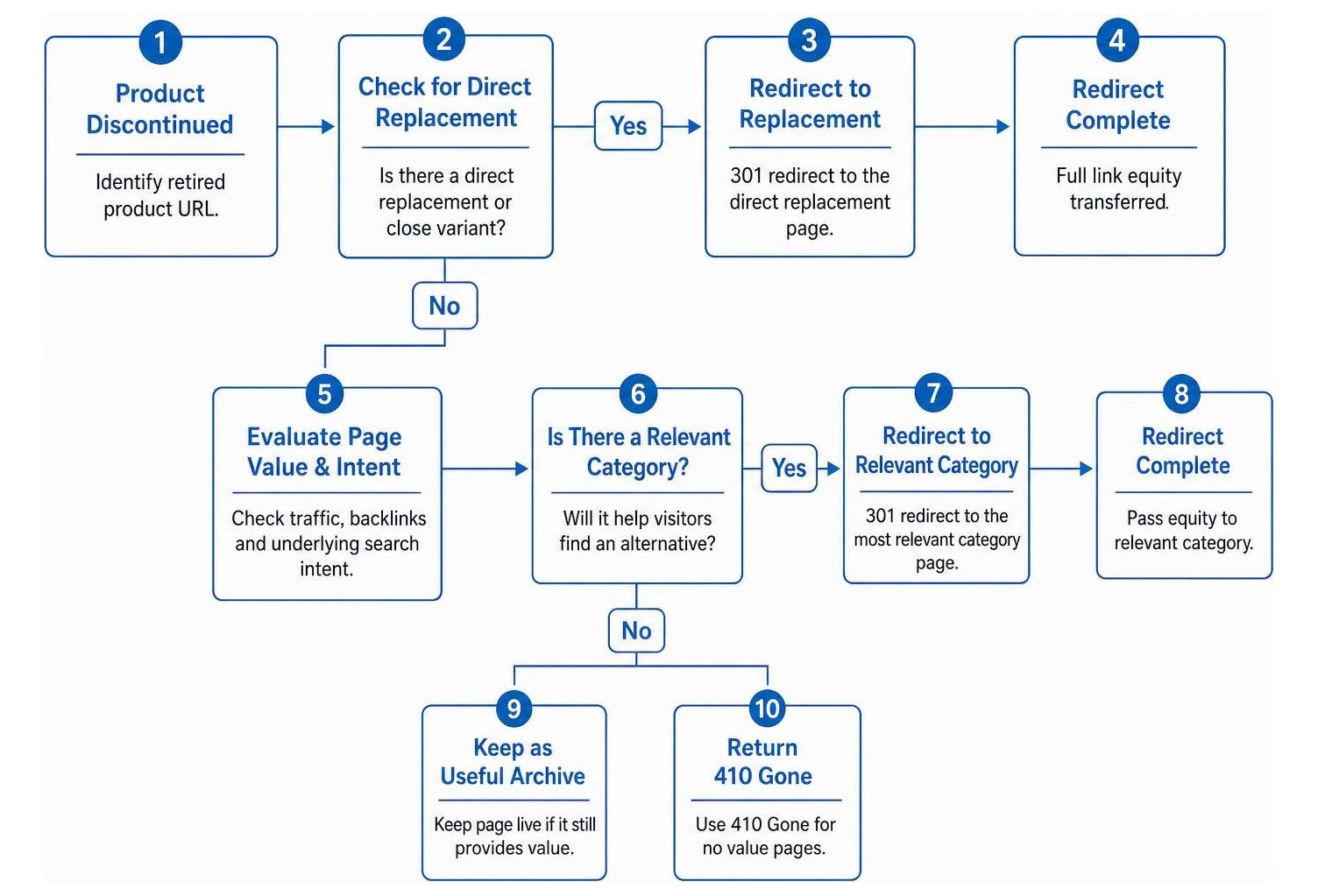
Every retired product URL on your website is an asset. When evaluating where an old product URL should point, you need to weigh its earned search equity against user intent. If you send a visitor looking for a specific running shoe to a completely unrelated department page, they will bounce instantly. Similarly, search engines evaluate topical relevance when passing equity between pages.
| Handling Option | HTTP Status Code | Best Scenario | Search Equity Preserved |
|---|---|---|---|
| Direct Replacement | 301 Permanent Redirect | Direct successor model or close variant exists | Full link equity transferred |
| Category Destination | 301 Permanent Redirect | Product line retired, but parent category is active | Moderate equity transferred |
| Informational Archive | 200 OK | High organic traffic, legacy guides, or active specs | Retains all original rankings |
| Clean Retirement | 410 Gone | No replacement, zero traffic, zero backlinks | None (signals permanent removal) |
| Temporary Out of Stock | 200 OK | Inventory will return within weeks or months | Retains all original rankings |
According to guidelines on redirects and Google Search, permanent redirects pass ranking signals to the target page, provided the new content closely matches the old page.
Step 1: How Do You Assess a Discontinued Product URL’s Value and Find Direct Replacements?
If a newer model, upgraded revision, or matching SKU fulfills the exact same customer requirement, route the old URL straight to that new item using a permanent redirect. This transfers accumulated PageRank, maintains referral equity, and prevents multi-hop redirect chains that degrade website performance.

Before making any technical changes, pull your analytics and backlink data to measure the value of the discontinued product URL:
- Organic Search Impressions and Clicks: Determine if the URL still captures steady organic search volume.
- Referring Domains and Inbound Links: Check whether external publications, review hubs, or manufacturer partners link directly to the page.
- Customer Search Intent: Identify whether visitors seek to buy the item, review technical specifications, or troubleshoot existing hardware.
When a direct successor exists, an explicit 301 redirect provides a seamless experience for search crawlers and shoppers alike. For example, if you discontinue a series 4 blender and release a series 5 blender, pointing the retired series 4 URL directly to the series 5 page passes full ranking signals without confusing potential buyers.
Step 2: What Should You Do When a Discontinued Product Has No Exact Replacement?
When an exact replacement does not exist, redirect the discontinued URL to the most specific active parent category or subcategory collection that carries comparable alternatives. Never redirect retired product pages to your homepage, as this triggers soft 404 classifications and wastes link equity.
Redirecting thousands of dead URLs to the homepage is a common technical error. It flattens your site's topical relevance and strips the context crawlers need to understand your catalog structure. When a shopper looking for a waterproof hiking boot lands on a generic homepage, they are unlikely to browse back into the catalog.
Instead, point the discontinued item to its specific subcategory (such as "Men's Waterproof Footwear"). If the item represents a variant belonging to an existing family of products, ensure your canonical tag signals and category structures clearly route remaining demand to the primary active collection.
Should You Keep a Discontinued Product Page Live or Serve a 410 Gone Instead of Redirecting?
Keep a discontinued product page live with a 200 status code if it drives steady informational traffic, hosts valuable product documentation, or receives continuous user searches for legacy support. Serve an HTTP 410 Gone response when the product is permanently discontinued, lacks a relevant replacement, and carries no meaningful backlinks or traffic.

When keeping an archival product page live, implement clear user experience updates:
- Disable Add-to-Cart Controls: Prevent shoppers from attempting to purchase unavailable inventory.
- Display Prominent Discontinuation Banners: State clearly that the item has been retired by the manufacturer.
- Feature 2 to 4 Comparable Alternatives: Showcase in-stock products with similar price points and specifications.
- Offer Legacy Documentation: Maintain downloadable user manuals, warranty details, and compatibility guides to capture long-tail technical queries.
When reviewing 404 vs 410 status codes, a 410 Gone explicitly tells search engines that the resource has been intentionally and permanently removed. This allows search engines to de-index the page more cleanly than a standard 404 Not Found response.
How Can You Implement and Monitor Discontinued Product Redirects Without Losing Traffic?
Map every retired SKU to a validated, active target page, test the HTTP response codes to ensure no redirect chains or loops exist, and review your Search Console performance reports to detect crawl anomalies.
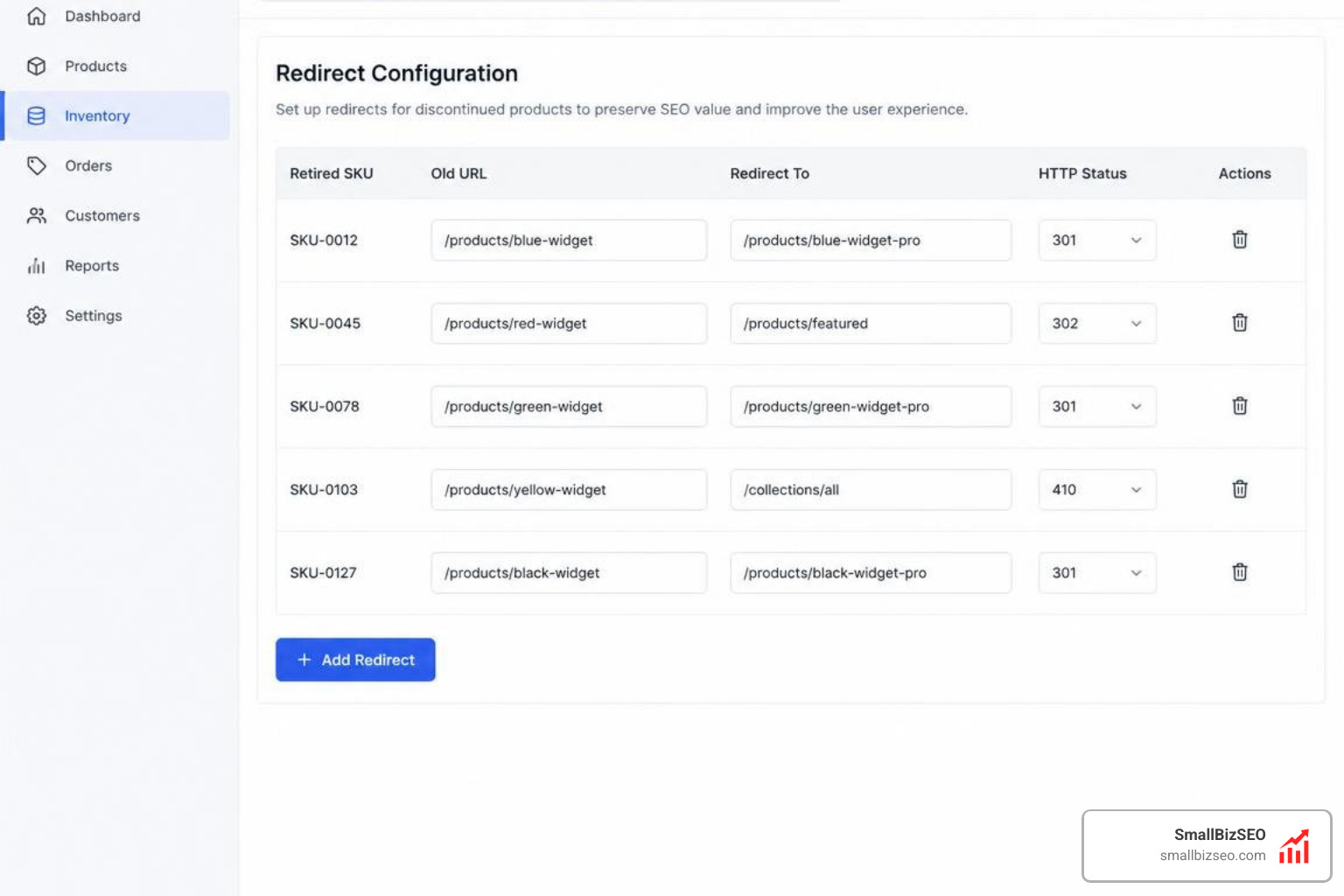
Managing inventory changes at scale requires structured technical execution. When hundreds of items sunset at once, haphazard configuration wastes your server's crawl budget and damages site crawlability.
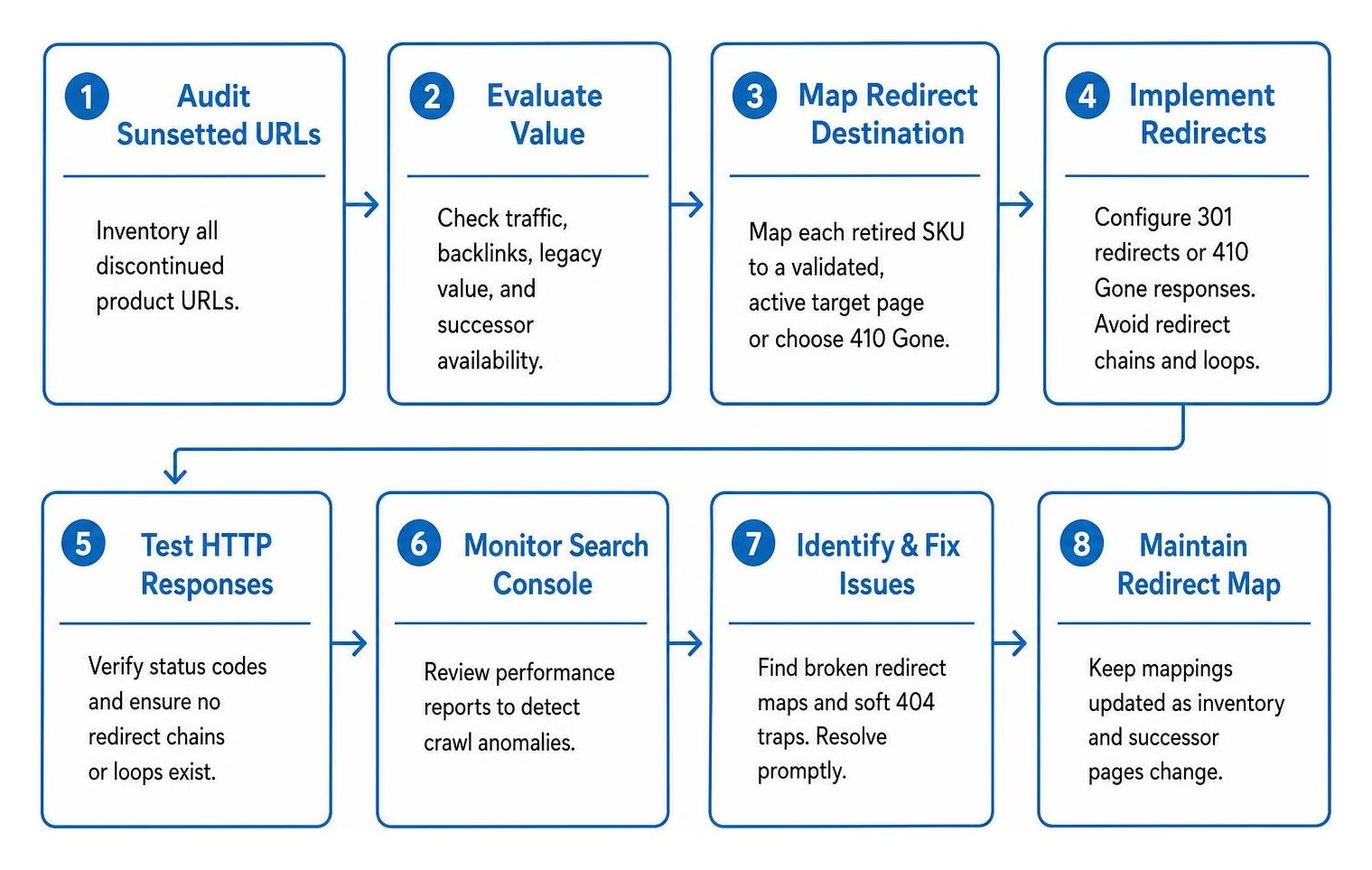
Following the ultimate guide to SEO audit errors helps identify broken redirect maps and soft 404 traps before they diminish overall organic performance.
How Do You Implement 301 Redirects in Shopify and PrestaShop Without Broken URLs?
Add your source-to-destination URL pairings directly into your ecommerce platform's native redirect manager or web server configuration rules, confirming that the source page is unpublished before activating the rule.
In Shopify:
- Shopify's built-in URL redirect manager only triggers redirects when the source URL returns a 404 status.
- Set the discontinued product status to Draft or Archived so the old product page unpublishes properly.
- Upload your redirect mappings in bulk via a standard CSV file under the Online Store Navigation settings.
In PrestaShop:
- Use the native SEO & URLs configuration settings or dedicated redirection modules to route retired catalog items.
- For enterprise catalogs, apply rewrite rules within your server configuration or
.htaccessfile to avoid database overhead. - Ensure the target destination returns an immediate 200 OK response rather than chaining through intermediate URLs.
Keeping your site architecture lean is an essential component of modern technical website maintenance, as outlined in our technical SEO guide.
How Should You Update Sitemaps, Structured Data, and Monitor Search Console After Redirecting?
Remove all redirected and retired URLs from your XML sitemaps, update structured data markup to reflect exact stock availability, and check Search Console to verify proper indexing health.
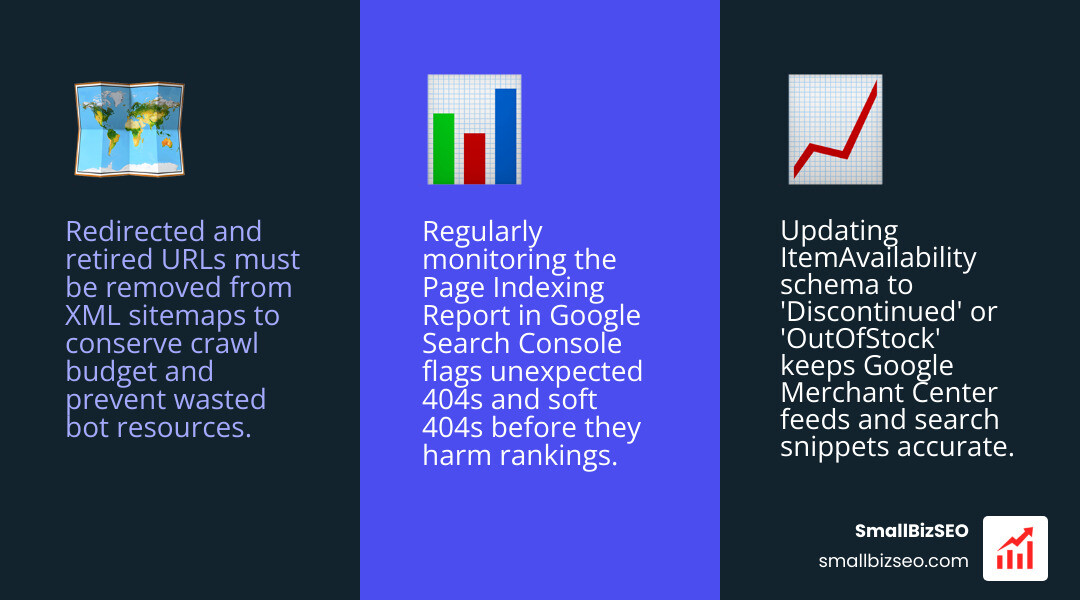
After setting up your redirects, complete these critical post-launch technical tasks:
- Regenerate Your Sitemap: Remove discontinued URLs from your main XML sitemap so search bots focus crawl resources on active, indexable pages.
- Update Schema.org Markup: Ensure your product schema uses accurate
ItemAvailabilityvalues (InStock,OutOfStock, orDiscontinued) to keep search snippets and Merchant Center feeds fully synchronized. - Monitor Index Coverage: Regularly review the page indexing report in Google Search Console to detect unexpected redirect errors, unhandled 404s, or soft 404 classifications.
Protect Your Store’s Search Visibility and Recover Sunsetted Product Revenue
Managing discontinued inventory does not have to mean surrendering search rankings or handing hard-won traffic over to competitors. By evaluating the value of each retired SKU, matching customer search intent to relevant successors, and maintaining clean technical configurations, you protect your link equity and guide shoppers smoothly toward active products.
If your catalog has accumulated broken paths or lost rankings from past catalog updates, we can help. Request a comprehensive SEO visibility audit from SmallBizSEO to diagnose catalog errors, streamline your redirect architecture, and maximize your store's organic revenue growth.