Troubleshooting ChatGPT Search: Why Old Business Pages Keep Appearing

How can you troubleshoot why ChatGPT Search links to an outdated business page?
To troubleshoot an outdated business page citation, first verify whether ChatGPT Search retrieved the link through a live search index, an unrefreshed crawler cache, or a third-party directory citation. Once you identify the source, update your server-side markup, configure proper redirects, or correct external profiles to supply clean data to AI crawlers.
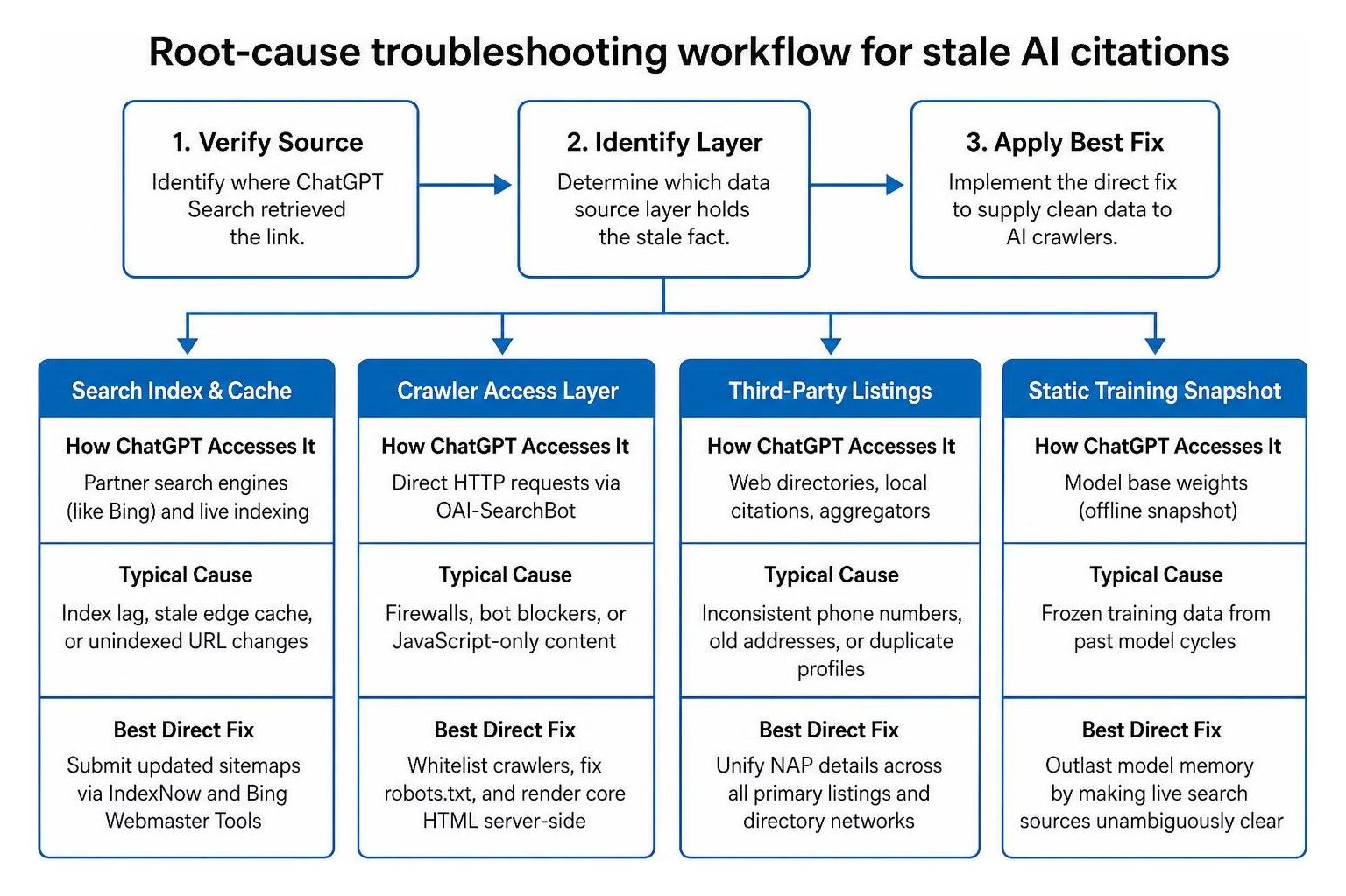
When an AI engine returns stale information, the root cause usually falls into one of three distinct layers. Understanding which layer holds the stale fact prevents wasted time trying to edit static model training data when a simple redirect or directory update solves the issue.
| Data Source Layer | How ChatGPT Accesses It | Typical Cause of Stale Information | Best Direct Fix |
|---|---|---|---|
| Search Index & Cache | Partner search engines (like Bing) and live indexing | Index lag, stale edge cache, or unindexed URL changes | Submit updated sitemaps via IndexNow and Bing Webmaster Tools |
| Crawler Access Layer | Direct HTTP requests via OAI-SearchBot |
Firewalls, bot blockers, or JavaScript-only content | Whitelist crawlers, fix robots.txt, and render core HTML server-side |
| Third-Party Listings | Web directories, local citations, aggregators | Inconsistent phone numbers, old addresses, or duplicate profiles | Unify NAP details across all primary listings and directory networks |
| Static Training Snapshot | Model base weights (offline snapshot) | Frozen training data from past model cycles | Outlast model memory by making live search sources unambiguously clear |
Why does ChatGPT Search retrieve cached or deleted URLs instead of live content?
ChatGPT Search often serves cached or deleted URLs because search-augmented language models prioritize response speed and depend on external index partner caches rather than executing raw HTTP requests for every single query.
Understanding the shift from batch crawling to live index updates helps clarify why this lag occurs. When a user submits a prompt, the system frequently rewrites the query behind the scenes to find relevant resources. As detailed in the OpenAI documentation on ChatGPT web search, the engine uses search partner indexes to pull citation candidates. If a page recently moved, natural content decay or delayed cache invalidation means the search partner still serves the older URL snapshot.
Furthermore, AI assistants often rely on proxy fetching and content caching to avoid hitting websites with excessive traffic. If a business page recently changed without sending an immediate re-indexing signal, the AI retrieves the cached version, leading to broken citations or outdated service listings.
How do you start troubleshooting why ChatGPT Search links to an outdated business page via crawler access?
Start diagnosing crawler access by confirming that OAI-SearchBot can reach and read your HTML without encountering firewall blocks, restrictive robots.txt rules, or client-side JavaScript rendering barriers.
Many business owners confuse GPTBot with OAI-SearchBot. While GPTBot crawls web content to train future foundation models, OAI-SearchBot is the dedicated crawler that retrieves real-time information and attributes links for ChatGPT Search. If your web host or security CDN automatically blocks unrecognized user-agents, it might return a 403 Forbidden response to OAI-SearchBot while allowing standard consumer traffic through.
To ensure your live pages are completely accessible:
- Inspect your robots.txt file: Ensure
OAI-SearchBotis explicitly permitted to crawl your public service, contact, and pricing pages. - Review security headers and firewall logs: Check your Web Application Firewall (WAF) or CDN settings to confirm that automated requests from AI search crawlers are not challenged by CAPTCHAs or IP blocks.
- Audit crawler activity: Regular review of your AI crawler analytics will reveal whether search bots are actively fetching your updated content or bouncing off edge server errors.
- Validate raw HTML rendering: OpenAI search crawlers do not execute heavy client-side JavaScript frameworks when indexing pages. Critical business details—such as services offered, hours, phone numbers, and addresses—must exist directly in the initial server-rendered HTML.
How do Bing indexing and directory citations influence AI business data?
ChatGPT Search relies heavily on established search engine indexes and third-party authority signals to determine which pages to cite. In fact, roughly 87% of citations in early ChatGPT search iterations matched Bing top results, yet only about 8% of cited URLs ranked within the traditional top 10 for the exact user prompt. This means the AI searches broadly across structured directories and authoritative mentions to find exact factual answers.
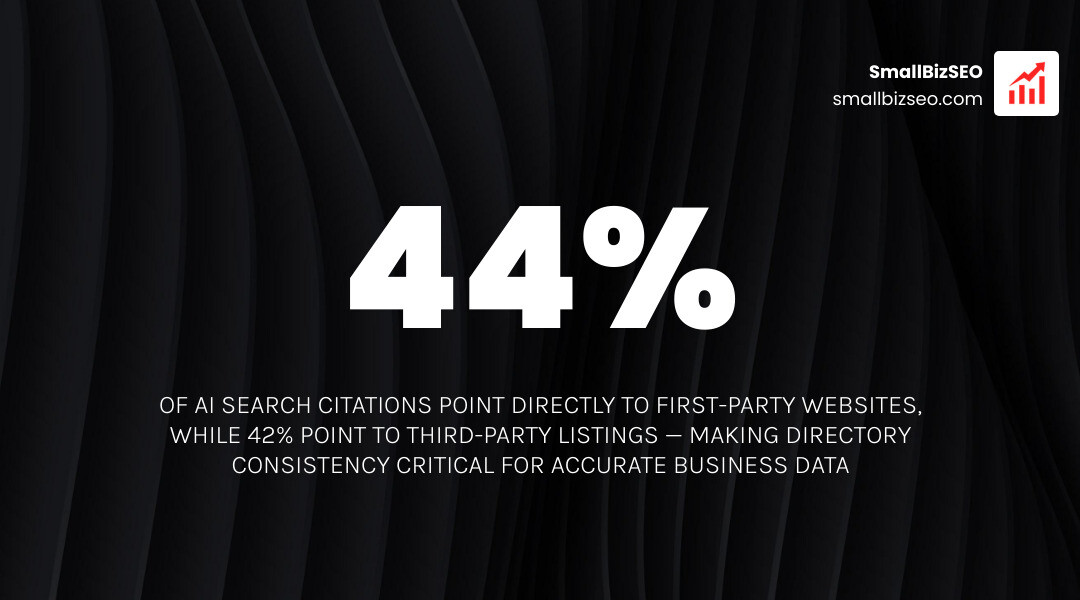
Research shows that around 44% of AI search citations point directly to first-party websites, while 42% point to listings and third-party directories. Furthermore, 59% of phone number citations in AI answers come from third-party sites rather than the business's own contact page. When third-party listings feature conflicting data, the AI struggles with source attribution, often displaying the older detail because it appears across multiple older directories.
To maintain consistent authority across search indexes:
- Verify Bing Webmaster Tools: Submit your updated XML sitemaps directly to Bing and implement the IndexNow protocol to trigger immediate re-crawling whenever content changes.
- Maintain absolute NAP uniformity: Ensure your Name, Address, and Phone number are identical across your website, Google Business Profile, Apple Business Connect, Bing Places, and Yelp.
- Eliminate duplicate profiles: Merge or remove duplicate business listings on major aggregators to prevent the AI from indexing contradictory information.
- Build branded web mentions: Independent studies indicate that branded web mentions hold the strongest correlation (0.664) with AI search visibility, surpassing standard backlink counts.
What should you do when an outdated ChatGPT Search business page returns a 404?
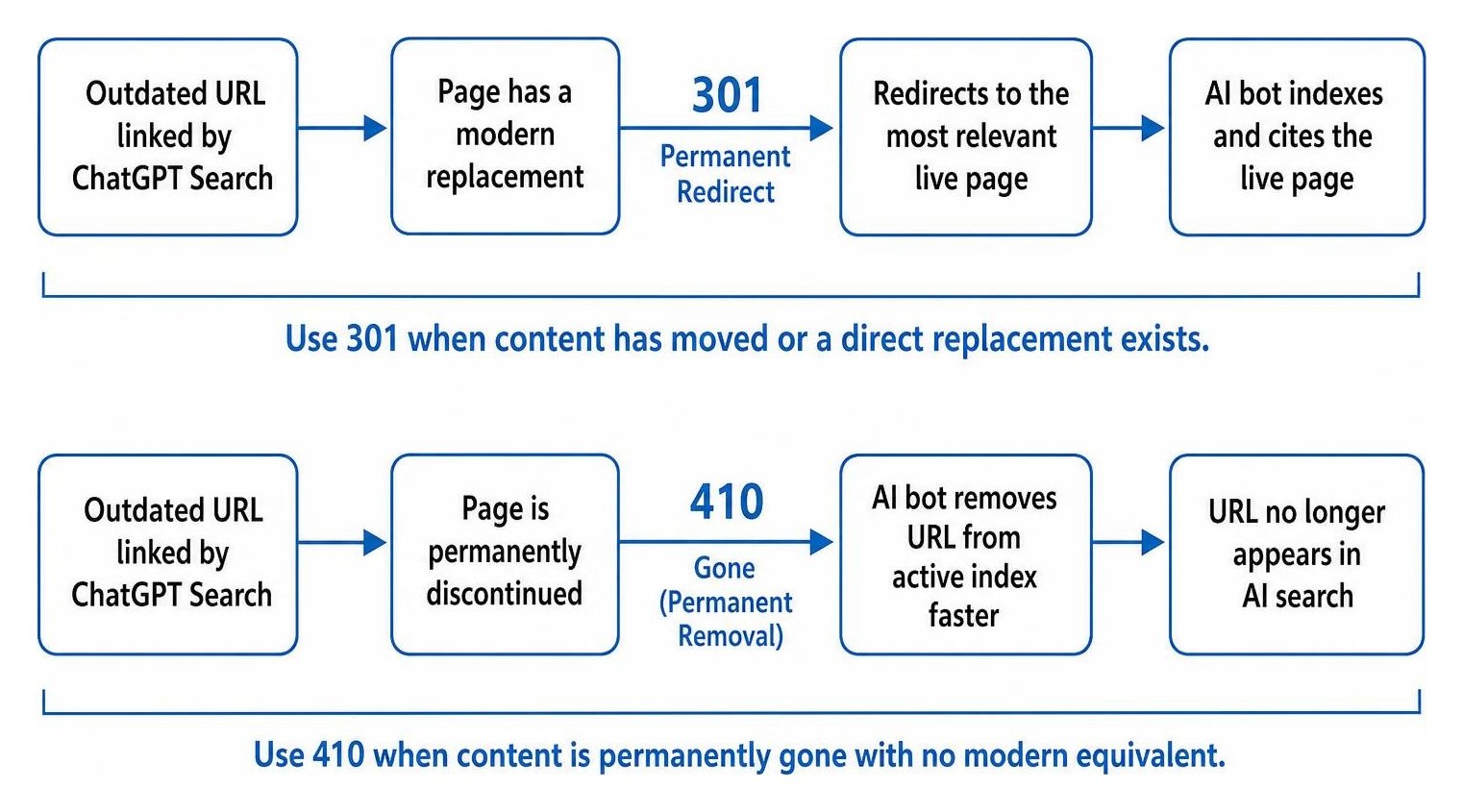
When ChatGPT Search links to a retired or deleted URL that yields a 404 error, immediately establish a permanent 301 redirect to the most relevant live counterpart, or issue an explicit HTTP 410 status code if the asset is permanently gone.
Data indicates that roughly 1 out of every 113 visits from ChatGPT Search lands on a dead 404 page, usually because an older URL was retired without proper server routing. Rather than letting AI referrals hit a dead end, follow these steps:
- Implement direct 301 redirects: If a product, service, or location page has moved, map the old URL to the direct replacement page. Avoid redirecting every dead link to your homepage, as search engines treat mass homepage redirects as soft 404 errors.
- Deploy a 410 Gone status for expired items: When a page is permanently discontinued with no modern equivalent, utilizing an HTTP 410 Gone status clearly instructs web crawlers to purge the URL from their active index much faster than a standard 404.
- Monitor AI referral parameters: Filter your analytics and server logs for traffic containing AI referral markers to identify broken links before they disrupt potential customers.
- Enforce canonical tags: Ensure every live page contains a self-referential canonical tag in the HTML header to eliminate indexing confusion across duplicate URL parameters.
How can you maintain fresh citations and avoid AI search errors?
To maintain fresh AI citations, publish clear factual text in your page copy, embed structured schema markup across your site, and maintain accurate information across all public web profiles.
AI engines are remarkably accurate when data is formatted cleanly. Studies show that AI search models achieve 89% accuracy when a website states facts clearly, but accuracy drops to 73% when information is vague or buried in complex scripts. Furthermore, only 55% of small businesses publish consistent operating hours across their contact pages, footers, and structured data, creating widespread confusion for search models.
To establish reliable AI citations:
- Implement JSON-LD structured data: Add
Organization,LocalBusiness, andOpeningHoursSpecificationschema markup to your site. This gives search crawlers machine-readable facts that reduce misinterpretation. - State facts plainly in text: State service details, pricing structures, and contact information within the first 60 words of each relevant landing page.
- Differentiate phone lines: Avoid labeling a 24/7 emergency dispatch line as general office hours; research indicates that 24-hour phone numbers are misread as continuous operating hours in 21% of AI responses.
- Leverage specialized AI visibility frameworks: Partnering with our data-driven AI SEO services helps small businesses monitor citation health, resolve crawl bottlenecks, and build durable E-E-A-T signals across modern AI platforms.
How can you test and verify updated business pages in AI search engines?
Verify that AI engines have indexed your updated business pages by conducting structured, logged-out search tests across multiple distinct queries and analyzing the cited source links.
Because repeat runs of identical AI prompts overlap on only 23% of the businesses they name, running a single test query does not give a complete picture. Use this step-by-step verification process:
- Open a clean, logged-out session: Use a private browsing window without saved personal preferences or location overrides that could skew results.
- Run targeted search queries: Ask specific, customer-focused questions, such as "[Business Name] current pricing" or "services provided by [Business Name] in [Industry]."
- Inspect the Sources panel: Click the web citation links returned in the answer. Verify that the URL points to your live page rather than an archived copy or an outdated third-party listing.
- Test direct URL fetching: Provide your exact URL directly in the prompt and ask the AI to summarize the live text. If it reads the page accurately, your server-level crawl access is working correctly.
- Log and track results over time: Search index updates typically propagate within 24 to 72 hours for direct crawler adjustments, though broader directory alignment can take several weeks. Maintain a dated record of changes and retest periodically to confirm long-term citation accuracy.
Protecting Your AI Search Visibility
Keeping your business information accurate in AI search results requires proactive technical SEO, consistent external listings, and clear on-page structure. When search bots encounter clean HTML, authoritative structured data, and aligned citations across the web, your live pages earn the prominent visibility they deserve.
If outdated links or missing citations are holding back your search presence, our team at SmallBizSEO is here to help. Explore our comprehensive technical audits and optimization strategies to ensure your business remains visible, accurate, and competitive across every modern search platform.