Analyse My Website SEO: A Quick Guide to Finding Errors

Analyse My Website SEO: A Quick Guide to Finding Errors
Why You Need to Check the SEO of a Website Before Anything Else
When you check the SEO of a website, you get a clear picture of exactly what's holding your site back in search results. Here's a quick overview of how to do it:
- Enter your URL into a free SEO checker tool (like Semrush, Seobility, or SE Ranking)
- Review your SEO score — 80+ is strong, 30–79 has room to improve, below 30 means critical issues
- Check for technical errors — broken links, crawl blocks, missing meta tags, slow page speed
- Look at on-page factors — title tags, headings, image alt text, content depth
- Fix high-priority issues first — start with anything flagged in red or marked critical
That's the short version. The rest of this guide walks you through each step in detail.
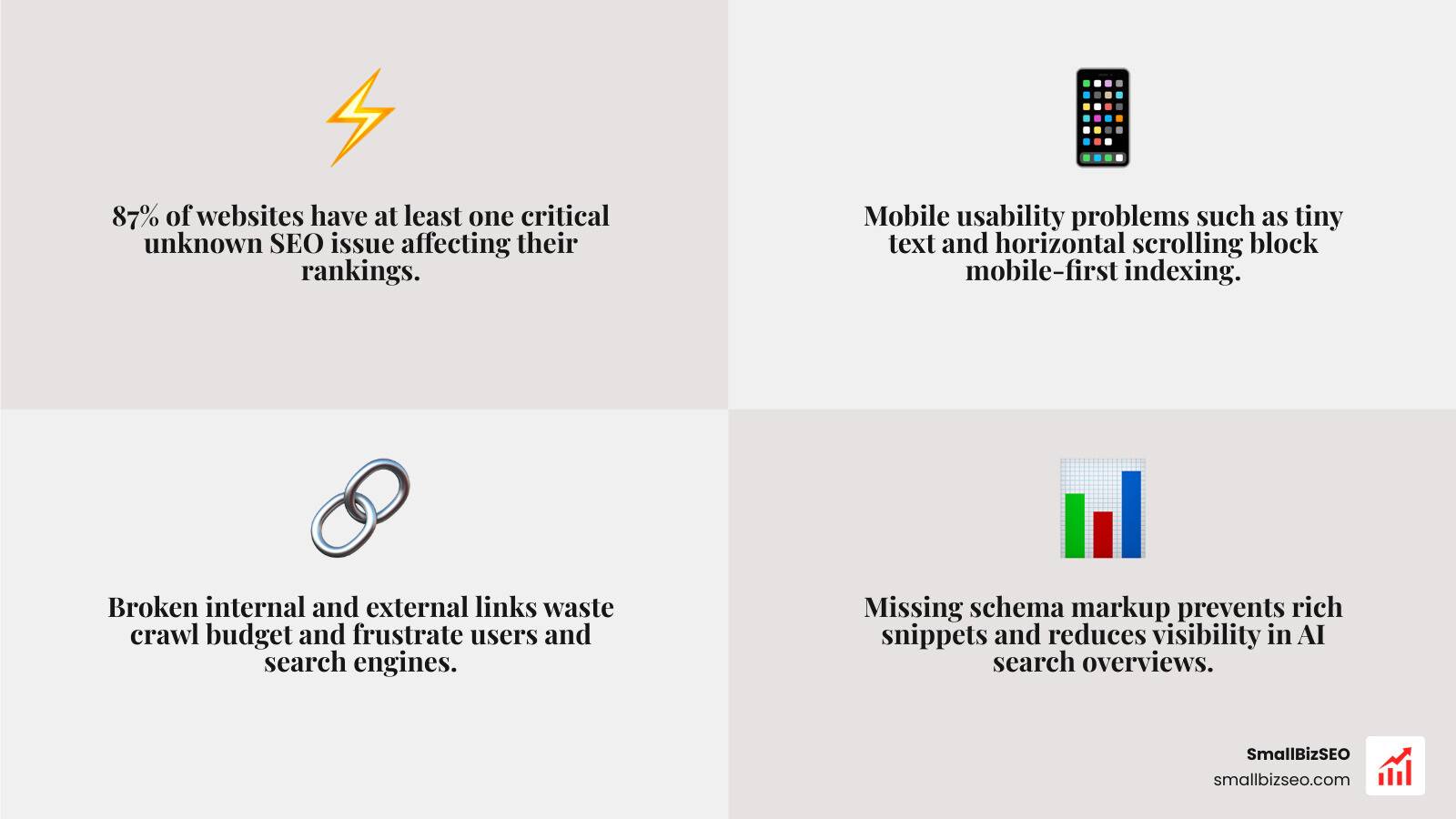
Most small business owners assume their website is fine — until traffic drops and leads dry up. The reality is sobering: 87% of sites have at least one critical SEO issue their owner didn't know about, and the average site carries 14 separate problems across technical, on-page, and performance areas.
These aren't rare edge cases. They're missing meta descriptions. Slow load times. Pages that Google can't even crawl. Small problems that quietly compound into real lost revenue.
I'm Clayton Johnson, a digital PR and SEO strategist who has helped businesses identify and fix exactly these kinds of hidden issues — including using the same SEO audit process you'll learn here to check the SEO of a website and turn underperforming pages into consistent traffic drivers.
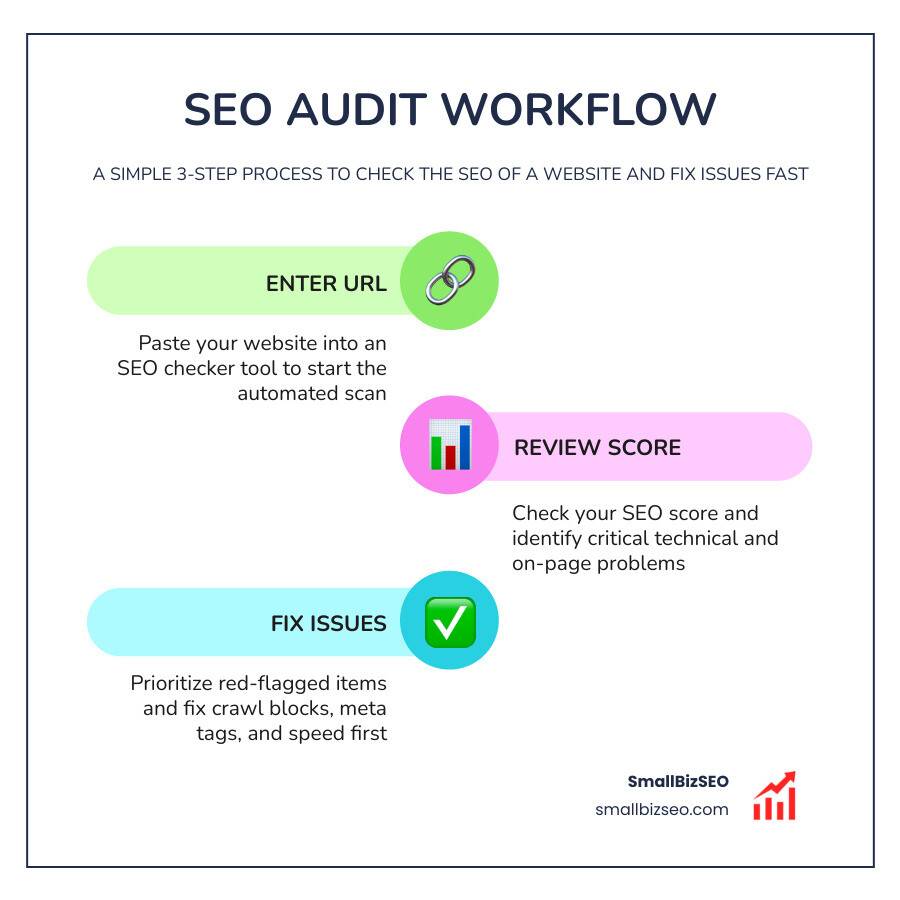
Quick check the seo of a website terms:
What is an SEO Checker and How Does It Work?
Think of an SEO checker as a digital health scan for your website. Just like a mechanic plugs your car into a diagnostic computer to find out why the "engine" light is blinking, an SEO checker scans your site’s underlying code to see why your pages aren't ranking as high as they should.
Most modern tools rely on a mix of technologies to evaluate your site:
- Web Crawlers: These bots mimic how search engines like Google browse your site. They follow links from page to page, checking for broken pathways, orphan pages, and redirect loops.
- Google Lighthouse Integration: Many top-tier checkers use Google's open-source Lighthouse engine to test performance, accessibility, and basic SEO. It calculates a score from 0 to 100 based on core metrics.
- DOM Analysis & JavaScript Rendering: Older tools only looked at static HTML/CSS. Today’s advanced checkers perform dynamic DOM analysis. They render JavaScript to see exactly what a modern browser—and Googlebot—sees after all scripts have loaded.

When you input your URL, the tool grades your page against hundreds of search engine guidelines. It then packages these findings into a single, easy-to-read SEO score. If your score is above 80%, you have a solid foundation. If it's between 30% and 79%, your site has clear optimization potential. Anything below 30% indicates critical technical errors that need immediate attention.
How to Check the SEO of a Website: A Step-by-Step Guide
Running an automated scan is only the first step. To truly understand your site's health, you need a systematic approach to review and prioritize the findings. By breaking down your audit into manageable phases, you can tackle critical errors first and build a roadmap for long-term growth.
For a complete and thorough inspection of your entire domain, we always recommend pairing your quick checks with a comprehensive Detailed SEO Analysis.
Step 1: Use an Automated Tool to Check the SEO of a Website
Start by selecting a reliable tool to run your initial scan. You can use the SEO Checker — Audit your Website with SEO Score Checker for a quick, one-click overview of your homepage. For a deeper look into site-wide health, tools like the Free SEO Checker: Check for SEO & AI Search Issues can crawl multiple pages to uncover hidden issues.
During this automated scan, your primary goal is to evaluate crawlability and indexability. If search engine bots cannot read your pages, nothing else matters. The tool will check your:
- Robots.txt File: To ensure you aren't accidentally blocking search engines from indexing your most important pages.
- XML Sitemap: To verify that you have a clean, updated roadmap of your content submitted to search engines.
- Server Response Codes: To catch 404 errors, broken redirects, or server timeouts that hurt your user experience.
To make sure your technical foundation aligns with official standards, take a look at our step-by-step guide on How to Pass Google's Own SEO Analysis Audits.
Step 2: Interpret the Report to Check the SEO of a Website Effectively
Once your report is ready, don't let the sheer volume of data overwhelm you. Focus your attention on the core on-page elements that directly communicate your page's topic to search engines.
If you want a highly detailed breakdown of your on-page semantics, you can use the SEO Analysis - Free tool by Alyze to inspect your text density and tag hierarchy. When reviewing your on-page data, pay close attention to:
- Meta Tags: Are your title tags and meta descriptions the correct length? Missing or poorly written titles confuse search engines and lower your click-through rates.
- Heading Hierarchy: Do your pages use a logical structure with a single H1 tag, followed by organized H2 and H3 tags?
- Image Alt Text: Are you providing descriptive alt attributes for your images to help visually impaired users and search crawlers understand your visuals?
Mastering these basic elements is the core of successful On-Page SEO.
Step 3: Optimize for AI Search Visibility and Generative Engine Optimization (GEO)
Search is changing rapidly. With roughly 40% of queries now occurring within AI-driven search engines, traditional keyword stuffing is no longer enough. Modern SEO requires optimizing for LLMs (Large Language Models) like ChatGPT, Claude, and Google Gemini.
To check if your site is ready for this shift, you can use SEO Site Checkup: Reclaim Lost Traffic with LLM-Ready SEO ... to analyze your AI search visibility. AI engines do not rely on simple keyword matching; they look for structured data, clear facts, and strong authority signals to cite your brand as a trusted source.
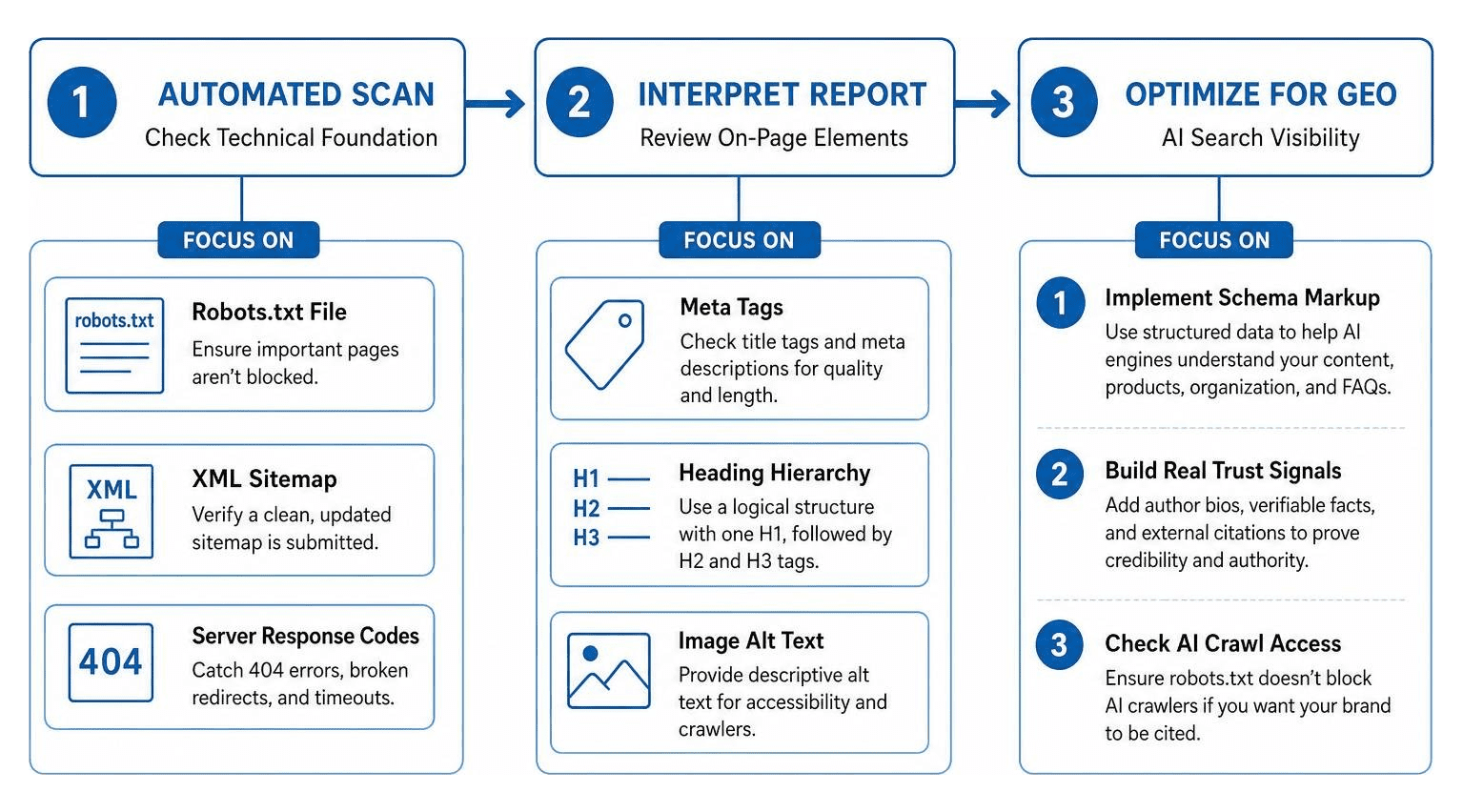
To optimize your site for GEO (Generative Engine Optimization), make sure you:
- Implement Schema Markup: Use detailed structured data to help AI engines identify your products, organization, and FAQs.
- Build Real Trust Signals: Clear author bios, verifiable facts, and external citations make your content more reliable for LLM agents.
- Check AI Crawl Access: Ensure your robots.txt file does not accidentally block AI crawlers if you want your brand to be cited in generative answers.
Key Metrics and Common Issues Identified in an SEO Audit
A comprehensive website check evaluates dozens of technical and user-experience metrics. When running your audit, keep an eye out for these critical factors:
- Core Web Vitals: Google uses these real-device speed metrics as direct ranking signals. Focus on improving your LCP (Largest Contentful Paint) to under 2.5 seconds, keeping your INP (Interaction to Next Paint) under 200 milliseconds, and maintaining a CLS (Cumulative Layout Shift) below 0.1.
- Mobile Usability: Since Google uses mobile-first indexing, your site must perform flawlessly on mobile devices. Watch out for tiny text sizes, horizontal scrolling, and touch targets that are too close together.
- Broken Links: Both internal and external broken links frustrate users and waste your crawl budget.
- Schema Markup: Missing structured data prevents your site from winning rich snippets in SERPs and reduces your visibility in AI search overviews.
For local businesses, technical errors can be especially damaging. Read our guide on the 5 Local SEO Mistakes Killing Your Visibility to make sure you aren't losing local customers to simple mistakes.
To help you decide which tools to use for your audits, here is a quick comparison of what you get with free vs. paid SEO checkers:
| Feature | Free SEO Checker | Paid SEO Checker |
|---|---|---|
| Audit Depth | Single URL / Surface-level scan | Entire domain crawl |
| Scheduling | Manual checks only | Automated recurring audits |
| White-Label PDF Reports | Rarely available | Fully customizable with your logo |
| Competitor Tracking | Limited or unavailable | Side-by-side keyword and gap analysis |
| AI Search Visibility (GEO) | Basic indicators | Detailed LLM citation tracking |
What to Do After Receiving Your SEO Report
An SEO report is only as valuable as the actions you take after reading it. Once you have your prioritized list of issues, group them into logical categories to tackle them systematically.
First, hand over the high-priority technical fixes—such as server errors, broken redirects, and slow Core Web Vitals—to your development team. Resolving these crawl blocks ensures search engines can fully access your site.
Next, focus on content optimization. Update your meta tags, correct your heading structures, and add descriptive alt text to your images. To build long-term authority that search engines and AI models trust, follow our strategy on How to Optimize Your Content for E-E-A-T and Build Real Search Trust.
Finally, find out what your competitors are ranking for that you might be missing. Use our guide on Keyword Gap Analysis: What It Is and How to Do It Right to discover fresh content opportunities and reclaim lost search market share.
Frequently Asked Questions about Website SEO Audits
How often should I run an SEO check on my website?
We recommend running a basic SEO check at least once a month. However, you should run an audit immediately after any major site changes, such as a CMS migration, a theme update, or a redesign. Regular monitoring helps you catch and resolve silent technical issues before they impact your organic rankings.
What is the difference between free and paid SEO checkers?
Free SEO checkers are great for quick, single-page snapshots of your homepage's health. Paid SEO checkers, on the other hand, offer deep site-wide crawls, competitor tracking, historical progress charts, and white-label reporting features that are essential for growing businesses and digital agencies.
How accurate and reliable are SEO checker results?
Most reputable SEO checkers are highly reliable because they pull real-time data directly from Google Lighthouse and use advanced crawlers that simulate actual search engine behavior. That different tools may weigh metrics slightly differently, so it is best to focus on consistent improvement over time rather than chasing a perfect score on one specific tool.
Conclusion
Taking the time to check the SEO of a website is the absolute first step toward building a successful online presence. Without a clean technical foundation, even the best content and strongest backlinks will struggle to rank.
If you want to dominate the local competition in the Big Apple, partnering with an experienced team can make all the difference. Check out the Top SEO Companies in New York City - Rankings | Clutch.co to see how top agencies compare.
For businesses looking for dedicated local expertise, we recommend exploring trusted local resources like this Trusted NYC SEO Agency | New York SEO Company , checking out the strategies from this SEO New York: Strategies for Digital Success in the Big ... guide, or working with a comprehensive New York City Digital Marketing Agency | SEO, Ads & Growth . If you are looking for a specialized SEO Agency in New York to Dominate Local Competition , finding a partner that understands the unique New York market is essential.
At SmallBizSEO, we help small businesses in New York, NY, eliminate the guesswork. Our data-driven "Velocity" framework delivers fast rankings and E-E-A-T-compliant growth through transparent, automated reporting.
Ready to take your search visibility to the next level? Explore our comprehensive SEO Services Guide to see how we can help, or get a clear, actionable roadmap for your site's success today with our professional SEO Visibility Audit.