DIY Technical Audits That Keep Small Business Websites Running Smoothly

DIY Technical Audits That Keep Small Business Websites Running Smoothly
Why Does a Growing Business Need a Small Business Technical Audit?
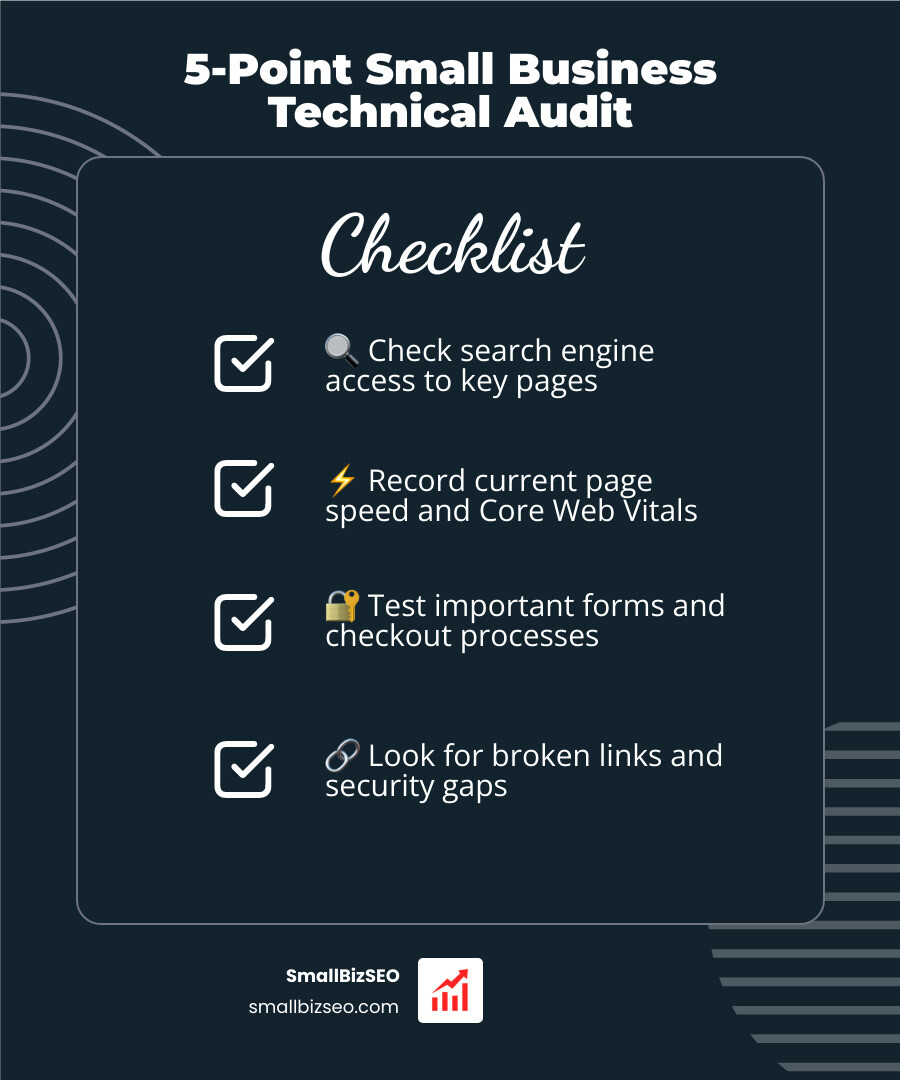
A small business technical audit helps you find website problems that keep customers from finding you or using your site. To start, record your current search traffic and page speed. Then check whether search engines can access your key pages, test important forms and checkout steps, look for broken links, and review basic security settings. Write down each issue so you can fix the ones that affect customers first.
You do not need to inspect every system at once. A focused review gives you a starting point and helps you decide which fixes you can handle yourself.
I'm Clayton Johnson, founder of SmallBizSEO, where I help businesses connect website structure and SEO with qualified leads. I'll use that experience to walk you through a small business technical audit you can run yourself.
Small business technical audit terms you need:
- transparent SEO reporting small business
- data driven SEO small business
- small business SEO link building
What Are the Core Triggers and Components of a Small Business Technical Audit?
A technical review is triggered when you notice sudden organic traffic drops, slow checkout speeds, recurring server errors, or bloated software stacks. A comprehensive review examines your infrastructure inventory, code quality, data protection, and search engine discoverability.
Most small business owners rely on multiple applications to operate daily. In fact, 93% of small business owners use at least one technology platform, and those utilizing six or more platforms report significantly higher profits than peers using single applications. However, adding more software introduces points of failure. SMBs typically invest between 6% and 10% of their revenue on IT, with high spenders investing over 16%. Without regular evaluations, this spend turns into waste.

When running a review, we focus on four primary pillars:
- Architecture and Server Health: Hosting response times, SSL certificates, and database stability.
- Search Discoverability: Crawling accessibility, URL structure, and structured data verified through a detailed SEO analysis.
- Security and Compliance: Access controls, user authentication, and data backup protocols.
- User Journey Funnels: Contact forms, checkout steps, and page rendering across desktop and mobile devices.
How Does a Technical Audit Differ from Financial or Compliance Reviews?
A technical audit evaluates digital assets, server configurations, and code quality, whereas financial reviews inspect accounting balance sheets and compliance reviews check statutory rules.
While the IRS audits less than 2% of small businesses annually, digital infrastructure faces constant threats every single day. Half of all small businesses face a cyber incident each year, and automated attacks target smaller operations nearly four times more often than enterprise organizations.
When evaluating a business sale or merger, investors frequently request Quality of Technology (QoT) Reports for Business Buyers alongside financial earnings reports. A technical audit uncovers the real state of your operational controls before hidden bugs undermine growth.
How Can You Conduct a DIY Technical Site Audit Step-by-Step?
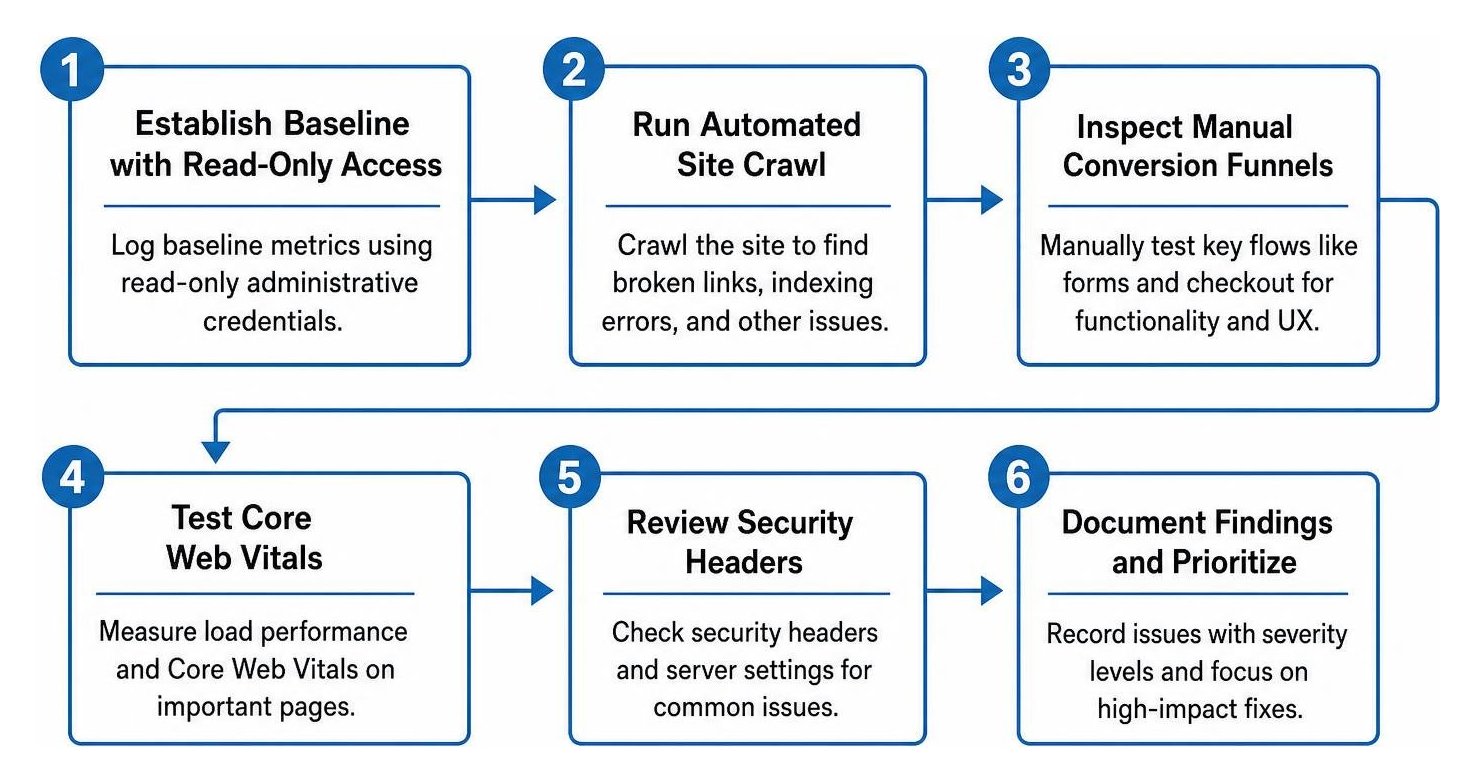
To conduct a DIY technical audit, log your baseline metrics using read-only access, run an automated site crawl, inspect manual conversion funnels, test Core Web Vitals, and review your security headers.
Before adjusting any settings, ensure you work with read-only administrative credentials to prevent accidental downtime. Prepare a simple spreadsheet to track URLs, issue descriptions, and severity levels.
Step 1: How Do You Evaluate Crawlability, Indexing, and Core Web Vitals?
You evaluate crawlability and speed by testing whether search engine bots can discover your content without getting blocked by server rules or heavy script files.
Start by verifying your server directions. An incorrect rule inside your robots txt file can inadvertently block important landing pages from search results. Review your XML sitemap to confirm that all listed URLs return standard 200 HTTP status codes rather than 404 broken page errors or redirect chains.
Next, test your page rendering metrics:
- Initial Rendering Speed: Check your first contentful paint score to verify that visitors see primary text and visual assets in under 1.8 seconds.
- Visual Stability: Ensure page elements do not shift unexpectedly while loading, which prevents frustrating misclicks on mobile devices.
- Crawl Depth: Confirm that your most valuable service pages sit no more than three clicks away from your homepage.
For deeper structural best practices, consult our comprehensive technical SEO guide to systematically audit indexation across complex site architectures.
Step 2: How Do You Find Security Vulnerabilities, Broken Links, and Technical Debt?
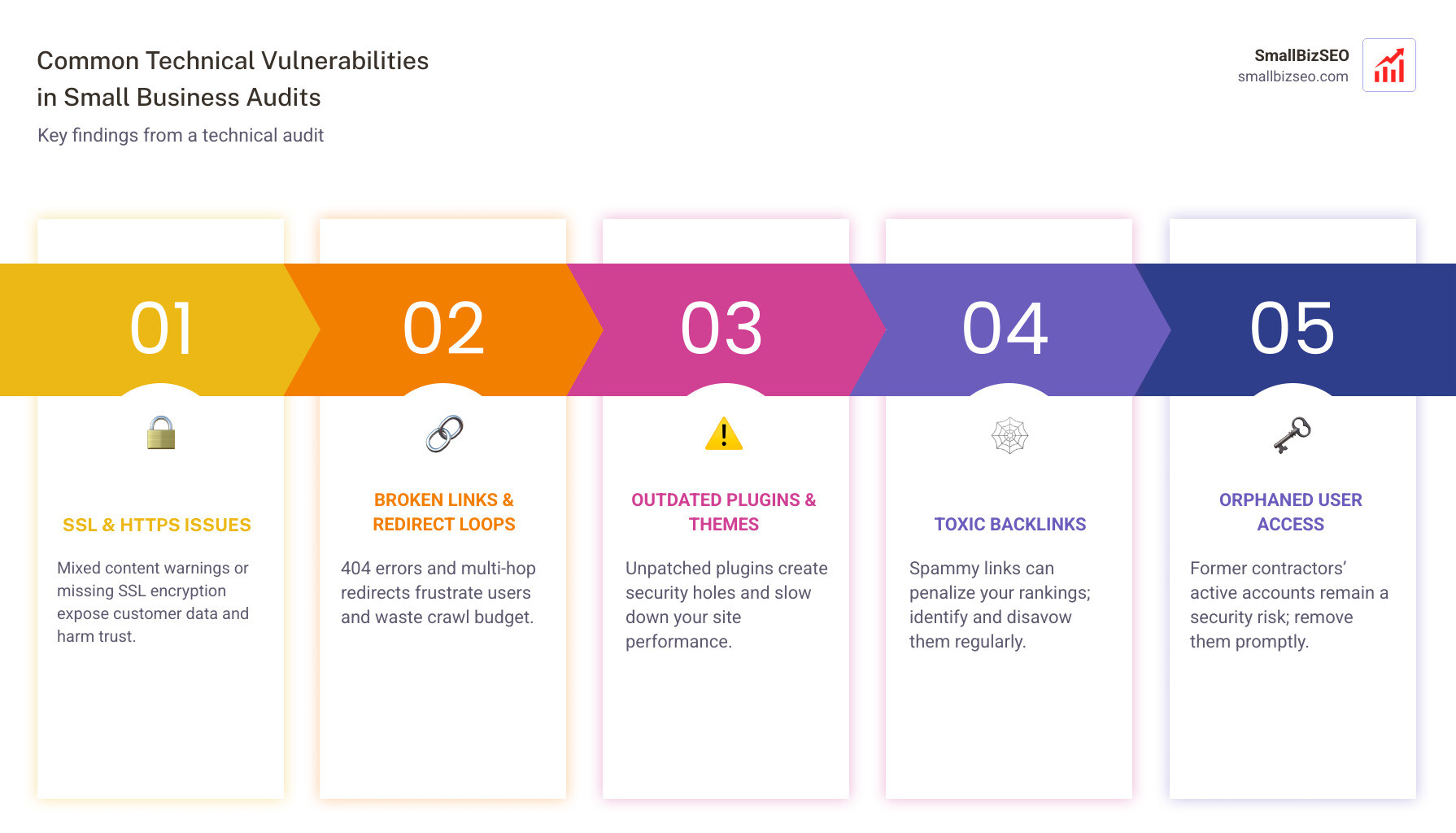
You identify vulnerabilities by checking for active SSL encryption, removing outdated plugins, inspecting internal redirect loops, and locating toxic external links.
Technical debt accumulates quietly. Developers spend about a third of their time managing technical debt rather than building revenue-generating features. On standard web applications, unused plugins and unpatched themes create direct security holes.
To clean up your site architecture:
- Validate that all traffic forces secure HTTPS connections without mixed-content warnings.
- Run an automated check to fix internal 404 links and remove multi-hop redirect chains.
- Audit your backlink profile to find toxic links and build authority using modern backlink analysis tools.
- Audit user administrative accounts and remove orphaned access privileges from previous contractors.
How Can You Turn Audit Findings into a High-Impact Growth Strategy?
Turn your audit findings into growth by ranking every issue by business impact and implementation effort, fixing critical conversion blockers within 30 days, and tracking performance weekly.
When Should You Hire Professional Help for a Small Business Technical Audit?
You should hire professional help when your website requires deep database refactoring, custom code audits, specialized server migrations, or formal compliance certifications.
While a DIY audit catches front-facing errors, complex platforms often benefit from an external review. Specialized advisory firms, such as a Fractional CTO + Discovery Audit, uncover hidden risks in underlying software stacks. If you run a web application, targeted options like a Technology Audit for SaaS Founders or enterprise-level IT Audit Services & Consulting provide deep code reviews. Similarly, organizations needing workflow diagnostics can turn to a Small Business Systems Audit or an independent Technical Business Review.
Hiring external guidance also protects hiring budgets. A bad technical hire costs at least 30% of that individual's first-year salary—often exceeding $40,000 in direct losses. An objective audit clarifies whether you truly need more developers or simply need to optimize your current infrastructure.
How Do You Prioritize and Implement High-ROI Technical Fixes?
Prioritize fixes by categorizing issues into revenue blockers, high-impact SEO wins, and long-term architectural maintenance.
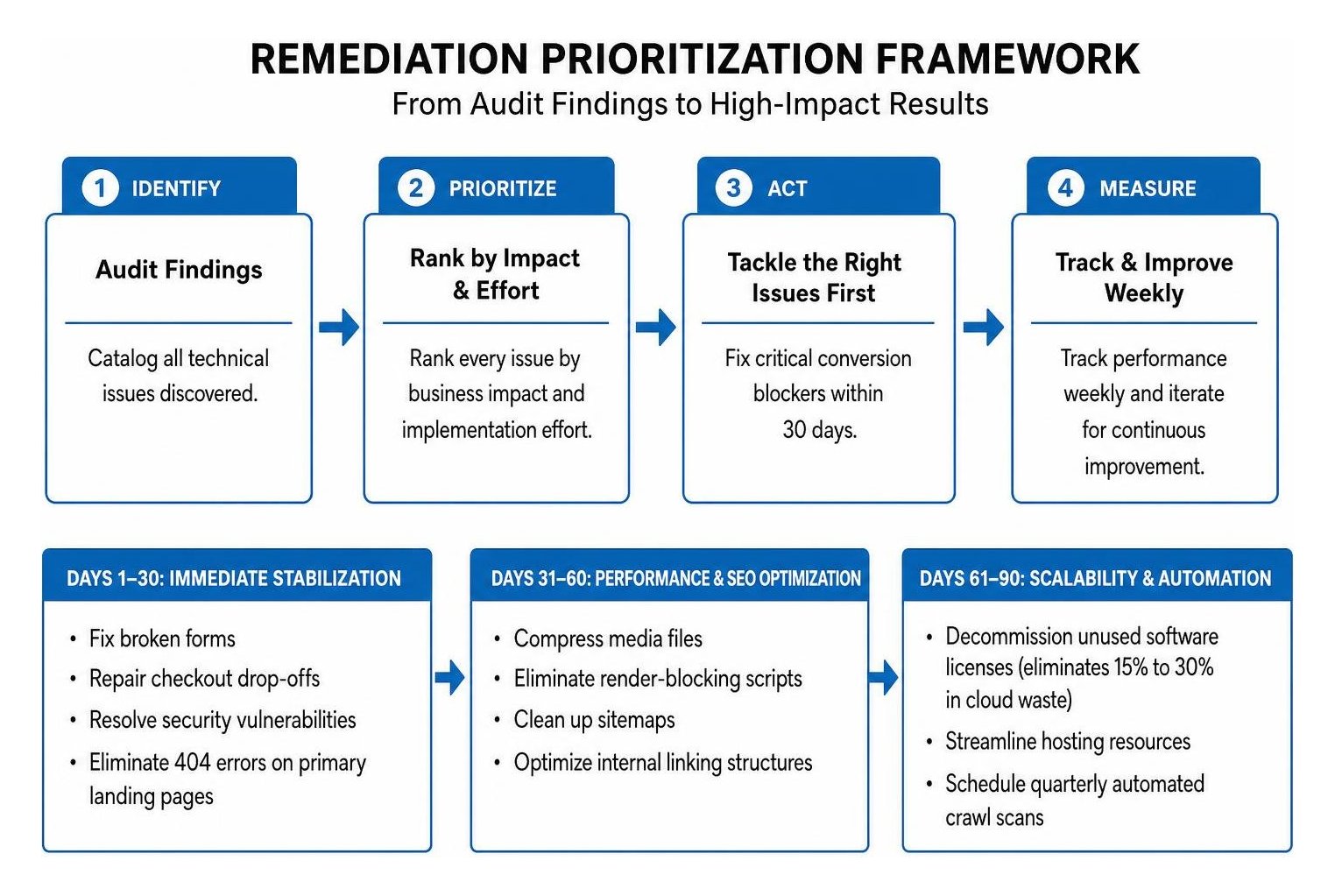
Follow a structured 90-day plan to execute changes safely:
- Days 1–30 (Immediate Stabilization): Fix broken forms, repair checkout drop-offs, resolve security vulnerabilities, and eliminate 404 errors on primary landing pages.
- Days 31–60 (Performance and SEO Optimization): Compress media files, eliminate render-blocking scripts, clean up sitemaps, and optimize internal linking structures.
- Days 61–90 (Scalability and Automation): Decommission unused software licenses (which regularly eliminate 15% to 30% in cloud waste), streamline hosting resources, and schedule quarterly automated crawl scans.
Taking Action on Your Technical Health
Maintaining clean technical infrastructure is not a one-time project; it is an ongoing growth discipline. Catching broken code, crawl errors, and slow page speeds early keeps your digital storefront welcoming to both customers and search engines.
At SmallBizSEO, we implement our data-driven "Velocity" framework to uncover hidden technical bottlenecks, accelerate organic rankings, and build sustainable online visibility. If you want expert support resolving complex site errors, explore our comprehensive technical SEO services or schedule a direct consultation through our contact page to get your digital growth back on track.