How to Coordinate X (Formerly Twitter) and Open Graph Metadata the Right Way

How do you coordinate X (Formerly Twitter) and Open Graph metadata?
Here's how to coordinate X (formerly Twitter) and Open Graph metadata: set the page title, description, image, and URL in Open Graph tags, then add an X Card (twitter:card) tag to choose how the link appears on X. Use separate X titles or images only when you want a different preview. Put the tags in the page's HTML head, use full HTTPS image URLs, and test the live link before sharing it.
That keeps your message consistent without maintaining two different sets of copy. If an updated image still does not appear, the platform may be showing a cached preview.
I'm Clayton Johnson, founder of SmallBizSEO. My work connecting technical SEO and content strategy informs this guide on how to coordinate X (formerly Twitter) and Open Graph metadata for clear, consistent link previews.
When someone pastes your link into a post on Facebook, LinkedIn, Slack, or X (formerly Twitter), the platform does not simply guess what your page is about. Instead, automated bots crawl your source code to generate a rich snippet complete with a headline, brief copy, and an eye-catching thumbnail.
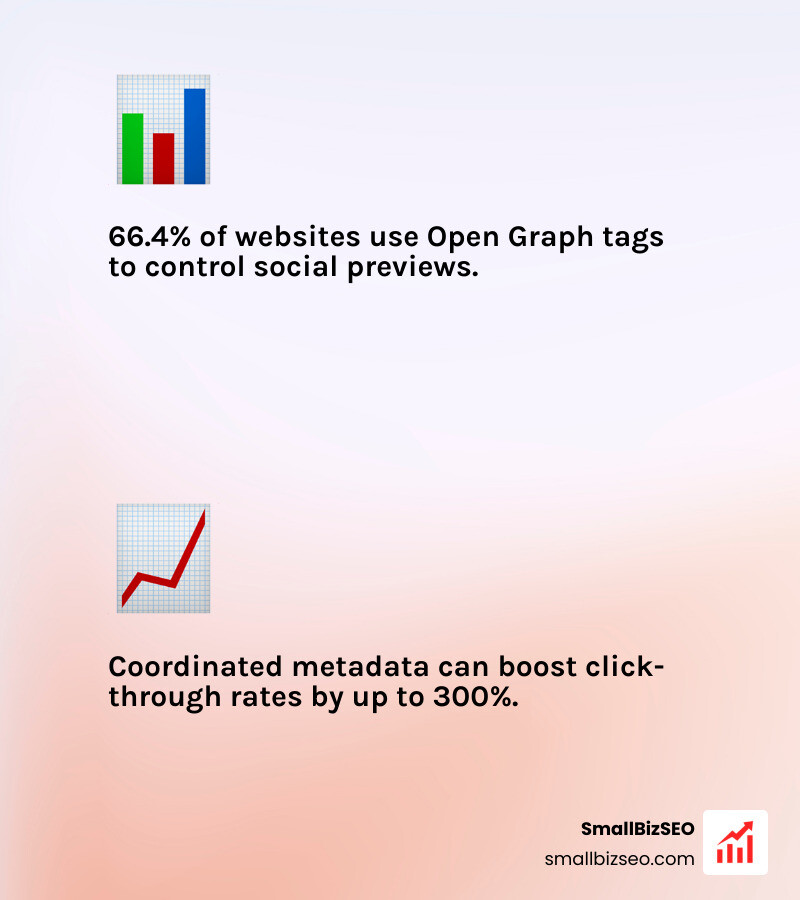
Over 66.4% of all websites use the Open Graph feature to display social media posts attractively and catch attention. Getting these snippets right directly influences your bottom line. For instance, a home furnishings retailer saw a 300% increase in click-through rates after implementing rich product cards across their social links. If your preview tags are broken or misaligned, your shared links display as raw, unclickable text strings or distorted images. Learning how to add X and Open Graph social metadata ensures every share looks intentional, trustworthy, and engaging.
How to Coordinate X (Formerly Twitter) and Open Graph Metadata Across Your Site
To build a reliable social preview foundation, you must understand how these two protocols coexist in your HTML head. Open Graph (OG) is the universal protocol developed by Facebook to turn web pages into rich social objects. Almost every modern platform—including LinkedIn, WhatsApp, Pinterest, Discord, and Slack—reads Open Graph by default.
X Card tags, on the other hand, are proprietary tags built specifically for the X ecosystem. Rather than competing against one another, these systems work in synergy. When you provide a full set of Open Graph tags and pair them with a single card declaration, you establish a lean, unified head architecture that serves every network simultaneously without bloating your code.
How Open Graph and X Card Tags Interact and Fall Back
What happens if you omit X-specific tags entirely? X looks for its own tags first; if none are found, it falls back to your standard Open Graph tags.
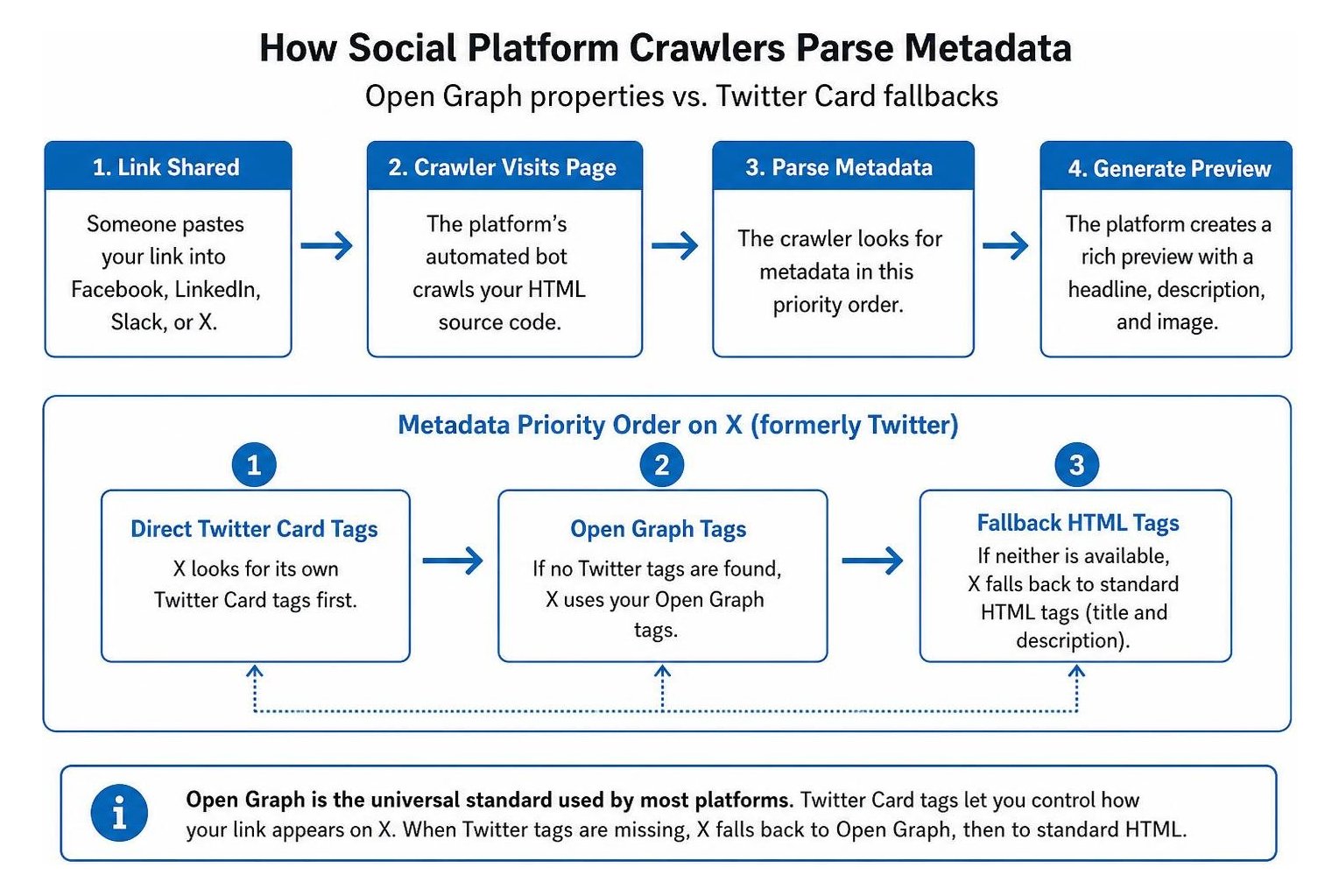
The X parser prioritizes metadata in this specific sequence:
- Direct X Card (
twitter:card) tags - Standard open graph tags
- Fallback HTML tags (such as standard title and description elements)
The primary reason to include dedicated X Card (twitter:card) metadata alongside Open Graph is to dictate the display layout (such as a large hero banner versus a compact square thumbnail) or to customize your copy specifically for the fast-scrolling feed on X.
A critical technical detail often overlooked in technical SEO is the difference between HTML attributes. Open Graph tags use the property attribute, whereas X Card tags use the name attribute. While some platforms gracefully parse mixed attributes, sticking strictly to the official standard prevents unexpected parser failures across less forgiving crawlers, as detailed in this X Card tag reference guide.
| Open Graph Property | X Card Tag Equivalent | Purpose | Required or Optional |
|---|---|---|---|
| og:title | twitter:title | Headline of the shared link | Required |
| og:description | twitter:description | Brief synopsis or summary copy | Required |
| og:image | twitter:image | Absolute URL of the preview image | Required |
| og:url | twitter:url | Canonical destination URL | Required |
| og:type | N/A (Handled via twitter:card) | Classifies the content object | Required for OG |
| N/A | twitter:card | Sets card style (e.g., summarylargeimage) | Required for X |
| og:image:alt | twitter:image:alt | Accessible image description | Highly Recommended |
| og:site_name | twitter:site | Brand name or platform handle | Recommended |
How to Coordinate X (Formerly Twitter) and Open Graph Metadata for Images and Dimensions
The most common point of friction between social networks is visual rendering. Different platforms apply slightly different cropping rules, which can slice off important logos or text overlays if your artwork is not properly planned.
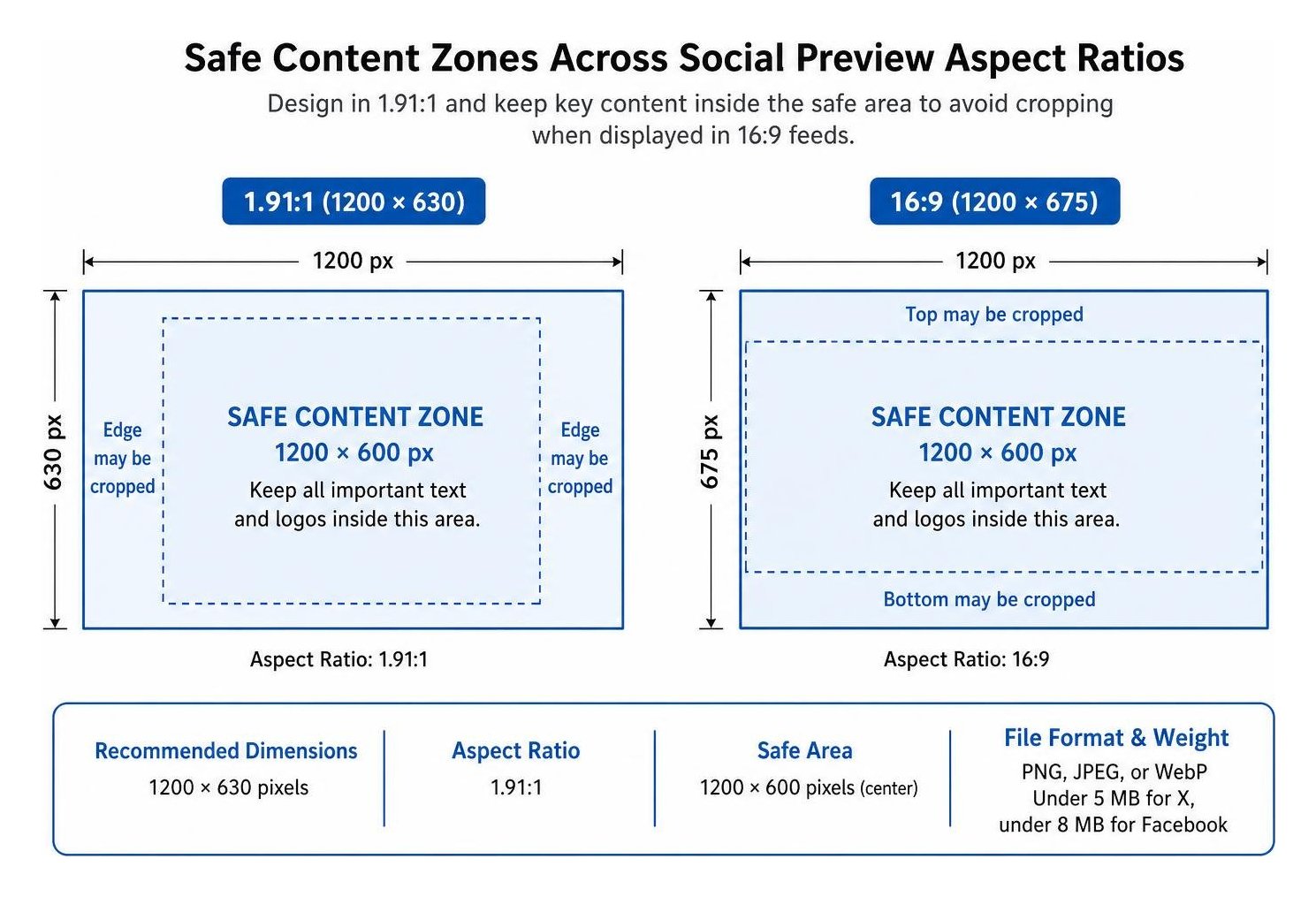
To satisfy every major social network with a single asset, design your primary featured image to these universal specifications:
- Dimensions: 1200 × 630 pixels
- Aspect Ratio: 1.91:1 (which scales down cleanly across feeds)
- Safe Area: Keep all essential typography and logos centered within the inner 1200 × 600 pixel zone to prevent edge cropping on mobile feeds that favor a 16:9 ratio
- File Format & Weight: Use standard PNG, JPEG, or WebP files, keeping total file size under 5 MB for X and under 8 MB for Facebook
Adhering to modern Open Graph image technical standards ensures your images load instantly on mobile networks. Always accompany your visual tags with descriptive alt text via both og:image:alt and twitter:image:alt. Prioritizing accessibility not only supports visually impaired users who rely on screen readers but also strengthens your overall visual content optimization.
How to Coordinate X (Formerly Twitter) and Open Graph Metadata in Core HTML and CMS Setups
Setting up coordinated metadata requires a clean, standard set of tags inside your page's head container. Whether you hand-code static templates or configure dynamic CMS fields, here is the essential tag stack to include on every indexable page:
- Set your standard canonical tag and meta description elements first.
- Add og:type (using "website" for homepages and "article" for blog posts).
- Define og:title, og:description, and og:url using absolute HTTPS URLs.
- Specify og:image along with og:image:width (1200) and og:image:height (630) to help crawlers calculate visual dimensions instantly.
- Define the X Card tag, twitter:card, as summarylargeimage to display a prominent hero card rather than a tiny square thumbnail.
- Provide twitter:site with your brand handle, and optionally override twitter:title or twitter:image if you need custom presentation on X.
Pairing these social markup tags with comprehensive schema markup and broader structured data builds a cohesive technical foundation. This structured clarity aligns your on-page SEO with social unfurling systems, helping both search crawlers and social bots understand your content without ambiguity.
Testing, Caching, and Troubleshooting Metadata Conflicts
Deploying your tags is only half the battle; validating that social networks read and display them accurately is what guarantees real-world performance. Because social platforms cache metadata aggressively to save server bandwidth, updates to your copy or imagery rarely show up immediately unless you trigger a manual re-scrape.
What Tools and Methods Clear Social Cache Instantly?
When you update a featured image or title, platforms will continue showing the old asset until their cached version expires. You can force immediate cache purges using these platform-specific inspection tools:
- Facebook Sharing Debugger: Paste your live URL and click "Scrape Again" to clear Meta's edge cache and view raw parser outputs.
- LinkedIn Post Inspector: Input your link to immediately refresh LinkedIn's preview data and inspect extracted container properties.
- X Composer Preview: Because the standalone validator was integrated directly into the platform, create a draft post in the web composer to check live unfurling and force a cache reset.
- URL Cache Busting: If a platform remains stubborn, add a lightweight query string parameter (such as ?v=2) to your og:image URL. The crawler treats this as a brand-new asset and fetches it instantly without waiting for cache expiration.
What Common Metadata Mistakes Break Social Previews?
When social cards fail to generate, the issue almost always stems from a handful of predictable markup mistakes:
- Relative Image Paths: Social bots cannot resolve relative URLs like
/images/hero.png. All og:image and twitter:image values must be fully qualified absolute URLs starting withhttps://. - Bot Blocking in robots.txt: If your server disallows Twitterbot (X's legacy crawler name) or FacebookExternalHit from accessing your media folders, cards will render without images.
- JavaScript Hydration Delays: Social crawlers do not execute heavy client-side JavaScript. If your single-page app inserts meta tags dynamically after page load, bots will only see blank tags. Always render metadata server-side or via static generation.
- Missing Card Types: Omitting the twitter:card tag entirely may cause X to render a plain link or a small summary box rather than a large image.
Ensuring your metadata functions properly keeps your social branding as sharp as your organic search snippet or rich serp feature listings.
Maximizing Your Social Search Impact
Coordinating your Open Graph and X Card tags gives your brand complete control over how your audience discovers and interacts with your content across the web. By using Open Graph as your core informational layer and layering X Cards on top for platform-specific styling, you maintain a lean, error-free markup architecture that drives higher click-through rates.
If you are ready to refine your metadata and streamline your broader search performance, reach out to SmallBizSEO to coordinate your social metadata and technical SEO today.