How to Optimize Your Facebook Business Page in 5 Easy Steps
How to Optimize Your Facebook Business Page in 5 Easy Steps
How Can You Improve Your Facebook Business Page SEO?
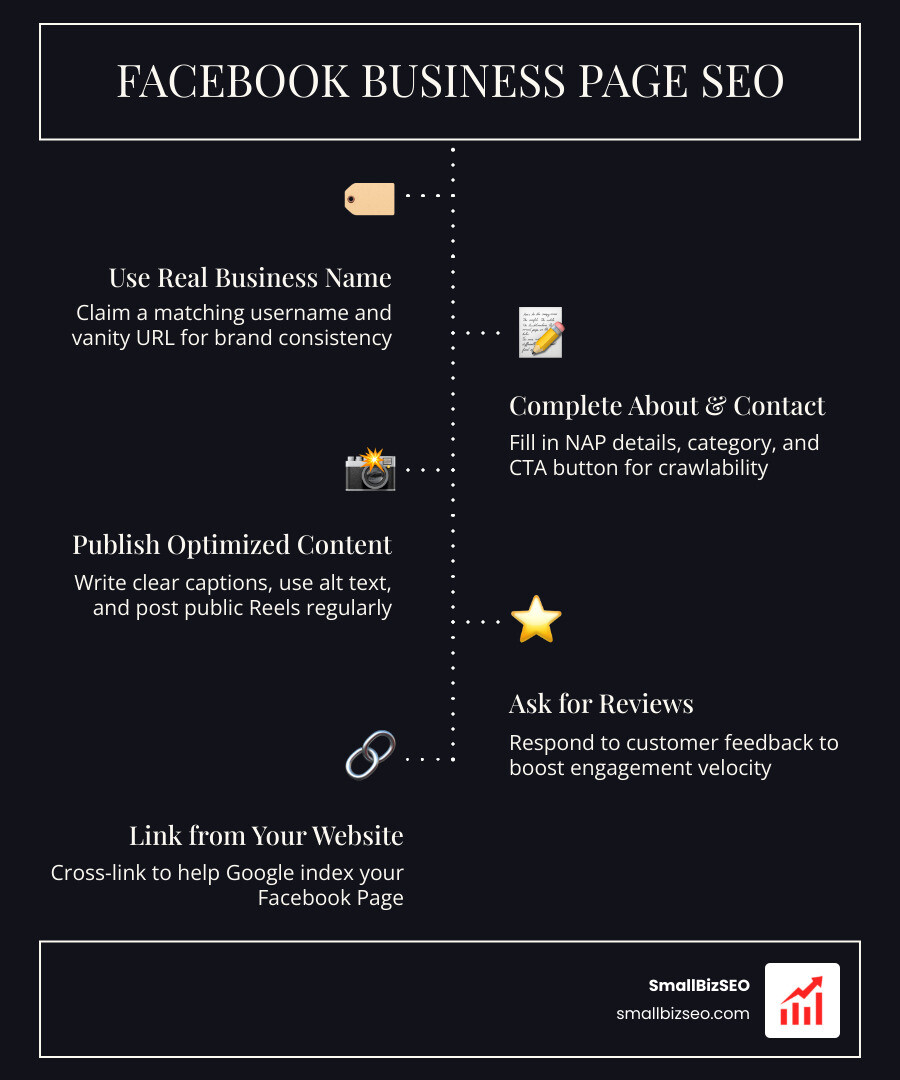
To make your Facebook Business Page easier to find, use your real business name, claim a matching username, and complete your About and contact details. Then publish useful public posts with clear captions and descriptive image alt text. Ask for honest reviews, respond to customers, and link to your Page from your website.
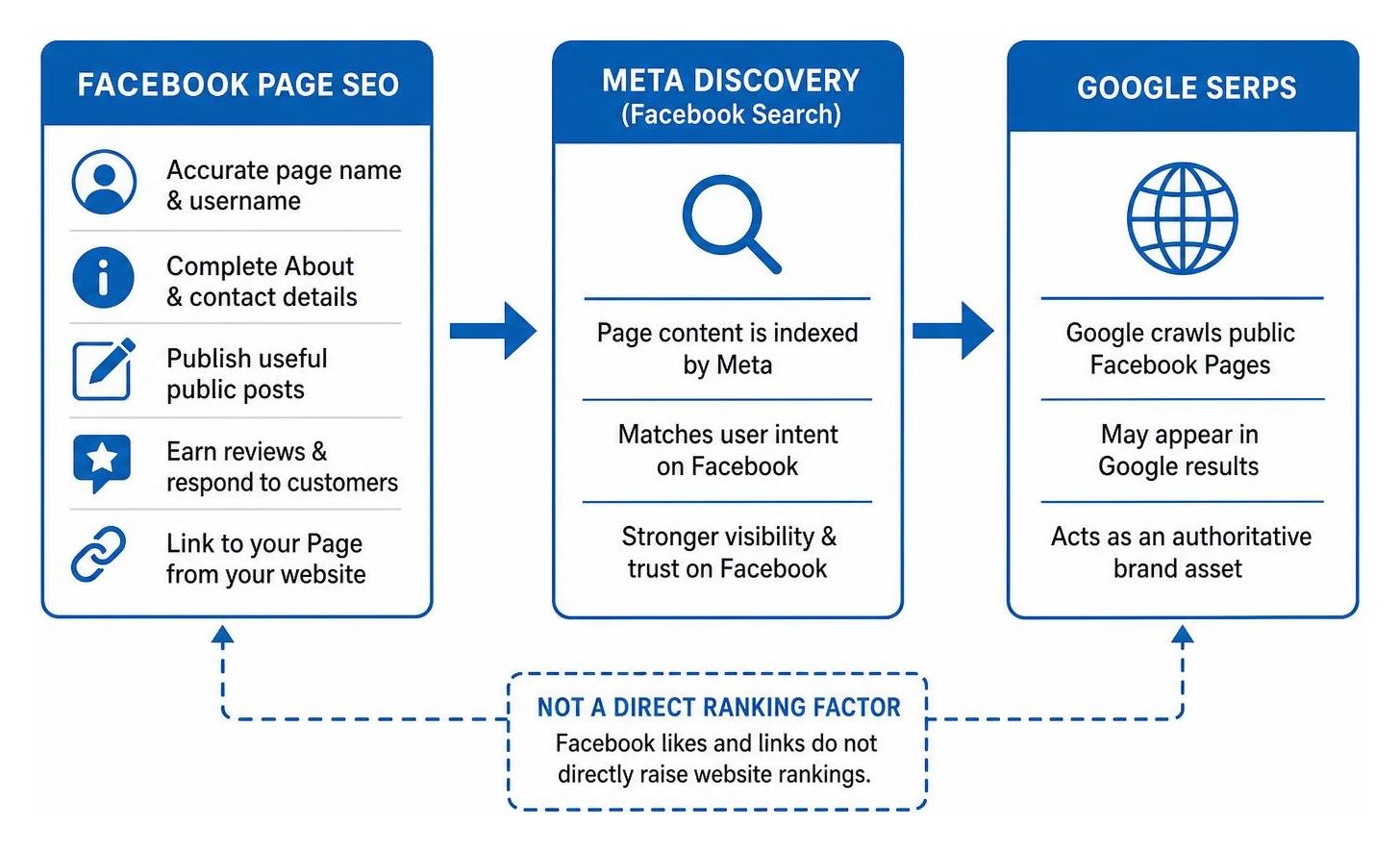
These steps help people find and trust your business on Facebook. A public Page may also appear in Google results, but Facebook likes and links do not directly raise your website's Google rankings.
I'm Clayton Johnson, founder of SmallBizSEO. I help small businesses connect SEO, content, and digital PR to search visibility, and I bring that practical approach to Facebook Business Page SEO.
Discover more about facebook business page SEO:
5 Essential Steps to Master Facebook Business Page SEO
Facebook Business Page SEO involves optimizing your social profile and public posts so they rank higher in Facebook's internal discovery engine and appear as authoritative brand assets in Google search results. Over 2.9 billion monthly active users rely on the platform, and 90% of consumers use social channels to stay connected with culture and discover new products.
When we optimize a page, we treat it like a dedicated search asset. Google crawls public social pages, matching user intent and evaluating overall trust. By strengthening your profile architecture, you capture zero-click searchers and guide ready-to-buy prospects into your conversion funnel.
Step 1: How Do You Optimize Core Page Details and Vanity URLs for Facebook Business Page SEO?
To optimize your core profile details, set your Page name to your exact legal business name, claim a clean vanity username, and complete every field in the About section with natural, descriptive keywords.
A concise vanity URL (such as facebook.com/yourbusiness) makes your brand easier to index on Google and simpler for customers to remember. Your About and Intro sections should immediately state what you offer and who you serve. Research indicates that a fully completed About section can increase follower conversions by up to 35%, while profiles with up-to-date business information receive 50% more views.
Follow these foundational setup rules:
- Choose the Right Primary Category: Pick the category that matches your core offering, then add relevant secondary categories to help Meta classify your services.
- Maintain Exact NAP Consistency: Keep your business Name, Address, and Phone number identical across Facebook, your website, and your directory listings.
- Add a Direct Call-to-Action (CTA): Use action buttons like "Contact Us," "Shop Now," or "Book Now" to funnel visitors directly to key landing pages.
- Implement Proven Profile Practices: Review actionable Facebook page setup tips and consult our comprehensive local SEO guide to align your profile details with broader search best practices.
Step 2: What Content Tactics and Alt Text Boost Your Search Visibility?
To make your content rank in social and external search, write your first sentence like an article headline, replace automated image descriptions with custom alt text, and prioritize engaging short-form video.
Google often extracts the first 12 to 13 words of a public Facebook post as its search title. Front-loading your primary topic in that opening line makes individual posts crawlable assets. Furthermore, 46% of consumers say unique, creative media makes a business stand out.
To maximize post reach:
- Front-Load Important Keywords: Place primary service phrases in the opening sentence of each caption.
- Update Image Alt Text: Replace generic automated text with concise descriptions that explain the photo accurately.
- Publish Reels and Video: Short-form videos generate stronger organic distribution in Meta algorithms than plain text.
- Maintain a Steady Cadence: Establish a regular posting schedule to build consistent topical authority.
- Leverage Professional Copy: When scaling your strategy, our dedicated SEO content services ensure every caption matches search intent while engaging human readers.
Step 3: How Can You Build Backlinks and Index Your Page on Google?
To ensure your Facebook Page appears in Google search results, verify that external search indexing is turned on in your Page settings and build inbound links from your website and digital profiles.
Inside your Page settings, ensure the option asking if you want search engines outside of Facebook to link to your profile is enabled. Link to your Facebook Page from your website header, footer, blog posts, and team email signatures. While Facebook routes external outbound links through redirects marked with rel="nofollow", earning links to your Facebook Page builds authoritative crawl paths.
Understanding the relationship between social media & local SEO impact helps clarify how social activity drives branded search queries and user discovery.
| Optimization Factor | Internal Facebook Search | External Google SERPs |
|---|---|---|
| Page Name & Username | Matches direct query intent | Generates URL slug and Title Tag |
| Post Opening Line | Drives feed relevance and engagement | Extracted as SERP snippet title |
| Outbound Links | Provides click paths for users | Nofollow (does not pass PageRank) |
| Inbound Backlinks | Minimal internal impact | Boosts Page crawlability and SERP authority |
| NAP Consistency | Helps local category discovery | Reinforces local search citation trust |
Step 4: How Do Customer Reviews and Social Engagement Drive Rankings?
Customer reviews and fast comment interactions boost your visibility by signaling authority to Meta's distribution models and building social trust that improves search conversion rates.
More than a billion people message businesses on Facebook each week. Meta's algorithms prioritize engagement velocity—how quickly people comment, share, and react after a post goes live. Turning on public reviews creates user-generated content that search engines can read. Pages with active, positive reviews see higher click-through rates from search results, and responding promptly to inquiries builds measurable brand credibility.
If managing social community signals feels overwhelming, partnering with a dedicated social media SEO company can help you systematize review monitoring, maintain prompt response rates, and drive steady organic discovery.
Step 5: Which Mistakes Should You Avoid to Protect Your Facebook Business Page SEO?
To protect your organic reach, avoid keyword stuffing in your Page name, never set essential posts to private, and ensure you do not publish low-quality automated spam.
Steer clear of these frequent errors:
- Keyword Stuffing the Business Name: Adding spammy keyword strings to your official title violates Meta guidelines and looks unprofessional.
- Restricting Page Visibility: Setting posts to private or placing unnecessary age/country restrictions prevents Google from indexing your content.
- Neglecting Inbound Inquiries: Ignoring customer messages or leaving reviews unanswered lowers your responsiveness score and reduces customer trust.
- Inconsistent Contact Details: Displaying phone numbers or addresses that differ from your website harms your local citation profile.
- Hashtag Overuse: Adding dozens of hashtags clutters copy; limit hashtags to 2 to 4 relevant tags per post.
Measuring Results and Next Steps for Long-Term Growth
Measuring your Facebook search performance requires monitoring organic impressions, referral sessions, and engagement signals across analytics platforms.
At SmallBizSEO, we implement our data-driven "Velocity" framework to help businesses build sustainable visibility across all organic channels. If you are ready to evaluate how your social profiles and website perform together, request our comprehensive SEO visibility audit for a clear, actionable analysis.
How Do You Track Ranking Success and Measure Organic Growth?
To evaluate your Facebook SEO performance, track your metrics across Meta Business Suite and Google Analytics 4 (GA4).
Focus on these essential indicators:
- Branded Search Volume: Track whether direct Google searches for your business name increase as your social reach expands.
- GA4 Referral Traffic: Monitor referral sessions coming from
facebook.comandl.facebook.comto see how many users visit your website. - Engagement Velocity: Review Meta Business Suite to identify which post formats earn the fastest shares, clicks, and replies.
- Search Console Visibility: Look for impressions of your public Facebook URLs inside Google Search Console to verify external indexing.
By maintaining accurate profile details, publishing helpful keyword-aligned posts, and engaging with your audience, your Facebook Page becomes a reliable asset for ongoing customer discovery.