The Ultimate Guide to Google Analytics Audits

The Ultimate Guide to Google Analytics Audits
Why Data Accuracy Matters: Common Tracking Failures
A Google Analytics audit is a comprehensive technical evaluation of your tracking setup to ensure data accuracy and measurement integrity. To perform a Google Analytics audit, evaluate foundational property settings, verify tag manager container architecture, inspect custom event parameters, test conversion triggers, review acquisition channel attribution rules, and ensure privacy consent compliance.
Working with skewed analytics numbers is far more dangerous than having no data at all. When reports fail quietly, teams end up pouring budget into low-converting campaigns, misjudging organic growth, or trusting vanity metrics. Upstream tracking failures quickly undermine business forecasting.
Client-side JavaScript tracking inherently loses a small fraction of information to network latency, ad blockers, and browser privacy restrictions. A regular baseline discrepancy of 10% to 15% between analytics platforms and backend systems like Shopify or custom CRM databases is standard across the web. However, serious tracking gaps emerge when technical problems create compounding distortions.
When tracking snippets break, the damage mirrors what happens during site crashes outlined in The Ultimate Guide To Seo Audit Errors What Literally Happens When Your Site Breaks. Common culprits include double-counting transactions on thank-you page reloads, duplicate tracking containers firing on every template, and untracked cross-domain journeys that turn paying customers into self-referrals.
Core Reasons for Data Inaccuracies in Measurement
Most tracking errors stem from everyday operational changes rather than bad platform code:
- Broken Triggers and Plugins: Standard CMS plugins or theme updates can overwrite custom data layers, breaking event triggers.
- Payment Gateway Overrides: Redirecting buyers to third-party processors without proper referral exclusion lists wipes out original traffic sources, crediting sales to payment vendors.
- Teething Trigger Logic: Form tags configured to fire on simple field clicks instead of verified form submissions inflate conversion metrics.
- Cookie Consent Misconfigurations: Paused or improperly sequenced consent banners either block legitimate tracking or track users before permission is granted, violating user privacy.
Many brands resolve these issues by conducting systematic measurement audits to clean up legacy data collection pipelines.
Recognizing Distortions Versus Critical System Blockers
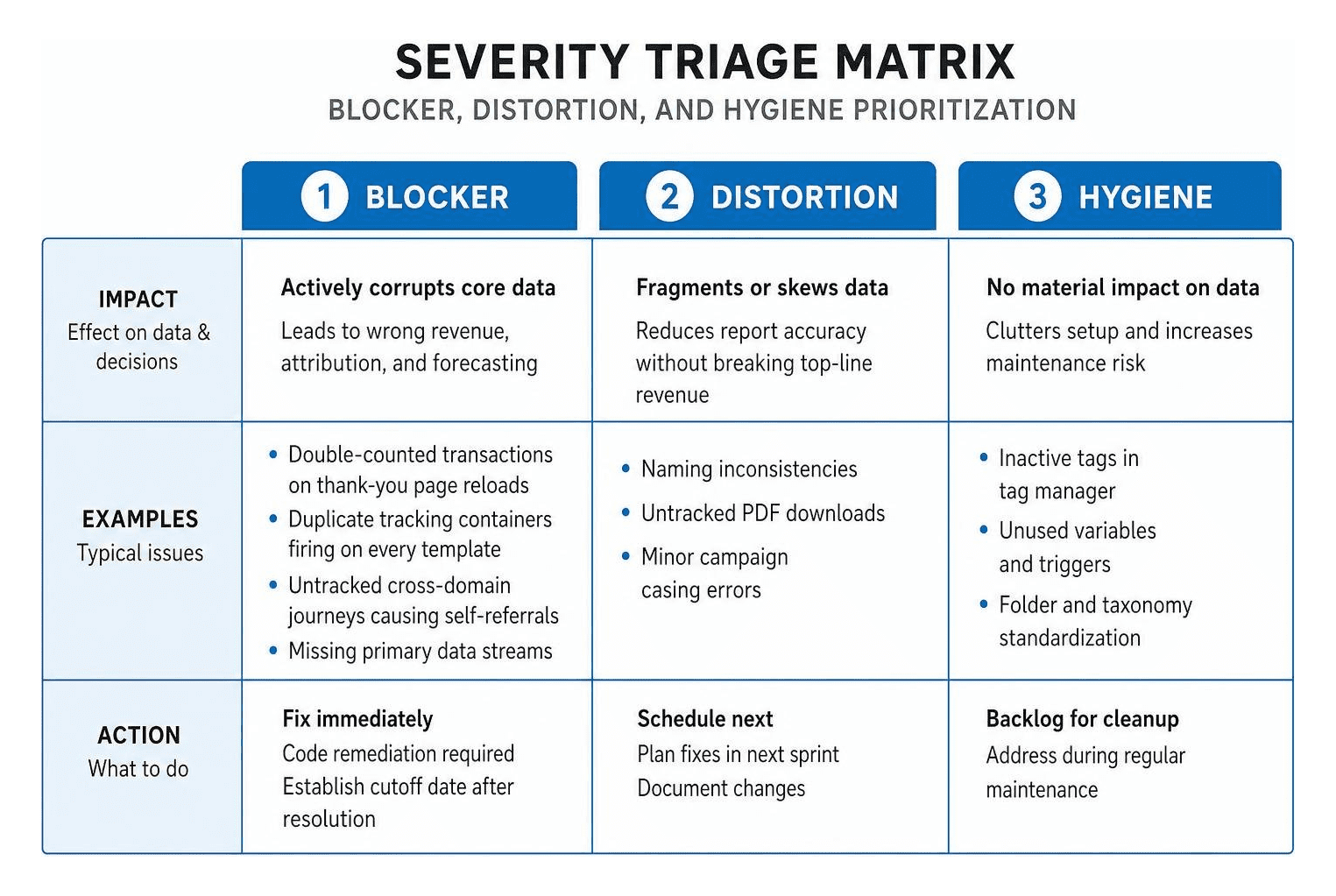
Not every analytics issue carries equal weight. Effective governance requires triaging findings based on their operational impact:
- System Blockers: Critical setup flaws that actively corrupt core financial data, such as double-counted revenue or missing primary data streams. These require immediate code remediation.
- Data Distortions: Naming inconsistencies, untracked PDF downloads, or minor campaign casing errors that fragment reporting tables without breaking top-line revenue calculations.
- Hygiene Backlog: Housekeeping tasks like archiving inactive Google Tag Manager tags or standardizing folder hierarchies.
Because web analytics platforms do not repair historical data retroactively, establishing a documented cutoff date after resolving major blockers ensures clean before-and-after reporting.
The Step-by-Step Google Analytics Audit Process
A structured evaluation ensures that every layer of data collection—from tag management containers to admin settings—functions cleanly.

Much like running a Detailed Seo Analysis, inspecting your measurement stack requires a methodical approach that covers both configuration settings and live user journeys.
Preparing Your Google Analytics Audit Framework
Before touching production settings, prepare your auditing environment:
- Secure Proper Access: Ensure you have Administrator or Editor permissions in the analytics property and Publish permissions in Google Tag Manager.
- Scope the Architecture: Define whether the review covers a single marketing site, a multi-domain ecosystem, or connected mobile applications.
- Gather Documentation: Review existing measurement plans, conversion definitions, and recent website update logs.
- Isolate Staging: Use Tag Assistant and DebugView tools to test events in development environments before deploying updates to production.
Reviewing Core Property and Tag Management Settings
Start by verifying foundational account settings:
- Data Retention: Standard properties default event-level data retention to two months. Extend this setting to fourteen months to support year-over-year reporting.
- Timezone and Currency: Align reporting time zones and currencies with your primary accounting and billing platforms.
- Internal Traffic Filters: Verify that internal IP address filters for employees and contractors are set to "Active" rather than left in "Testing" mode.
- Container Hygiene: Remove orphaned tags, obsolete triggers, and development sandbox scripts from your Google Tag Manager container to optimize site performance.
Auditing Custom Events and Conversion Tracking
Modern measurement platforms rely on an event-based data model. Every user interaction must adhere to strict naming conventions to keep reports organized.
| Event Type / Feature | Recommended Parameter Schema | Default Enhanced Measurement Behavior | Best Practice Configuration |
|---|---|---|---|
| Page Views | page_location, page_title |
Automatically enabled | Fire once per URL change; disable duplicate hardcoded tags |
| Purchase | transaction_id, value, currency, items |
Not captured by default | Require unique transaction_id deduplication via dataLayer |
| Form Submissions | form_id, form_name |
Often fires on field click | Disable automated trigger; deploy custom submit listener |
| File Downloads | file_name, file_extension |
Automatically enabled | Retain default unless using custom CMS download trackers |
| Outbound Clicks | link_url, link_domain |
Automatically enabled | Disable if custom click tags manage outbound affiliate links |
Always format event and parameter names in clean snake_case (such as generate_lead or add_to_cart) to prevent duplicate rows in reports.
Validating Acquisition Channels and UTM Attribution
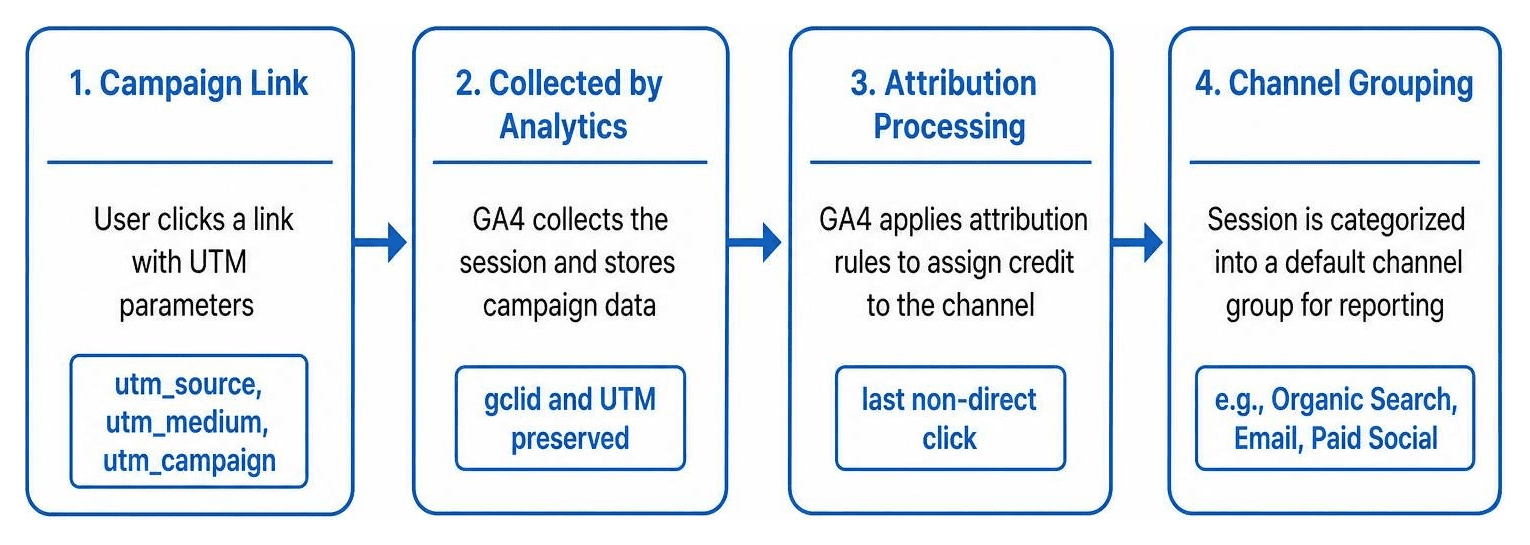
Poor URL tagging quickly pollutes acquisition channels. For instance, an audit can reveal that a high percentage of incoming traffic falls into the "Unassigned" channel group simply because marketing teams mixed uppercase and lowercase letters in campaign tags or used non-standard medium names.
Following the guidelines in a Google Analytics Audit Checklist: A Complete Guide helps standardize campaign tagging rules. Check that URL redirects across your site preserve gclid parameters and campaign query strings without stripping them during HTTP-to-HTTPS hops.
Data Privacy, Consent Mode, and Compliance Checks
Modern data collection must respect user privacy and adhere to international regulations:
- Personally Identifiable Information (PII): Scan site search queries and page URLs to confirm that customer email addresses, phone numbers, or passwords are never passed in query strings.
- Consent Management Integration: Verify that marketing and advertising tags do not execute before a visitor grants explicit consent through your cookie banner.
- Cross-Domain Linkers: Ensure that sessions moving between subdomains or third-party checkout flows carry linker parameters (
_gl) to preserve session integrity without duplicating user IDs.
Automated Tools vs Manual Google Analytics Audit Methods
Both automated audit software and manual human reviews play distinct roles in maintaining accurate data.
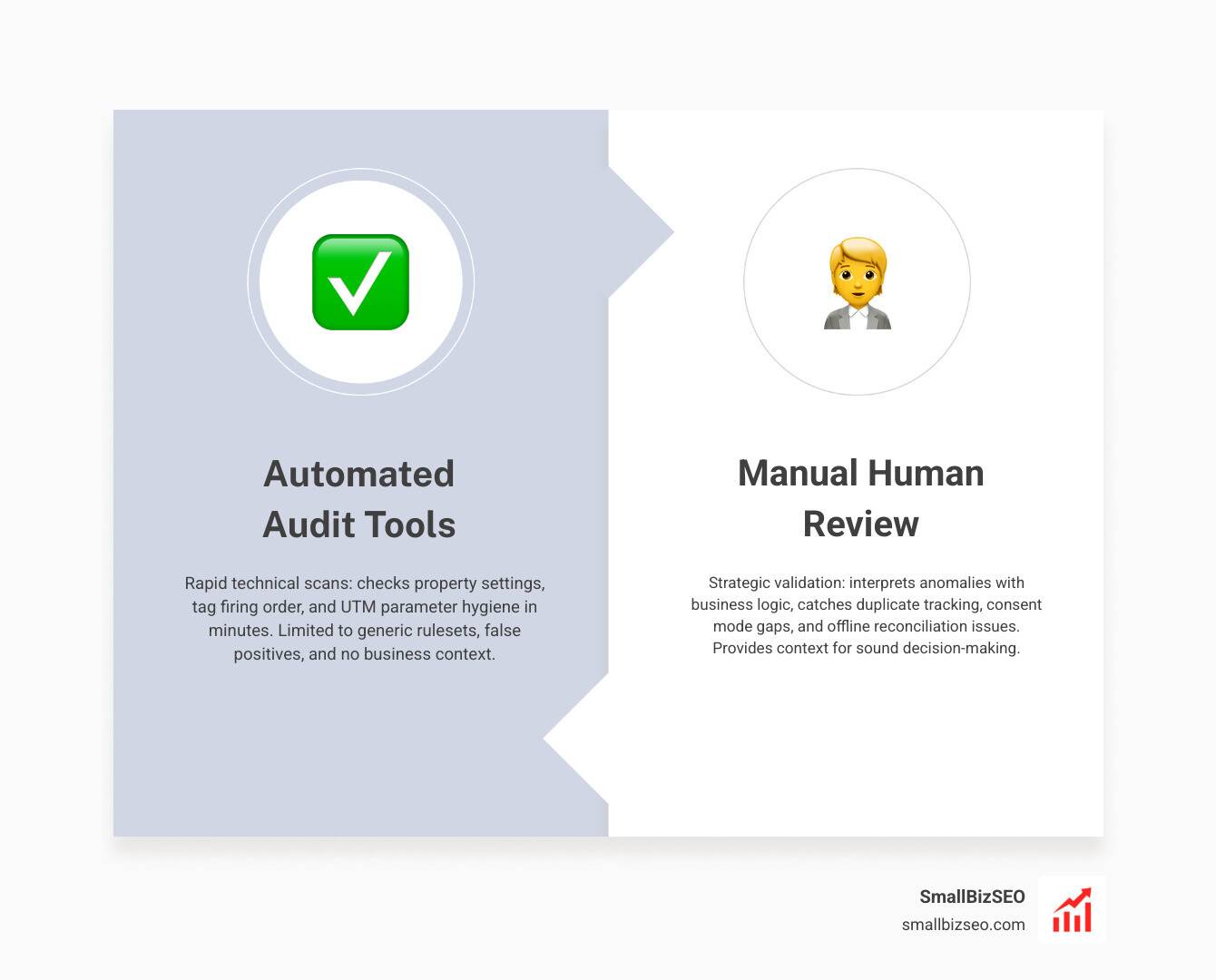
Deciding how to balance automated scans and human analysis follows the same logic explored in Paid Seo Audits Vs Free Tools Is It Worth The Money. Automated checkers excel at rapid technical scans, while human analysts provide the business context required for sound decision-making.
Key Limitations of Automated Audit Tools
While automated tools can scan hundreds of property settings in minutes, they come with natural constraints:
- Zero Business Context: An automated crawler cannot know whether a 30% drop in contact form completions represents a broken trigger or an intentional update to the checkout flow.
- Generic Rule Applications: Tools often flag missing third-party ad integrations as critical errors, even for businesses that do not run paid search campaigns.
- Regulatory Blind Spots: Automated platforms cannot determine whether advanced identity stitching complies with specialized industry rules, such as healthcare privacy standards.
- Attribution Nuance: Scanners can identify whether UTM parameters exist, but they cannot tell if a paid search ad was accidentally tagged with organic search parameters.
Essential Features in Modern Analytics Quality Tools
When selecting diagnostic software for ongoing quality checks, look for these core features:
- Direct API validation for property settings and stream configurations
- Automated detection of duplicate page view tags and orphaned container snippets
- Event schema verification against standard dataLayer parameters
- Real-time anomaly alerts for sudden spikes in unassigned traffic or drops in key transactions
- Raw event exports and data stream validation
Building an Actionable Remediation and Maintenance Plan
An audit deliverable that merely lists errors without an execution framework will not solve tracking problems. Transform your findings into a practical roadmap.

Use an impact-versus-effort matrix to schedule fixes efficiently:
- Immediate Wins (High Impact, Low Effort): Update data retention to fourteen months, activate internal IP filters, and adjust timezones.
- Core Sprints (High Impact, High Effort): Rebuild the e-commerce dataLayer, deploy server-side deduplication, and standardize event naming schemas.
- Governance Tasks (Low Impact, Low Effort): Archive legacy GTM containers and clean up unused custom dimensions.
- Strategic Backlog (Low Impact, High Effort): Set up custom data warehouse pipelines and advanced multi-touch attribution dashboards.
Establishing Ongoing Health Checks and Governance Cycles
Tracking setups are not set-and-forget systems. Every website redesign, plugin update, or marketing campaign introduces potential failure points.
Partnering with an experienced Technical Seo Company helps ensure that measurement systems evolve smoothly alongside technical site enhancements. Review your core data pipelines quarterly, test event triggers after major website deployments, and set up automated alerts to catch sudden traffic fluctuations.
Frequently Asked Questions About Google Analytics Auditing
How often should an analytics audit be performed?
Conduct a comprehensive analytics audit at least twice a year. In addition, run targeted health checks immediately following major website redesigns, CMS updates, payment gateway changes, or cookie consent banner updates.
Can historical data errors be fixed retroactively?
No. Property settings, internal traffic filters, and channel definitions apply only to data collected after those configurations go live. When you fix an error, annotate the deployment date in your reporting tools and establish a clean reporting cutoff date.
What is the acceptable variance between analytics and backend sales?
A variance of 10% to 15% between web analytics and backend systems (such as Shopify or internal order databases) is normal. This gap is caused by browser privacy controls, ad blockers, and users declining tracking consent. If the variance climbs above 20%, investigate potential double-counting, missing confirmation triggers, or payment gateway referral breaks.
Turn Clean Analytics Into Confident Growth
Reliable data is the foundation of every successful marketing strategy, organic search campaign, and conversion optimization plan. When your analytics platform records clean, trustworthy numbers, you can allocate marketing budgets confidently and identify genuine growth opportunities.
We help businesses eliminate technical blindspots and build solid measurement frameworks through our Seo Visibility Audit. Take control of your analytics today to ensure every business decision is backed by verified data.