Why Maintaining AMP Pages Might Be Hurting Your Development Velocity

When Does AMP Maintenance Slow Down Website Updates?
You can tell when AMP maintenance adds unnecessary website complexity: keeping AMP and regular pages in sync, fixing validation errors, and testing changes takes more time than the speed benefit is worth. If your regular mobile pages are already fast, compare their Core Web Vitals, traffic, and conversions with AMP before continuing to maintain both.
I'm Clayton Johnson, founder of SmallBizSEO. My work connecting technical SEO with business goals shapes how I assess when AMP maintenance adds unnecessary website complexity.
When Does AMP Maintenance Add Unnecessary Website Complexity?
Maintaining Accelerated Mobile Pages adds unnecessary friction the moment the technical overhead of running two parallel rendering systems exceeds the performance return. For modern websites, modern browsers and fast hosting deliver exceptional speed without requiring a restrictive secondary framework.

When Google first introduced AMP, mobile networks were significantly slower and responsive design best practices were inconsistently applied across the web. AMP solved a real problem by enforcing strict coding standards and pre-rendering assets. However, research into improving user experience with AMP and broader academic analysis on the impact of mobile optimization show that performance gains stem primarily from stripping away asset bloat rather than the AMP framework itself.
When your team spends hours each month fixing broken AMP validation tags, reconciling analytics discrepancies, or recreating standard interactive features using proprietary components, your development velocity stalls. This friction compounds over time, turning what was once a speed optimization tactic into a legacy engineering burden.
How Does Maintaining Two Codebases Slow Engineering Teams?
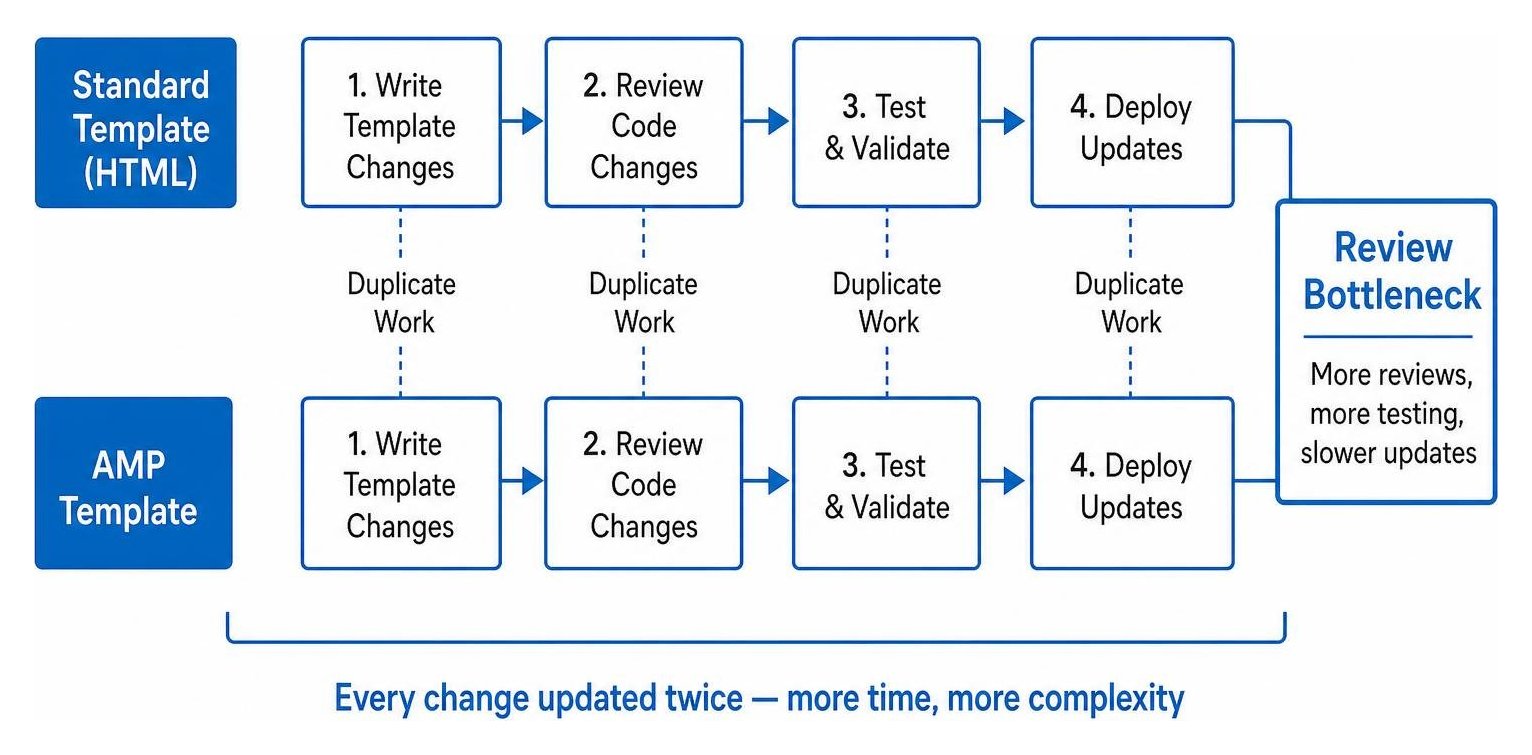
Maintaining two codebases slows down teams by forcing developers to write, review, and test every single template change twice: once for standard HTML and once for AMP.
AMP imposes strict technical limits:
- Custom inline CSS is capped at 75KB per page.
- Author-written custom JavaScript is restricted to 150KB and must run within specific web workers.
- Standard HTML elements are swapped for custom tags (such as using proprietary image and media tags instead of standard markup).
When marketing or product teams launch a new site feature, developers cannot simply deploy standard, reusable components. Instead, they must construct an alternate, stripped-down AMP version that adheres to these rigid limits. As discussed in comparative analyses like WordPress page builders vs custom themes, template bloat and conflicting architectures drastically increase long-term technical debt.
Furthermore, maintaining page parity requires constant vigilance when synchronizing canonical tags and mobile updates. If a canonical link is misplaced or the AMP version drifts from the primary content, search engines may drop the page from indexation or flag parity errors.
How Can AMP Limits Affect Features and Monetization?
AMP limits directly restrict lead generation, interactive user experience, and revenue generation by blocking standard JavaScript tools, complex forms, and flexible ad placements.
Standard digital marketing relies heavily on interactive elements: dynamic pricing calculators, exit-intent lead capture modals, multi-step qualification forms, and personalized product recommendations. Building these features within AMP requires proprietary vendor components that often fail to match the seamless experience of your primary site. Teams managing modern web applications frequently run into major hurdles when managing complex interactive scripts and hydration across parallel mobile templates.
Monetization and tracking also suffer:
- Ad Revenue Caps: AMP restricts custom script execution, limiting sophisticated header bidding wrappers and dynamic ad layouts, which often reduces overall ad viewability and yield.
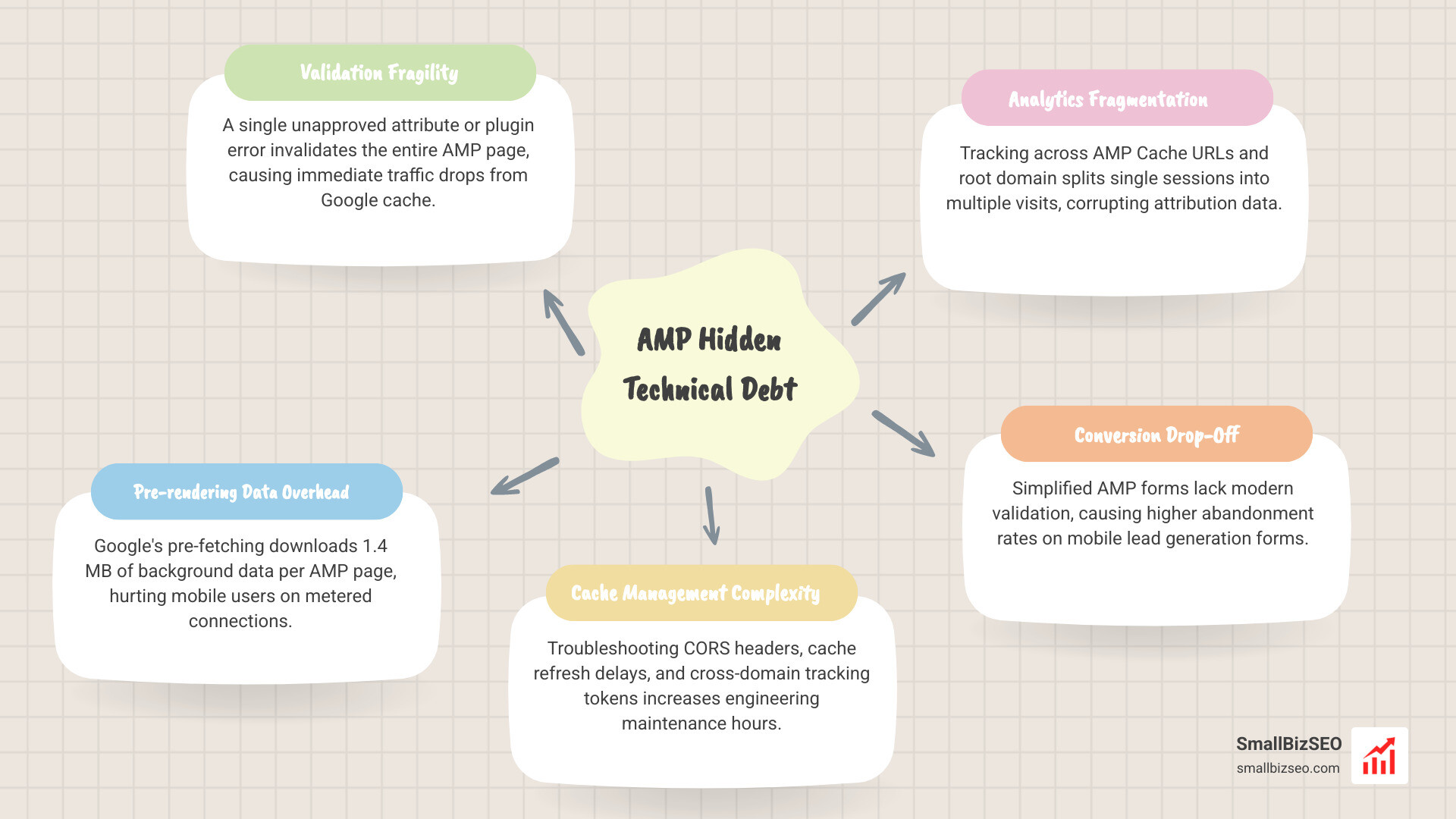
- Analytics Fragmentation: Tracking user journeys across Google AMP Cache URLs and your root domain frequently splits single sessions into multiple visits, corrupting attribution data.
- Conversion Drop-Off: Simplified AMP forms often lack modern validation features, causing higher abandonment rates on mobile lead generation forms.
What Hidden Technical Debt Can AMP Create?
The hidden technical debt of AMP includes persistent validation failures in Google Search Console, resource-intensive cache management, and unexpected data transfer overhead.
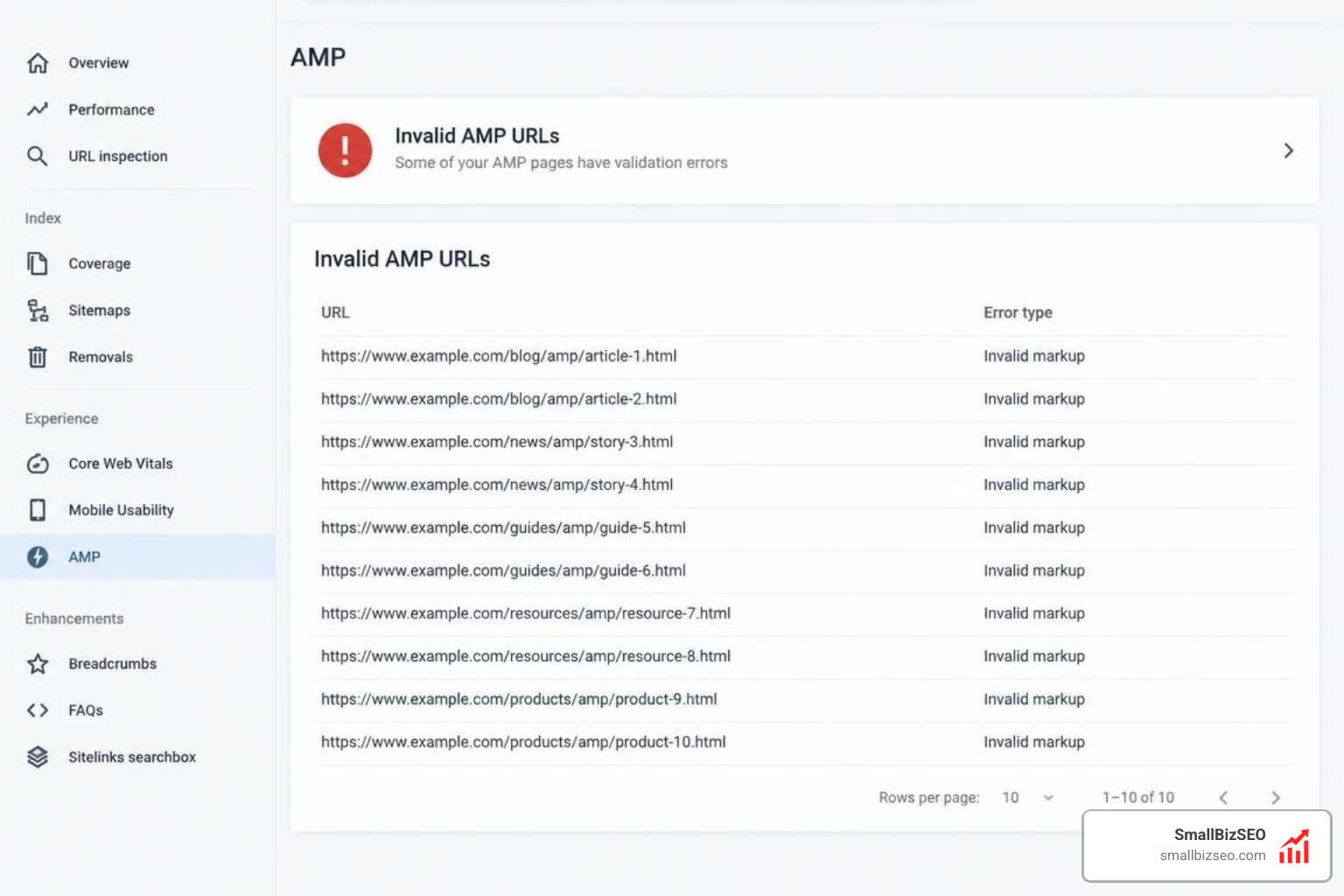
AMP is notoriously unforgiving. A single unapproved attribute or a minor syntax error from a third-party plugin invalidates the entire page. When an AMP page fails validation, search engines stop serving the cached version immediately, causing sudden traffic drops that require urgent developer intervention. Finding and fixing these issues is a core part of resolving crawl and indexing errors during site audits.
In addition to validation fragility, Google's pre-rendering mechanism downloads an average of 1.4 MB of background data per pre-fetched AMP page. For mobile users on metered connections, this unseen data transfer creates a poor user experience before they even click a search result. When you factor in the engineering hours spent troubleshooting CORS headers, cache refresh delays, and cross-domain tracking tokens, the actual maintenance cost becomes disproportionately high.
How Does AMP Compare With Native Core Web Vitals Optimization?
Native optimization delivers comparable or superior mobile speed to AMP without imposing restrictive design constraints or requiring a second codebase.
With Google's Page Experience Update, search rankings evaluate objective performance benchmarks across all pages equally rather than granting exclusive privileges to AMP markup. Approximately 9% of well-optimized standard mobile pages achieve a better SpeedIndex score than their AMP equivalents because they avoid third-party script wrappers and multiple CDN hops.
| Evaluation Metric | AMP Implementation | Native Core Web Vitals Optimization |
|---|---|---|
| Codebase Overhead | Dual templates (HTML & AMP HTML) | Single, unified responsive template |
| Styling & Layout | Max 75KB CSS; strict component limits | Modern CSS, utility frameworks, full design freedom |
| Script Execution | Heavily restricted; custom tags required | Standard JS with modern bundlers & deferral |
| Caching Layer | Google AMP Cache proxy | Edge caching via standard modern CDN |
| Analytics Accuracy | Prone to cross-domain session splitting | Clean, single-domain tracking |
| Maintenance Workload | High (ongoing validation & parity checks) | Low (single deployment pipeline) |
By implementing clean responsive design, compressing assets with modern formats like WebP or AVIF, and fine-tuning server response times, your primary site can easily achieve green scores across all Core Web Vitals metrics without the headache of dual-template maintenance.
How Can You Decide Whether AMP Is Still Worth Maintaining?
You can decide if AMP is worth maintaining by conducting an audit that measures mobile conversion rates, development hours spent on AMP fixes, and your current organic search traffic distribution.

Google no longer requires AMP for inclusion in Top Stories carousels or mobile search features. To determine whether you should keep or remove your AMP setup, evaluate your current performance against this operational checklist:
- Calculate Engineering Hours: Track how much time your developers spend troubleshooting validation errors and synchronizing marketing updates across AMP templates.
- Review Core Web Vitals on Canonical Pages: Test your non-AMP mobile pages in PageSpeed Insights. If your standard pages already pass Largest Contentful Paint (LCP) and Interaction to Next Paint (INP), AMP provides zero ranking advantage.
- Audit Mobile Conversion Rates: Compare lead generation and e-commerce conversion rates between AMP URLs and regular mobile URLs. Standard pages almost universally convert higher due to superior UX flexibility.
- Inspect Traffic Attribution: Check if AMP URLs are causing high bounce rates or split sessions in your analytics reports.
If your canonical pages are fast and AMP maintenance is consuming valuable engineering cycles, you can safely transition away. Review our guide to demystifying technical performance signals and follow a proven step-by-step AMP sunsetting strategy to remove the framework without causing 404 errors or ranking drops.
How Can You Move to Modern Web Performance Standards?
Transitioning from AMP to a high-velocity, single-codebase architecture begins with optimizing your primary templates to pass Core Web Vitals natively.
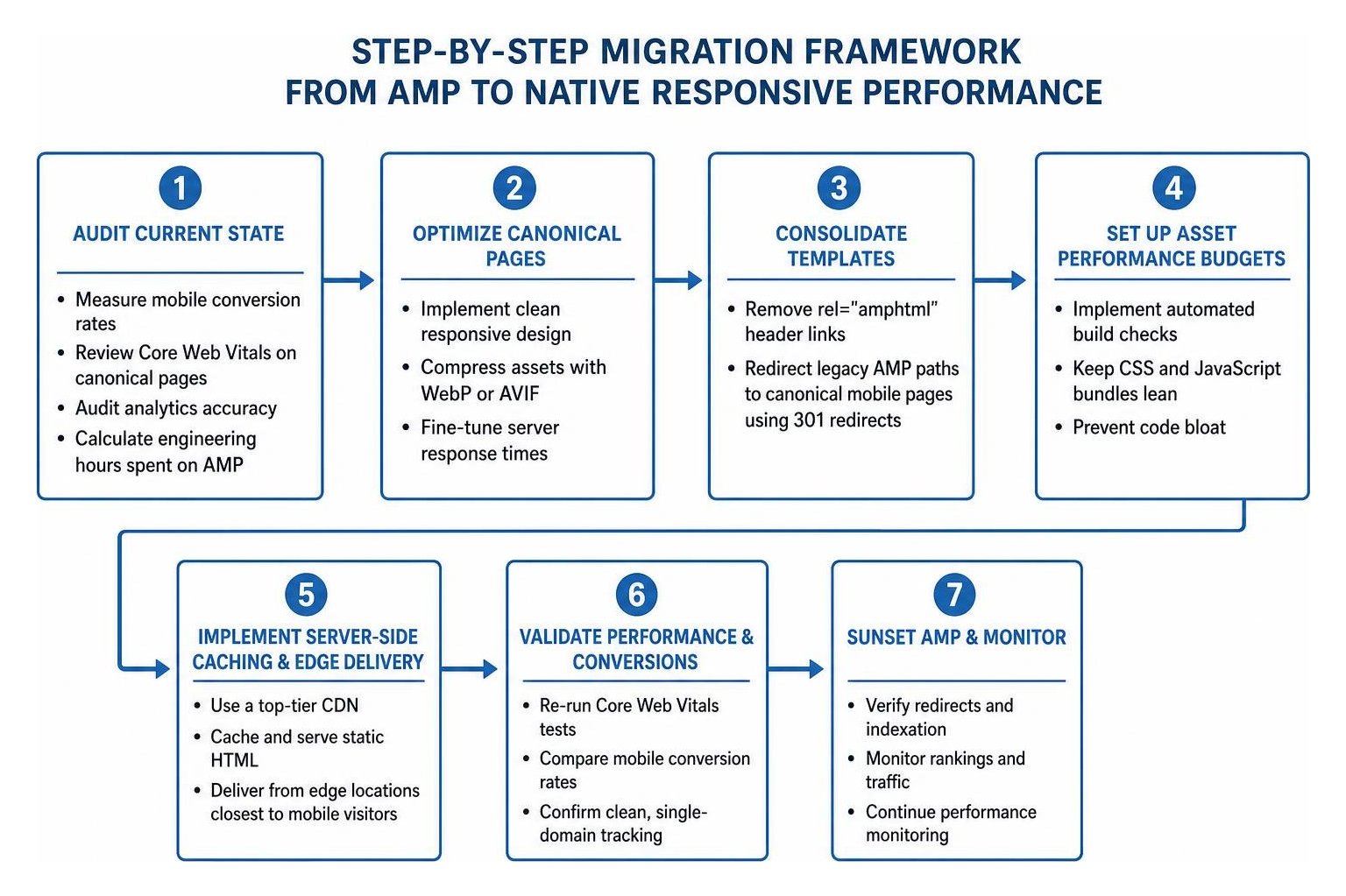
To retire your AMP pages and accelerate your development cycle:
- Consolidate Your Templates: Remove the
rel="amphtml"header links pointing to your AMP URLs and redirect legacy AMP paths directly to your canonical mobile pages using 301 permanent redirects. - Set Up Asset Performance Budgets: Implement automated build checks to keep your CSS and JavaScript bundles lean, preventing the code bloat that AMP originally tried to eliminate.
- Implement Server-Side Caching and Edge Delivery: Use a top-tier CDN to cache and serve static HTML at edge locations closest to your mobile visitors.
- Optimize Visual Elements: Use responsive image syntax (
srcset), modern image compression, and explicit height/width attributes to prevent Cumulative Layout Shift (CLS). - Automate Real-User Monitoring: Track Core Web Vitals continuously inside Google Search Console to catch real-world performance regressions instantly.
If you are ready to eliminate unnecessary development complexity and ensure your primary website delivers rapid mobile load times, we can help. Partner with our team to streamline your technical SEO and schedule a full mobile performance evaluation today.