A Diagnostic Field Guide for Visibility Loss Without Manual Actions
What should you do when organic visibility drops without a manual action?
Start diagnosing visibility loss without a manual action on a small business website by confirming the drop in Google Search Console, segmenting performance by core service pages and queries, and ruling out technical crawl barriers before editing copy. For small business websites with compact page structures, losing organic visibility on just two or three primary lead-generation pages can severely impact incoming calls and inquiries. A blank Manual Actions report confirms that Google has not issued a human penalty, meaning the loss stems from automated algorithm re-evaluations, technical site errors, or shifting search intent.
I'm Clayton Johnson, founder of SmallBizSEO. My work in SEO, content, and digital growth strategy shapes this approach to diagnosing visibility loss without a manual action: find evidence of the cause before choosing a fix.
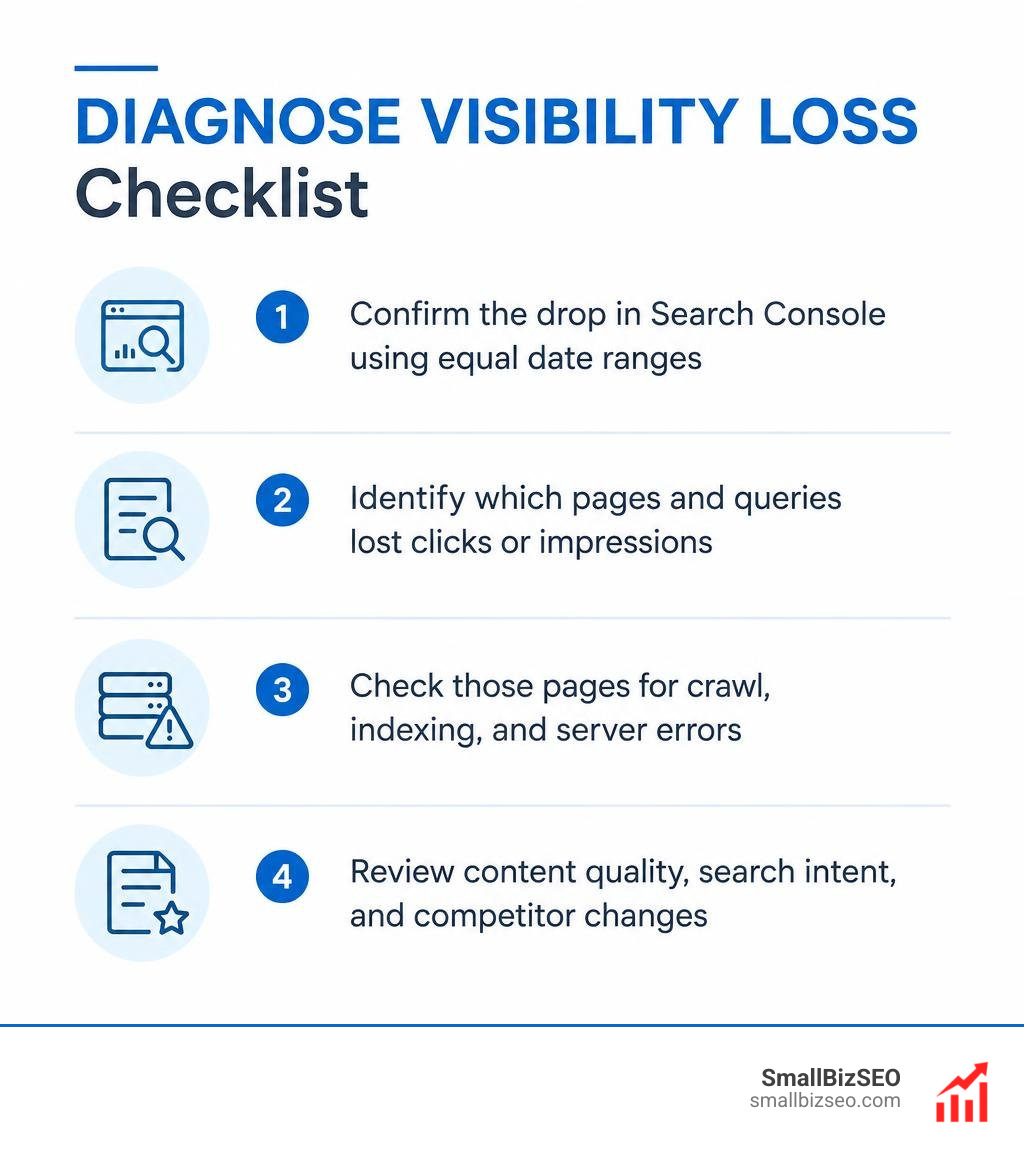
When search impressions decline on a small business site, business owners often react by overhauling page copy or buying disavow tools. However, rushing into broad changes makes it difficult to identify the true problem. Instead, follow a disciplined process of elimination tailored to small business site constraints: verify that the traffic drop is real, isolate the affected service or article URLs, eliminate CMS and hosting bottlenecks, evaluate content relevance against top search results, and review competitor movements.
How should you diagnose visibility loss without a manual action?
To diagnose visibility loss on a small business website, compare matching performance periods in Google Search Console to verify a genuine decline, segment traffic across core service templates, and inspect technical blockers, content relevance, and competitor movements in a fixed sequence.
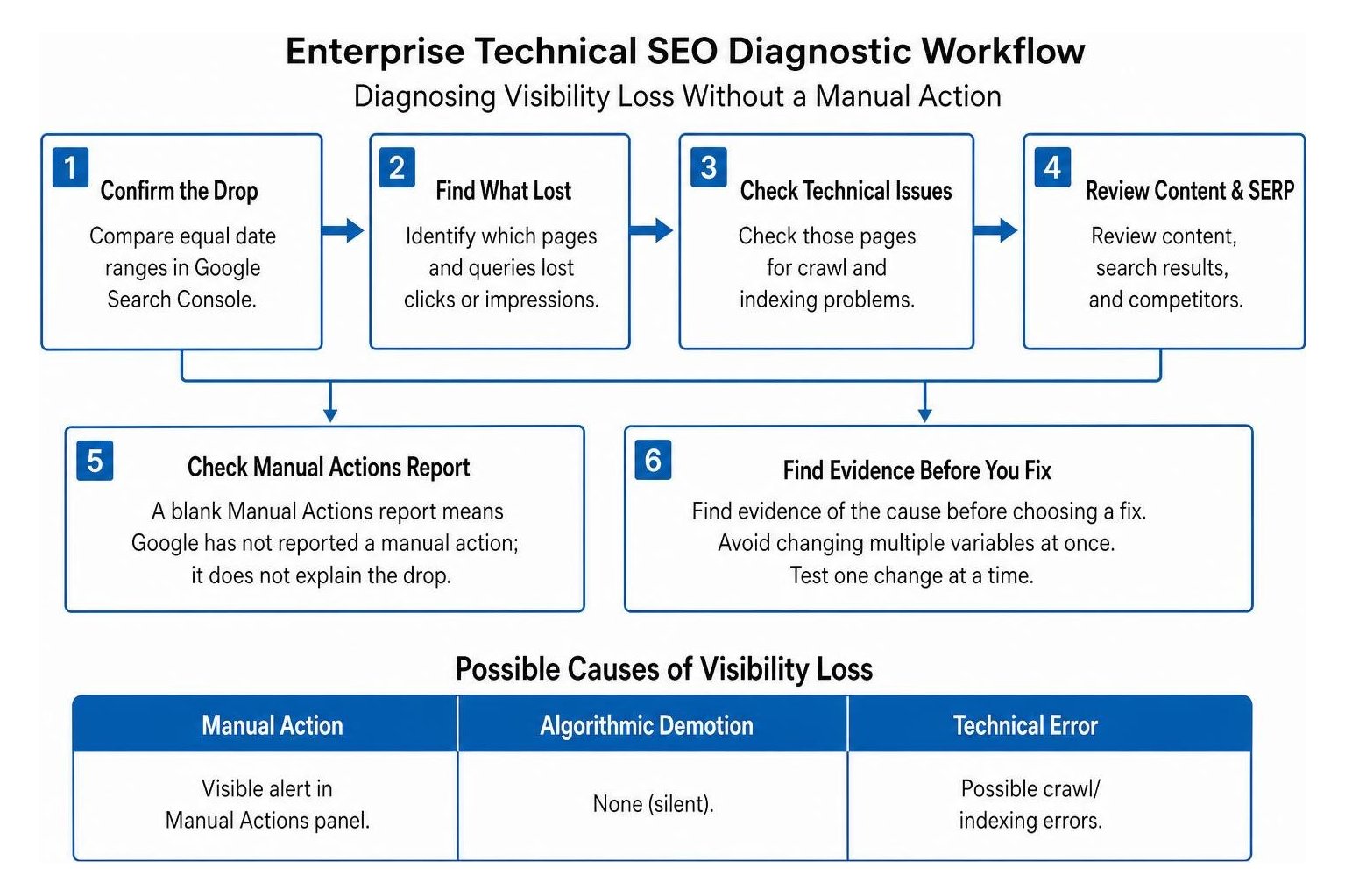
A sudden drop above 15% across monthly organic trends warrants immediate investigation. For small business websites operating with limited marketing bandwidth, avoid modifying multiple variables simultaneously. Changing service page copy, canonical tags, and navigation menus at the same time clouds performance data and makes it impossible to determine what caused the drop or what resolved it.
| Characteristic | Manual Action | Algorithmic Demotion | Technical Error |
|---|---|---|---|
| GSC Notification | Visible alert in Manual Actions panel | None (silent) | Possible crawl/indexing errors |
| Drop Pattern | Instant, cliff-like drop across pages | Step-change or gradual decline | Instant drop on affected URLs |
| Resolution Method | Fix violation & submit reconsideration | Improve overall quality & wait for recrawl | Fix technical blocker & request reindex |
| Expected Timeline | Review takes 2 to 8 weeks | Recovery often takes more than 6 months | Days to weeks after recrawling |
When an issue stems from automated search evaluation rather than human review, understanding the mechanics of an algorithmic demotion helps small business owners set realistic expectations for their recovery roadmap.
How can you tell an algorithmic demotion from a manual penalty?
Open Google Search Console and inspect both the Manual Actions and Security Issues reports. If both screens state "No issues detected," your small business website is experiencing an unnotified algorithmic adjustment, a technical blockage, or shifting search intent.
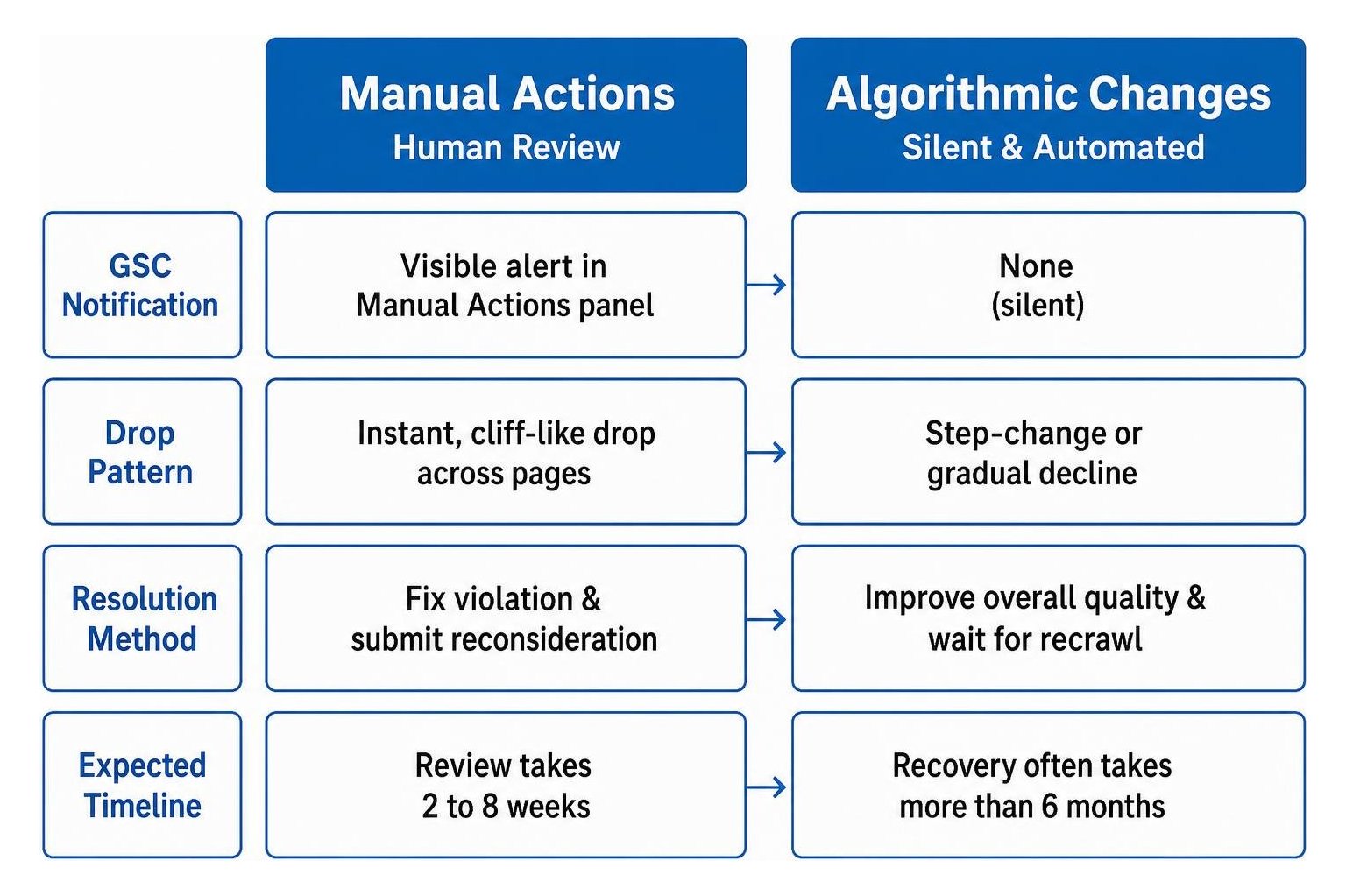
Manual actions occur when a human reviewer determines that a domain violates Google search policies, such as spammy structured data, compromised assets, or purchased link schemes. These triggers produce explicit notices and require a formal reconsideration request.
In contrast, algorithmic systems operate automatically. When an automated system updates, it recalculates quality, authority, and relevance scores across entire page clusters. If your small business site traffic drops without a notification, you do not need a reconsideration request. Instead, run through a pre-refresh diagnostic checklist to evaluate whether your service pages satisfy customer intent and maintain technical health.
How can you check for technical errors that affect visibility?
Inspect server logs, review CMS plugin settings, and run live URL inspections on your main service and product pages to ensure search bots can access, crawl, and render your site without errors.

Small business websites often rely on standard platforms like WordPress, Shopify, or Squarespace, where theme updates or plugin conflicts can inadvertently block search crawlers. Review these core areas before making any content changes:
- Robots Directives: Check your robots.txt file to ensure key service directories or media folders are not blocked.
- Index Directives: Inspect page source code for accidental
noindextags introduced after a plugin update or site redesign. - Canonical Conflicts: Confirm canonical tags point directly to the live, preferred URL rather than a staging subdomain or HTTP protocol.
- Status Codes and Hosting: Review hosting logs for elevated 5xx server timeouts or 4xx broken links caused by shared hosting constraints.
- Rendering Integrity: Verify that essential service descriptions, pricing tables, and call-to-action buttons appear in the initial HTML rather than depending entirely on heavy JavaScript plugins.
Conducting a structured site audit isolates infrastructure defects before you invest valuable budget into rewriting existing pages.
Could content quality or a change in search intent explain the drop?
Compare your affected service pages and resource guides against current top-ranking competitors to identify shifts in user intent, missing topic depth, or formatting gaps.
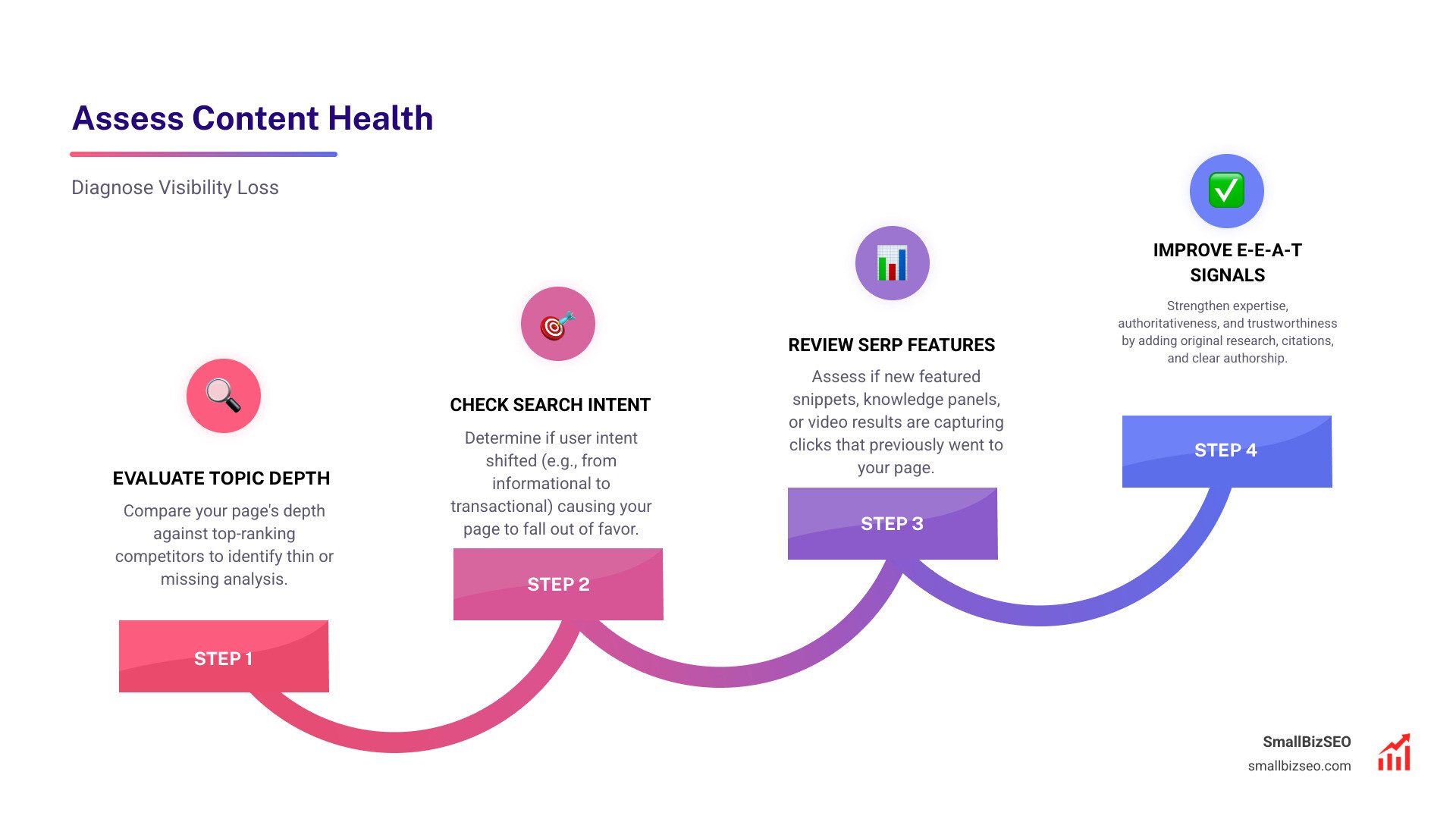
Search systems regularly refine how they match customer queries with relevant answers. A small business service page that once ranked highly for commercial keywords may slip if search intent shifts toward comprehensive buyer guides, transparent pricing breakdowns, or interactive quote calculators.
To assess content health effectively on a small business website:
- Evaluate Topic Depth: Check whether your service pages provide clear answers, process breakdowns, and transparent expectations compared to competing businesses.
- Review Experience and Expertise: Demonstrate real-world trust by highlighting professional credentials, customer case studies, and transparent service details.
- Check for Keyword Cannibalization: Ensure multiple blog posts or overlapping service pages are not competing against each other for identical search terms.
- Identify Format Gaps: Determine whether top search results use structured FAQs, clear comparison charts, or detailed step-by-step guides.
A structured detailed SEO analysis identifies where your page copy no longer satisfies user expectations or automated quality systems.
Which data points help pinpoint a visibility drop?
Analyze impressions, clicks, click-through rate, and average position across individual service URLs and search queries in Google Search Console to isolate the exact scope of the decline.
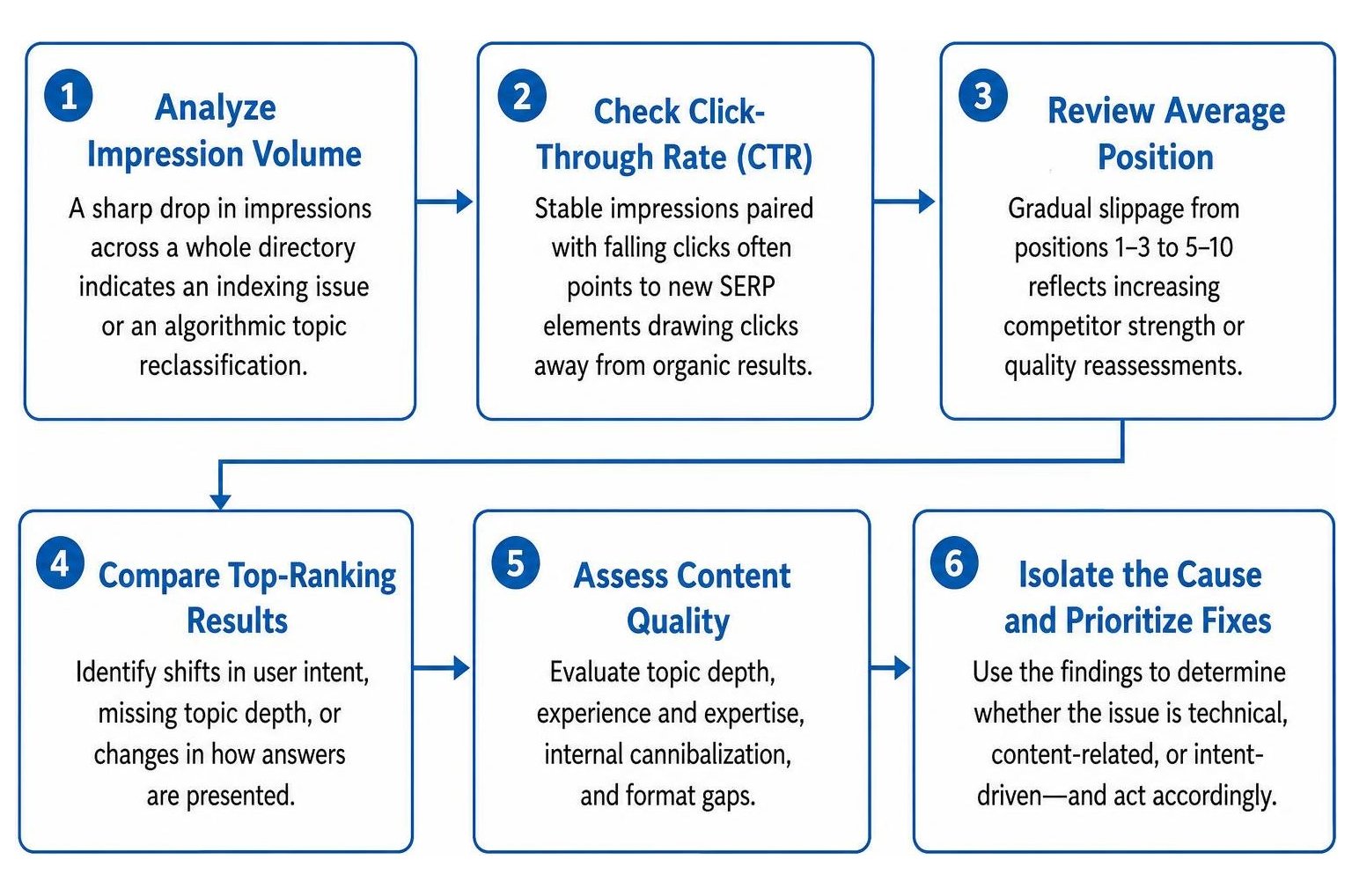
Looking only at aggregate website traffic can hide critical trends. For a small business website, focus on specific Search Console metrics to isolate issues:
- Impression Volume: A sudden loss of impressions across a core service category points to indexing blocks or automated topic reassessments.
- Click-Through Rate (CTR): Steady impressions combined with declining clicks suggests that localized map packs, AI overviews, or paid ads are pushing standard organic results further down the screen.
- Average Position: Gradual position drops from top positions to lower page-one results highlight growing competition or aging content.
- URL Segment Loss: Isolating losses to specific subfolders helps distinguish between a sitewide demotion and an issue limited to a single service line or blog section.
Tracking these metrics helps small business owners prioritize limited optimization time on the specific pages that generate the most business revenue.
Did competitors gain visibility or did your backlink profile change?
Examine search engine results pages and inbound link metrics to determine whether competitor gains or lost authority signals caused your ranking changes.
Visibility loss on small business websites is frequently driven by external competitive moves. A competing business may have revamped its service hub, collected authentic customer reviews, or earned coverage in local and industry publications.
Review the backlink profile of your primary landing pages. Losing key industry citations or acquiring low-quality link spam can affect automated ranking calculations. A targeted SEO visibility audit clarifies whether your decline stems from internal website defects, off-page authority losses, or aggressive competitor improvements.
How can you implement a structured recovery plan and protect your rankings?
To implement a recovery plan on a small business website, fix verified technical and hosting errors first, upgrade underperforming service pages to match search intent, and track recovery metrics against your baseline over a multi-month period.
Algorithmic recovery requires consistent execution and patience. While resolving technical crawl blocks or plugin errors can restore rankings in days or weeks, broad algorithmic re-evaluations of content quality and domain authority often take several months. For small businesses with lean resources, prioritizing high-intent service pages delivers the fastest return on effort.
At SmallBizSEO, our data-driven Velocity framework helps small businesses eliminate technical blockers, build credible industry authority signals, and monitor progress with clear reporting. By focusing on data instead of guesswork, you can resolve ranking declines and protect your search visibility. If your organic performance has declined without an explanation in Search Console, schedule a comprehensive SEO visibility audit with our team to isolate the root cause and execute an effective recovery strategy.