6 Troubleshooting Steps When Google Search Fails to Index Your Site

How Do You Add Your Website to Google Search?
To add your website to Google Search, verify your site in Google Search Console, submit its sitemap, and use URL Inspection to request indexing for important pages. Google may find your site without these steps, but submission helps it discover your pages. A request is not a guarantee: Google must crawl a page, process its content, and decide whether to index it.
I’m Clayton Johnson, founder of SmallBizSEO. My work in technical SEO and content strategy helps small business owners add your website to Google Search and understand what to check when a page does not appear.
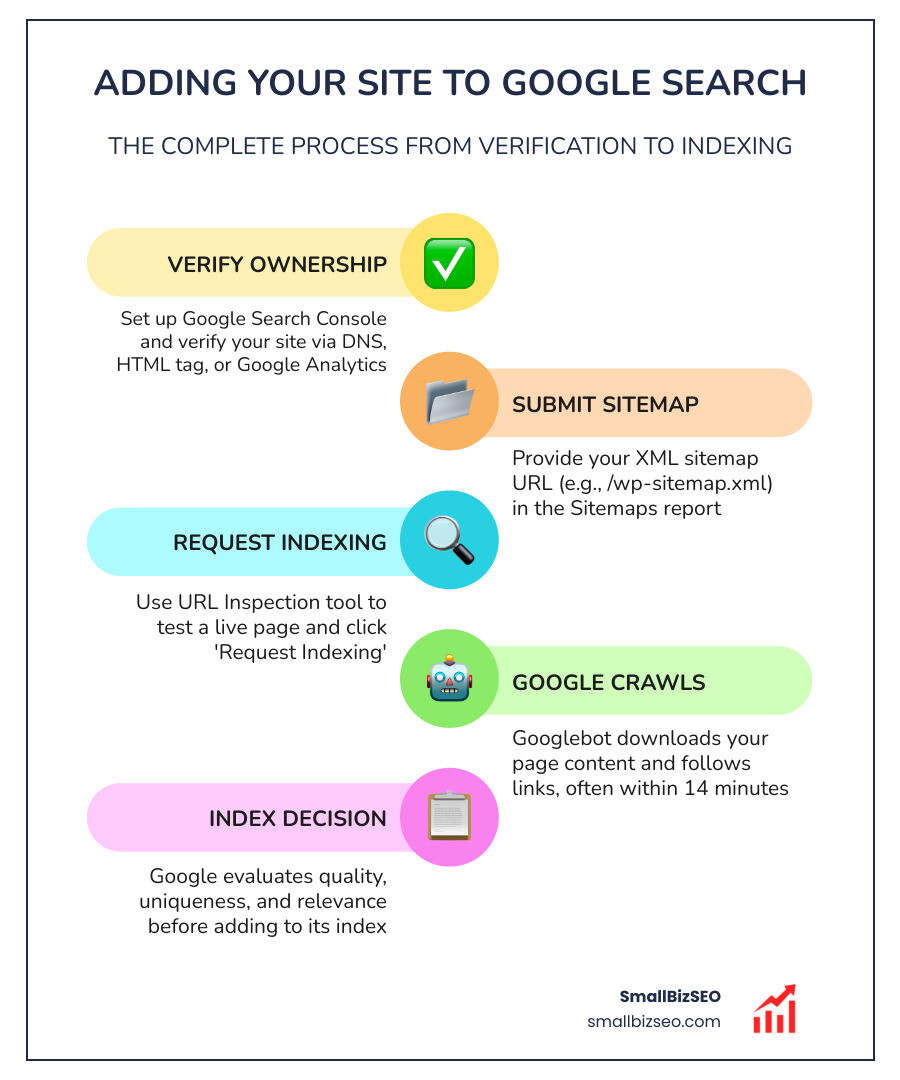
Quick look at add your website to google search:
Google handles more than 92.24% of all worldwide search queries. Every single day, its systems process roughly 500 million brand-new search terms—about 15% of daily searches—that Google has never encountered before. To capture this search traffic, automated crawlers known as Googlebot constantly follow links across the web. However, leaving your site to be discovered passively can leave your business invisible for weeks. Setting up proper technical pipelines ensures Google can fetch, render, and evaluate your pages immediately.

Why Should You Manually Add Your Website to Google Search?
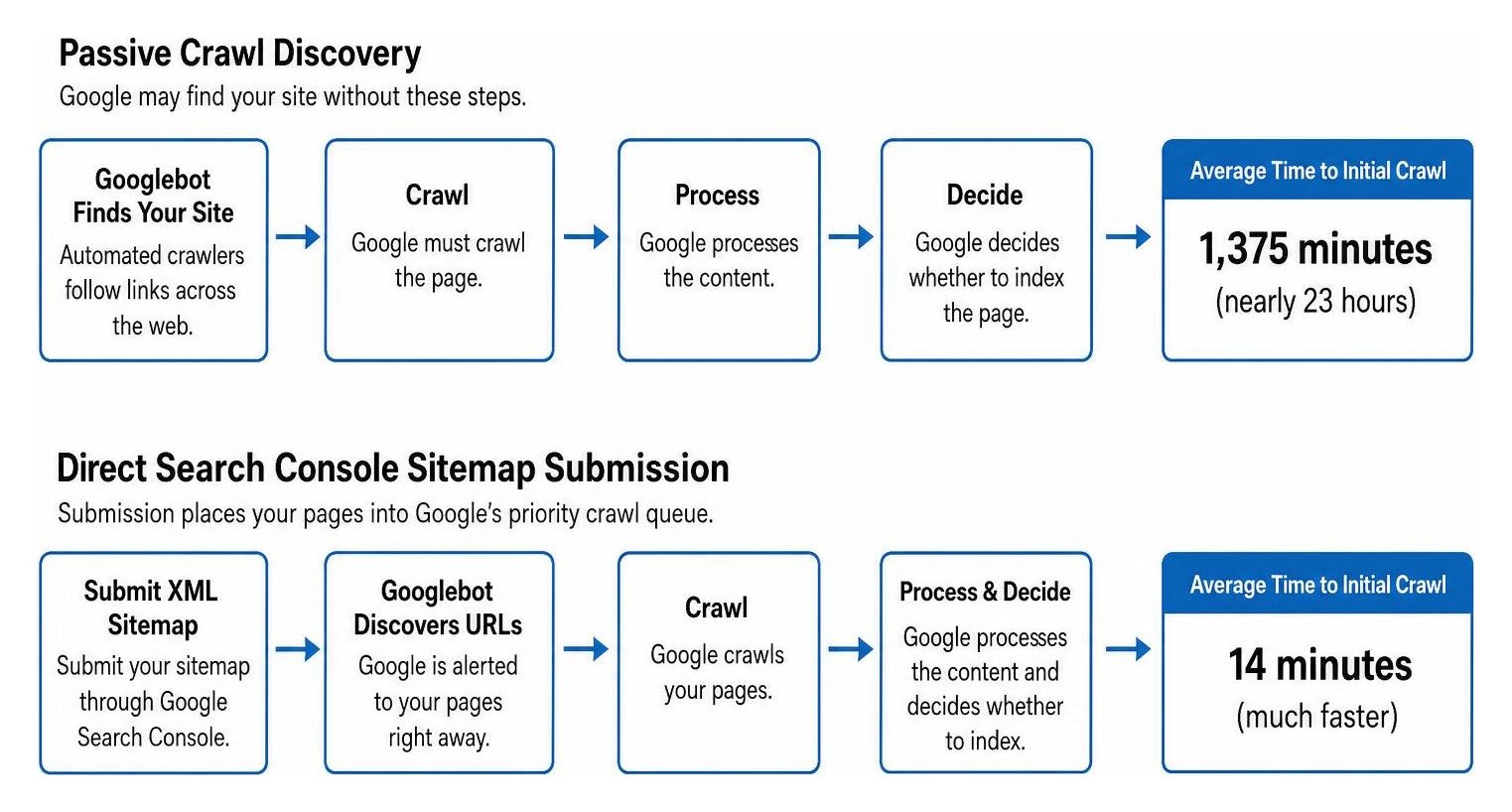
Manual submission alerts Google to your content right away instead of waiting for external crawlers to stumble upon it. Research shows that without submitting an updated sitemap, Google takes an average of 1,375 minutes (nearly 23 hours) just to crawl a new web address. When you submit an XML sitemap through Google Search Console, that initial crawl time drops to roughly 14 minutes.
Direct submission places your pages into Google's priority crawl queue. This early discovery is critical because why getting found matters directly affects your ability to generate leads, capture early brand searches, and outpace competitors. While manual submission does not bypass Google's quality evaluations, it removes discovery bottlenecks so your pages can begin being evaluated for rankings immediately.
How Can You Check If Google Has Already Indexed Your Site?
To check if your site is indexed, enter site:yourdomain.com directly into Google Search or inspect the specific page URL inside Google Search Console.
Running a site: search operator provides an instant look at which pages from your domain currently reside in Google's database. If zero results return, Google has not added your domain to its index yet. For detailed technical data, Google Search Console's URL Inspection tool provides real-time information regarding canonical selection, crawl dates, and rendering errors.
| Diagnostic Method | Best Used For | Key Insight Provided | Limitation |
|---|---|---|---|
site:yourdomain.com Search |
Quick sitewide check | Total count of indexed URLs | Does not show crawl errors or live blocking directives |
| GSC URL Inspection Tool | Individual page diagnostics | Exact crawl timestamp, canonical URL, and index eligibility | Must inspect URLs one at a time |
How Do You Add Your Website to Google Search with GSC?
To connect your site to Google, open Google Search Console, add your domain, and verify that you own it. Verifying ownership protects your site's private search analytics and grants access to tools that influence how your pages appear in search results.
- Navigate to Google Search Console and log in with your primary Google account.
- Select a property type: choose Domain to cover all subdomains and protocols (http and https), or URL-prefix to manage a specific web address format.
- Complete ownership verification using your preferred method:
- DNS TXT Record: Add the generated TXT record to your domain's DNS provider settings. This is the cleanest and most reliable method for domain-level properties.
- HTML Meta Tag: Insert the provided verification meta tag into the
section of your website’s homepage. - CMS Integration: Use native tools, such as the Site Kit plugin on WordPress, to automate the verification process without manual code editing.
Establishing this connection is a core element of understanding SEO 101: what it is and how it works, as it provides the direct line of communication needed between your site and search engines.
How Do You Submit XML Sitemaps and Request URL Crawls?
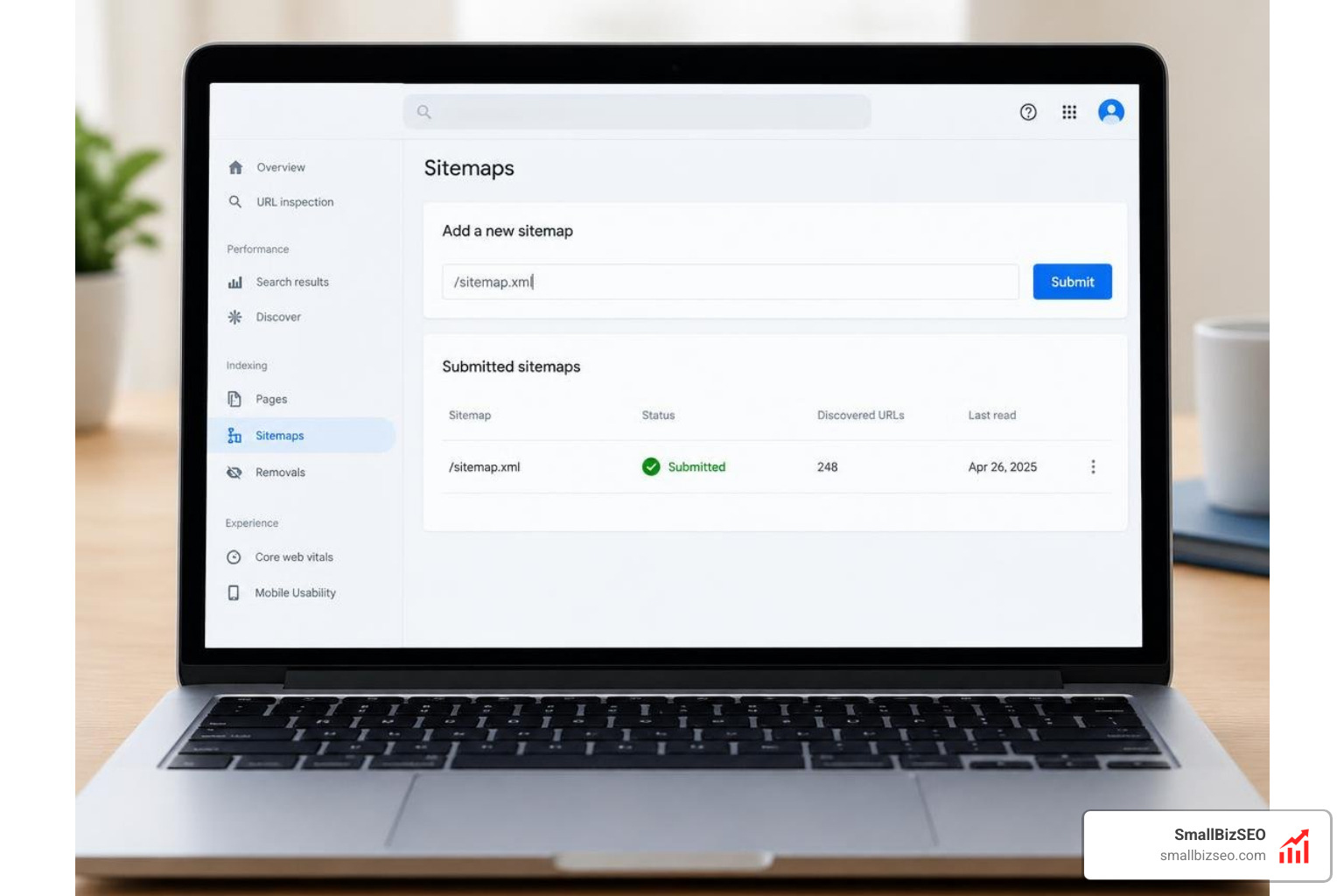
To submit your pages in bulk, provide your XML sitemap URL under the Sitemaps tab in Google Search Console; to submit single pages, use the URL Inspection tool.
Consulting official resources on getting started with Search Console makes it easy to complete these essential steps:
- Locate your XML sitemap. Modern WordPress websites automatically generate one at
/wp-sitemap.xml, while custom platforms or plugins often output to/sitemap.xmlor/sitemap_index.xml. - In Google Search Console, click on Sitemaps in the left sidebar navigation.
- Paste the relative sitemap path into the "Add a new sitemap" field and click Submit.
- To index a freshly published or heavily updated page immediately, paste the complete URL into the top search bar (URL Inspection tool).
- Review the live status, click Test Live URL to confirm Googlebot can access the content, and then click Request Indexing.
Following this process offers a reliable, step-by-step guide to boosting SEO search visibility while ensuring your server crawl budget is utilized efficiently.
How Can You Troubleshoot Indexing and Expand Search Engine Visibility?
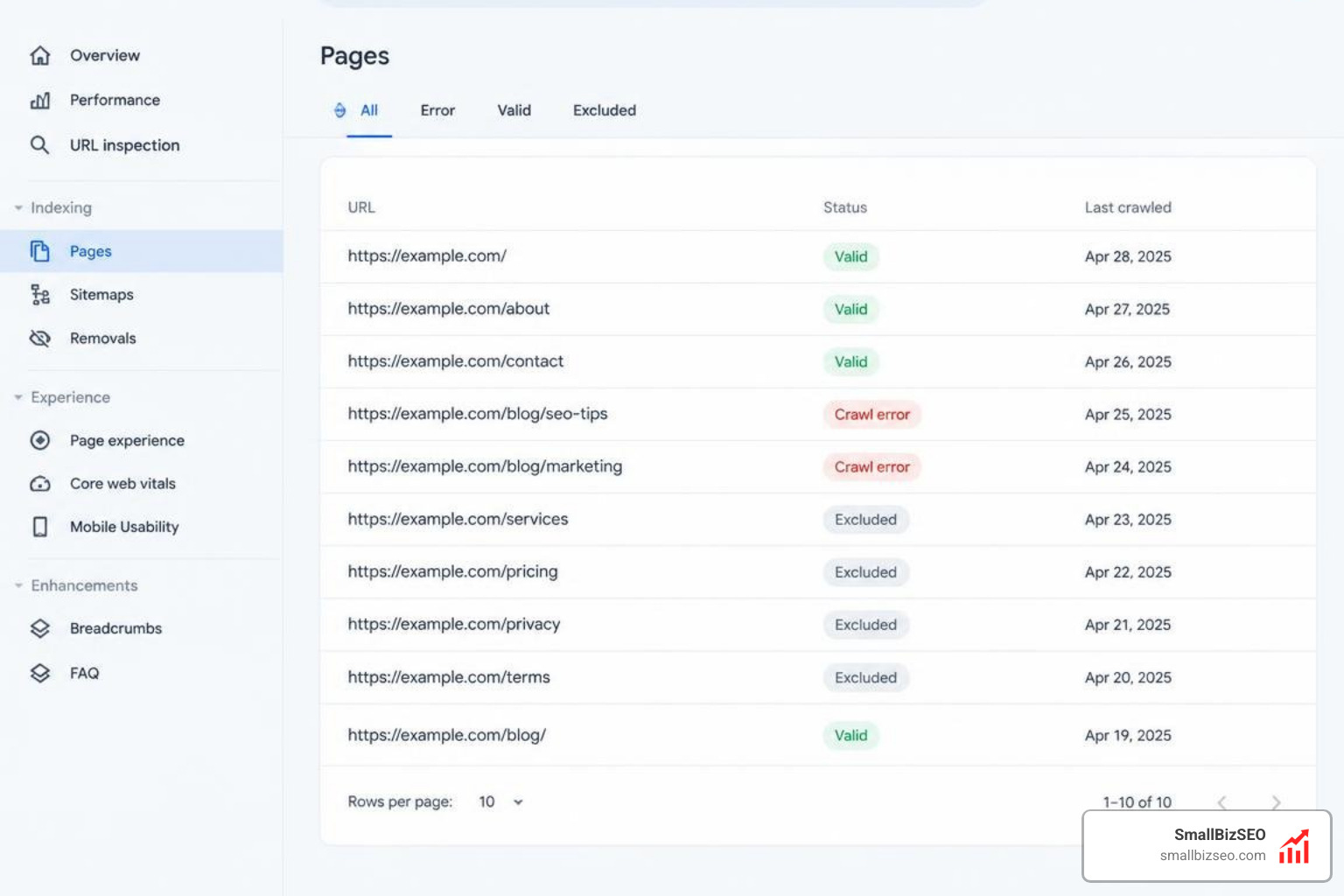
If your pages do not appear in search results, use Google Search Console's Page Indexing reports to diagnose crawl barriers, resolve technical errors, and submit your content to complementary search platforms.
Why Is Your Website Not Indexing, and How Do You Fix It?
Websites fail to index when search engines encounter crawl blocks, accidental noindex directives, broken redirects, low-quality content, or manual security penalties.
To diagnose and resolve indexing blockers, check these common issues:
- Robots.txt Disallow Directives: Check your
robots.txtfile to ensure you are not blocking Googlebot from crawling critical pages, CSS files, or JavaScript assets needed for rendering. - Accidental Noindex Meta Tags: Developers frequently leave
tags active when pushing sites from staging environments to live production. Remove these tags from any page you want indexed. - WordPress Search Visibility Setting: In your WordPress dashboard, navigate to Settings > Reading and verify that "Discourage search engines from indexing this site" is unchecked.
- Canonical Tag Conflicts: Ensure your self-referential canonical tags point to the preferred live URL version to prevent search engines from ignoring the page as a duplicate.
- Thin or Low-Value Content: Google prioritizes helpful, unique content. Pages with very little original text, duplicate paragraphs, or automated spam often fail quality thresholds. Applying sound on-page SEO techniques for measurable growth ensures your pages provide sufficient value to merit indexing.
- Manual Actions or Security Issues: Open the "Security & Manual Actions" tab in Google Search Console to confirm your site is free from malware warnings or spam penalties.
Should You Submit Your Site to Bing, Yahoo, and Other Search Engines?
Yes, submitting your website to Bing, Yahoo, and regional search engines expands your potential audience beyond Google.
Setting up Bing Webmaster Tools is straightforward: you can import your verified Google Search Console properties with a single click. Because Microsoft Bing powers search results for Yahoo, submitting your site to Bing automatically establishes visibility across Yahoo search as well.
Additionally, implementing modern submission protocols like IndexNow allows participating search engines, including Bing and Yandex, to receive instant crawl alerts whenever you publish or edit content.
At SmallBizSEO, we implement our data-driven "Velocity" framework to eliminate technical indexing barriers and deliver fast, E-E-A-T-compliant search engine visibility through transparent reporting. If you want to identify hidden crawl bottlenecks and ensure your site is completely search-ready, schedule a comprehensive SEO visibility audit with our team.
Accelerate Your Website's Path to Organic Search Traffic
Submitting your website to Google Search is an essential starting point for building online visibility. By verifying ownership in Google Search Console, submitting structured XML sitemaps, and keeping your site free from technical crawl barriers, you give your content the fastest route from publication to the search index. Regular check-ins on your performance and indexing reports will ensure your pages remain accessible, healthy, and ready to capture valuable search traffic.