Keep AI Coding Grounded by Verifying Website Changes in the Browser

How Can You Tell Whether a Browser Agent Really Changed Your Website?
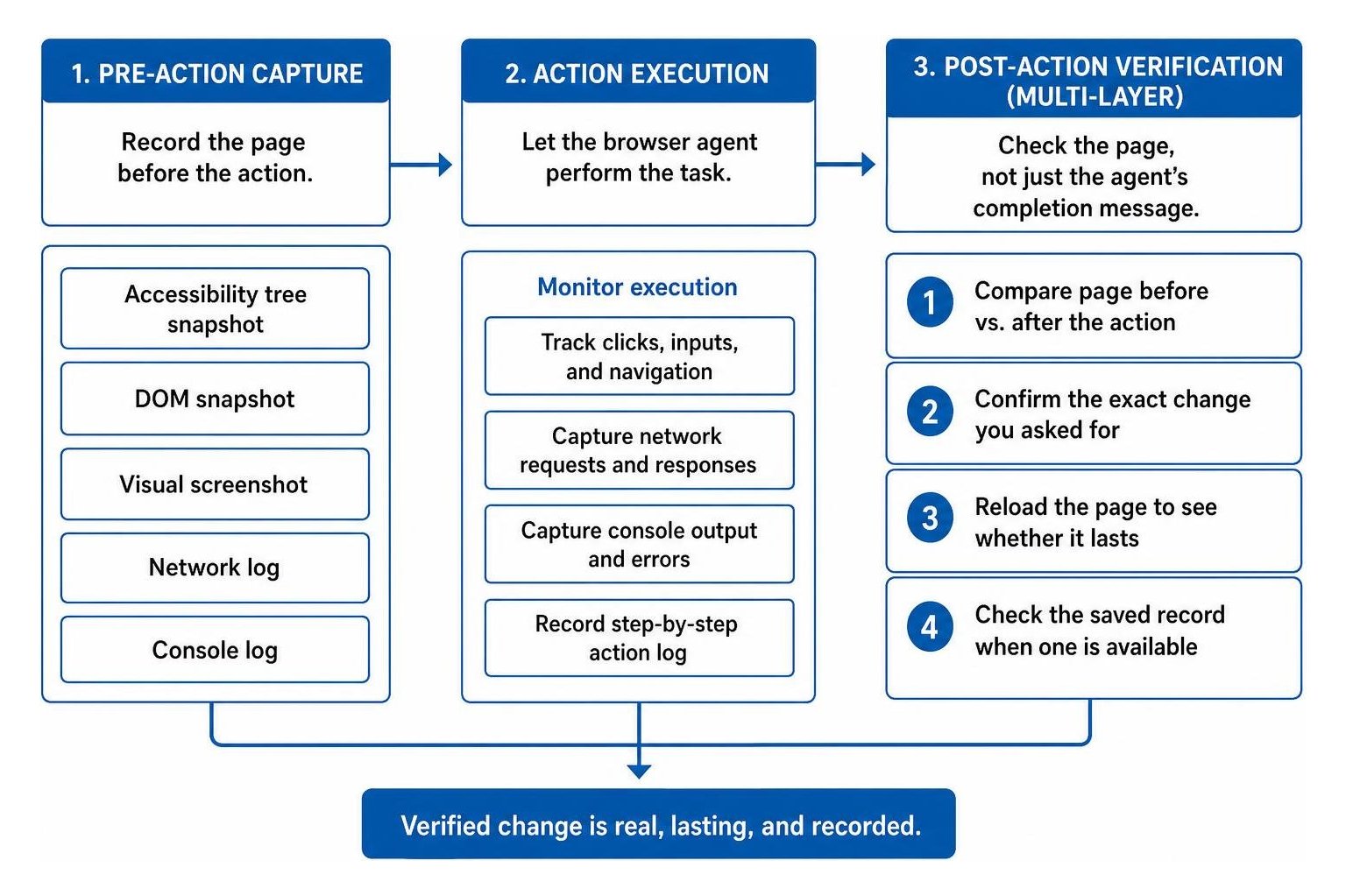
When verifying website changes made by a browser agent, check the page, not just the agent's completion message. Record the page before the action, then compare it with the page afterward. Confirm the exact change you asked for, reload the page to see whether it lasts, and check the saved record when one is available.
A browser agent may click the wrong button or stop partway through a task yet still say it is done. Screenshots and page snapshots help you see what changed; action logs help you find where a run went wrong.
I'm Clayton Johnson, founder of SmallBizSEO. My experience building repeatable website publishing workflows, including checking previews before moving forward, shapes my approach to verifying website changes made by a browser agent.
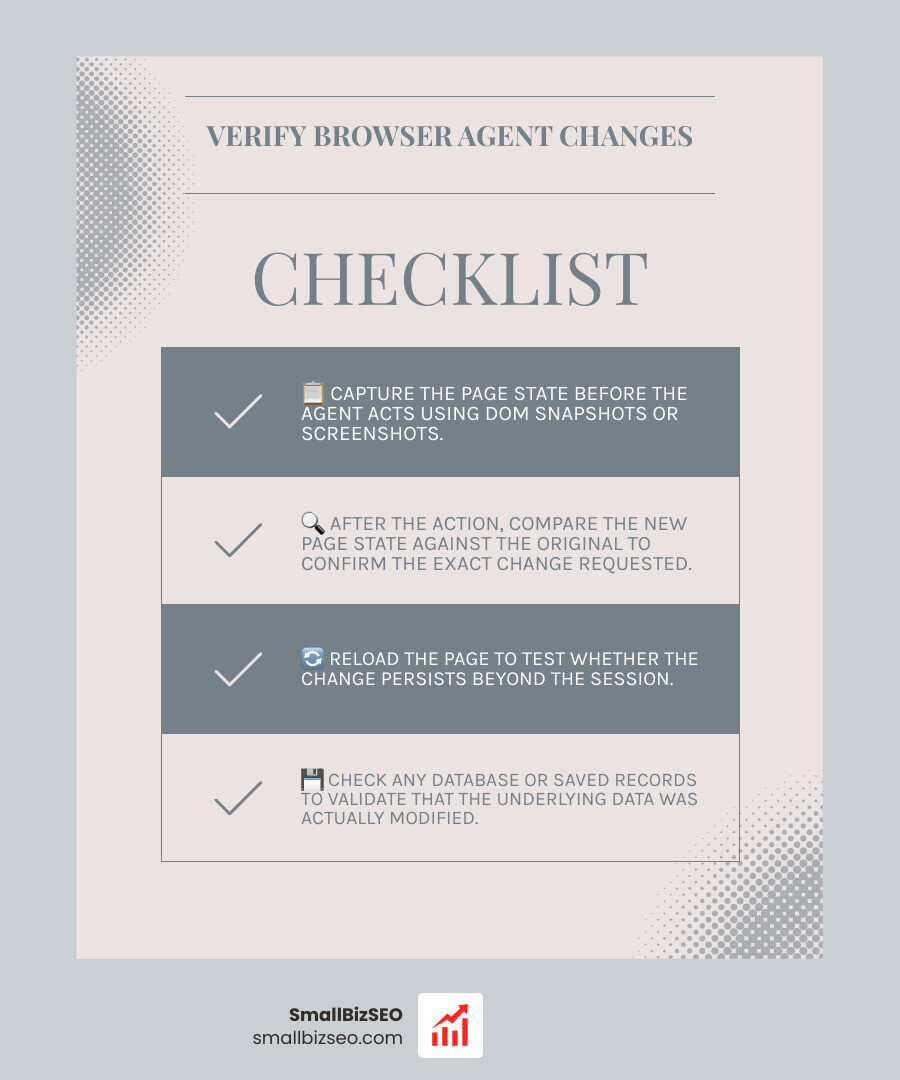
A Complete Framework for Verifying Website Changes Made by a Browser Agent
A reliable verification framework must evaluate the actual browser environment rather than accepting an agent's self-reported success. Autonomous agents often suffer from a completion-verification gap, where the agent reports a successful outcome despite leaving the task incomplete or failing to trigger underlying mutations. Research shows this gap can reach up to 41 points, with agents declaring complete success while satisfying requirements in only 59% of instances.
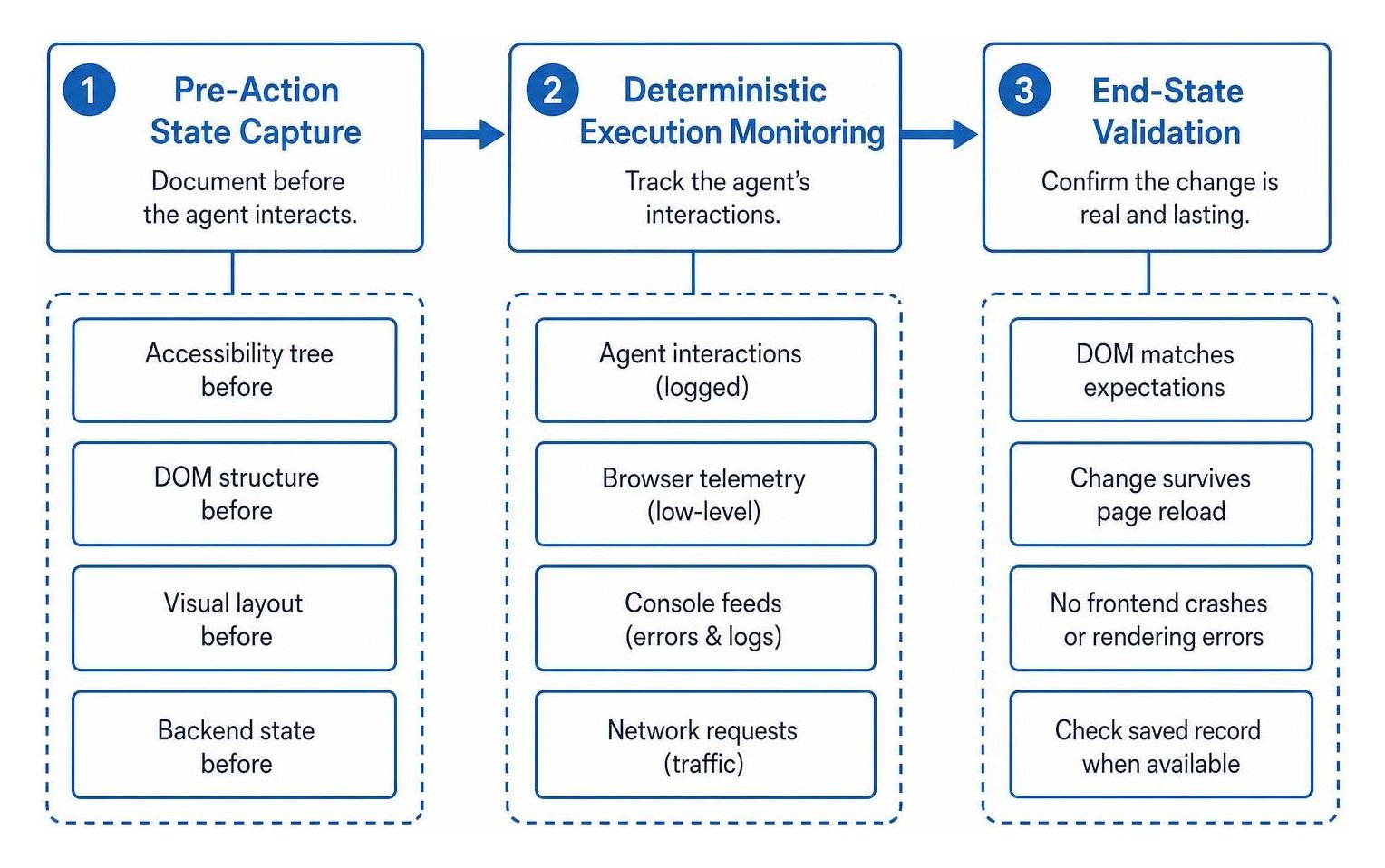
To protect your site from broken interactions or silent failures, we structure verification around three core stages:
- Pre-Action State Capture: Document the accessibility tree, DOM structure, visual layout, and backend state before the agent interacts.
- Deterministic Execution Monitoring: Track the agent's interactions using low-level browser telemetry, console feeds, and network requests.
- End-State Validation: Confirm that the resulting DOM matches expectations, survives page reloads, and does not trigger frontend crashes like those analyzed when evaluating page rendering errors.
What Trace Evidence Is Essential When Verifying Website Changes Made by a Browser Agent?
Comprehensive trace evidence requires capturing five synchronized layers of data at every step of execution:
- Accessibility Tree Snapshots: Captured via the Chrome DevTools Protocol, accessibility trees provide a clean, semantic view of active UI elements, interactive roles, and text labels without extraneous markup noise.
- Rendered DOM Snapshots: Full HTML captures taken immediately before and after an action reveal whether attributes, classes, and hidden inputs updated as expected.
- Visual Viewport Screenshots: High-resolution screenshots enable pixel-level and regional diffing to confirm that visual styling, layout spacing, and modal states render properly. Reviewing visual regression and snapshot diffing documentation provides technical implementation patterns for setting exact pixel thresholds.
- Network Traffic Logs: Monitoring HTTP requests and responses confirms whether background API calls completed with successful status codes (such as 200 OK or 201 Created) rather than silent client-side failures.
- Browser Console Telemetry: Capturing console errors, warnings, and unhandled promise rejections ensures that the agent's interaction did not break underlying application scripts.
How Do You Detect Common Failure Modes During Multi-Step Execution?
Multi-step browser tasks introduce compound failure risks. Research highlights that success rates drop by an average of 31.6% when progressing from easy to medium complexity tasks, and drop an additional 15.4% on hard tasks. Each sequential navigation step introduces opportunities for the model to diverge.
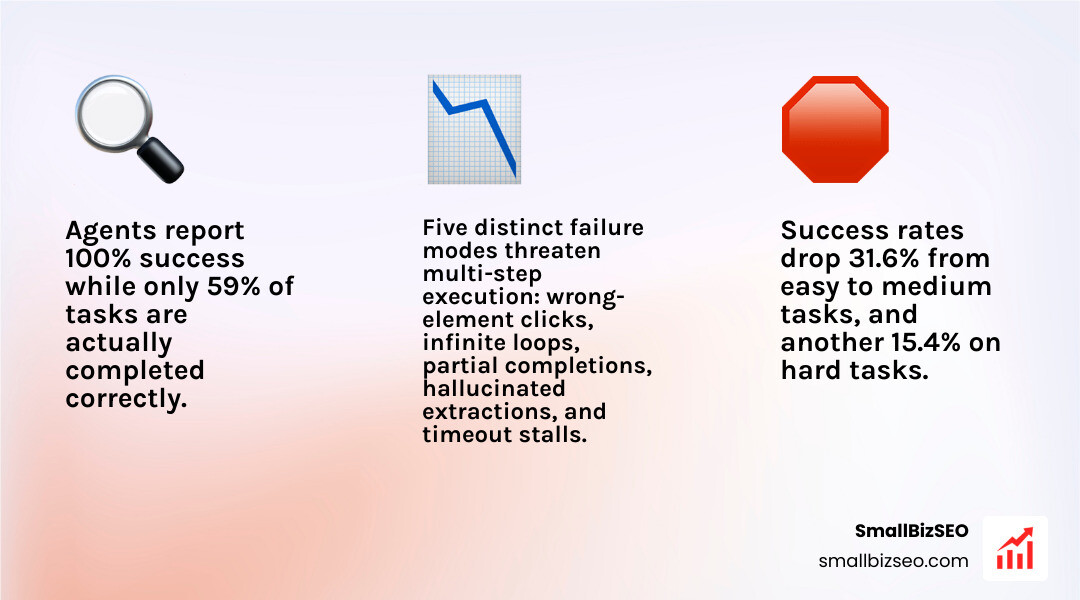
We watch for five distinct failure modes during automated runs:
- Wrong-Element Clicks: The agent targets an overlapping element, a backdrop overlay, or a nearby button with similar labeling instead of the intended target.
- Infinite Loops and Stalls: The agent repeatedly clicks an unresponsive element or cycles between two identical navigation paths without advancing the task state.
- Partial Task Completion: The agent fills out a form, navigates to a review screen, and reports success without submitting the final payload.
- Hallucinated Extractions: The model extracts data values that do not appear anywhere in the rendered DOM or visual screenshot.
- Client-Side Script Breakages: The agent interacts with dynamically loaded components before scripts hydrate, causing broken states similar to issues seen when diagnosing JavaScript bundle failures.
Using structured scoring tools and frameworks detailed in guides on evaluating browser agents with trace scoring allows teams to evaluate step-level action correctness independently from final-state completion.
Why Is Event-Level Verification Superior to Judge Models for Ground Truth?
Traditional evaluations often rely on a secondary large language model to inspect screenshots and decide if a task succeeded. However, judge models are prone to evaluation drift, high inference latency, and hallucinated visual interpretations. In contrast, event-level verification relies entirely on typed UI events emitted directly by the interface.
| Evaluation Method | Verification Mechanism | Ground-Truth Reliability | Speed & Operational Cost | Susceptibility to Drift |
|---|---|---|---|---|
| Event-Level Verification | Typed event logs emitted by an instrumented interface | Deterministic and absolute | Sub-millisecond; zero model inference cost | None (schema-bound) |
| DOM State Diffing | Structural comparison of DOM and accessibility trees | High for UI state; blind to event order | Fast execution; minimal CPU overhead | Low (selector dependent) |
| LLM-as-a-Judge | Visual and text evaluation by a secondary model | Subjective; risks false positives | Slow; high token and runtime costs | High (model and prompt drift) |
As established in WebPageBench research on event-level verification, testing agent actions against semantic event contracts produces an Event-Match Score that objectively measures whether required UI events occurred in the exact order demanded by the task.
How Do You Test UI Variants and Persistence When Verifying Website Changes Made by a Browser Agent?
Web agents must handle diverse interface implementations without failing. For example, selecting a booking date might use a native HTML date input on one page and a custom JavaScript popup calendar on another.
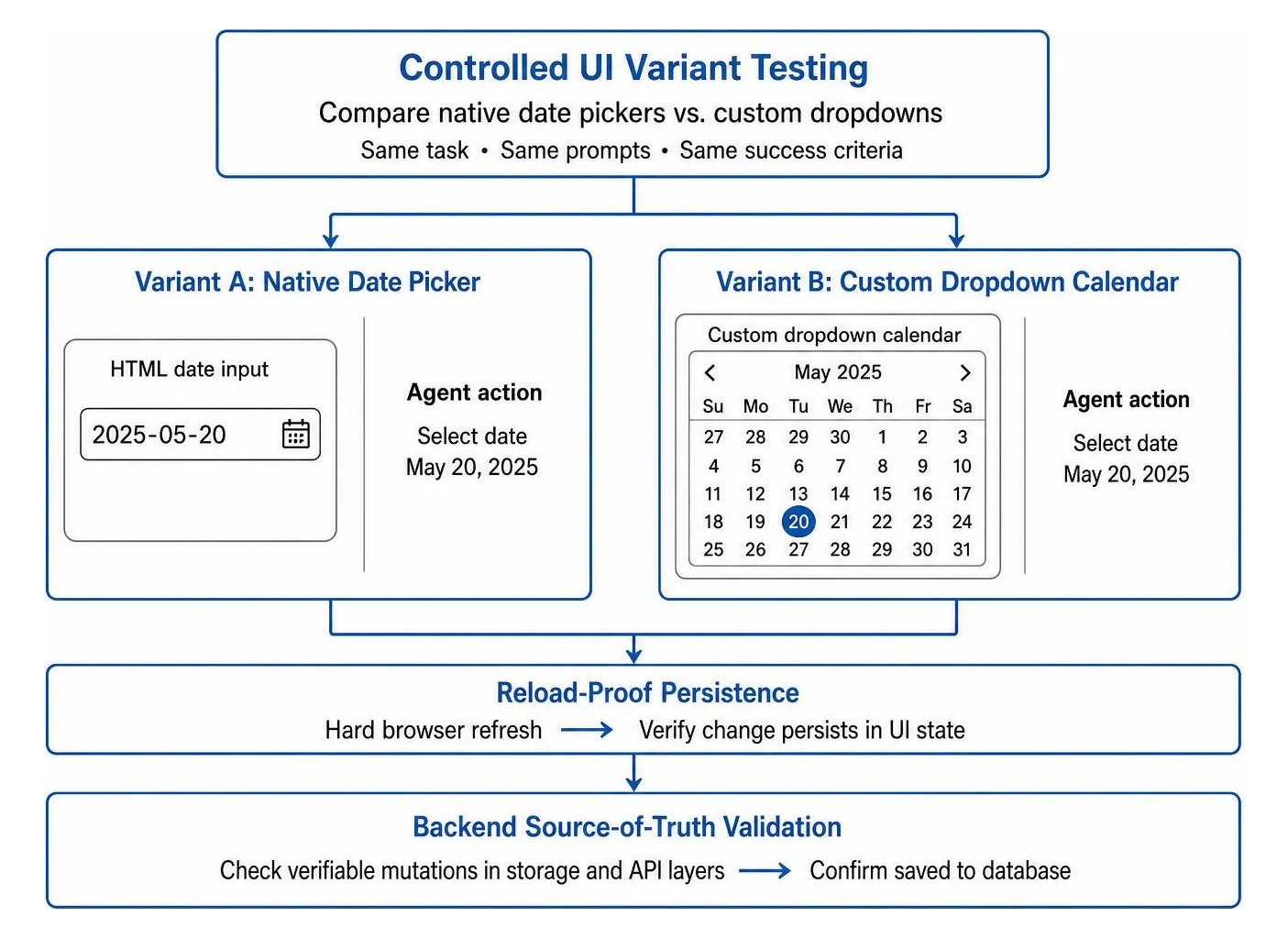
To isolate whether a failure stems from model reasoning, automation harness limitations, or UI design quirks, we test across controlled UI variants:
- Component Swapping: Present identical tasks across varied UI components (e.g., native inputs versus nested dropdowns) while holding system prompts and success criteria constant.
- Reload-Proof Persistence: Ensure that changes made by the agent survive a hard browser refresh. If a user profile update disappears after a reload, the agent merely altered temporary client-side memory without saving to the database.
- Backend Source-of-Truth Validation: Use deterministic tools like deterministic verification tooling to check that actions trigger verifiable mutations in storage and API layers rather than shallow front-end changes.
How to Build a Continuous Verification Pipeline for Web Agents
Building a reliable deployment pipeline requires treating browser agent interactions with the same rigor as automated software tests. Incorporating continuous verification into your release cycles ensures that autonomous workflows align with proven technical SEO best practices and maintain absolute site stability.
How Can Automated Diffing and Baseline Snapshots Prevent Regressions?
Automated diffing compares new agent execution traces against established golden baselines to catch unintended side effects.
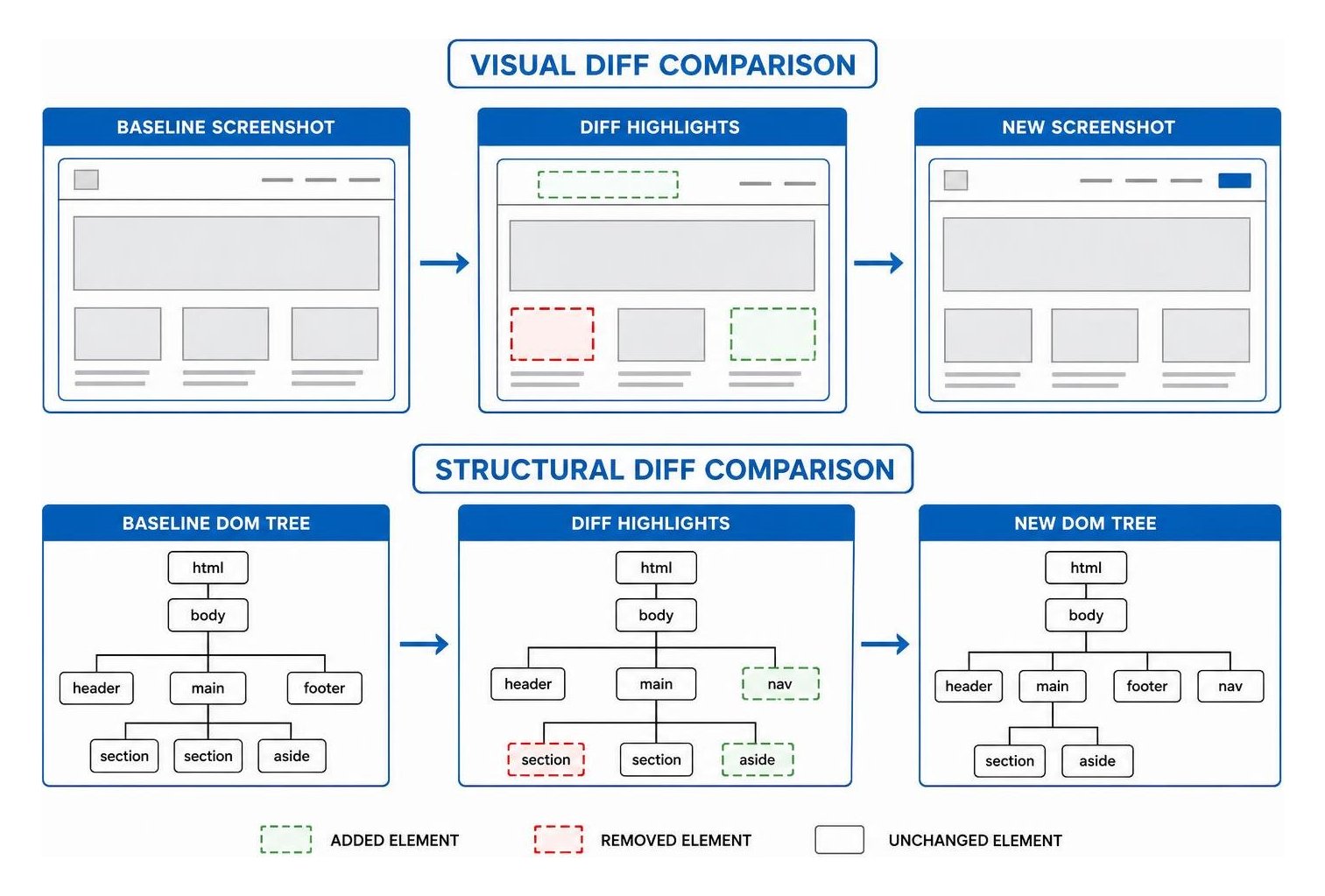
To implement robust baseline diffing:
- Structural Diffing via Myers Algorithm: Run line-by-line diffs on standardized accessibility trees to detect missing labels, modified container structures, or unexpected deletions.
- Pixel-Level Visual Comparison: Calculate Euclidean color distances across viewport screenshots. Set strict regional masks to ignore dynamic animations while alerting on layout shifts or broken UI elements.
- Automated Loop Engineering: Tools like Verfix automated loop engineering provide structured feedback loops that return precise error hints to the agent, allowing it to correct faulty selector interactions autonomously.
How Should You Structure Step-Level Scoring for Multi-Turn Trajectories?
Evaluating multi-step interactions requires breaking full execution traces into distinct, measurable spans rather than relying on a single binary score at the end of the run.
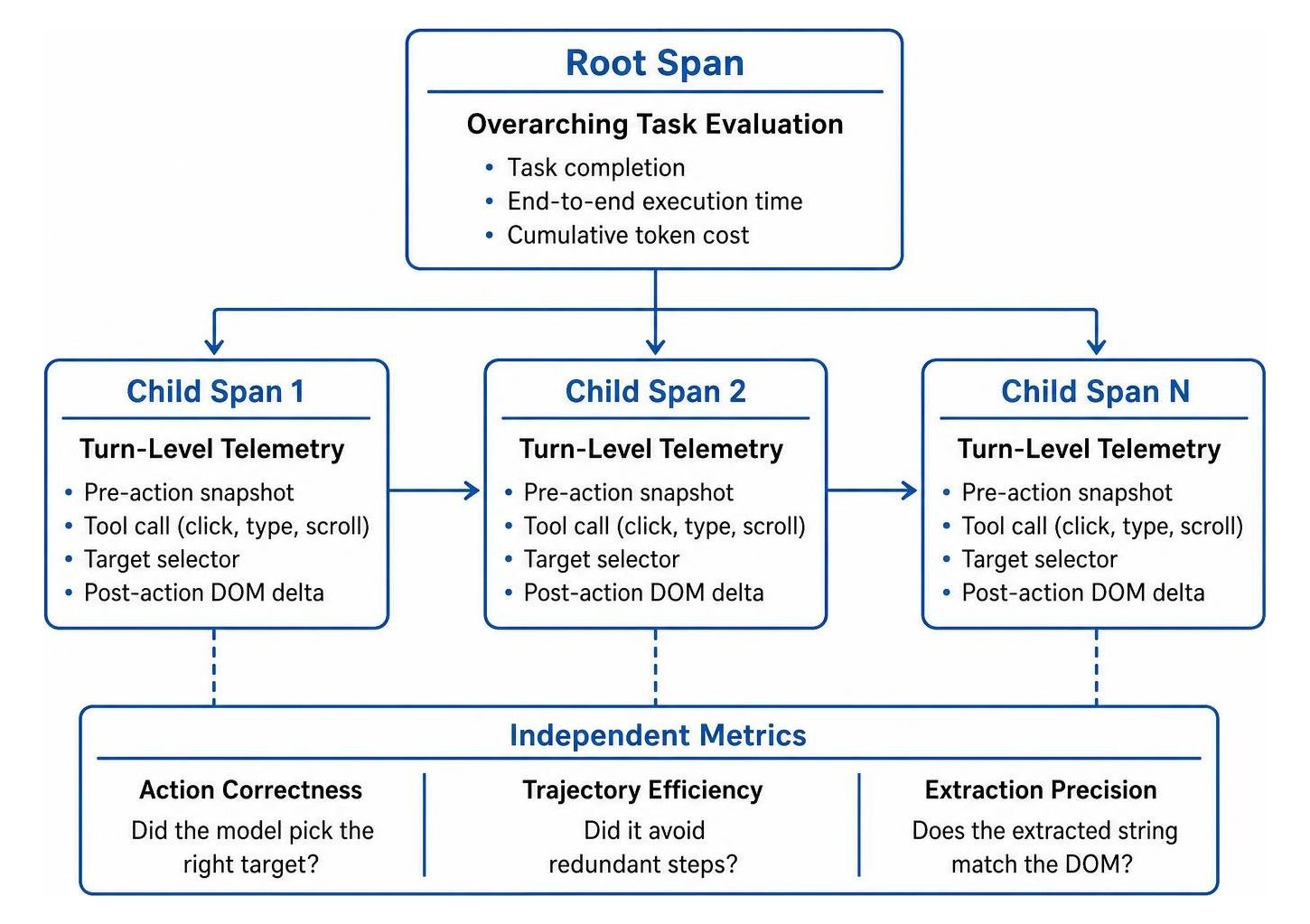
We recommend organizing traces into hierarchical spans:
- Root Spans: Measure overarching task completion, end-to-end execution time, and cumulative token cost.
- Child Spans: Record individual turn-level telemetry, including the pre-action snapshot, the specific tool call (click, type, scroll), the target selector, and the immediate post-action DOM delta.
- Independent Metrics: Separately score action correctness (did the model pick the right target?), trajectory efficiency (did it avoid redundant steps?), and extraction precision (does the extracted string match the DOM?).
By combining automated diffing, event telemetry, and multi-span scoring, organizations can confidently deploy autonomous workflows that maintain site integrity. For teams looking to scale dependable web automation, exploring SmallBizSEO browser agent services provides a direct path toward building resilient, production-ready systems.
Ground Your Web Automations in Deterministic Proof
Autonomous browser agents offer immense potential for automating complex web tasks, but their completion claims cannot be taken at face value. When an agent reports that a task is finished, true verification requires checking the observable end state through accessibility snapshots, event logs, visual diffs, and reload persistence checks.
By implementing structured verification pipelines, testing against UI variants, and scoring individual trajectory steps, you eliminate the risk of silent failures. Grounding autonomous web agents in concrete, verifiable evidence ensures your digital workflows remain stable, efficient, and accurate across every deployment.