Build an SEO Friendly E-Commerce Website That Actually Ranks
Build an SEO Friendly E-Commerce Website That Actually Ranks
How Do You Build an SEO-Friendly E-Commerce Website?
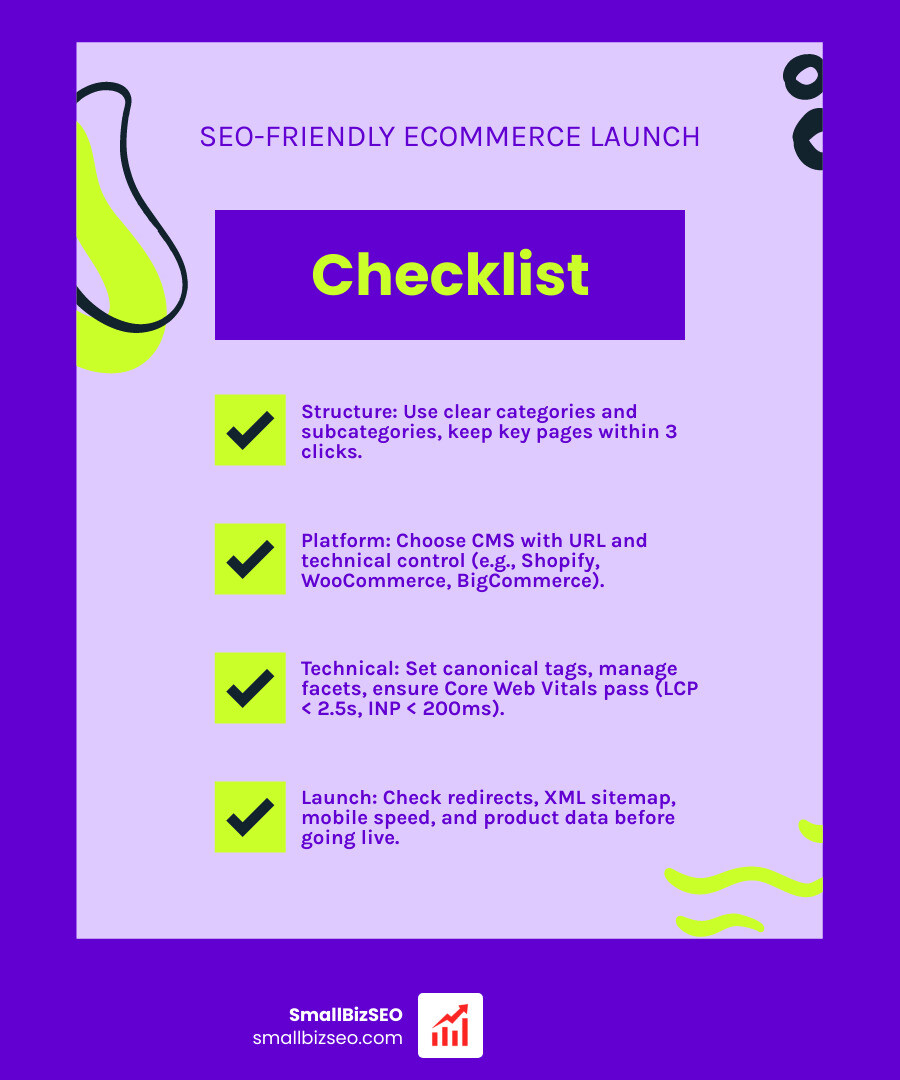
Start with a store that both shoppers and search engines can navigate. Choose a platform that lets you edit page titles and URLs. Organize products into clear categories, write useful descriptions, and make sure important pages can be crawled. Before launch, check mobile speed, product data, redirects, and your XML sitemap.
I'm Clayton Johnson, founder of SmallBizSEO and a digital marketing strategist. My work on site structure, content, and digital PR informs this guide to building an SEO friendly ecommerce website that helps shoppers find what they need.
Key terms for SEO friendly ecommerce website:
How Should You Structure an SEO Friendly E-Commerce Website?
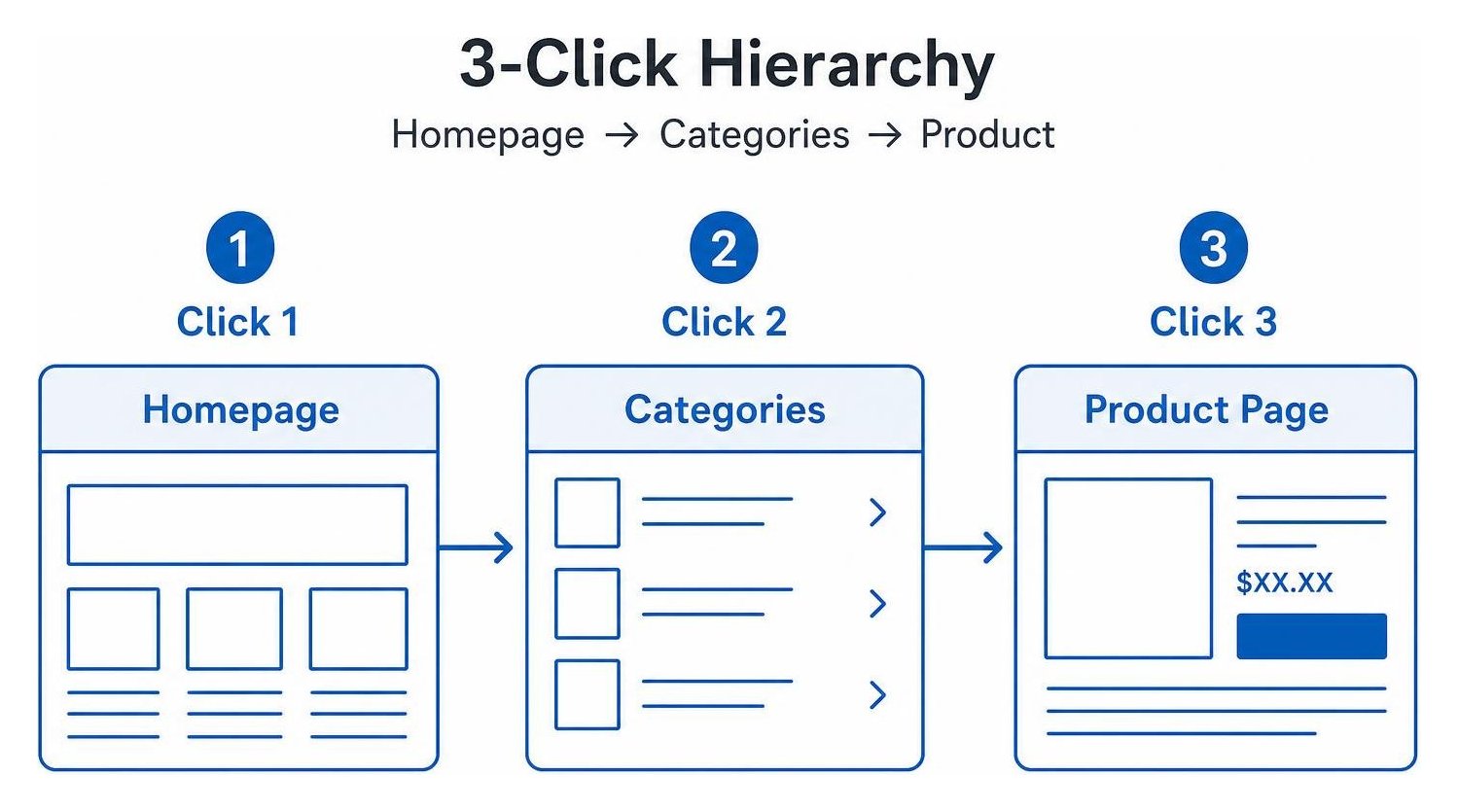
An SEO-friendly e-commerce structure organizes products logically from the homepage down to individual product detail pages, ensuring every critical page is reachable within three clicks.
A shallow, hierarchical architecture distributes internal link equity smoothly and preserves your crawl budget. When search engine bots arrive at your homepage, they follow links to top-level category hubs, move into focused subcategories, and finally reach your product detail pages. Keeping your URLs shallow—ideally under five slashes—prevents important inventory from getting buried in complex subfolders.
Clear breadcrumb trails reinforce this hierarchy for both visitors and search engine crawlers. Implementing structured breadcrumbs lets shoppers retrace their steps effortlessly while providing search engines with semantic pathways that define your topical silos. For deeper structural insights, review our technical SEO guide.
Which CMS Platform Best Supports an SEO Friendly E-Commerce Website?
The best platform is one that grants full control over your URL slugs, metadata, canonical tags, and server-level robots configuration.
Choosing the right software shapes how easily your store ranks. Open-source solutions like WooCommerce inherit the technical flexibility of WordPress, giving you complete freedom over your URL paths and server directives. Hosted platforms like Shopify provide robust out-of-the-box speed and reliability, though they enforce specific URL prefixes. Developers seeking raw performance often explore open-source high-performance storefront templates to build custom headless architectures.
| Platform | URL Slug Control | Native Schema Support | Speed & Core Web Vitals | Starting Monthly Price |
|---|---|---|---|---|
| Shopify | Moderate (forced prefixes) | High (OS 2.0 native) | High (built-in CDN) | $39/mo |
| WooCommerce | Full control | Plugin-dependent | Variable (host-dependent) | Free (open-source) |
| BigCommerce | High | High (built-in microdata) | High (optimized stack) | $39/mo |
| Adobe Commerce (Magento) | Full control | High (customizable) | Variable (requires tuning) | Custom pricing |
How Should Technical Crawlability, Facets, and Speed Be Configured?
Configure technical SEO by keeping crawlable URLs clean, restricting low-value faceted filter combinations with canonical or noindex directives, and optimizing templates for Core Web Vitals.
Faceted navigation creates millions of duplicate URL parameters when shoppers filter by size, color, or price. Left unchecked, search bots waste their crawl budget indexing these duplicate parameter variations. Direct faceted filters to canonicalize back to the primary category page, or apply a noindex, follow rule on non-essential filter strings.
Page speed directly influences search rankings and conversion rates. Target an Interaction to Next Paint (INP) threshold under 150ms and a Largest Contentful Paint (LCP) under 2.5 seconds. For merchants running hosted storefronts, check out practical Shopify SEO fixes and review this technical Shopify Liquid audit framework to eliminate theme script bloat.
How Should You Structure Data and Merchant Feeds for AI Overviews and Google Shopping?
Structure your data using accurate Schema.org JSON-LD markup on product pages, and sync real-time pricing and stock levels directly with the Google Shopping Graph via Merchant Center feeds.

Search engines connect billions of product listings using structured data and merchant feeds. By embedding complete Product schema—including SKU, price, availability, and customer reviews—you qualify for rich search snippets and citations in AI Overviews.
Add BreadcrumbList schema to highlight category trails and ItemList schema on collection templates. Keep your Merchant Center feed synchronized with your on-page data to prevent ranking penalties or listing rejections.
How Should You Optimize and Launch an E-Commerce Website?
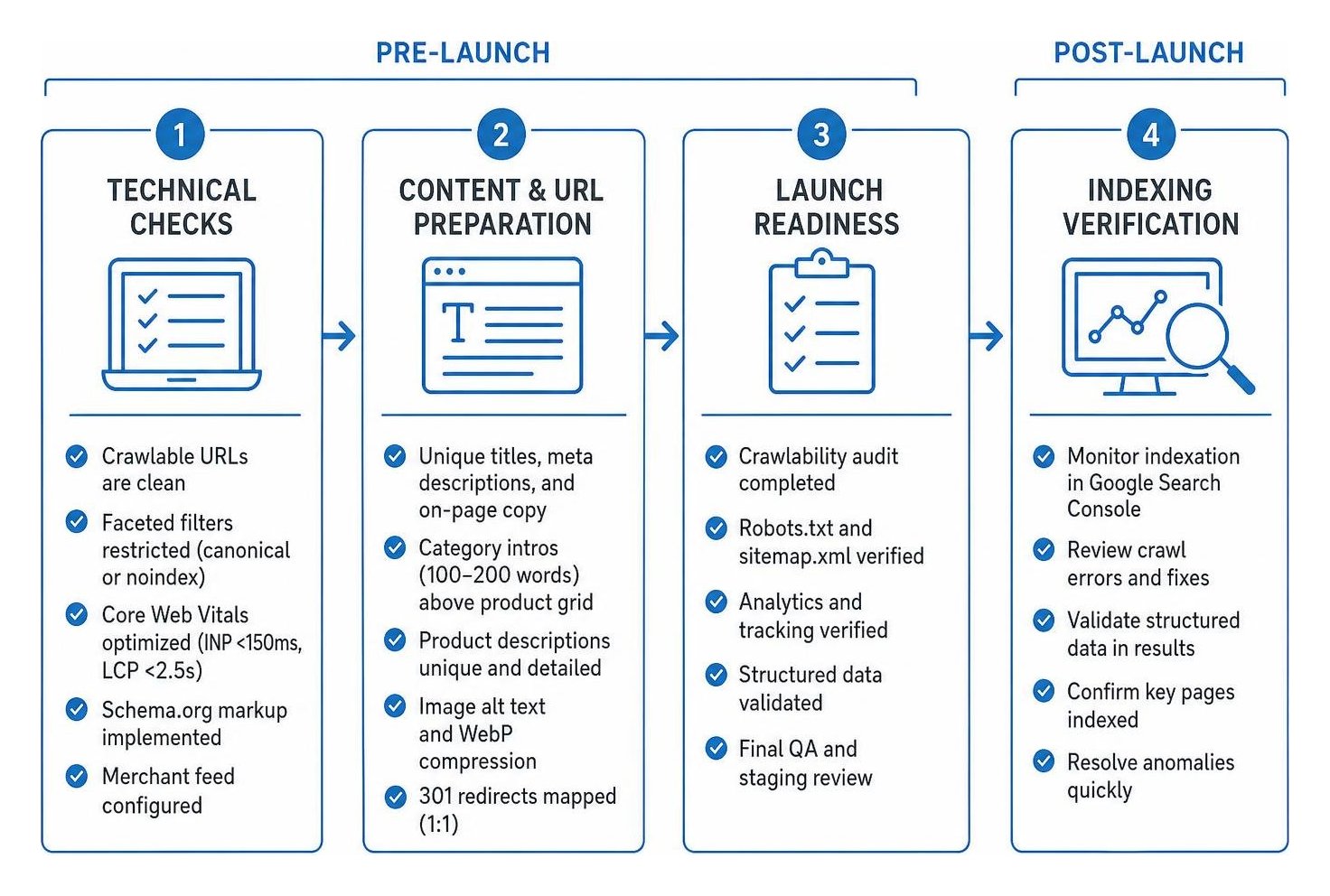
Before launching, audit crawlability, map all 301 redirects, craft distinct on-page copy, and verify analytics tracking; after launch, immediately monitor indexation to resolve crawl anomalies.
A successful store launch requires a structured roadmap to protect existing traffic and build new organic visibility. If you are migrating an older catalog, ensure every legacy URL points to its exact modern equivalent with a one-to-one 301 redirect. Use our actionable ecommerce SEO checklist to verify your technical foundation before flipping the switch.
How Do You Optimize Category and Product Pages on an SEO Friendly E-Commerce Website?
Optimize commercial pages by targeting high-intent buyer keywords, publishing 100 to 200 words of introductory copy on category pages, and crafting unique, detailed product descriptions.
Category pages often deliver the highest return on organic search because they capture broad commercial searches. Write a unique introductory overview above the product grid and add helpful shopping advice in the footer. Use a single H1 tag containing your primary commercial keyword, compress product images into modern WebP formats, and write descriptive alt text.
On paginated collection pages, allow each page to self-canonicalize rather than pointing every page back to page one, ensuring search engines discover all products. To avoid splitting your search equity, learn to identify and fix keyword cannibalization across product lines.
What Essential Technical Checks Prevent Duplicate Content and Indexing Errors?
Prevent duplicate content by standardizing URL parameters, pointing variant product URLs to the primary parent URL, enforcing sitewide HTTPS, and resolving trailing slash discrepancies.
Duplicate content dilutes your ranking signals across multiple identical pages. Common culprits include:
- Tracking tags and sorting parameters that generate duplicate URLs
- Color or size variant pages that share identical descriptions
- Subcollections that repeat parent category product listings
Set canonical tags on all product variants to point back to the canonical parent product URL. Enforce HTTPS sitewide, normalize your URLs to either include or exclude trailing slashes consistently, and verify your XML sitemap inside Google Search Console immediately after launch.
How Do You Measure Organic Performance and Scale Authority Post-Launch?
Measure success by tracking non-brand organic clicks and revenue in Google Analytics 4, monitoring indexation trends in Google Search Console, and building authoritative backlinks through targeted digital PR and content hubs.
Launching your store is just the beginning. Long-term organic growth depends on building topical authority and acquiring high-quality backlinks. Publish buying guides, product comparisons, and problem-solving articles that link directly to your commercial category pages. As your catalog expands, partnering with a dedicated ecommerce SEO company like SmallBizSEO helps keep your site optimized, competitive, and continuously growing.
Ready to Turn Your Store Into an Organic Revenue Engine?
Building an SEO-friendly e-commerce store requires connecting clean site architecture, fast technical performance, structured product data, and high-value commercial copy. By addressing crawl bottlenecks early, organizing your catalog into logical collections, and maintaining accurate product feeds, you build a dependable foundation for sustained organic sales.
If you are ready to expand your search visibility and outrank competing brands, explore our tailored SEO packages, request a comprehensive SEO visibility audit, or contact us today to scale your online revenue.