Stop Wasting Crawl Budget on Canonicals That Target Redirected URLs

How can you find canonical tags pointing to redirected pages?
To learn how to find canonical tags pointing to redirected pages, crawl your site and export the canonical URL listed for each page. Check the HTTP status of every canonical target. Flag targets that return a 301 or 302 redirect, then update those tags to point directly to the right page that returns 200 OK.
A canonical tag names the page you want search engines to treat as the main version. If that URL redirects, it adds an extra step and may conflict with your other SEO signals.
I'm Clayton Johnson, founder of SmallBizSEO, where I help small businesses make technical SEO easier to understand. My approach to how to find canonical tags pointing to redirected pages starts with checking live responses, not just reading the tags.
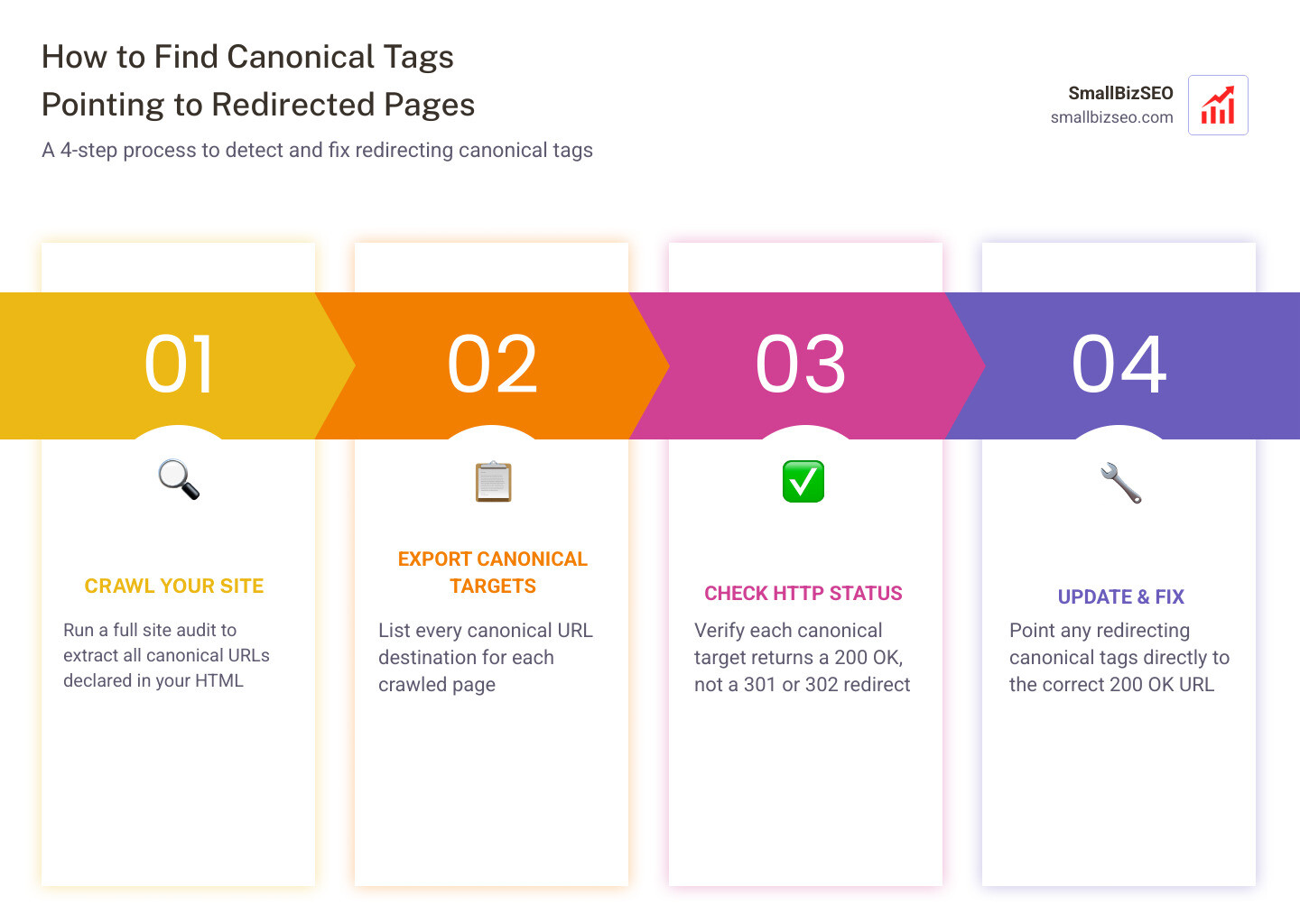
How to Find Canonical Tags Pointing to Redirected Pages
Finding canonical tags that point to redirecting URLs requires checking the full journey of a link directive from your HTML to the server response. When an HTML document declares a preferred URL, crawlers expect that destination to resolve directly with a clean status code. If that declared URL triggers an immediate redirect, search engine bots encounter mixed signals.
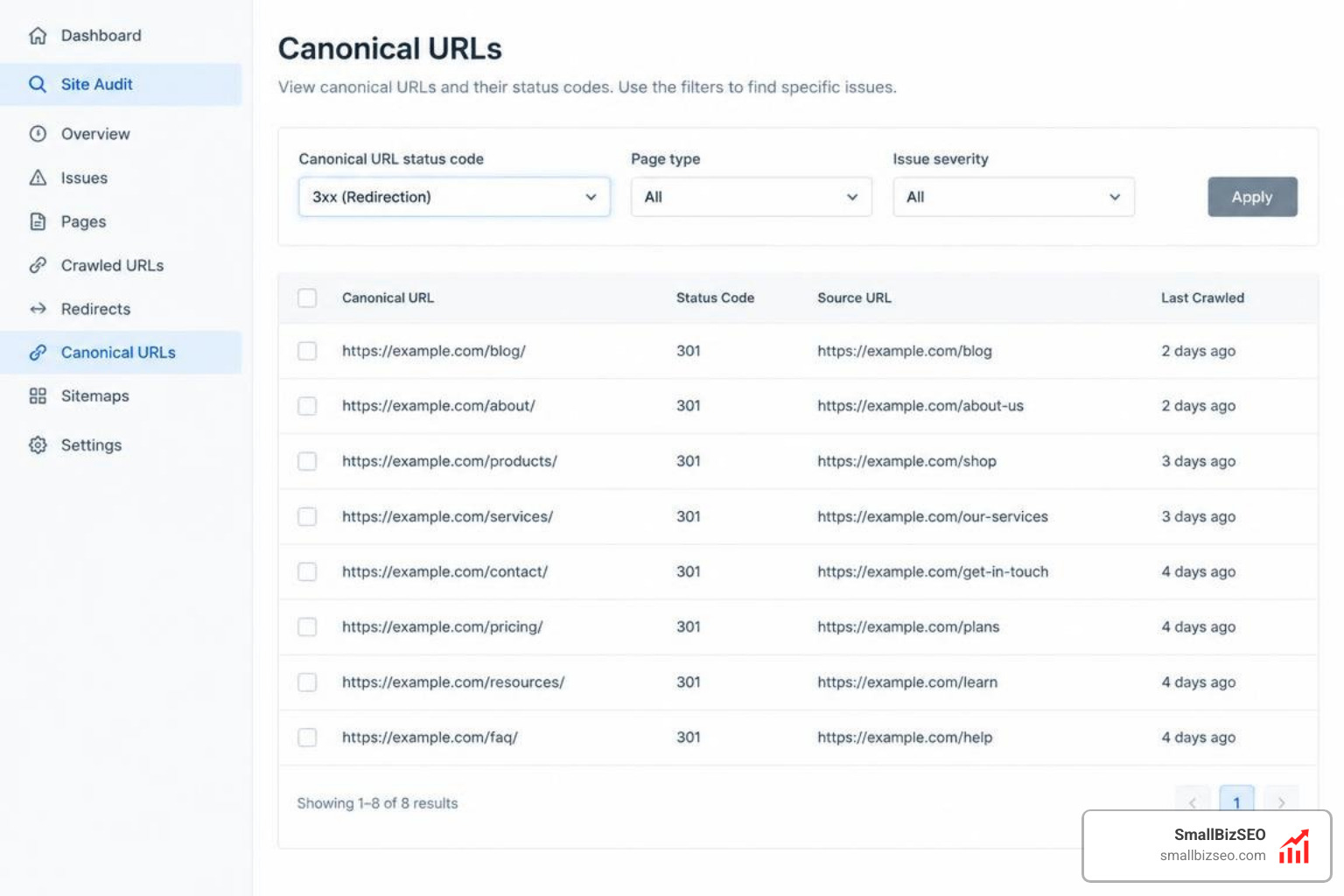
To catch these issues across your domain, configure your crawler to look beyond static source code. Modern web applications frequently inject or modify tags during client-side execution. By running both raw HTML and rendered DOM comparisons, you can see if JavaScript modifies your canonical links after page load. Combining these audits with server log analysis helps you pinpoint precisely where bots spend resources following avoidable redirect hops.
Why Is Learning How to Find Canonical Tags Pointing to Redirected Pages Critical for Crawl Budget?
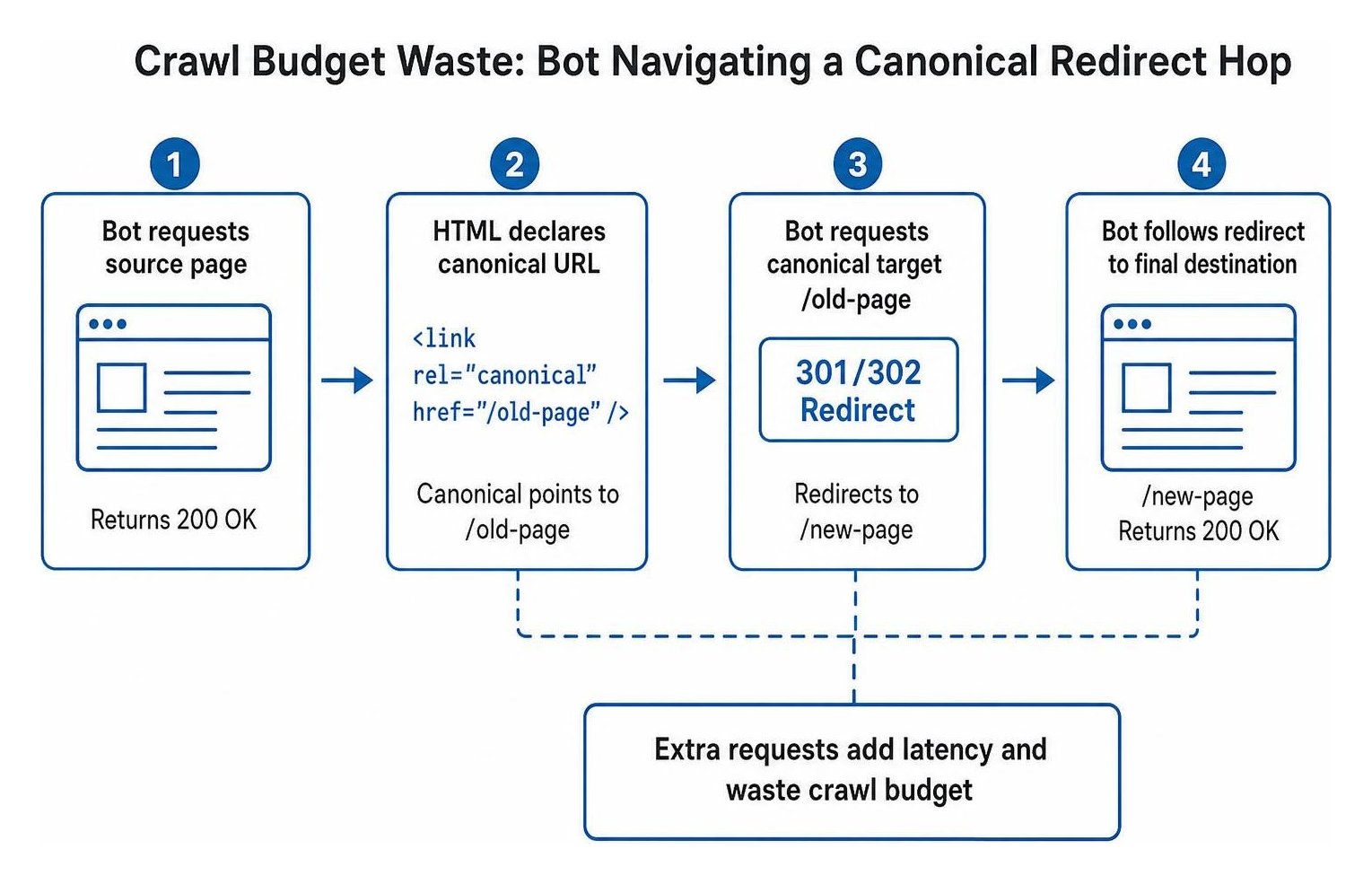
Canonical tags pointing to redirecting URLs waste crawl budget by forcing search bots to request intermediate, non-indexable URLs instead of indexing your primary content immediately.
When you specify a canonical address, you tell search engines, "This is the primary page you should evaluate and rank." If that URL immediately returns a 301 or 302 redirect, search bots must spend additional crawl requests traversing the redirect hop before discovering the final destination.
Industry studies show that over 40% of SaaS websites lack canonical tags entirely, and 25% have canonicals pointing to incorrect URLs. These mistakes dilute link equity and introduce avoidable indexing delays. As outlined in our technical SEO guide, search engines treat canonical tags as hints rather than absolute directives.
According to Google's documentation on specifying canonical URLs, canonicalization signals work best when they align across sitemaps, internal links, and server responses. When a canonical URL redirects elsewhere, Google may ignore your tag, consolidate authority to an unintended page, or struggle to resolve duplicate content efficiently.
Step-by-Step Guide on How to Find Canonical Tags Pointing to Redirected Pages Using Site Audits
To audit your website for canonical tags pointing to redirects at scale, follow this four-step process using any standard website crawler:
- Run a full domain crawl: Configure your crawling tool to crawl all HTML pages, collect canonical tag data from the document head, and follow internal links.
- Export declared canonical targets: Navigate to the canonical directives report, filter for pages with canonical URLs that differ from the current address, and export the complete list of target destinations.
- Execute a list-mode crawl on target URLs: Upload the exported canonical URLs into your crawler in list mode to check their live server response codes.
- Filter for non-200 status codes: Identify any canonical target returning a 301, 302, 307, 404, or 500 status code.
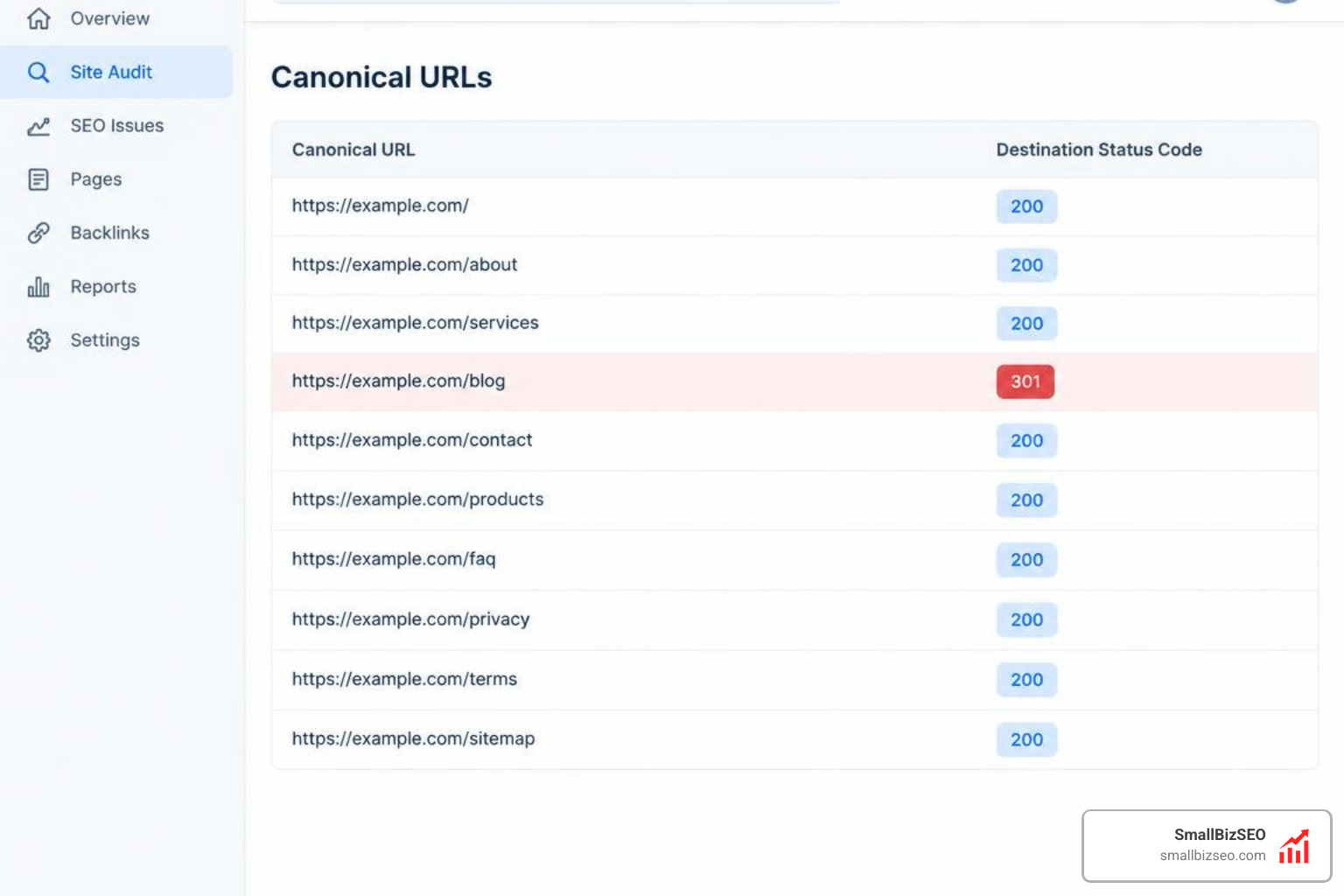
When performing a comprehensive site audit, set up custom extraction filters to separate canonicals injected by JavaScript from those present in the initial server response. If a JavaScript framework dynamically updates your canonical tags after rendering, Googlebot may encounter conflicting directives during its two-wave indexing process.
How to Inspect Single URLs and Search Console Indexing Reports
You can identify individual canonical redirect errors by reviewing diagnostic reports inside Google Search Console and inspecting live server responses via the command line.
Inside Google Search Console, navigate to the page indexing report to review URLs listed under the "Alternate page with proper canonical tag" status. While this classification normally indicates healthy canonicalization, Google support guidance on alternate page statuses notes that this report often masks canonicals pointing to redirecting targets.
Check the URL Inspection tool to compare the user-declared canonical against the Google-selected canonical. If Google selects a different URL, inspect the declared target's server headers using terminal commands to check for redirect responses.
Regularly auditing your overall index coverage ensures that critical landing pages remain indexed rather than stalled in non-canonical status tables.
How to Fix and Prevent Redirecting Canonical Tags
Fixing canonical tags that point to redirects involves updating the HTML source code so every canonical tag points directly to a destination that returns a 200 OK status code.
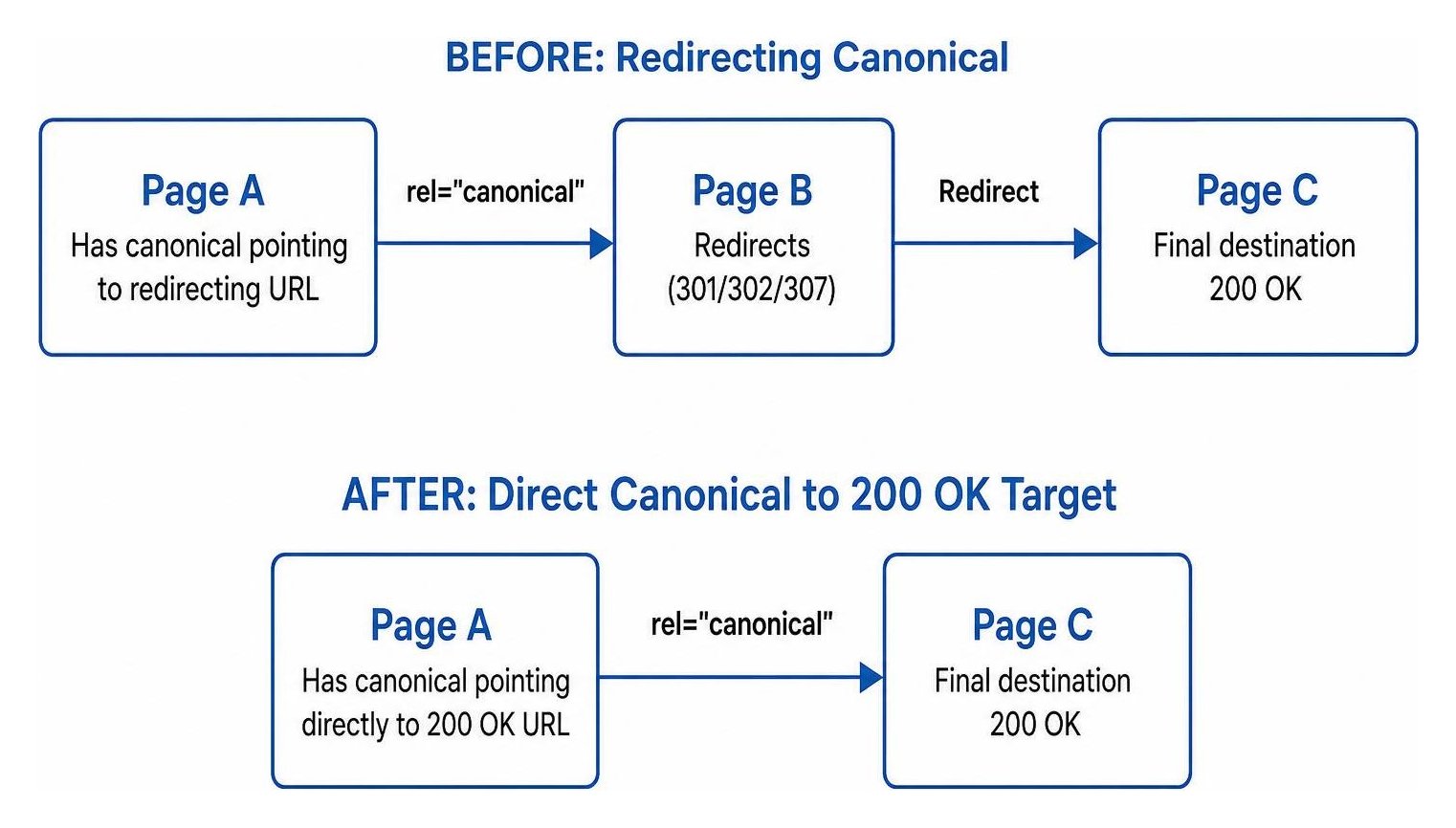
Eliminating redirect hops in your canonical tags cleans up your site architecture, speeds up indexation of newly published content, and ensures link equity flows straight to your primary pages without getting lost across intermediate hops.
How Do You Resolve Redirect Chains and Update Non-200 Canonicals?
Resolve redirecting canonical tags by editing your page templates or CMS settings so every rel="canonical" link points directly to the ultimate 200 OK destination, bypassing all intermediate hops.
Canonical chains occur when Page A sets Page B as its canonical, but Page B redirects to Page C (which may even canonicalize to Page D). These loops and multi-step chains create significant confusion for crawlers.
To resolve these issues cleanly:
- Open your CMS template or header configuration where the canonical URL is declared.
- Replace any outdated, redirecting target URLs with the final, canonical URL.
- Verify protocol consistency (always point directly to HTTPS rather than HTTP).
- Match your site's trailing-slash and subdomain conventions (such as www vs. non-www).
- Review consolidated pages using our redirect mapping guide to confirm retired pages route straight to their new homes.
- Complete a post-migration cleanup after structural redesigns to ensure retired URLs are not referenced in active canonical tags.
How Do 301 and 302 Redirects Differ When Assigned as Canonicals?
A 301 redirect indicates a permanent move and serves as a strong canonicalization signal, whereas a 302 redirect indicates a temporary move and tells crawlers to retain the original URL's indexing signals.
When a canonical tag points to a 301 redirect, search engines will generally follow the redirect and treat the final destination as the intended canonical version, though the conflicting directives add processing overhead.
When a canonical tag points to a 302 redirect, search engines face contradictory instructions: the canonical tag suggests the target URL is the primary source, but the 302 header indicates the target URL has temporarily moved elsewhere. Understanding HTTP status code behavior helps you prevent these signal conflicts.
| Feature / Behavior | 301 Permanent Redirect | 302 Temporary Redirect |
|---|---|---|
| Directive Intent | Permanent address change | Temporary address relocation |
| Link Equity Transfer | Passes full ranking signals | Retains signals at source |
| Search Engine Interpretation | Strong canonical signal to target | Weak/ambiguous canonical signal |
| Crawler Action on Canonical | Resolves to target, but wastes crawl step | May ignore canonical tag entirely |
| Recommended SEO Fix | Update canonical directly to final URL | Update canonical directly to final URL |
How to Automate Ongoing Audits and Validate 200 OK Status Codes
Preventing canonical regressions requires automated monitoring integrated into your site maintenance and deployment routines.
Add URL validation scripts to your staging and continuous integration pipelines. These tests can crawl modified templates, extract declared canonical destinations, and verify that every destination returns an immediate 200 OK status before code changes deploy to production. Catching trailing-slash mismatches, protocol errors, or outdated URLs early prevents ranking disruptions.
Proactively resolving SEO audit errors protects your organic visibility. At SmallBizSEO, we help small businesses automate technical monitoring through our canonical tag optimization framework, ensuring your directives remain clean, accurate, and aligned with search engine standards.
Keep Your Canonical Architecture Clean and Direct
Maintaining an accurate canonical architecture ensures search engines spend their time crawling, rendering, and ranking your highest-value content rather than chasing avoidable redirect loops. By auditing your canonical destinations, validating server responses, and pointing every directive to a clean 200 OK URL, you establish clear signals that protect your organic search performance. Check your site directives today to make sure your crawl budget supports real growth.