Top Browser Extensions for Auditing Content Visibility in AI Models
Which AI Visibility Checker Chrome Extension Should You Use?
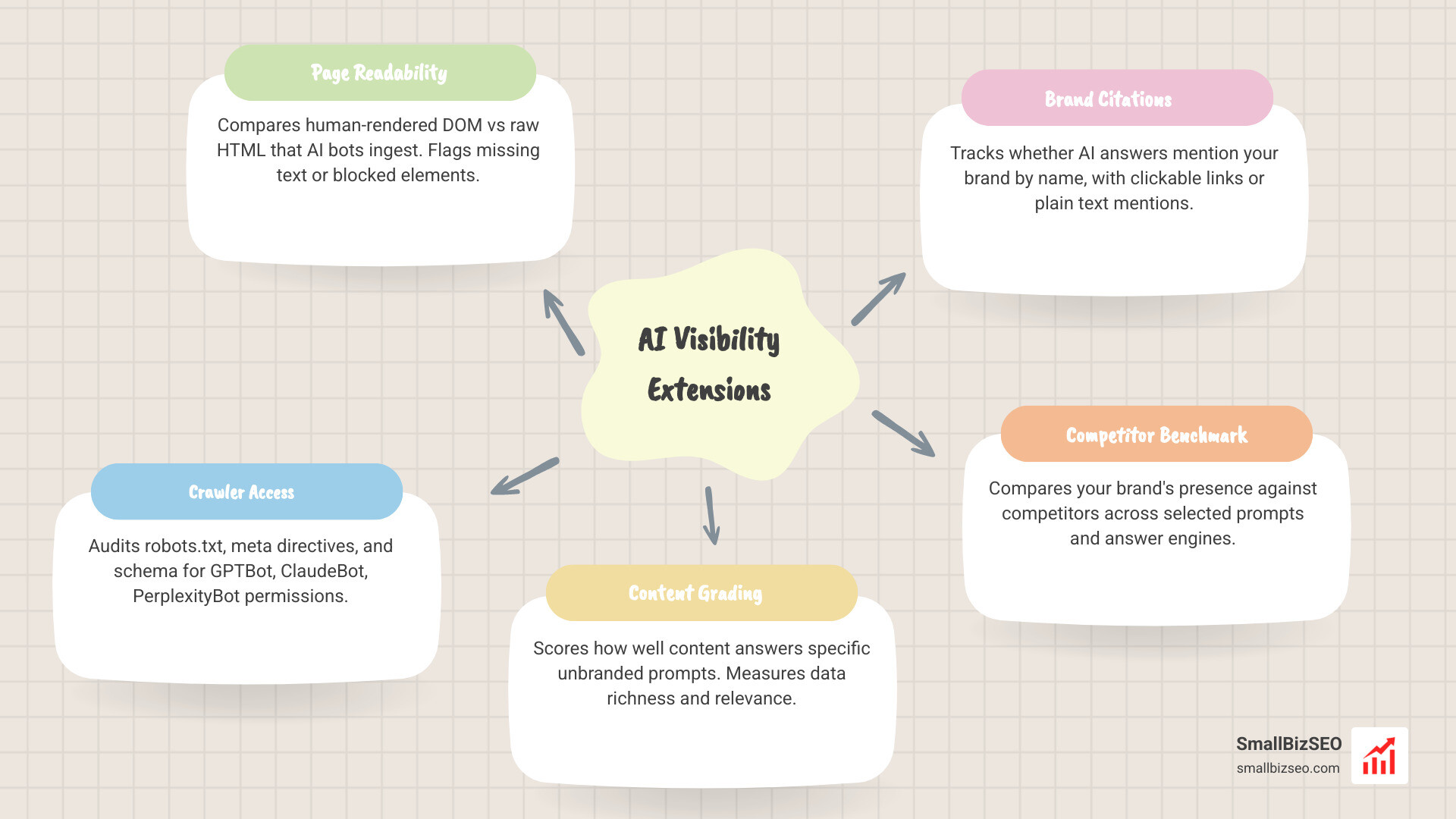
The right ai visibility checker chrome extension depends on what you want to check. Adobe’s AI Content Visibility Checker compares what a person sees with what an AI fetcher may read. Meikai checks crawler access, schema, and page content. Yolando grades how well content answers questions, while Ekamoira checks whether AI answers mention or cite your brand.
These tools answer different questions. A page audit can reveal missing text or blocked crawlers, but it cannot promise a citation. A prompt check shows whether your brand appears in selected answers, but it may not explain why.
I’m Clayton Johnson, founder of SmallBizSEO, where I work on technical SEO and content that helps small businesses get found. In this guide to the ai visibility checker chrome extension landscape, I’ll focus on the checks that help you choose a tool and act on its findings.
Ai visibility checker chrome extension vocabulary:
Why Does AI Visibility Matter for Modern Web Search?
AI visibility matters because generative search engines use machine-readable page content to synthesize answers and generate citations, rather than relying solely on traditional search rankings.
Discovery habits have fundamentally shifted. With nearly 800 million people now using ChatGPT every week alongside platforms like Perplexity, Claude, and Google Gemini, users increasingly seek direct answers rather than scrolling through lists of traditional blue links.
Generative Engine Optimization (GEO) and Answer Engine Optimization (AEO) require understanding how AI bots crawl the web. Unlike traditional search engine crawlers that execute client-side scripts, AI bots execute 0 lines of JavaScript. They pull only the raw HTML sent in the server's initial response. Furthermore, AI crawlers spend approximately 2 seconds on a page before moving on. Rendering an entire page in a headless browser requires roughly 20 times more computing power, so AI systems bypass JavaScript execution to conserve resources.
When an AI crawler encounters a page dependent on client-side rendering, it misses dynamic elements like product descriptions, specifications, or pricing tables. In fact, research shows that 28% of Fortune 100 website content is invisible to AI crawlers. If an answer engine cannot read your core text in raw HTML within its strict time limit, it will either omit your brand or summarize third-party mentions instead.
How Do the Top AI Visibility Checker Chrome Extension Tools Compare?
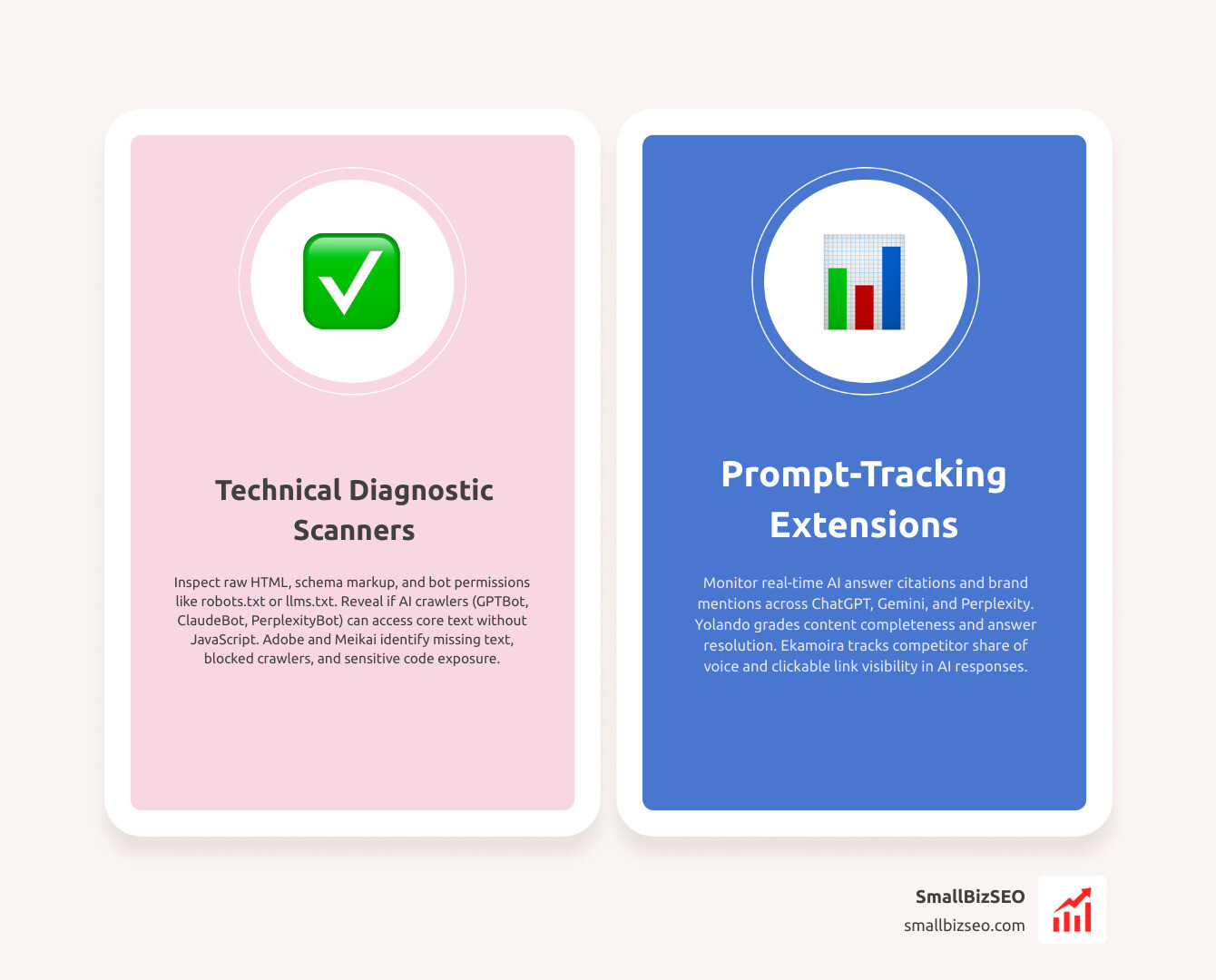
AI visibility browser extensions fall into two functional categories: technical diagnostic scanners that inspect raw HTML, schema, and crawler permissions, and prompt-tracking extensions that monitor real-time citations and brand recommendations across large language models.
| Extension Name | Focus Area | Key Features Evaluated | Execution Type | Chrome Store Rating |
|---|---|---|---|---|
| Adobe AI Content Visibility Checker | Technical Crawlability | Agent View vs. Human View, Citation Readability Score | Server / Cloud Analysis | 4.8 / 5.0 (30 ratings) |
| Meikai AI Visibility Checker | Technical SEO & GEO | Bot access (GPTBot, ClaudeBot), schema, /llms.txt | Local In-Browser | 5.0 / 5.0 (11 ratings) |
| AI Difference Engine | Technical DOM Audit | Raw response HTML comparison, sensitive code exposure | Local In-Browser | Technical Utility |
| AI Visibility Audit (inocta.io) | Protocol & Agent Checks | axe-core agentic rules, WebMCP tools, robots.txt | Local In-Browser | 5.0 / 5.0 (5 ratings) |
| Yolando AI Visibility Score (GEO) | Content & Schema | 11 content-type rubrics, answer resolution, trust markers | API Integration | 5.0 / 5.0 (15 ratings) |
| FixAEO Extension | AEO Prompt Presence | 0–100 score, unbranded buyer prompts (Gemini) | Cached DB Lookup | Free Utility |
| AI Visibility Checker (Ekamoira) | Prompt Monitoring | Mentions vs. citations across ChatGPT, Perplexity, Google | Multi-Platform Prompt Check | 5.0 / 5.0 (2 ratings) |
| AI Visibility Tool (aeotester.com) | Hybrid GEO Scanner | robots.txt, llms.txt, structured schema, entity clarity | Local In-Browser | 5.0 / 5.0 (3 ratings) |
Why Should You Use an AI Visibility Checker Chrome Extension for Generative Search?
An AI visibility checker Chrome extension helps you identify whether AI crawlers can access, parse, and extract your content before you spend time and resources on off-page promotion.
Client-side rendering bottlenecks represent the primary reason websites remain hidden from answer engines. A browser extension allows you to simulate what a crawler ingests without digging through complex server logs. Performing a structured guide to AI SEO audits reveals whether your initial HTML payload contains your primary message or if you need server-side rendering (SSR) or pre-rendering solutions.
Additionally, browser extensions check critical server directives:
- Robots.txt Crawl Permissions: Verifying access rules for dedicated AI bots such as GPTBot, ClaudeBot, PerplexityBot, and Google-Extended.
- Emerging Standards: Detecting whether an
/llms.txtfile exists to provide AI systems with clean markdown summaries. - Citation Readability: Measuring the proportion of user-visible text available in static source code.
Which Technical Extensions Check Raw HTML and Machine Readiness?
Technical extensions audit raw HTML, bot crawl permissions, structured data, and potential security vulnerabilities to ensure machines parse your pages accurately.
The Adobe AI Content Visibility Checker allows webmasters to toggle directly between an Agent View and a Human View. This comparison generates a Citation Readability Score that highlights text visible to users but absent from the crawler's fetch.
For complete protocol auditing, the Meikai AI Visibility Checker scans bot access permissions, inspects JSON-LD schema markup, and verifies /llms.txt configurations. Complementing this, the AI Difference Engine inspects raw response HTML to verify critical brand context while ensuring sensitive internal comments or unrendered personal data are shielded from LLM ingestion.
For advanced technical teams, the inocta.io AI Visibility Audit evaluates agent readiness using Google's 33-rule agentic accessibility set via axe-core and checks for WebMCP tool declarations. Incorporating these diagnostic tools alongside automated SEO visibility audits ensures your foundational code remains accessible.
Which Prompt-Tracking Extensions Measure Brand Citations and Presence?
Prompt-tracking extensions evaluate how often your brand surfaces in generated answers and whether answer engines provide direct, clickable links to your domain.
The Yolando AI Visibility Score applies 11 content-type rubrics (such as product pages, blog posts, and documentation) to measure data richness, answer resolution, and trust signals.
For search monitoring, the FixAEO extension queries category-level buyer-intent prompts to output an AI Presence score from 0 to 100 based on Google Gemini responses. Similarly, the AI Visibility Checker by Ekamoira tracks brand mentions across ChatGPT, Perplexity, and Google AI Overviews, differentiating between plain-text brand mentions and clickable source citations.
How Do You Choose the Right AI Visibility Checker Chrome Extension for Your Workflow?
Choose an extension based on your specific operational goals, technical requirements, and data privacy needs.
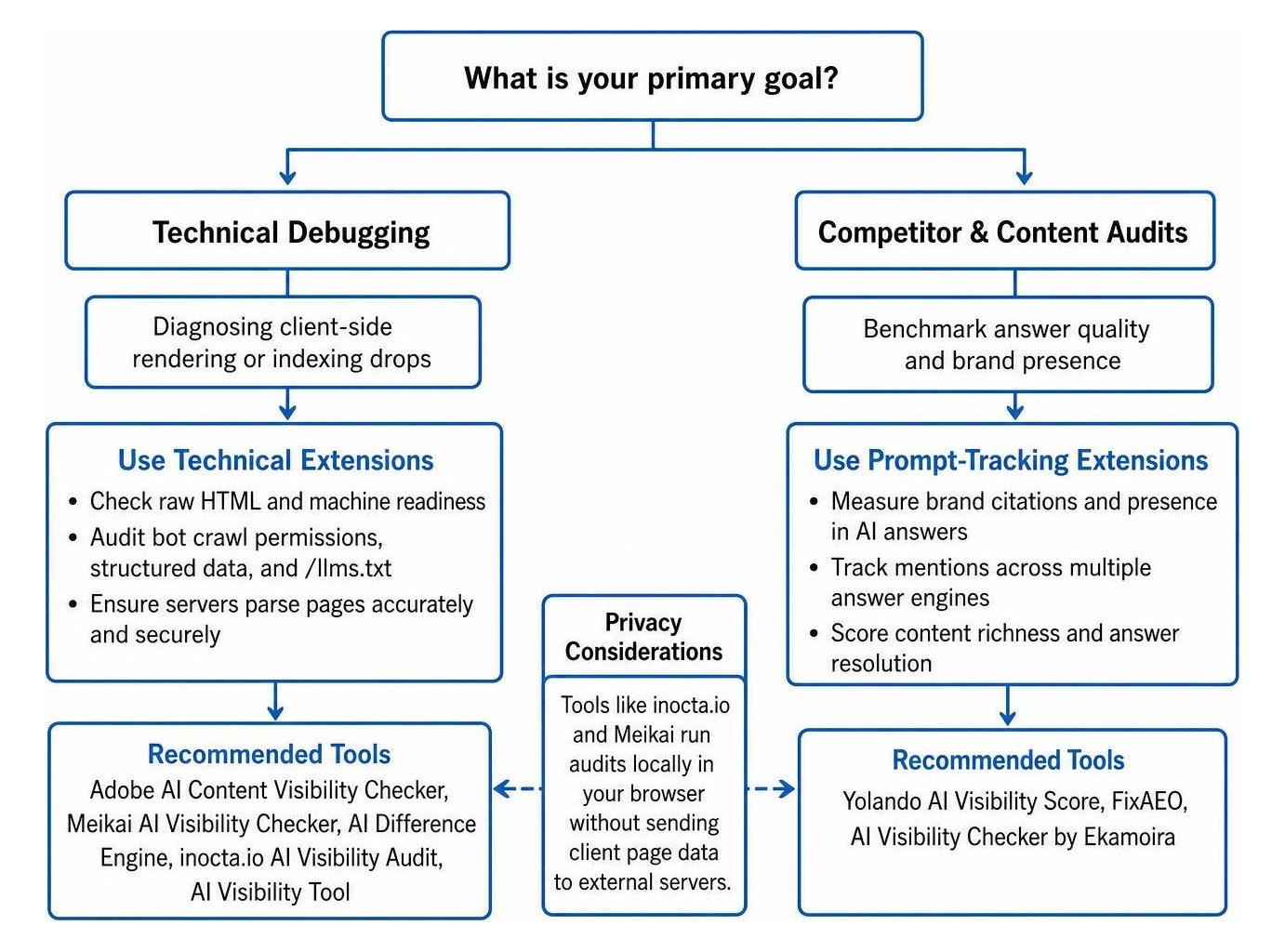
- Technical Debugging: If you are diagnosing client-side rendering or indexing drops, use raw HTML inspectors like Adobe's checker or the AI Visibility Tool.
- Competitor & Content Audits: If you want to benchmark answer quality, Yolando and FixAEO provide rapid scoring for sales pitches or editorial planning.
- Privacy Considerations: Tools like inocta.io and Meikai run audits locally in your browser without sending client page data to external servers, making them ideal for pre-launch staging sites.
How Can You Interpret Visibility Scores and Optimize for AI Citations?
Use visibility scores as a diagnostic starting point, then address crawl blocks, entity clarity, structured schema, and factual content depth.
Most first-time website checks land between 40 and 69 out of 100, while the average website scores between 45 and 65 on GEO grading scales. A score of 70 or higher is considered good, and scores above 75 place a site in the top tier. Major tech platforms with server-rendered architectures score high—such as Shopify (98/100) and Webflow (97/100)—whereas sites with heavy client-side scripts or crawler blocks can score low, such as Amazon (32/100) or Nike (63/100).
To turn low scores into citations, prioritize these technical and editorial fixes:
- Unblock AI Search Crawlers: Allow GPTBot, ClaudeBot, and PerplexityBot in your
robots.txtfile so answer engines can fetch real-time citations. - Supply Static Content: Deliver your core copy in static HTML rather than relying on client-side JavaScript execution.
- Implement Structured Data: Add Organization, Product, and FAQPage JSON-LD schema to define your entities clearly.
- Format Content for Direct Answers: Structure headings as natural questions and place concise direct answers in the first two sentences to streamline optimizing content for AI models.
- Publish an
/llms.txtFile: Provide language models with a standardized, clean markdown roadmap of your most important resources.
Moving Beyond Browser Extensions to Full AI Search Presence
Browser extensions provide fast, page-level snapshots of technical machine readiness and prompt presence. However, earning consistent citations across major AI search engines requires an integrated approach that connects technical crawlability, structured entity definitions, and authoritative digital references.
At SmallBizSEO, our data-driven Velocity framework pairs on-page machine-readability optimizations with comprehensive technical audits and E-E-A-T-compliant content strategies. Explore our specialized SmallBizSEO AI visibility solutions to ensure your brand is accurately understood, referenced, and cited across the next generation of search platforms.