Boost Holiday Conversions Without Ruining SEO by Using Temporary Redirects

When should you use a temporary redirect for a seasonal promotion?
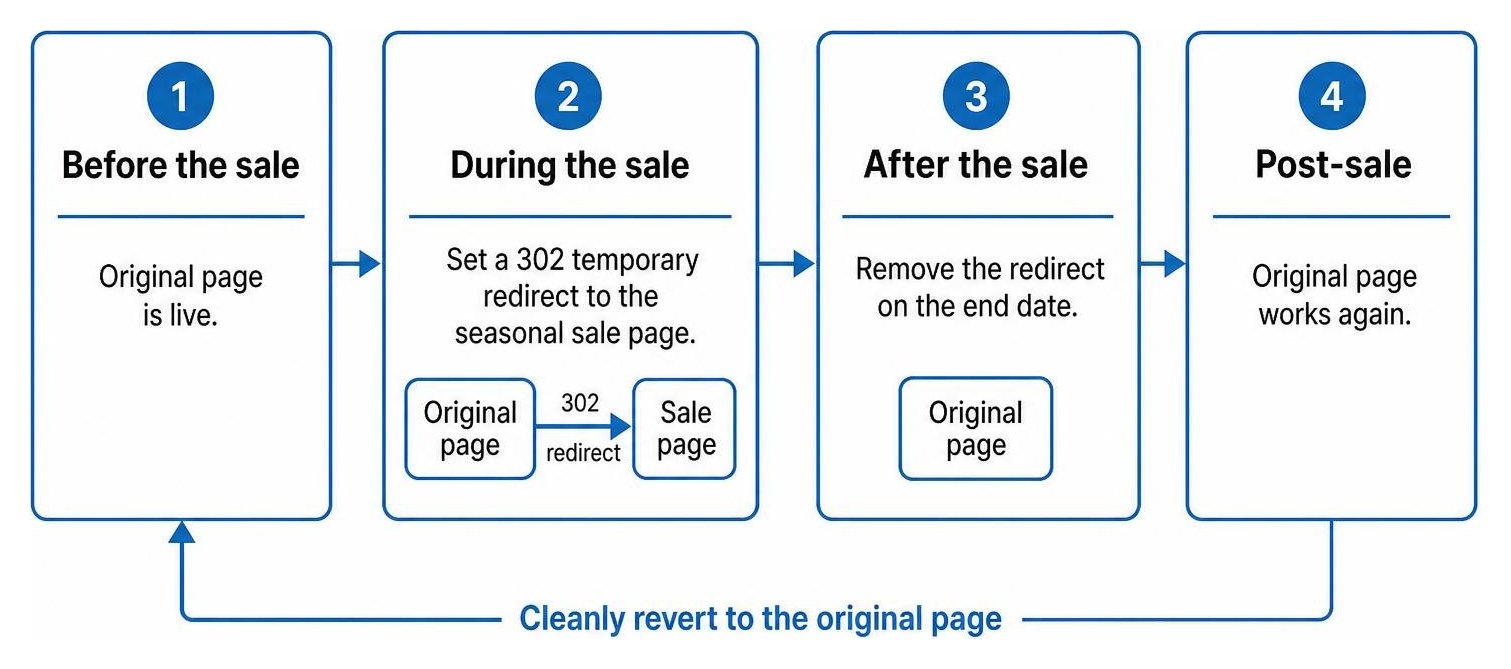
Deciding when to use a temporary redirect for a seasonal promotion starts with one question: Will the original page return after the sale? If yes, use a 302 redirect to send visitors to a relevant campaign page. Set an end date, then remove the redirect so the original URL works again. If the original page can stay useful throughout the sale, you may not need a redirect at all.
I’m Clayton Johnson, founder of SmallBizSEO, where I focus on helping small businesses make clear SEO and content decisions. That work informs my guidance on when to use a temporary redirect for a seasonal promotion and how to plan its removal.
Introduction: The High Cost of Mismanaged Campaign Routing
Seasonal marketing brings intense spikes in user interest, but sudden URL restructuring can introduce severe technical debt. Over 66% of links across the web are dead, and when visitors encounter a broken landing experience, roughly 77% leave permanently without converting. Managing temporary routing poorly causes immediate bounce rate spikes, lost organic visibility, and wasted promotional budgets.
When running limited-time campaigns, misconfigured routing harms performance before search crawlers even finish indexing the offer. Every redirect hop introduces roughly 60 to 70 milliseconds of latency. If hops accumulate into chains of three or more, mobile visitors can experience up to two full seconds of delay. In e-commerce, research shows a mere 0.1-second improvement in mobile speed correlates with an 8.4% lift in conversions. Choosing the right redirect type ensures your short-term promotions convert shoppers while keeping long-term rankings intact.
When Should You Use a Temporary Redirect for a Seasonal Promotion?
Use a 302 temporary redirect when a promotional campaign replaces a standard page for a specific, finite window and the source page will return once the campaign concludes.

If an established product line, category hub, or standard lead generation form must temporarily yield to a holiday promotion, a 302 redirect signals to search engines that your original destination remains the canonical authority. This prevents search crawlers from overwriting your primary page in the index while delivering shoppers straight to the seasonal offer.
Why is a 302 redirect the right choice instead of a 301?
A 302 redirect signals a temporary change, preserving the original page's indexing status and preventing aggressive browser caching. A 301 redirect signals a permanent move, transferring canonical equity to the destination and instructing browsers to cache the instruction indefinitely.
Understanding the difference between permanent and temporary signals is crucial:
| Technical Feature | 301 Permanent Redirect | 302 Temporary Redirect |
|---|---|---|
| Search Engine Index | Replaces old URL with new URL in search results | Keeps original URL indexed in search results |
| Link Equity Transfer | Passes 90% to 99% of PageRank permanently | Retains PageRank on the source URL |
| Browser Caching | Cached aggressively by client browsers | Not cached; easily removed or modified |
| Primary Use Case | Site migrations and permanent domain changes | Flash sales, seasonal offers, and A/B testing |
| Reversibility | Difficult to revert due to browser caches | Immediate rollback upon removing server rule |
Marketers often consult resources like 301 vs 302 Redirect: Which Should You Use? to confirm these mechanics. When you use a permanent 301 for a holiday sale, browsers cache the route. Even after you delete the rule, returning visitors may get stuck loading the old promo page. For permanent technical adjustments, modern standards rely on permanent status codes like a 308 redirect, but seasonal sales require the fluid flexibility of a 302.
When should you use a temporary redirect for a seasonal promotion instead of keeping a static URL?
Use a 302 redirect when high-intent traffic from marketing channels or existing evergreen landing spots must land on an active campaign without changing your underlying site architecture.

Temporary routing is ideal for:
- Offline and Print Collateral: Dynamic QR codes printed on physical packaging or retail signage should point to an unchanging routing URL that forwards via a 302 to the active seasonal offer.
- Expiring Campaign Destinations: When launching time-sensitive marketing, teams frequently utilize expiring links to automate cutoffs for flash discounts.
- Branded Vanity URLs: Short, memorable domain links used in paid or social ads can forward users straight to deep holiday sales pages without fragmenting core site authority.
How long can a 302 stay active before search engines treat it as permanent?
A 302 redirect can generally remain active for several weeks to a few months, but keeping it live longer than 90 days increases the risk that search engines will interpret it as permanent.
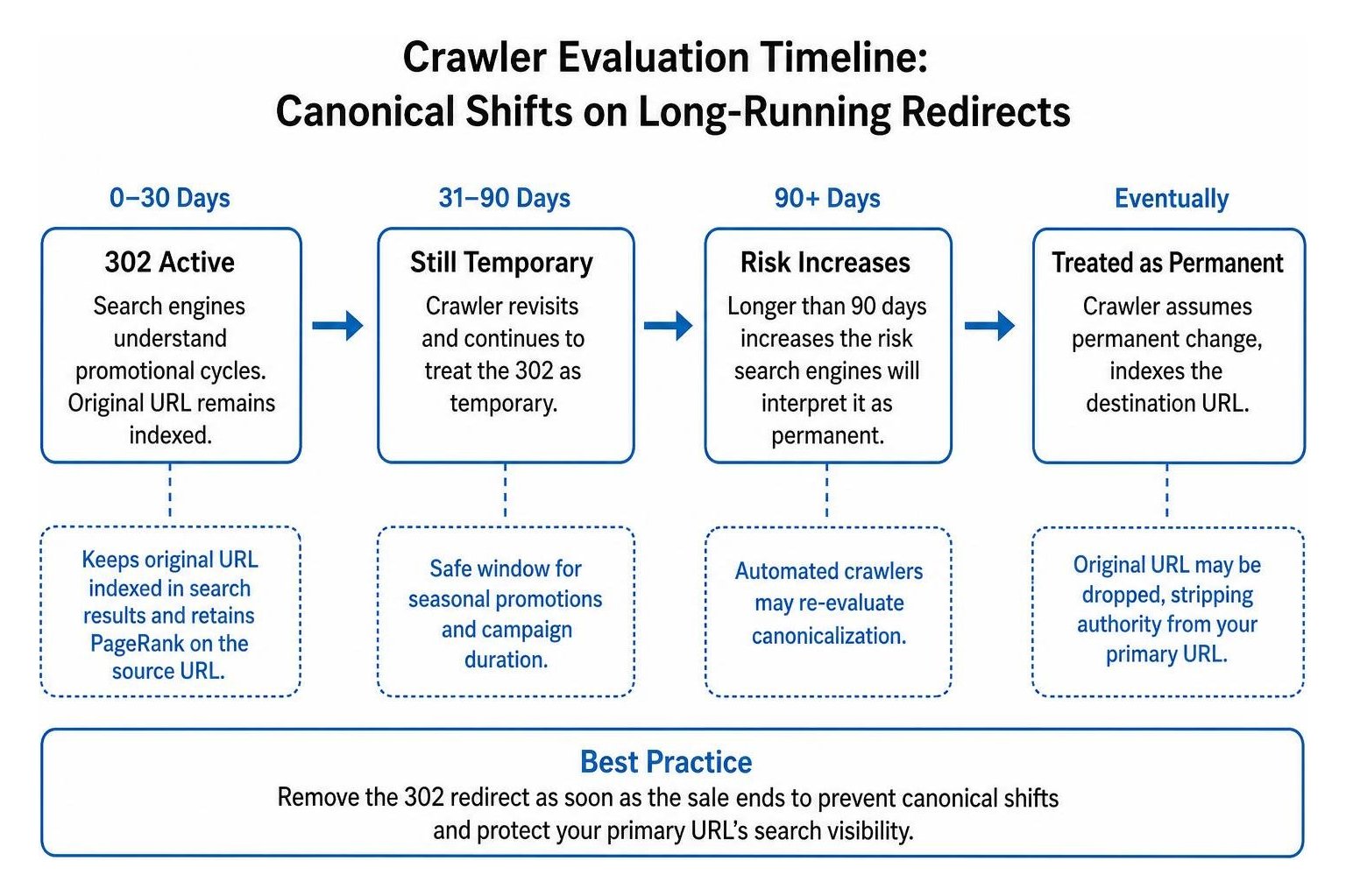
Search engines understand promotional cycles, but if an automated crawler encounters the same 302 redirect month after month, it will eventually re-evaluate canonicalization. The algorithm may assume the change is permanent, indexing the seasonal landing page and stripping the authority of your primary URL. Learning how to spot accidental permanent 302s and fix indexing issues helps you prevent long-running redirects from degrading search visibility.
How Do You Implement, Monitor, and Roll Back Seasonal Redirects?
Implement seasonal redirects directly at the server or edge layer as a single hop, monitor them with crawl diagnostics, and cleanly remove the configuration as soon as the sale ends.

How do you set up a temporary redirect for a seasonal promotion across Apache, Nginx, and WordPress?
Configuring clean redirect headers depends on your hosting stack:
- Apache (.htaccess): Add a simple directive at the top of your configuration: Redirect 302 /summer-collection /holiday-clearance
- Nginx Server Blocks: Implement a targeted rewrite directive: rewrite ^/summer-collection$ /holiday-clearance redirect;
- PHP Headers: Send raw HTTP status headers before any HTML renders: header('Location: https://smallbizseo.com/holiday-clearance', true, 302);
- WordPress Plugins: Use a reputable management plugin to select the 302 Found status code for your source and destination paths.
Ensuring your server utilizes modern HTTP/2 HTTP/3 protocols helps reduce handshake latency. If your promotion involves forms, reading the developer guide to handling post data across permanent redirects clarifies how HTTP methods behave across status codes like 302 and 307.
How do you test and safely remove temporary redirects after a campaign?
Validate your routing before launch and complete a clean rollback after the promotion concludes.
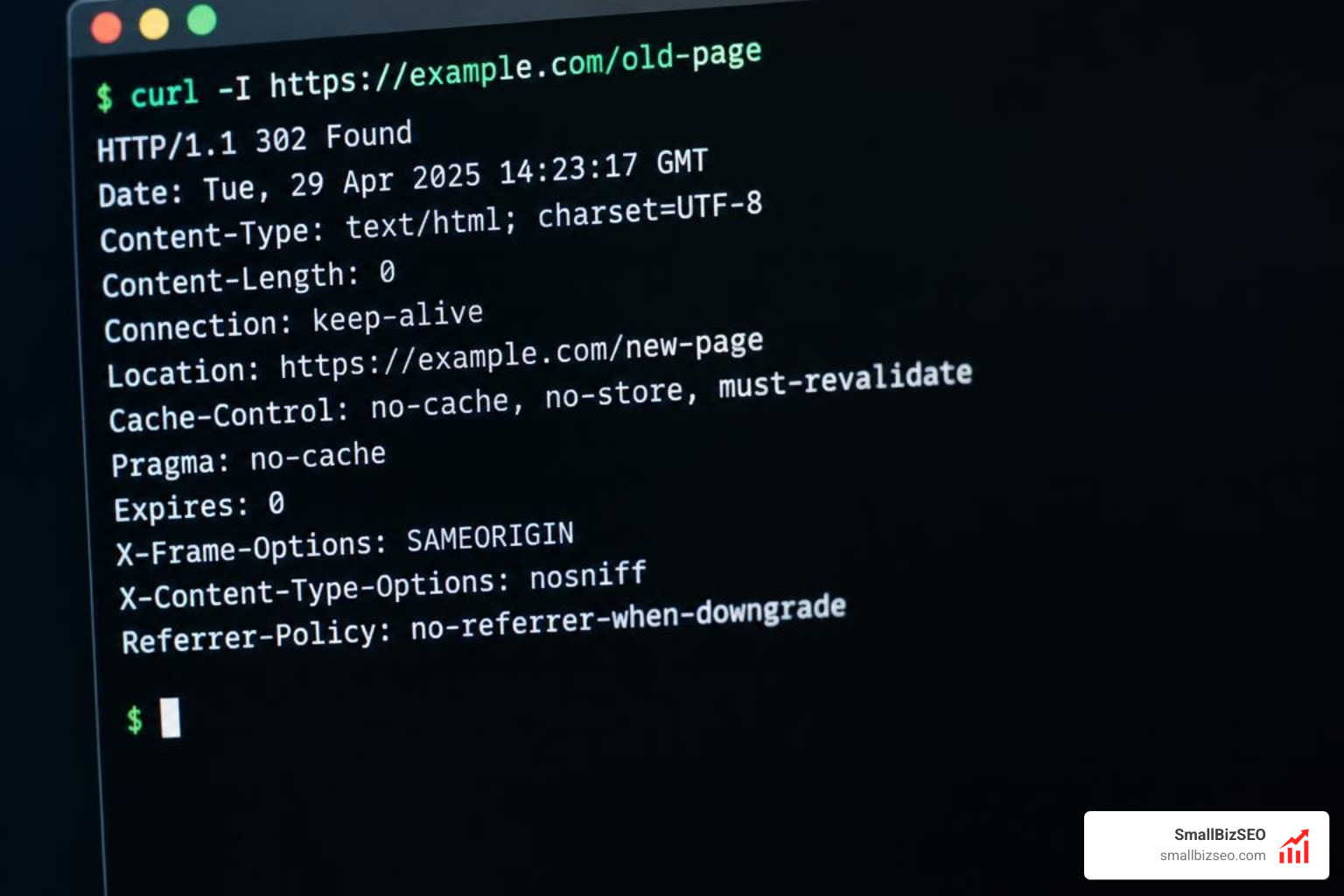
Follow these testing and decommissioning steps:
- Verify Response Headers: Use browser developer tools or command-line network tools to inspect the HTTP header and verify it returns a 302 status code rather than a cached 301.
- Eliminate Chains: Ensure the redirect points directly to the final live page. Approximately 20% of websites suffer from redirect chains that waste crawl budget and slow page loads.
- Audit via Crawlers: Run technical scans to verify internal navigation links point directly to active URLs.
- Remove the Rule and Purge Caches: Once the promotion ends, delete the 302 rule from your server or plugin and clear your server, CDN, and browser caches.
- Safeguard Discontinued Inventory: When campaign-specific products sell out permanently, review strategies to stop losing link equity when sunsetted products disappear.
- Protect User Experience: If seasonal campaign URLs receive residual traffic after deletion, turn missing pages into revenue with an effective 404 error page strategy to guide shoppers back to active products.
Protect Your Seasonal Campaign Performance
Managing temporary redirects correctly ensures your short-term sales convert while your long-term organic rankings stay protected. By applying 302 redirects with clear end dates and keeping redirect paths to a single hop, your business captures seasonal revenue without accumulating technical debt. Explore professional SmallBizSEO 302 redirect solutions to maintain a resilient search presence across every sales cycle.