Stop Sending Old Campaign Traffic to Unrelated Pages

How Can You Retire Expired Campaign Pages Without Sending Visitors to the Wrong Place?
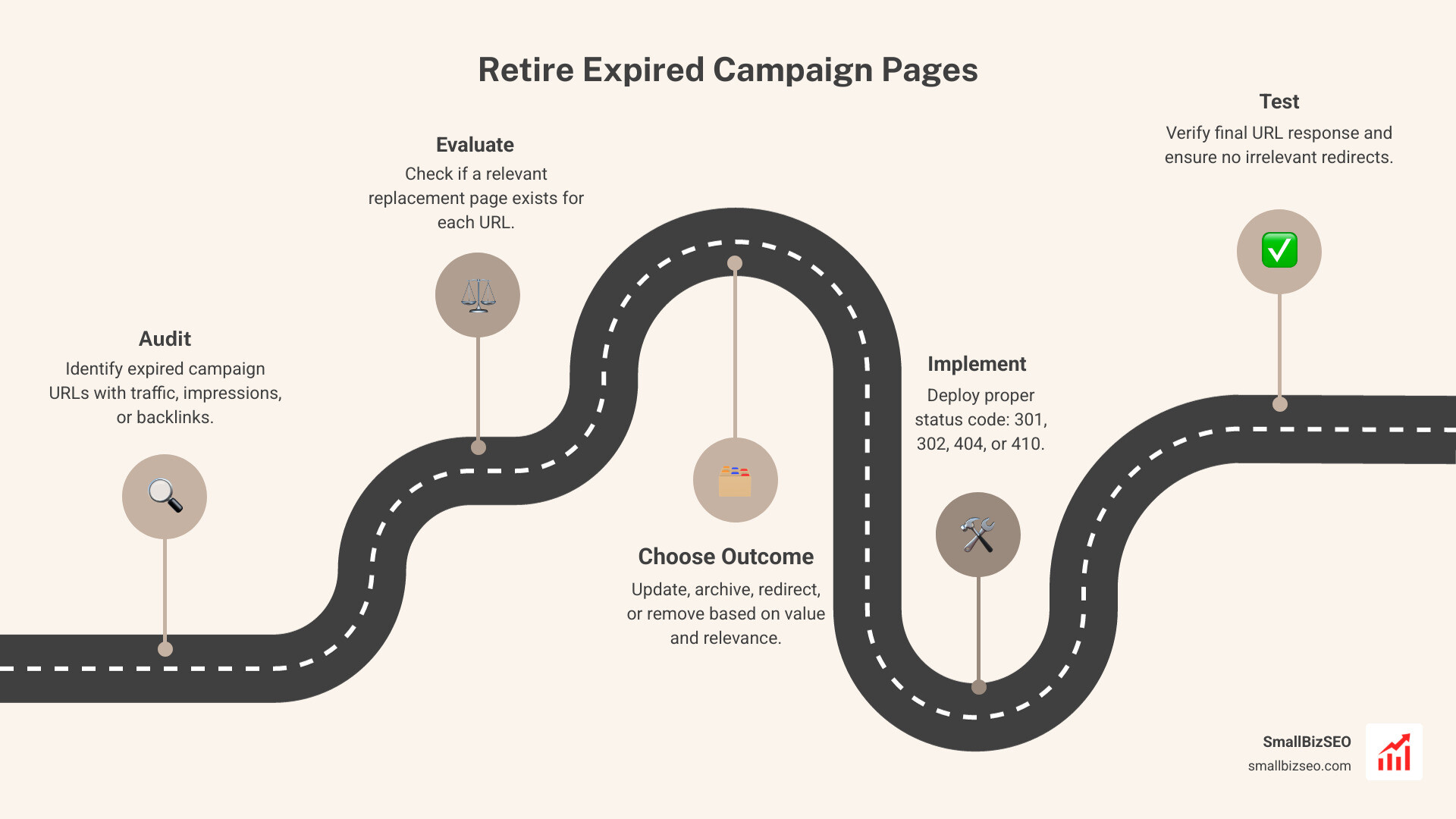
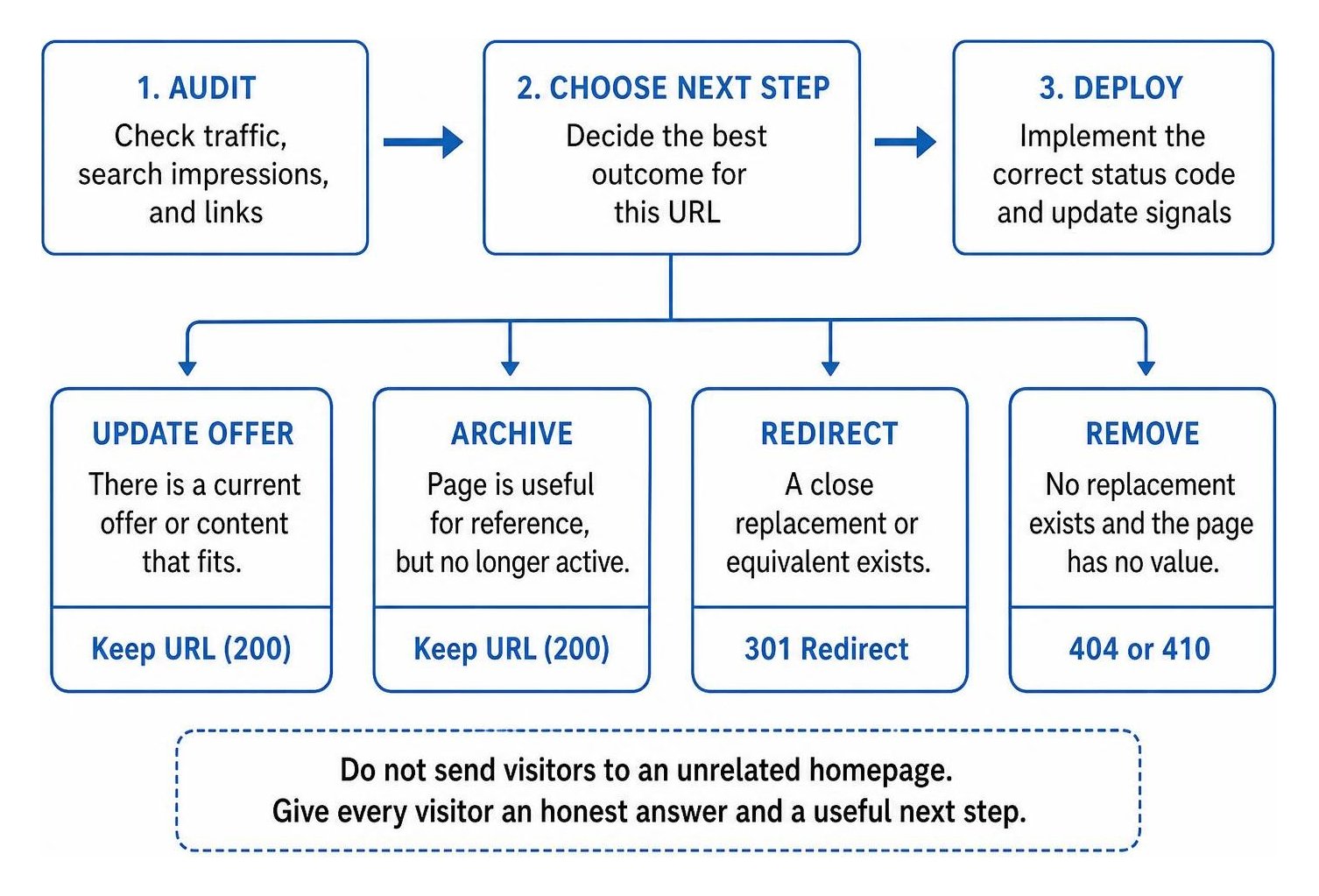
To learn how to remove expired campaign pages without irrelevant redirects, start by checking which URLs still get visits, search impressions, or links. Then choose the next step for each page: update a useful offer, keep a clearly labeled archive, redirect to a close replacement, or return a 404 or 410 if no replacement exists. Do not send visitors to an unrelated homepage.
An old email or printed QR code may keep bringing people to a campaign long after it ends. The URL should still give them an honest answer and a useful next step.
I’m Clayton Johnson, founder of SmallBizSEO. My work in technical SEO, content, and link building shapes this guide to how to remove expired campaign pages without irrelevant redirects while keeping the visitor’s needs in view.
How Do You Remove Expired Campaign Pages Without Irrelevant Redirects?
To cleanly retire an outdated marketing asset, audit each URL for traffic and backlinks, choose an honest outcome based on whether an equivalent destination exists, and deploy the correct server status code.
When seasonal promotions or product launches wrap up, marketing teams often leave the landing pages running or forward all incoming traffic to the root domain. Both shortcuts hurt your site. Stale landing pages promise expired discounts that frustrate potential buyers, while blanket redirects confuse search engines. Following structured guidelines on retiring a marketing landing page ensures your brand maintains user trust while preserving search performance.
How Do You Audit Traffic and Value When Deciding How to Remove Expired Campaign Pages Without Irrelevant Redirects?
Audit old campaign URLs by reviewing Google Analytics 4 sessions, Google Search Console impressions, backlink profiles, and server access logs over the past twelve months.
Begin by compiling an inventory of all past campaign URLs across your content management system. Check Google Search Console to see if the page still ranks for valuable organic keywords or captures residual clicks. Next, inspect your backlink profile in your preferred SEO tool to identify external websites, news coverage, or influencer reviews that still link to the page.
We recommend prioritizing broken pages that drive real value so you do not waste technical resources on URLs with zero inbound equity. Cross-reference your analytics with direct server log files to catch offline traffic drivers like printed QR codes or automated email sequences. A systematic process for auditing public campaign landing pages ensures you base every retirement decision on real user demand rather than guesswork.
What Are the Four Honest Outcomes: Update, Archive, Redirect, or Remove?
The four honest outcomes for an expired promotional URL are: update it with evergreen content, convert it into an archive page, redirect it to an equivalent product or category, or remove it entirely with an explicit error code.
| Outcome | Best Use Case | Search Engine Action | User Experience |
|---|---|---|---|
| Update | Annual or recurring sales (e.g., Black Friday) | Retain 200 OK status; refresh meta tags | Shows next launch date and waitlist form |
| Archive | Educational webinars, event slides, whitepapers | Retain 200 OK status; remove conversion forms | Provides historical context and related guides |
| 301 Redirect | Discontinued models with direct replacements | 301 Permanent Redirect to matching item | Seamlessly delivers the modern alternative |
| 410 Gone | One-time flash sales with no equivalent | 410 Gone status; drop from index quickly | Displays custom, helpful not-found screen |
When managing URLs with high domain authority, preserving link equity when sunsetting pages helps transfer hard-earned ranking strength directly to the replacement asset. However, if an offer cannot be fulfilled and no close alternative exists, managing stale campaign pages honestly by explaining the promotion has ended protects your brand reputation far better than a deceptive redirect.
Why Do Irrelevant Homepage Redirects Trigger Soft 404 Errors?
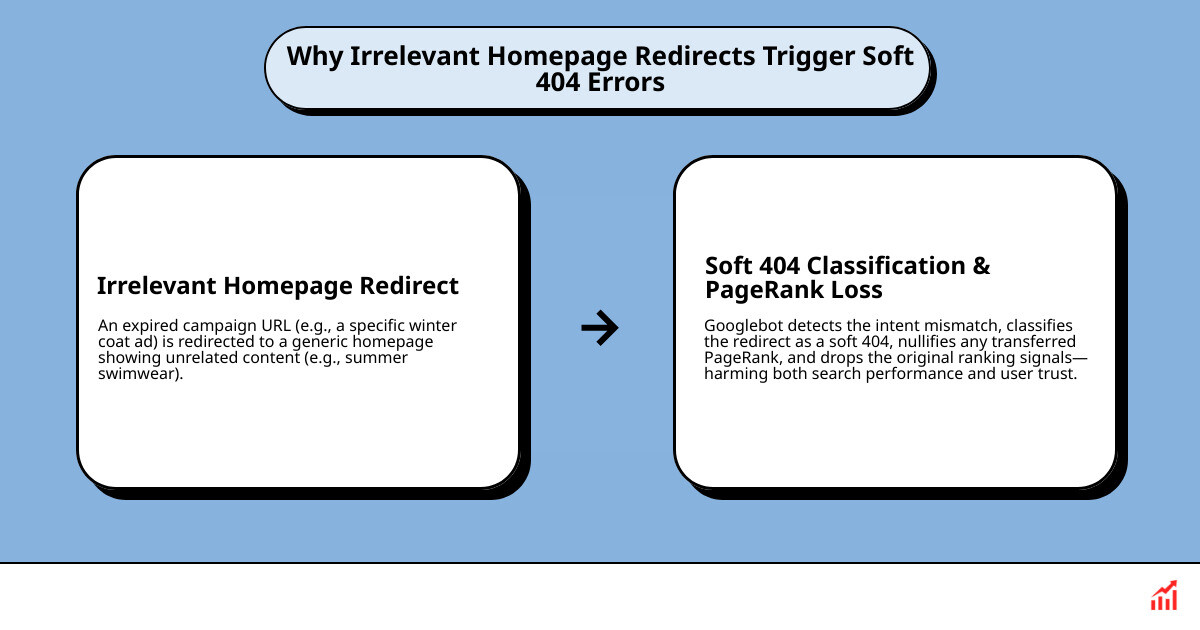
Forwarding an expired specific promotion to your homepage triggers a soft 404 error because search engines recognize that the destination content does not satisfy the visitor's original search intent.
When Googlebot crawls a retired URL that forwards to a generic homepage, it compares the original topic against the destination. If an ad for a specific winter coat forwards to an open homepage featuring summer swimwear, the search engine identifies an intent mismatch. Google then applies a soft 404 classification, nullifies any transferred PageRank, and drops the original ranking signals.
Instead of dumping visitors into the website lobby, focus on turning missing pages into helpful user experiences using tailored navigation, search bars, and category recommendations that help lost shoppers find what they need.
When Should You Use a 301, 302, 404, or 410 Status Code?
Use a 301 for permanent replacements, a 302 for temporary pauses, a 404 for missing pages without clear replacements, and a 410 when content is permanently removed from the server.
According to official RFC 9110 web standards, limited-time promotional pages serve as the textbook scenario for returning an explicit 410 Gone status code. While Google processes standard 404s and 410s similarly by removing the URL from its search index, a 410 signals intentional permanent removal and prompts search crawlers to clear their index faster.
If a seasonal landing page temporarily pauses between sales cycles, use a temporary redirect to route visitors to a waiting list while avoiding indexation issues. Watch out for configuration mistakes by spotting accidental permanent 302 redirects, which can prevent search engines from transferring historical relevance to the correct final URL.
How to Remove Expired Campaign Pages Without Irrelevant Redirects Across Apache, Nginx, Caddy, and CMS Platforms
Configure explicit server directives or native CMS redirect modules to pass query strings and return clean status codes without creating redirect loops.
When configuring server rules, always ensure UTM tracking parameters and query strings append correctly to the destination URL so marketing attribution remains intact. Following proper techniques for retiring campaign pages without breaking links keeps inbound partner links working smoothly.
- Apache (.htaccess): Return a clean 410 for an expired flash sale using
Redirect gone /promo/spring-flash-sale. To permanently forward an old product to a new model while preserving query parameters, useRedirectMatch 301 ^/promo/old-sku(.*)$ /products/new-sku$1. - Nginx: In your server configuration block, serve an immediate removal code using
location = /promo/expired-offer { return 410; }. For matching replacements, writelocation = /promo/old-model { return 301 /products/new-model$is_args$args; }. - Caddy: Implement clean status handling with
respond /promo/ended-campaign 410or configure permanent forwarding withredir /promo/v1-launch /products/v2-launch 301. - Static Hosting & CMS Platforms: On hosts using static redirect files, specify the rule on a single line such as
/promo/sale /catalog/seasonal 301. On platforms like WordPress or Webflow, unpublish the original slug first, then map the path inside your redirect manager to a closely related category page.
Long-Term Maintenance: How to Audit Entry Points, Flatten Chains, and Monitor Retired URLs
Review retired campaign assets annually, update third-party entry points, and eliminate intermediate redirect hops to keep server latency low.
How Do You Test Deployments and Prevent Multi-Hop Redirect Chains?
Test retired URLs using terminal inspection tools like curl to verify they resolve directly to a 200 OK or 410 status in a single hop.
When links pass through multiple forwarding rules over several marketing cycles, they create an unnecessary redirect chain that slows down page load times and wastes crawler bandwidth. Googlebot follows only about ten hops before aborting, and search engines advise keeping redirect paths to no more than three hops.
Run command-line header checks after setting $URL to the retired campaign URL: curl -ILs "$URL" | grep -E "HTTP|Location". This confirms that the URL resolves in exactly one hop without dropping tracking parameters. Update live entry points across your digital footprint, including transactional email templates, affiliate portals, social bio links, and print QR codes.
At SmallBizSEO, we help businesses streamline their technical architecture through our Velocity framework, delivering rapid rankings and clean indexation through transparent reporting. If your website carries years of unmanaged marketing URLs, request a professional SEO visibility audit to identify broken pathways and reclaim your organic search equity.
Protect Your Search Equity and User Trust
Letting old campaign pages linger without a clear retirement plan confuses visitors and dilutes your search visibility. By auditing historical traffic, matching URLs to relevant product replacements, and serving clean 410 Gone status codes when promotions end permanently, you protect your crawl budget and maintain strong user trust across every digital channel.