Suspended by Google: How Should You Organize Evidence Before Filing an Appeal?

What Should You Gather Before Appealing a Business Profile Suspension?
Check the suspension notice and correct any confirmed policy issue before opening the appeal form. Then organize your evidence into four groups: business identity, location, real-world operations, and online consistency. Choose clear, current documents that support the facts on your Google Business Profile, and give each file a name that tells the reviewer what it proves.
A suspension can make it harder for customers to find your business. A focused packet helps you show that the business is real, operates as described, and follows Google's profile rules. Knowing how to organize evidence before appealing a business profile suspension makes the review process smoother and improves your chances of reinstatement.
I'm Clayton Johnson, founder of SmallBizSEO. My work in SEO focuses on clear business information and credible supporting evidence, which shapes this guide on how to organize evidence before a business profile suspension appeal.
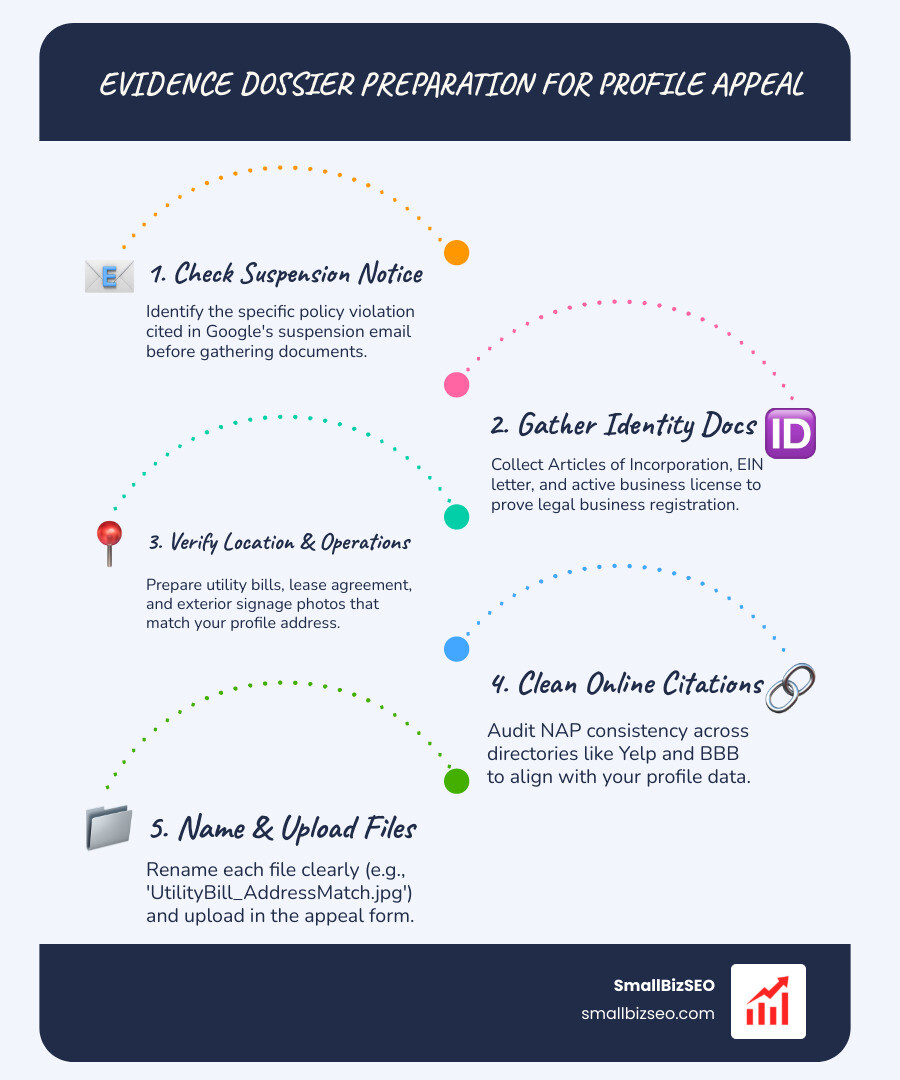
How to Organize Evidence Before a Business Profile Suspension Appeal: The 4 Core Document Pillars
When Google restricts or suspends a listing, automated filters evaluate whether the entity is legitimate, located where it claims, and operating in compliance with platform guidelines. Reviewers need clear documentation that directly proves real-world authenticity. For more context on profile guidelines, review Fix suspended or disabled profiles - Google Business Profile Help.
We organize evidence into four primary document categories so human reviewers can verify each business detail quickly.
What Legal Registration and Tax Documents Prove Business Identity?
Official government and financial records verify that your business exists legally under the exact name listed on your profile.
To build your business identity folder, gather:
- State Registration or Articles of Incorporation: Official filing documents showing legal entity formation and active status.
- EIN Confirmation Letter: Your official federal tax identification letter issued by tax authorities.
- Active Business Licenses: Trade, municipal, or professional licensing showing your exact business entity name.
- Sales Tax or Certificate of Good Standing: Current state-issued certificates demonstrating active standing.
When organizing these files, verify that every record reflects the exact operating name displayed on your listing. Identifying and spotting and fixing business discrepancies following a suspension ensures your legal identity documents align with Google's requirements, as outlined in the official What to Prepare Before You Appeal - Google Business Profile Community guide.
What Proof of Physical Location and Real-World Operations Is Required?
Physical location proof proves that your business genuinely occupies its stated address rather than relying on a virtual office, co-working space, or unauthorized shared mailbox.

To establish physical occupancy and active operations, assemble:
- Current Utility Bills: Electric, gas, water, or commercial internet bills issued within the last ninety days displaying your legal business name and service address.
- Commercial Lease Agreement: A complete, signed lease showing the physical address, suite number, and term duration.
- Permanent Exterior Signage Photos: Clear, wide-angle, unedited photos showing permanent exterior signage affixed to the building, entrance doors, and lobby directories.
- Interior Workspace Photos: Uncropped images displaying functional workstations, inventory, branded reception areas, or commercial equipment.
- Masked Operational Invoices: Recent customer invoices or supplier fulfillment receipts (with customer personal data masked for privacy) demonstrating active commercial transactions.
How to Organize Evidence Before a Business Profile Suspension Appeal for Service-Area Businesses vs. Storefronts
Storefront businesses and service-area businesses (SABs) require different evidence structures because their operational models differ.
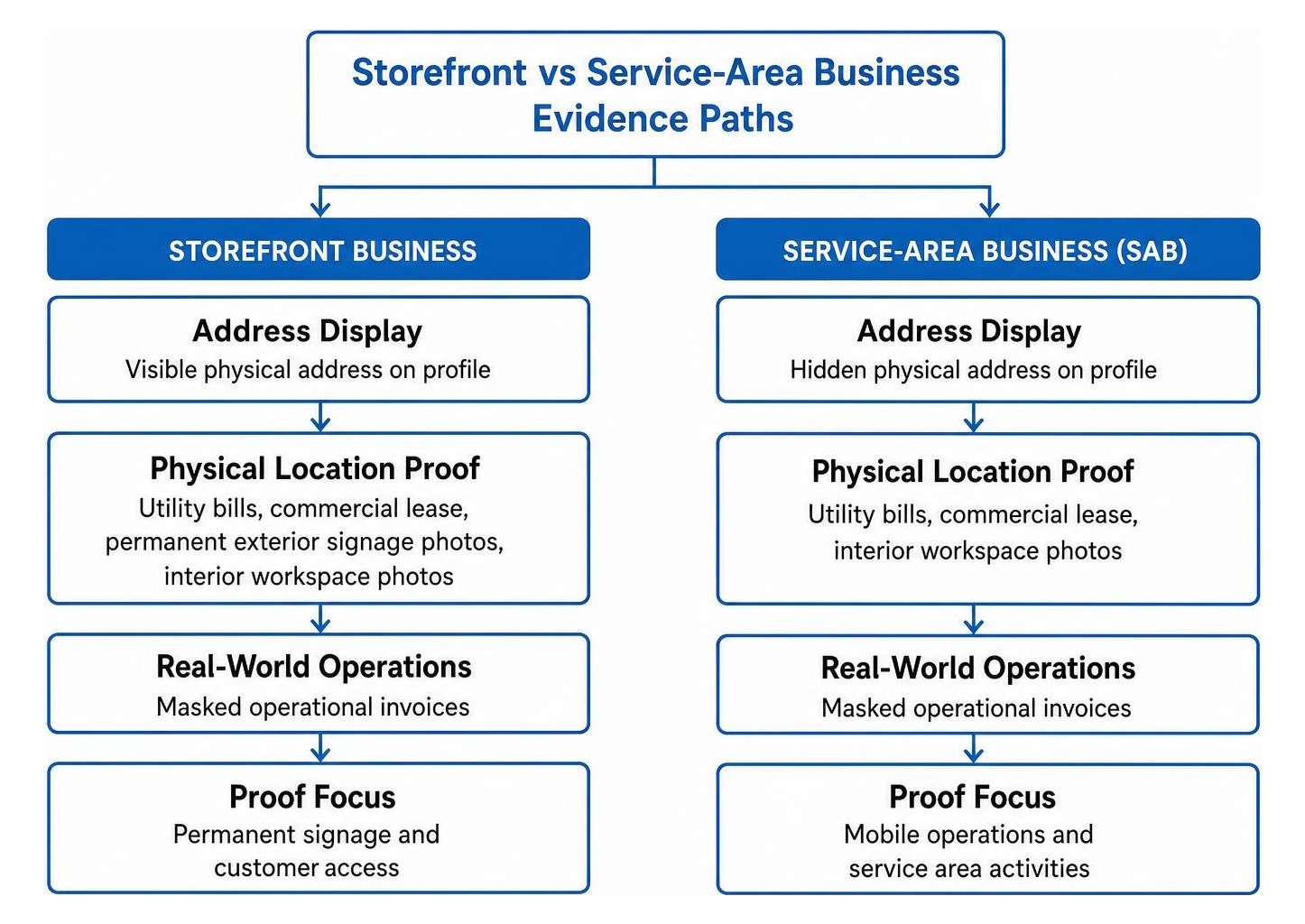
A storefront must show permanent signage and customer access, while a service-area business must keep its residential address hidden and demonstrate mobile operations.
| Evidence Requirement | Storefront Business Profile | Service-Area Business (SAB) |
|---|---|---|
| Address Display | Visible physical address on profile | Hidden physical address on profile |
| Primary Location Proof | Commercial lease, utility bill, building directory | Proof of base address (registration/utility bill) |
| Visual Signage Proof | Permanent exterior building signage, office door | Branded work vehicles, commercial tools |
| Transportation Proof | Customer parking, physical entrance photos | Official commercial vehicle registration |
| Activity Proof | On-site reception, retail counter, workspace | Route schedules, masked on-site service logs |
Review the official Required Evidence for a Successful Google Business Profile ... guidelines to confirm your category meets platform standards before uploading your documentation.
Why Online Consistency and Citation Cleanliness Support Your Appeal Packet
Google cross-references appeal submissions with external web data to verify trust signals. Inconsistent digital citations across the web can trigger automated identity flags.
Ensure your digital presence aligns with your evidence:
- Website Landing Pages: Link your profile directly to a functional landing page with matching name, address, and phone details.
- Accurate Contact Records: Maintain strict NAP consistency across all major platforms.
- Authoritative Directory Listings: Focus on verifying industry citations across established supplier portals and trade associations.
- Brand Profile Uniformity: Prevent conflicting signals by cleaning up ambiguous online brand profiles before submitting your appeal.
Submitting Your Appeal and Navigating Potential Denials
How to Organize Evidence Before Appealing a Business Profile Suspension Step by Step
Preparation determines appeal outcomes. We follow a clear process to ensure every piece of evidence is verified, structured, and presented logically.
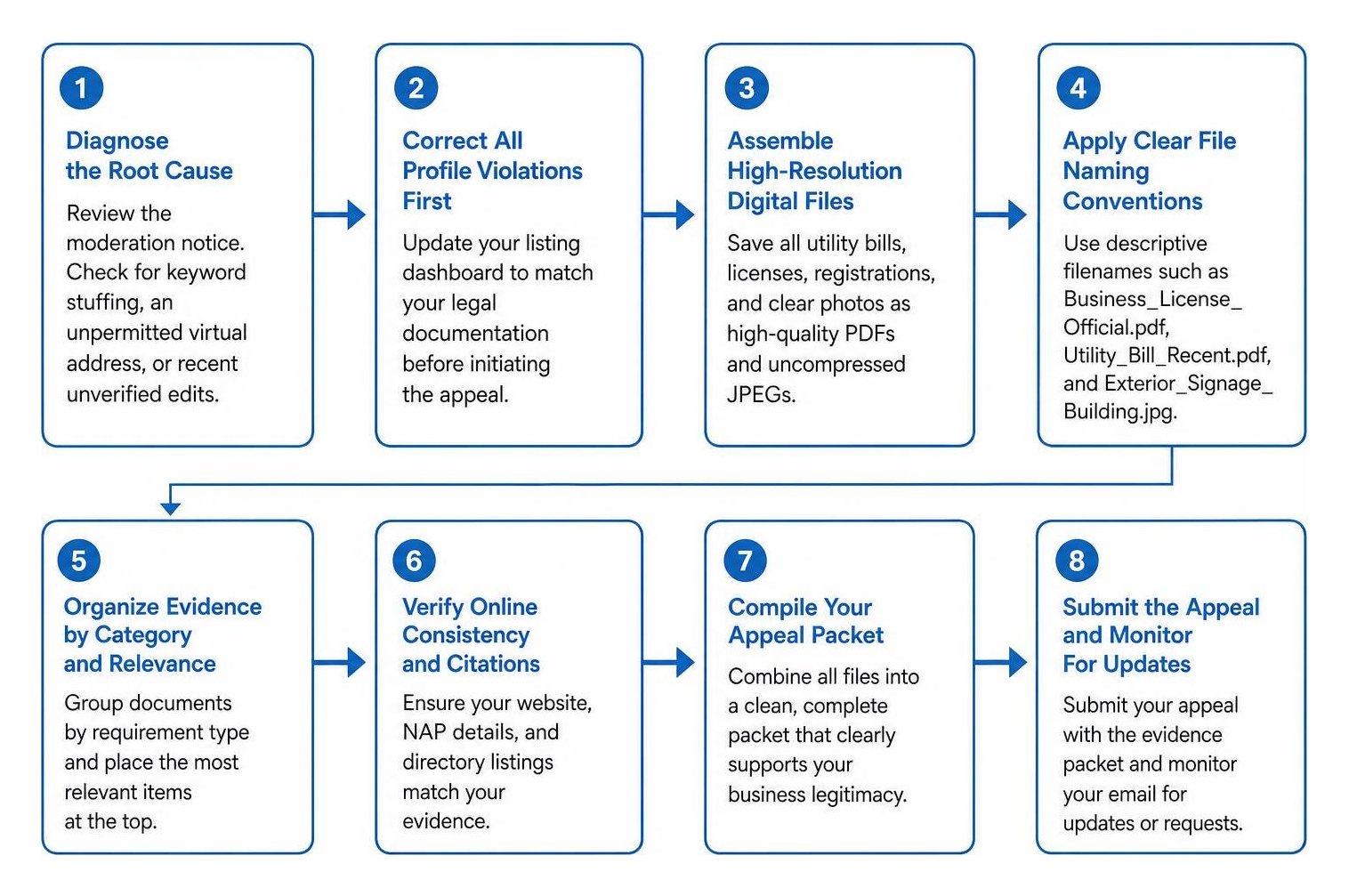
- Diagnose the Root Cause: Review the moderation notice. Check for keyword stuffing in your business name, an unpermitted virtual address, or recent unverified edits.
- Correct All Profile Violations First: Update your listing dashboard to match your legal documentation before initiating the appeal.
- Assemble High-Resolution Digital Files: Save all utility bills, licenses, registrations, and clear photos as high-quality PDFs and uncompressed JPEGs.
- Apply Clear File Naming Conventions: Use descriptive filenames such as
Business_License_Official.pdf,Utility_Bill_Recent.pdf, andExterior_Signage_Building.jpg.

Avoid these common submission mistakes:
- Submitting low-resolution, cropped, or blurry photos of temporary paper signs.
- Uploading only a single document instead of a complete four-part evidence dossier.
- Submitting mismatched names between your legal documents and profile title.
- Sending repeated appeal requests while your case is actively pending.
What Steps Should You Take If Your Reinstatement Appeal Is Denied?
If an initial appeal is denied, avoid creating a replacement profile. Opening duplicate listings violates Google guidelines and complicates future reinstatement.
If you receive a denial:
- Review the Denial Notice: Read the explanation to identify remaining eligibility concerns.
- Gather Fresh Supporting Evidence: Obtain supplementary proof, such as updated trade permits, tax documents, or equipment titles that directly address the flagged issue.
- Submit an Additional Review Request: Use Google's official review workflow for denied appeals, attaching your updated documentation packet.
At SmallBizSEO, we help businesses identify technical discrepancies and structure compliant evidence packets. If you need professional guidance navigating complex verification challenges, explore our dedicated business profile suspension support services.
Practical Next Steps to Restore Your Profile
Organizing clear, well-documented evidence is the most reliable way to recover a suspended profile. By assembling valid registration records, utility bills, location photos, and consistent web citations, you provide Google reviewers with the clear proof they need to approve your appeal. Take time to audit every document, correct any profile discrepancies, and submit a complete evidence packet.