Avoid These Embarrassing CDN Mistakes That Expose Outdated Content to Users

How Do You Fix CDN Setup Mistakes That Expose Outdated Website Content?
To fix cdn setup mistakes that expose outdated website content, compare the live page with the latest deployment, check its Cache-Control and Age headers, and purge stale HTML from each CDN or proxy. If the old page persists, check the browser cache and service worker. Then set clear rules for HTML and keep older versioned assets available during deployments so cached pages do not break.
I’m Clayton Johnson, founder of SmallBizSEO. My work in SEO and content strategy helps me explain cdn setup mistakes that expose outdated website content and why accurate pages matter for search visibility.
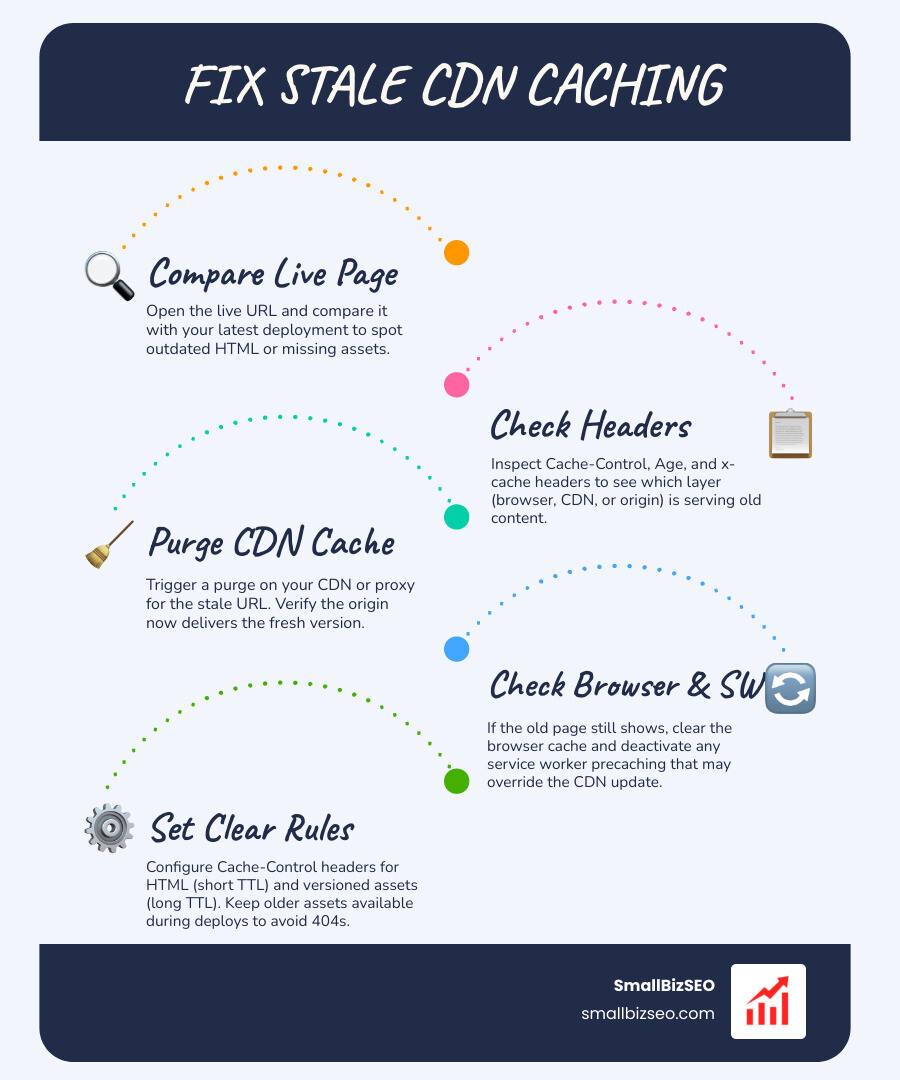
Content Delivery Networks (CDNs) speed up websites by caching assets across globally distributed edge servers. When everything works, users enjoy lightning-fast Time to First Byte (TTFB), search bots crawl fresh pages, and origin servers stay protected from high traffic.
However, misconfigured edge caching and improper cache invalidation can cause your network to serve outdated HTML, broken styling, or even sensitive user data. To maintain high search performance and user trust, site owners need to stop serving outdated web pages to your visitors by fixing underlying edge rules.
Which CDN Setup Mistakes Are Most Likely to Expose Outdated Website Content?
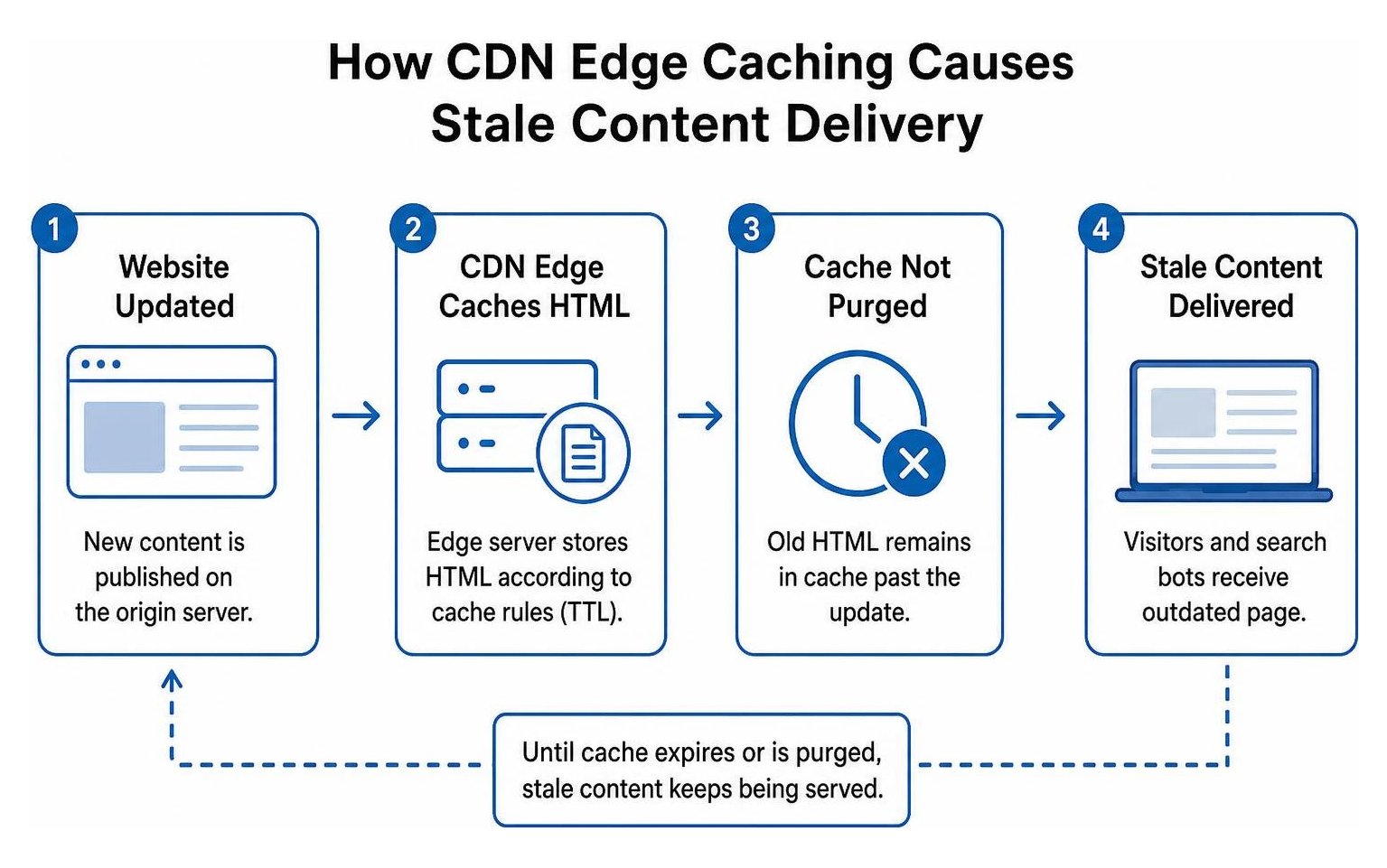
The most common causes of stale website content are missing or incorrect cache rules, conflicting proxy layers, and deployment steps that delete files before visitors stop requesting them.
When edge proxies rely on static-only default caching rules, dynamic pages can get trapped in shared caches. Origin server bottlenecks often force CDNs to rely on fallback caches, extending the lifespan of stale files. Understanding RFC 9111 HTTP caching standards and matching your Time to Live (TTL) settings to asset types prevents these edge misconfigurations from degrading your user experience.
How Can Missing Cache-Control Headers Cause a CDN to Serve Outdated Content?
Without clear cache directives, a CDN may cache HTML longer than intended or serve one visitor content meant for another.
When an origin server sends a response without an explicit Cache-Control header, edge networks make an assumption. Some CDNs default to caching these responses, turning the absence of a directive into an accidental opt-in for edge storage. This can lead to shared cache leakage, where user-specific or sensitive dynamic pages are served to other visitors.
The distinction between no-cache and no-store is critical:
no-cachetells the CDN and browser that they can store the document, but they must revalidate it with the origin server before serving it.no-storeforbids any caching completely, requiring a full origin fetch on every request.
Using Vary headers (such as Vary: Accept-Encoding, Cookie) ensures that the CDN creates unique cache keys for different response representations, preventing cross-user exposure. Consult the technical breakdown on Fixing Stale HTML After a Deploy | FP Guide to structure your headers properly.
| Header Directive | Browser Behavior | Shared CDN Edge Behavior | Best Use Case |
|---|---|---|---|
no-store |
Never stores response | Never caches response | Sensitive dashboards, checkout flows |
no-cache |
Stores, revalidates on use | Revalidates with origin | Dynamic HTML, core index files |
public, max-age=31536000, immutable |
Stores for one year | Caches indefinitely | Fingerprinted/hashed CSS, JS, images |
| Missing Header | Varies by browser heuristic | May default to edge caching | Avoid entirely |
How Can Chained Reverse Proxies Cause Outdated Content to Reach Visitors?
When multiple proxies cache the same page, one layer may continue serving an old copy even after another layer has been purged.
Many modern websites layer a security CDN (like Cloudflare) directly in front of an edge-rendered hosting platform (like the Vercel Edge Network). When you trigger a deployment on your hosting platform, its internal cache purges automatically. However, the outer CDN proxy remains unaware of the release and continues serving cached HTML.

This synchronization failure leads to regional inconsistencies and 404 errors for newly referenced assets. If you choose to chain proxies, review the official guide on how-to-troubleshoot-stale-content-returned-from-the-edge-network-when-using-an-external-proxy-or-cdn. For smaller setups, our practical CDN guide for small businesses explains when a single-provider setup is far safer and easier to maintain.
Why Can Deleting Hashed Assets During a Deploy Cause 404 Errors and Broken Layouts?
Deleting old assets too soon can break pages that visitors still have open and that still request those files.
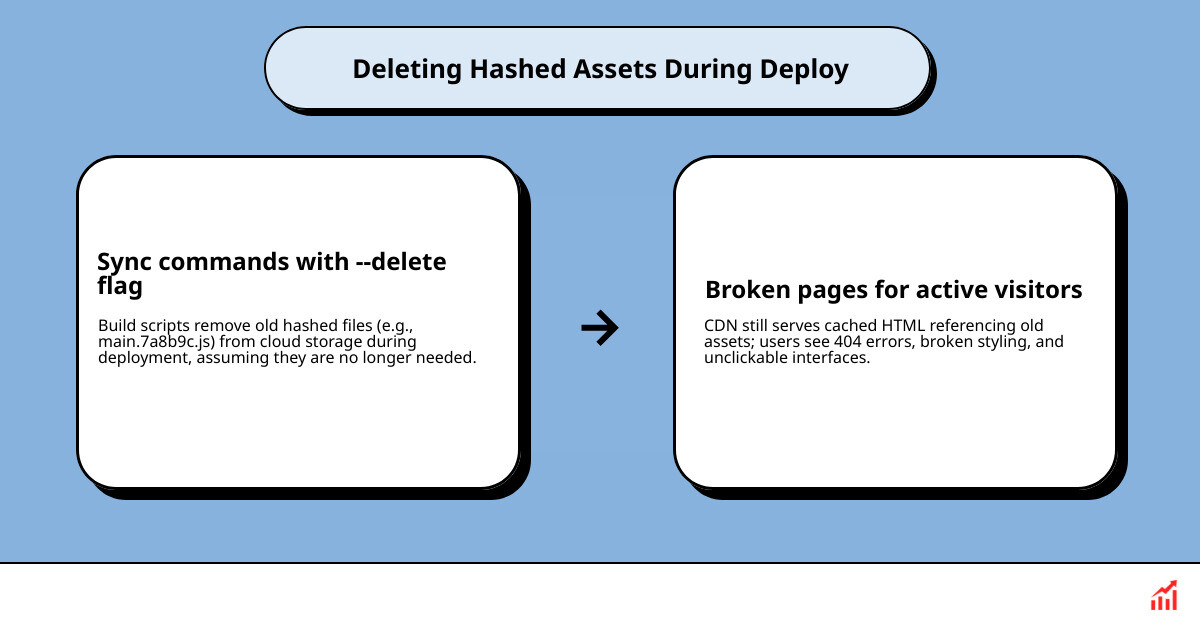
Modern build pipelines use content hashing to create unique filenames for compiled assets (such as main.7a8b9c.js). Because these files are unique, they are safe to cache forever. Problems arise when build scripts run sync commands with flags like --delete on cloud storage buckets.
If your CDN holds a cached HTML page for even 10 minutes, visitors loading that page will request the old JavaScript and CSS files. If those files were wiped out during the sync, users encounter missing files, broken styling, and unclickable interfaces. Our guide on handling chunk loading errors and missing JS bundles details the recovery paths. Always retain old hashed files for at least two weeks, following the asset retention principles in How to version static assets: cache-busting done right.
How Can Service Workers and Third-Party Scripts Keep Showing Outdated Pages?
A service worker or cached third-party script can keep serving an old page even after the CDN has the latest version.
Service workers operate inside the user's browser, intercepting network requests and serving precached resources directly from local device storage. If a service worker is configured to prioritize its cache without checking the network, it will serve stale content indefinitely—even after a full CDN purge.
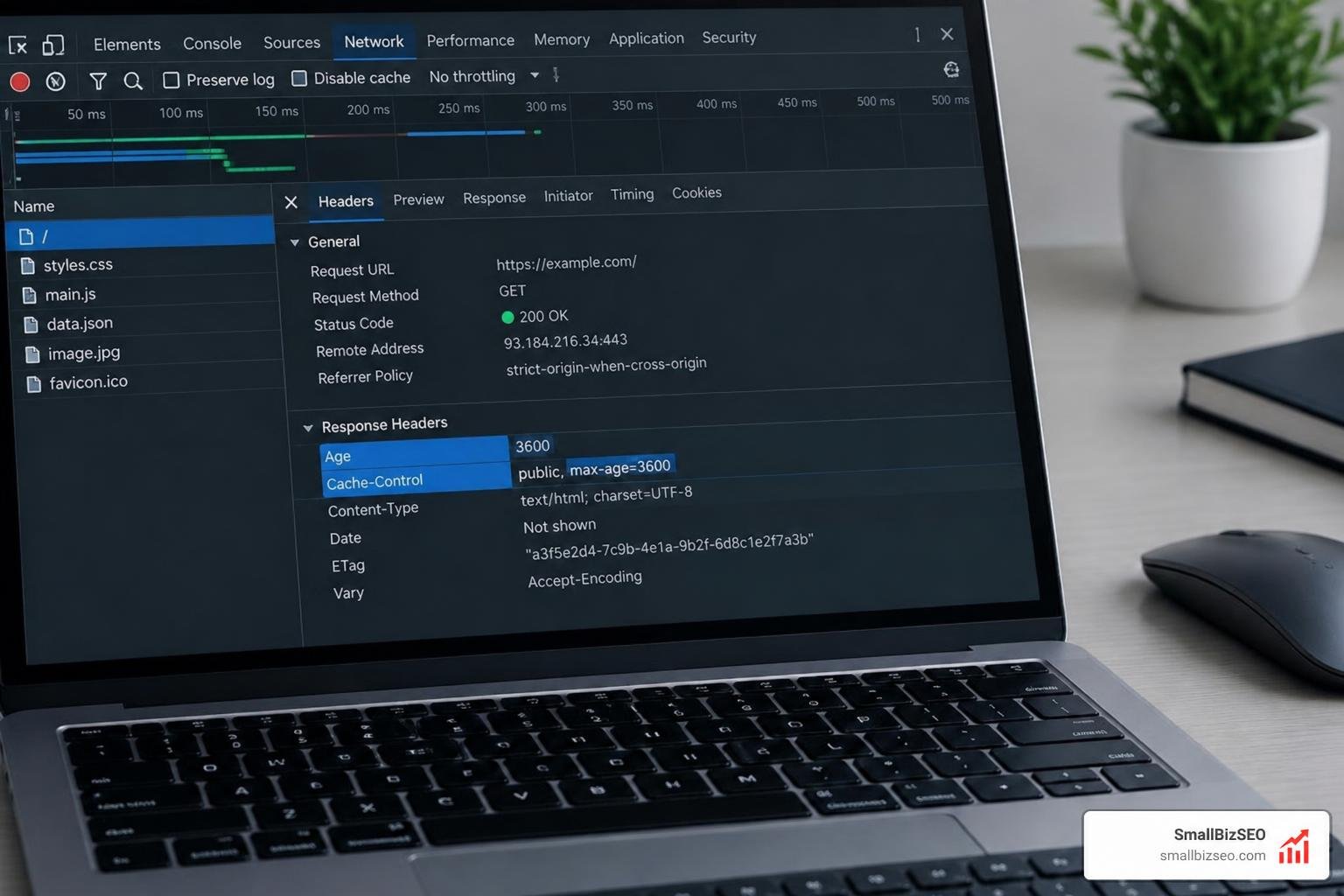
Similarly, un-versioned third-party scripts or embedded widgets with long browser TTLs can display outdated messaging, broken forms, or old banners. Inspecting the Age header in browser developer tools reveals whether a response came from an edge server or the client's internal browser cache. It is also important to maintain consistency across technical files by resolving discrepancies between CDN policies and robots.txt.
How Can You Diagnose, Purge, and Prevent Stale CDN Caching?
Compare responses from the browser, CDN, and origin; purge affected content; then update cache and deployment rules to prevent the issue from recurring.
Systematic cache validation prevents deploy surprises, safeguards zero-downtime releases, and ensures a healthy cache hit ratio (consistently targeting 85% or higher) without locking visitors into outdated experiences.
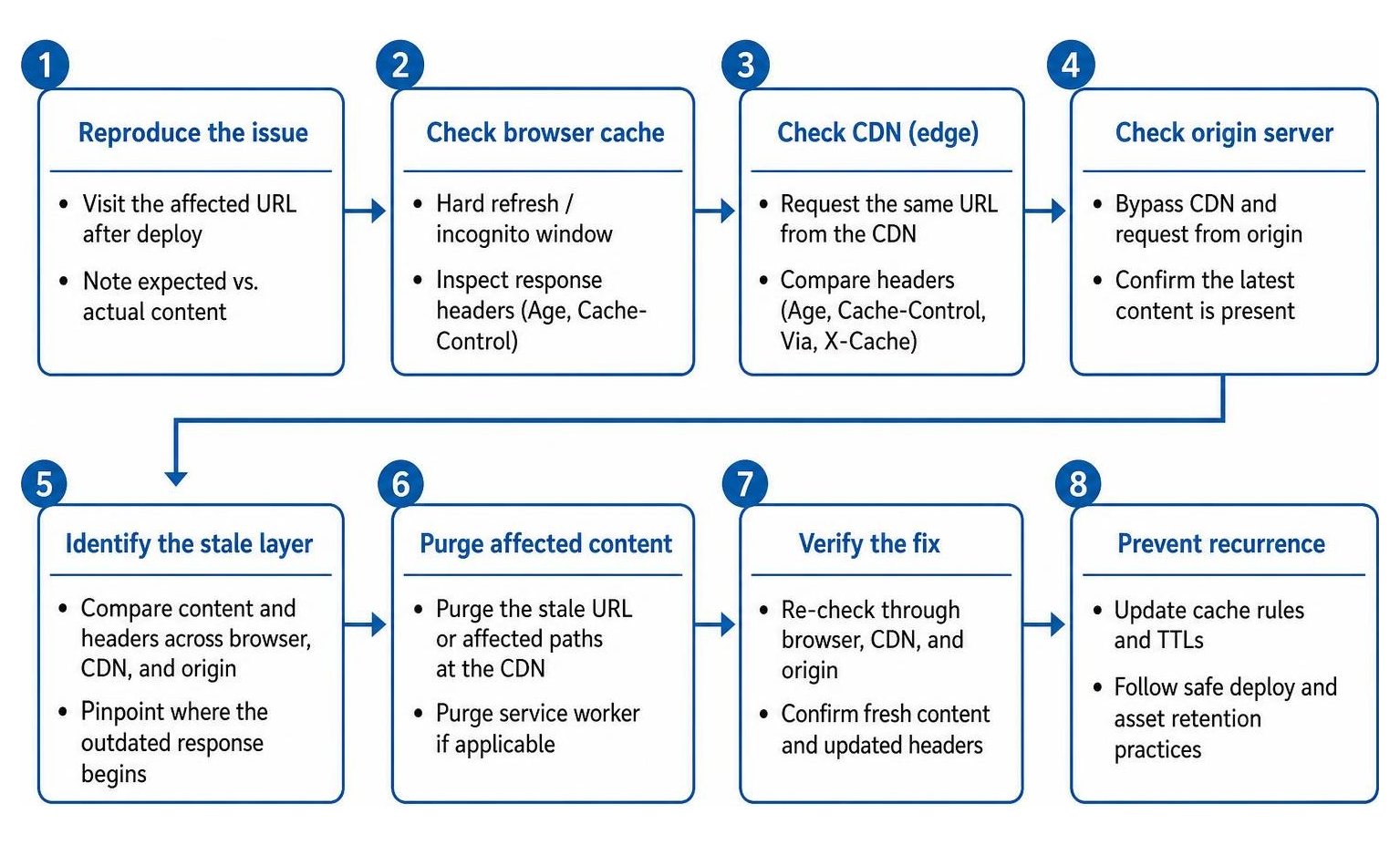
How Can You Tell Whether the Browser, CDN, or Origin Is Serving an Old Page?
Inspect response headers and compare the same URL through each cache layer to find where the outdated response begins.
Follow these diagnostic steps to pinpoint the stale layer:
- Test in a Fresh Session: Open a private or incognito window with DevTools set to "Disable cache" to bypass local browser storage.
- Read Edge Cache Headers: Examine the response headers. Look for
CF-Cache-Status,x-cache, orx-vercel-cache. A status ofHITindicates the CDN served stored content, whileMISSorBYPASSconfirms an origin fetch. - Check Document Age: Review the
Ageheader. A high number (e.g.,Age: 86400) means the CDN has held that copy for 24 hours. - Bypass the CDN Entirely: Request the page using a direct origin domain (such as a staging URL or direct host URL) or use unique query parameters to force an origin lookup.
- Inspect the Service Worker: Open the Application tab in browser DevTools, inspect registered service workers, and test the page after checking "Bypass for network."
Regularly reviewing these response markers protects user experience and ensures search crawlers receive the correct page versions. You can review broader edge performance techniques in our website redesign checklist for SEO best practices and monitor how caching influences real-world user metrics by analyzing site speed metrics in PageSpeed Insights.
How Can Split Caching and Automated Purges Help Prevent Stale Content?
Cache HTML for shorter periods than versioned static assets, and trigger purges when content changes.
A robust caching strategy relies on split cache policies:
- HTML Documents: Serve dynamic and static HTML files with
Cache-Control: public, no-cache(or a short edge TTL usingstale-while-revalidate=60). This ensures the CDN or browser quickly revalidates the document structure against the origin. - Hashed Assets: Deliver JavaScript, CSS, and media files containing unique build hashes with
Cache-Control: public, max-age=31536000, immutable. Because the URL changes whenever the content changes, these files can stay cached indefinitely. - Automated Webhook Purges: Integrate edge purge triggers into your continuous integration and deployment (CI/CD) pipelines. Whenever a release completes, send an automated API call to invalidate only the HTML routes.
- Origin Shielding: Configure an origin shield PoP (Point of Presence) between your edge nodes and your web server to consolidate cache revalidations and eliminate origin traffic spikes.
Implementing these caching principles keeps your site modern, dependable, and swift. If you want our team to evaluate your edge delivery and search performance, request a comprehensive technical SEO audit to strengthen your digital architecture.
Keep Your Content Fresh and Your Edge Network Resilient
Serving stale web pages frustrates visitors, damages conversion rates, and creates confusion for search engine crawlers. By eliminating chained proxy blind spots, using strict Cache-Control headers for HTML documents, retaining versioned static assets across builds, and automating edge purges, you can deliver sub-second loading speeds without risking outdated content delivery. Make split caching and deployment verification a standard part of your engineering workflow to ensure your audience always sees your best, most up-to-date work.